AI Inbound Lead Routing: Build an Automatic Lead Assignment Workflow

Co-Founder, HelloGrowthCRM · March 13, 2026 · 17 min read
Quick Answer
AI inbound lead routing automatically assigns each new lead to the right sales rep based on lead score, territory, product expertise, and rep capacity — without manual rules maintenance. It cuts average first-response time from 12 hours to under 4 minutes for high-scoring leads, improving contact rates and pipeline conversion.
HelloGrowthCRM software
Built for real small-business sales teams
HelloGrowthCRM helps reps qualify faster, follow up on time, and close more deals—with practical automation in one place.
- AI lead scoring and pipeline visibility
- Built-in dialer, WhatsApp, and email automation
- Sales forecasting and RevOps-ready reporting
What Is AI Inbound Lead Routing — and Why Manual Assignment Fails
Inbound lead routing is the process of assigning every new lead that contacts your business to the right sales rep, automatically, in the shortest possible time. In teams without routing automation, leads are assigned manually — a sales manager opens a spreadsheet or inbox, reviews the lead, and forwards it to whichever rep they think is appropriate.
This process takes anywhere from 15 minutes to several hours, and during that time the lead has moved on.
The speed-to-lead research is unambiguous: Harvard Business Review found that companies responding within one hour are 7× more likely to qualify a lead versus those responding after 60 minutes. InsideSales.com puts the optimal response window at five minutes — beyond that, conversion probability drops precipitously.
Manual assignment cannot operate in a 5-minute window consistently across a team of 5 or more reps.
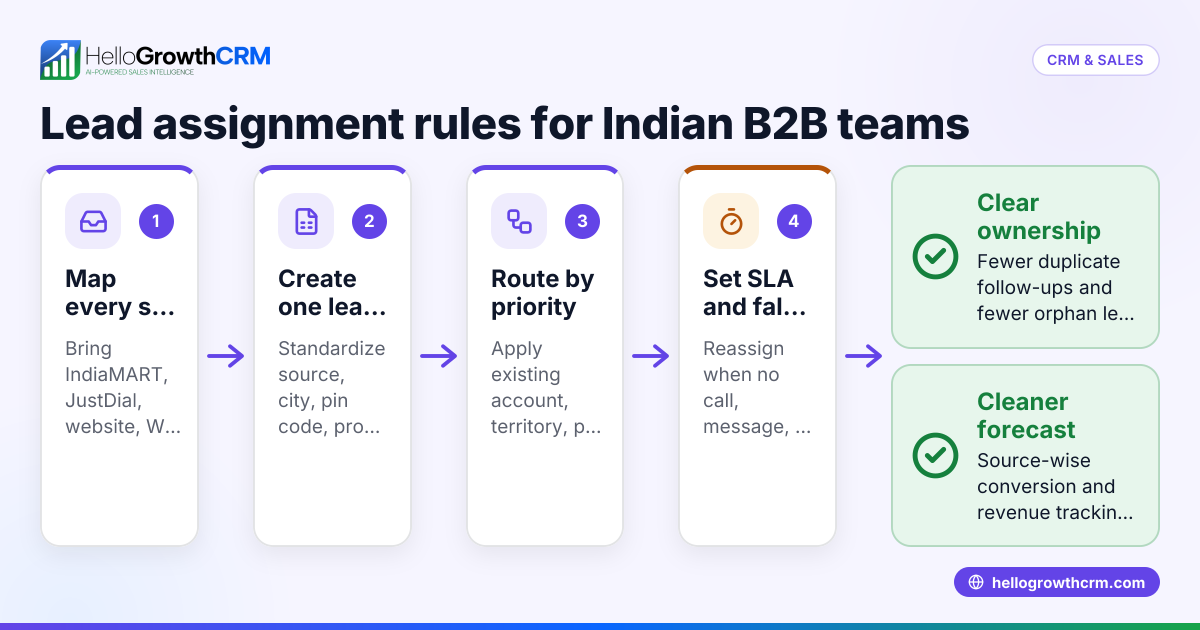
AI inbound lead routing replaces the manual assignment step with an automated rules engine that evaluates incoming lead attributes — source, geography, industry, deal size, language preference, product interest — and matches each lead to the best-available rep in under 30 seconds.
When combined with automatic WhatsApp or email notification, the assigned rep receives the lead context and can respond before the prospect has moved to the next tab in their browser.
HelloGrowthCRM's routing engine processes inbound leads from 60+ connected sources — including web forms, WhatsApp Business, Meta Lead Ads, IndiaMart, JustDial, Google Lead Forms, and Sulekha — applying routing rules in real time without any manual intervention.
The 5 Inbound Lead Routing Strategies and When to Use Each
Not every team needs the same routing logic. The right strategy depends on team size, geographic coverage, product complexity, and how differentiated your reps are by skill or specialization.
Round-robin routing is the simplest strategy: leads are distributed sequentially across all available reps to ensure equal workload. It works well for homogeneous teams where every rep has the same skills and territory. The drawback is that round-robin ignores rep capacity — a rep in the middle of three active calls gets the next lead anyway.
Availability-based routing assigns leads only to reps who are currently logged in and not in an active call. This ensures every assigned lead reaches a rep who can respond immediately. HelloGrowthCRM integrates with its built-in dialer to detect active call status and route around busy reps during peak hours.
Territory-based routing assigns leads based on geography — state, city, pin code, or self-reported region. This is essential for multi-city operations and for businesses with field sales teams where reps are physically closer to certain accounts. Territory rules in HelloGrowthCRM can be layered: if no rep covers a territory, the lead falls back to a national round-robin.
Skill-based routing assigns leads based on product interest, language, industry, or deal size. A lead from a manufacturing company asking about ERP integration routes to the rep with manufacturing experience; a lead from a real estate developer routes to the real estate specialist. Skill-based routing is most valuable when conversion rates differ significantly across rep specializations.
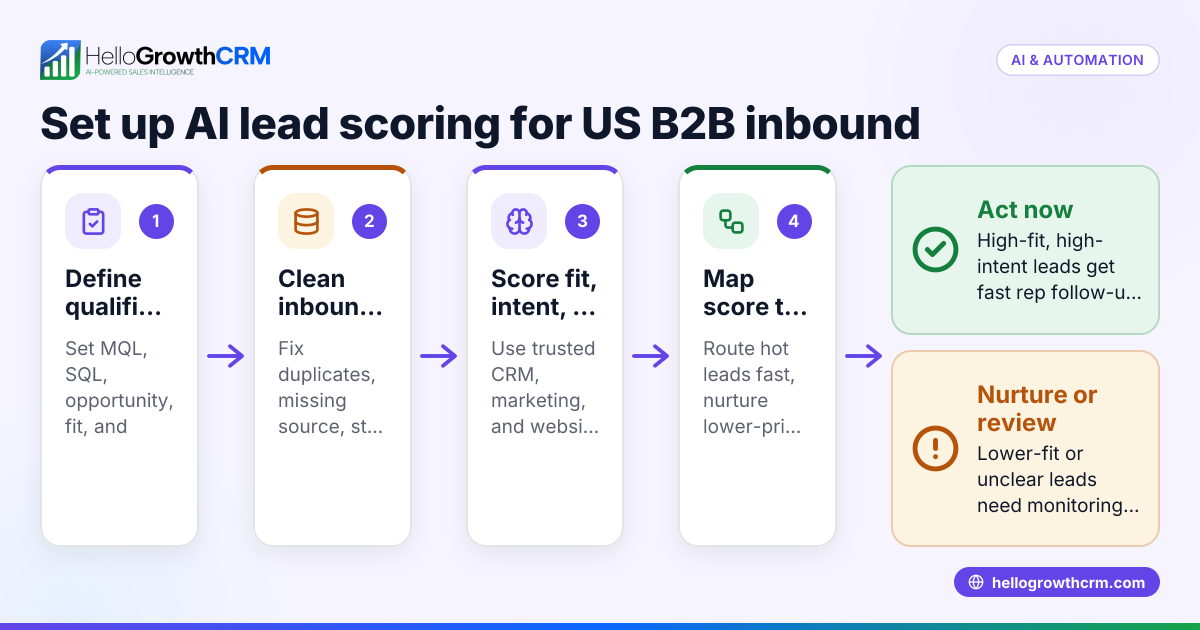
Priority routing assigns high-value leads — above a deal size threshold, from a premium source, or with an AI score above 80 — directly to senior reps or team leads. Priority routing ensures your best closers spend their time on the opportunities most likely to convert, while junior reps handle leads still in the qualification stage.
HelloGrowthCRM supports all five strategies simultaneously. A single routing policy can apply round-robin for standard leads, availability-based logic during peak hours, and priority escalation for high-score leads — with territory fallback rules at every layer.
How to Set Up Routing Rules in HelloGrowthCRM: Step-by-Step
Setting up an inbound lead routing workflow in HelloGrowthCRM takes approximately 45 minutes for a team of 5–10 reps. The process has five steps.
Step 1: Connect your lead sources. Go to Settings → Integrations and connect each channel your team uses — web form embed, WhatsApp Business API, Meta Lead Ads, IndiaMart, or any of the 60+ available integrations. Each connected source creates leads in the CRM automatically; no CSV imports required.
Step 2: Define your team territories and skills. In Settings → Teams → Rep Profiles, add territory (state or city), language, product specialization, and any custom qualification criteria to each rep's profile. These attributes are what the routing rules use to match leads to reps.
Step 3: Build your routing rules. In Settings → Lead Routing, create a new routing policy. Define the matching criteria — source, lead industry, deal size range, geography — and the assignment action: round-robin, specific rep, or priority rep. Add fallback rules for cases where no primary rule matches.
Step 4: Configure SLA escalation. Set first-response SLA targets by lead source (for example, 5 minutes for paid leads, 30 minutes for organic). When a lead breaches the SLA without a rep touchpoint, HelloGrowthCRM sends an escalation alert to the assigned rep and a cc-alert to the team manager.
Step 5: Set up the automatic first-touch message. In Automations → Lead Triggers, create a trigger that fires when a new inbound lead is created. Add an automatic WhatsApp template message that acknowledges receipt, confirms expected response time, and optionally includes a calendar booking link. This fires within 60 seconds of lead capture regardless of rep availability.
With these five steps complete, every inbound lead from every connected source is assigned, SLA-tracked, and auto-acknowledged within 60 seconds of arrival — without any manual intervention.
SLA Enforcement: Turning Response-Time Targets into Measured Operations
Defining a response-time target is not the same as enforcing it. Most sales teams have informal policies (respond within 30 minutes) that exist in Slack messages and onboarding documents but are never measured, never escalated, and never reviewed. The result is that reps know the policy exists but don't experience consequences for missing it, so response times drift to whatever level feels comfortable in the moment.
SLA enforcement in HelloGrowthCRM operates at three levels. The rep-level alert fires when a newly assigned lead has not been contacted within the SLA window. The rep receives a push notification on mobile and desktop that interrupts their current activity and surfaces the lead details with a one-tap call or WhatsApp button.
The interruption is intentional — a polite reminder is not effective for SLA compliance.
The manager-level escalation fires if the rep doesn't respond to the first alert within a secondary window (typically 5 minutes after the SLA breach). The team manager receives an email with the lead name, source, assigned rep, and time since arrival. The manager can reassign the lead in one click from the email.
The weekly SLA report shows every rep's average first-response time by source over the past 7 days, with a trend line and the number of SLA breaches. This report is the operational tool managers use in weekly pipeline reviews to coach reps on response discipline — it makes the invisible visible.
In practice, SLA enforcement produces its most significant results in the first 30 days after deployment. When reps understand that response time is measured and escalated, average first-response time typically drops 60–80% within two weeks. The behavioral change requires no coaching conversation — the system provides the real-time feedback that changes behavior.
WhatsApp Auto-Response: The 60-Second Acknowledgment That Changes Conversion
The automatic first-touch message is the single highest-ROI element of an inbound lead routing setup. Here is why: at the moment a prospect submits a form or sends a WhatsApp inquiry, their attention is fully on your company. They are expecting a response.
If they receive an acknowledgment within 60 seconds, their confidence that you are a responsive, professional organization is reinforced. If they hear nothing for 2 hours, they have already opened three competitor websites and scheduled a demo with the fastest responder.
HelloGrowthCRM's WhatsApp auto-response triggers as part of the same routing workflow that assigns the lead. The message fires within 60 seconds of lead creation regardless of rep availability, shift hours, or current call volume. The template is customizable per lead source — a lead from a premium paid campaign gets a different message than a form submission from a blog post.
An effective inbound WhatsApp auto-response has four components: (1) personalization — use the lead's first name; (2) acknowledgment — confirm the specific inquiry or service they expressed interest in; (3) expectation setting — tell them exactly when to expect a call (within 15 minutes, within 2 hours — whatever your actual SLA is); and (4) an alternative CTA — offer a calendar link for self-serve scheduling for prospects who don't want to wait for a callback.
For Indian B2B sales teams, the WhatsApp response outperforms email acknowledgment by 4–6× on read rates. WhatsApp messages are opened within 3 minutes on average; email acknowledgments are read within 3 hours. The platform match is simply better — if your lead came in via WhatsApp or from an Indian digital channel where WhatsApp is primary, your first response should be WhatsApp.
Measuring Inbound Lead Routing Performance: The 4 Metrics That Matter
Routing workflows produce measurable outcomes, and the metrics that reveal whether your routing is working are specific. Generic CRM reports won't show you routing effectiveness — you need four specific measurements.
First-response time by source measures the gap between lead creation and the first rep touchpoint (call, WhatsApp message, or email). Track this separately by source because the urgency of response varies by channel. A paid lead has a 5-minute target; an organic inbound has a 30-minute target.
Averaging across sources hides whether you're hitting the critical targets. HelloGrowthCRM's routing analytics show median first-response time by source with a 7-day trend.
SLA compliance rate measures the percentage of leads that received a first touchpoint within the defined SLA window. The target for any functional routing operation is above 90% — meaning 9 in 10 leads get a first rep contact within your SLA. Below 80%, you have a routing problem (leads not reaching the right rep fast enough) or a response problem (reps not responding to notifications).
The compliance rate breaks down separately by rep so managers can see who is the constraint.
Routing accuracy measures whether leads are reaching the right rep on the first assignment. You can proxy this with reassignment rate — the percentage of leads that were reassigned to a different rep after initial assignment. High reassignment rates (above 15%) signal that routing rules are misconfigured or rep territory data is incorrect.
Source-level conversion rate measures inbound-to-qualified conversion rate separately for each lead source. Routing improvements that reduce first-response time should produce a measurable lift in inbound-to-qualified conversion within 30 days. Tracking this per source lets you attribute the improvement to specific routing changes rather than to seasonal or market effects.
Advanced Routing: AI-Assisted Assignment and Dynamic Re-Routing
Standard routing rules handle the majority of assignment decisions well. AI-assisted routing handles the edge cases and high-value exceptions that rules alone miss.
HelloGrowthCRM's AI routing layer analyzes each incoming lead against historical closed-deal patterns and suggests the rep who has historically converted the highest percentage of leads from this source, industry, company size, and deal-size range. The suggestion is available to the routing engine as a weighting factor — you can configure it to always follow the AI suggestion, use it only when confidence is above a threshold, or present it to the manager as a recommendation without auto-applying.
Dynamic re-routing solves the problem of leads that fall through despite correct initial assignment. If an assigned rep hasn't made contact within the SLA window and the SLA escalation fires, the routing engine can automatically reassign the lead to the next-best available rep rather than waiting for the manager to act.
This loop-closing behavior ensures that every inbound lead eventually reaches a rep who responds, rather than aging in an unacknowledged queue.
Account-based routing is the advanced pattern for B2B teams managing named accounts. When an inbound lead comes from a company that already exists in the CRM — a known account with an assigned account executive — the routing engine should bypass standard round-robin logic and assign the new lead directly to the account executive.
HelloGrowthCRM's routing rules support an account-match condition: if the lead's company matches an existing CRM account, route to that account's owner regardless of other rules. This prevents the awkward situation of a new contact from a key account being assigned to a junior rep who has no context on the account relationship.
From Routing to Revenue: Connecting the Dots with HelloGrowthCRM
Inbound lead routing is not an end in itself — it's the first step in a revenue workflow that should carry every qualified lead from first contact to closed deal. The routing configuration determines how fast and how accurately leads reach reps. What happens after assignment determines whether fast routing translates into revenue.
A complete inbound lead-to-revenue workflow in HelloGrowthCRM has five stages: (1) capture and auto-acknowledge (60 seconds), (2) routing and rep notification (60 seconds after capture), (3) first live contact — call or WhatsApp reply (within SLA window), (4) qualification and pipeline entry (within 24 hours of first contact), and (5) nurture sequence activation for qualified leads (automatic, triggered by qualification stage change).
The transition from routing to qualification is where most teams lose ground. A rep that responds within SLA but runs an unstructured qualification call doesn't advance the lead. HelloGrowthCRM addresses this with mandatory qualification fields that must be completed before a lead can advance from 'Contacted' to 'Qualified' in the pipeline — budget, timeline, decision-maker contact, and next meeting date.
These required fields ensure qualification happens on every lead, not just the ones reps are excited about.
The full workflow produces measurable results at 30, 60, and 90 days. At 30 days, SLA compliance and first-response time improve as the system operates and reps adapt to notification-driven behavior. At 60 days, inbound-to-qualified conversion lifts as faster responses and structured qualification replace ad-hoc calls.
At 90 days, pipeline coverage improves as more qualified leads enter structured nurture sequences. The routing setup is the foundation — and every element of the downstream revenue workflow depends on it being correct.
HelloGrowthCRM's onboarding team helps configure routing, SLA enforcement, and first-touch automation during the 14-day free trial. Book a 30-minute demo to see the routing workflow in action with your team's actual lead sources and routing requirements.
Implementation checklist for AI Inbound Lead Routing: How to Build an Automatic Lead Assignment Workflow
AI Inbound Lead Routing: How to Build an Automatic Lead Assignment Workflow creates the most value when the team turns it into a repeatable operating rhythm instead of treating it like a one-time idea. That means defining ownership, documenting the workflow, and making sure the CRM captures the information required to move work forward consistently.
For teams in the AI & Automation category, the real gain usually comes from clarity. Reps should know what triggers the next step, managers should know what to inspect weekly, and leadership should know which metrics indicate that the workflow is improving execution rather than just creating extra activity.
A practical implementation checklist should also explain what happens before launch and what happens after launch. Before rollout, the team should agree on definitions, entry criteria, ownership rules, and the small set of data points that matter most.
After rollout, the team should review real records, measure whether the workflow is actually being used, and tighten the process when a stage, task, or handoff is still too ambiguous.
This is where many CRM initiatives lose momentum. Teams buy the feature or copy the framework, but they never translate it into a weekly operating habit. The stronger path is to keep the workflow simple, connect it to visible manager review points, and make sure the next action is obvious enough that reps do not need to guess what to do next.
What strong teams standardize after adopting AI Inbound Lead Routing: How to Build an Automatic Lead Assignment Workflow
The strongest teams usually standardize stage rules, ownership, response expectations, and the minimum fields required for reporting. They also make sure follow-up tasks, communication history, and manager review points are visible in one system instead of being scattered across spreadsheets and inboxes.
That consistency is especially important for HelloGrowthCRM readers because the platform is designed to connect lead management, communication, pipeline control, and reporting in one place. When those pieces stay aligned, teams spend less time cleaning up process gaps and more time improving conversion quality.
Standardization does not mean forcing the whole company into unnecessary complexity. It means choosing the handful of rules that make execution more reliable. That might include one definition of a qualified lead, one owner for each stage transition, one agreed list of required fields, and one review cadence for deals or accounts that are going stale.
Those rules make automation and dashboards more trustworthy because everyone is working from the same operating model.
It also helps new hires ramp faster. When a process is written down clearly and reflected in the CRM itself, reps can understand how work moves without relying on tribal knowledge. That reduces friction, shortens onboarding time, and makes the system easier to improve later because the baseline workflow is already visible and testable.
Metrics to review when evaluating AI Inbound Lead Routing: How to Build an Automatic Lead Assignment Workflow
A useful workflow should change measurable outcomes. The exact metrics vary by topic, but most teams should review conversion rate, stage velocity, follow-up completion, response time, pipeline aging, and forecast confidence. Looking at both activity metrics and quality metrics gives a more reliable picture than tracking volume alone.
If the workflow is not improving those signals, the issue is often not effort but design. The team may be tracking too much, automating too early, or failing to define the next action clearly enough for reps and managers to trust the process.
It is also worth separating leading indicators from lagging indicators. Leading indicators show whether the team is doing the right things now, such as responding quickly, completing follow-up tasks, or moving records forward with the right context. Lagging indicators show whether those habits ultimately improve outcomes, such as more meetings booked, better conversion between stages, higher win rates, or more accurate forecasts.
Teams need both views if they want to improve the system instead of reacting only after performance slips.
For HelloGrowthCRM buyers, this matters because the platform is meant to reduce the gap between activity and insight. A strong CRM should help teams see what changed, why it changed, and which part of the workflow needs attention next. When those metrics are reviewed consistently, the blog topic becomes more than educational content.
It becomes a practical operating standard that guides better day-to-day decisions.
How HelloGrowthCRM readers should apply AI Inbound Lead Routing: How to Build an Automatic Lead Assignment Workflow
The best next step after reading this guide is to connect the topic to a real operating problem in your funnel. That could be slow lead response, unclear qualification, poor pipeline hygiene, weak forecasting, or disconnected communication. Once the problem is specific, it becomes easier to decide which features, tools, or service paths inside HelloGrowthCRM will actually help.
That practical lens is what turns educational blog content into a useful buying and implementation resource. It helps teams compare options more clearly, reduce CRM complexity, and make better process decisions with less trial and error.
A useful way to apply the guide is to identify one workflow your team already struggles with, then map the current steps from start to finish. Where does work stall? Which fields are missing? Which manager review points are inconsistent? Which channels are disconnected from the CRM?
Answering those questions creates a direct path from educational content to implementation priorities, which is much more valuable than collecting ideas without acting on them.
From there, teams can use HelloGrowthCRM in stages. Some will start with software only and implement the workflow internally. Others will pair the software with managed RevOps support so follow-up, reporting, and process discipline improve faster. In both cases, the strongest outcome comes from using the blog guidance as a bridge between diagnosis and execution, not as a standalone article that never changes how the team works.
Frequently Asked Questions
Ready to put this into practice?
Set up your pipeline, WhatsApp follow-ups, and AI lead scoring in minutes — free, no credit card.
Try HelloGrowthCRM freeGet CRM tips in your inbox
Join thousands of sales professionals who get weekly insights on CRM strategy, AI automation, and pipeline optimization.
Rushabh Shah is co-founder of Soor LLC and leads product strategy at HelloGrowthCRM. He has worked with hundreds of small business sales teams to design CRM workflows that improve pipeline predictability and reduce operational overhead.