HelloGrowthCRM software
Built for real small-business sales teams
HelloGrowthCRM helps reps qualify faster, follow up on time, and close more deals—with practical automation in one place.
- AI lead scoring and pipeline visibility
- Built-in dialer, WhatsApp, and email automation
- Sales forecasting and RevOps-ready reporting
An automatic email response is a pre-programmed message that sends instantly when your business receives an email. It confirms to the sender that their message arrived and can provide basic information or next steps. For small businesses, this speeds up communication, reduces lost leads, and improves customer experience without needing staff to reply manually every time.
Why this comes up / what goes wrong
Small-business owners often struggle with slow email replies or missing inquiries because they handle sales and customer questions alongside many other tasks. Leads can be lost or frustrated if they don’t get a prompt acknowledgment. Without automatic responses, teams might overlook messages or take hours to reply, costing sales opportunities. Owners want a way to ensure every email gets an immediate reply, even if a detailed answer comes later.
Step-by-step
- Choose your email platform or CRM: Decide where to create your automatic email response. Many email clients and CRMs offer built-in tools. Check if your current system supports automatic replies or sequences.
- Write a clear, concise message: Your automatic response should thank the sender, confirm receipt, and provide any important info like expected reply times or links to FAQs.
- Set the trigger: Configure the system to send the automatic reply whenever a new email arrives at your sales or support address.
- Test your setup: Send a test email from a different account to verify the automatic response triggers correctly and the message reads well.
- Monitor and update: Periodically review your automatic message for relevance and accuracy. Adjust it if your business hours or processes change.
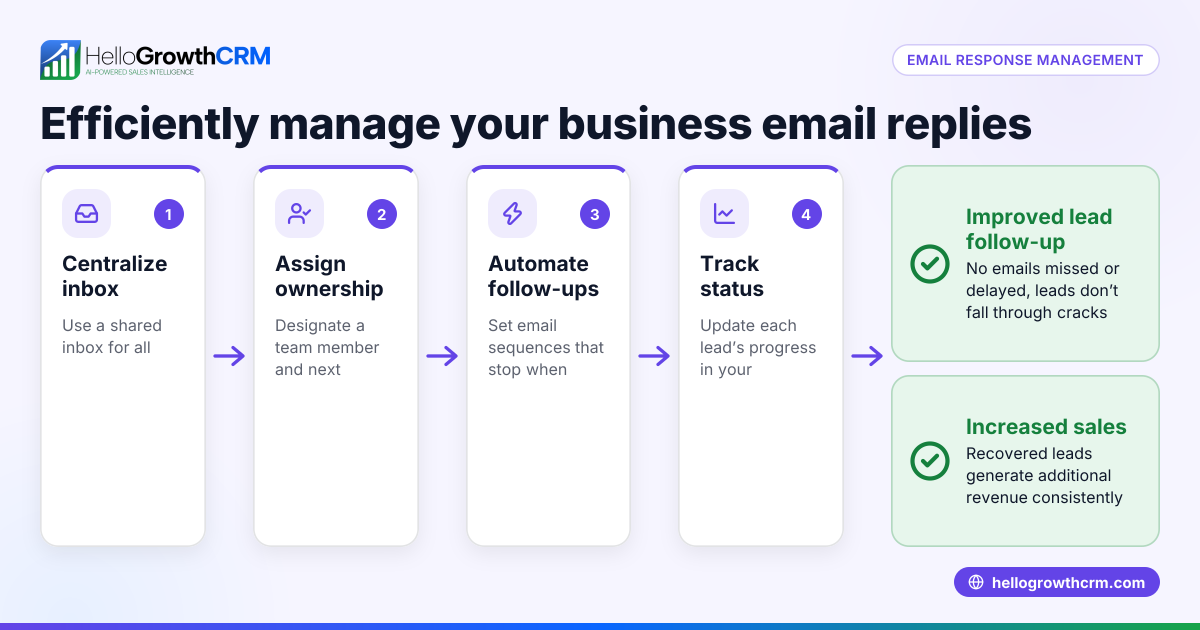
- Consider multi-step follow-ups: Beyond one automatic reply, set up sequences that send follow-up emails over days or weeks, stopping when the prospect replies. This keeps leads engaged without manual effort.
- Train your team: Make sure everyone knows how automatic responses work and how to check shared inboxes for replies to avoid duplicated efforts.
For more on multi-step email outreach, see email automation and sequences.
Example (fictional figures)
BrightSmile Dental, a two-location practice in Columbus, Ohio, wants to set an automatic email response for appointment requests.
- They write a message: “Thank you for contacting BrightSmile Dental. We received your request and will reply within 24 hours.”
- They set the trigger on 03/15/2026 to send this message immediately on incoming emails.
- They test by sending an email from a personal account and confirm the automatic reply arrives instantly.
- To keep leads engaged, they create a five-step follow-up sequence over two weeks that sends reminders and helpful dental tips, stopping if the patient replies.
This setup saves staff time and ensures no inquiry goes unanswered.
Common mistakes
- Overly generic messages: Avoid vague replies that don’t add value. Include clear next steps or contact info.
- Not testing the response: Always test to prevent technical issues or typos.
- Sending multiple auto-replies: Prevent loops where your system replies repeatedly to the same email.
- Ignoring follow-up: Automatic responses confirm receipt but must be backed by timely personal replies.
- Not training the team: Without team awareness, replies might be duplicated or missed.
Prevent these by regularly reviewing your email automation setup and training your staff.
Doing this in HelloGrowthCRM
HelloGrowthCRM offers a shared inbox called HelloMail where replies to quotation emails are visible to the whole sales team on the deal, reducing missed communications. It also supports sequences and campaigns, letting you set up a five-step follow-up over two weeks that runs automatically and stops the moment the prospect replies. This helps small businesses automate their email outreach without losing the personal touch. Learn more at email automation and sequences.
Frequently asked questions
What is the difference between an automatic email response and an email sequence? An automatic email response is a single, immediate reply triggered by receiving an email. An email sequence is a series of timed follow-up messages sent automatically over days or weeks until the recipient responds. Sequences keep prospects engaged beyond the initial reply.
Can automatic email responses be personalized? Yes, many email systems and CRMs allow you to include the recipient’s name, company, or other details dynamically in the automatic response, making it feel more personal and relevant.
Will automatic email responses annoy customers? When done right, automatic responses reassure customers that their message was received. Keep the message helpful and brief to avoid annoyance. Avoid sending frequent or repeated auto-replies.
How do I stop automatic email replies when a prospect replies? Use a CRM or email automation tool that supports sequences with reply detection. When the prospect replies, the sequence automatically stops further messages, preventing unnecessary emails.
Can I manage automatic email responses and other channels together? Yes, tools like HelloGrowthCRM integrate email, WhatsApp, and SMS sequences, allowing you to automate multi-channel follow-ups efficiently. See WhatsApp and SMS CRM for details.
Key takeaways
- Automatic email responses send instant, pre-written replies to incoming emails, confirming receipt.
- Setting them up involves choosing a platform, writing a clear message, configuring triggers, and testing.
- Avoid common mistakes like generic messages, repeated replies, and lack of team training.
- Multi-step follow-up sequences keep leads engaged beyond the initial automatic reply.
- HelloGrowthCRM supports shared inboxes and automated sequences that stop on reply, streamlining your sales communication.
Start improving your email responsiveness today. Start on the Free Forever plan (200 leads, no credit card).
Ready to put this into practice?
Set up your pipeline, WhatsApp follow-ups, and AI lead scoring in minutes — free, no credit card.
Try HelloGrowthCRM freeGet CRM tips in your inbox
Join thousands of sales professionals who get weekly insights on CRM strategy, AI automation, and pipeline optimization.

The HelloGrowthCRM team publishes guides on CRM strategy, AI sales tools, and revenue operations for small business sales teams.