HelloGrowthCRM software
Built for real small-business sales teams
HelloGrowthCRM helps reps qualify faster, follow up on time, and close more deals—with practical automation in one place.
- AI lead scoring and pipeline visibility
- Built-in dialer, WhatsApp, and email automation
- Sales forecasting and RevOps-ready reporting
Automatic SMS sending uses software to send texts to customers or leads automatically, helping small businesses maintain timely contact, send reminders, confirm appointments, and nurture leads efficiently. This article explains why small businesses use automatic SMS, how to set it up, a practical example, common pitfalls, and how HelloGrowthCRM supports SMS follow-ups.
Why this comes up / what goes wrong
Small business owners often lose leads or customers due to slow or inconsistent follow-up. They may rely on manual texting from their phone or spreadsheets to track who to message next. This approach is time-consuming and error-prone. Without automation, messages can be delayed or forgotten, leading to missed sales and unhappy customers. Automatic SMS sending solves this by scheduling and sending messages on your behalf, keeping communication timely and consistent.
Step-by-step
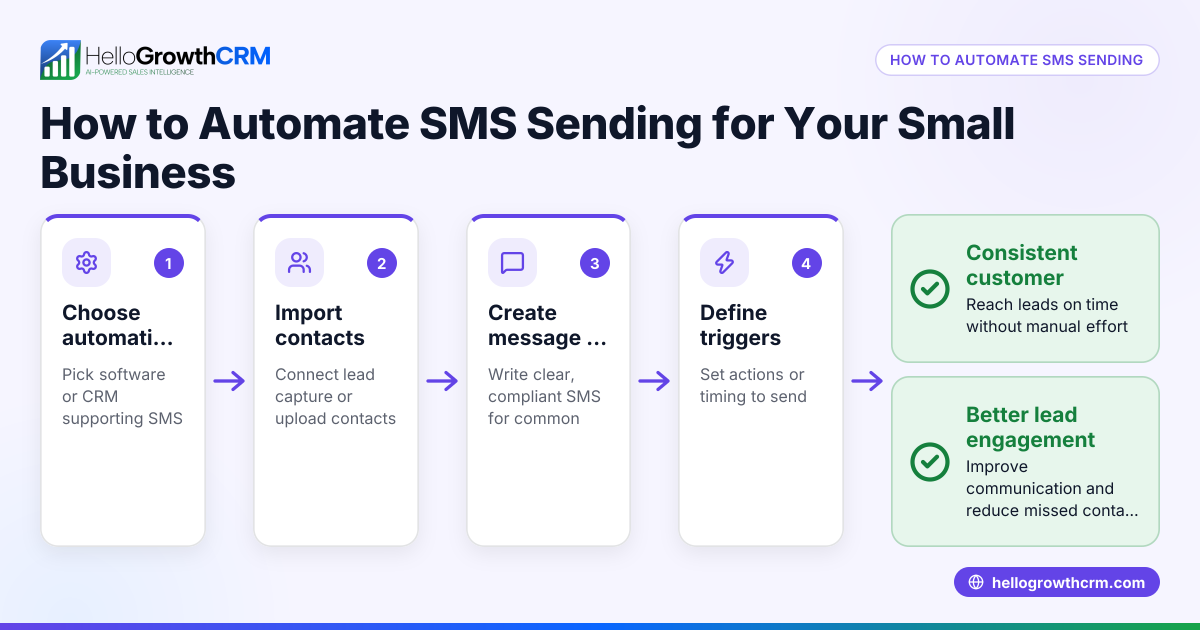
- Choose an SMS automation tool: Select software that supports automatic SMS sending and fits your business size and communication channels.
- Import or capture contacts: Gather your leads or customer phone numbers into the system, either by importing a list or capturing them from web forms.
- Segment your contacts: Organize contacts into groups based on criteria like lead stage, location, or purchase history to send relevant messages.
- Create message templates: Write clear SMS templates for different scenarios such as appointment reminders, follow-ups, or promotions.
- Set triggers and schedules: Define when messages should be sent automatically, for example, immediately after a lead inquiry or a day before an appointment.
- Test your messages: Send test messages to yourself or your team to check content, timing, and delivery.
- Launch your campaign: Activate the automation and monitor the sending status to ensure messages go out as planned.
- Track responses and adjust: Review replies and delivery reports to improve message templates and timing.
Check that your tool logs conversations and follow-ups on the contact record for easy tracking.
Example (fictional figures)
GreenLeaf Landscaping in Charlotte, North Carolina, wants to automate appointment reminders via SMS.
- They have 200 leads scheduled for appointments in April.
- Each SMS costs $0.05 to send.
- They set up automatic reminders to go out 1 day before each appointment.
Calculations:
200 messages × $0.05 = $10 total SMS cost
By automating, GreenLeaf saves 2 hours weekly previously spent manually texting, worth $50/hour in labor:
2 hours × $50 = $100 saved weekly
In one month (4 weeks):
$100 × 4 = $400 labor saved
Total monthly benefit = $400 labor saved - $10 SMS cost = $390 net saving
This shows how automatic SMS sending can save time and money while reducing no-shows.
Common mistakes
- Not segmenting contacts: Sending the same message to all leads wastes opportunities. Prevent this by grouping contacts by relevant criteria.
- Ignoring message personalization: Generic messages feel spammy. Use templates with placeholders for names or dates.
- Failing to test messages: Errors in timing or content can damage your reputation. Always send test messages first.
- Over-messaging: Too many texts annoy customers. Set reasonable frequency limits.
- Not tracking replies: Without logging responses, follow-ups become confusing. Use a CRM that logs SMS conversations on lead records.
- Choosing tools without multi-channel support: Some customers prefer WhatsApp or email. Consider tools that integrate these channels for better reach, such as HelloGrowthCRM's WhatsApp messaging and email automation features.
Doing this in HelloGrowthCRM
HelloGrowthCRM supports WhatsApp and SMS messaging workflows that help teams engage leads on channels they already use. WhatsApp conversations with a lead are logged on the lead record, and follow-ups can be sent as SMS or WhatsApp messages automatically. This keeps all communication organized and timely without manual effort. Learn more about HelloGrowthCRM’s WhatsApp and SMS CRM capabilities and how it fits HelloGrowthCRM for the United States businesses. You can also combine this with the built-in CRM dialer for calls alongside messages.
Frequently asked questions
What is automatic SMS sending? Automatic SMS sending uses software to send text messages to contacts without manual intervention each time, based on triggers like form submissions or scheduled dates.
How can automatic SMS sending improve my small business? It saves time, ensures timely follow-up, reduces missed opportunities, and improves customer experience by sending reminders and updates automatically.
Do I need special hardware to send automatic SMS? No special hardware is needed. You just need software or a CRM with SMS automation features and an internet connection.
Can I personalize automatic SMS messages? Yes, most tools let you insert contact details like names or appointment dates into message templates for personalization.
Is automatic SMS sending legal? You must comply with US laws like the Telephone Consumer Protection Act (TCPA) by obtaining consent before sending marketing texts. (docs.fcc.gov)
Can I combine SMS with WhatsApp messages? Yes, tools like HelloGrowthCRM support both WhatsApp and SMS messaging workflows, letting you engage leads on their preferred channels.
Key takeaways
- Automatic SMS sending uses software to send texts without manual effort.
- It helps small businesses follow up faster and more consistently.
- Set up involves choosing a tool, importing contacts, creating templates, and scheduling messages.
- Avoid common mistakes like ignoring segmentation and failing to track replies.
- HelloGrowthCRM supports SMS and WhatsApp messaging with conversation logging for easy follow-up.
Start improving your lead follow-up today by trying HelloGrowthCRM’s free plan with 200 leads and no credit card at Start on the Free Forever plan (200 leads, no credit card).
Ready to put this into practice?
Set up your pipeline, WhatsApp follow-ups, and AI lead scoring in minutes — free, no credit card.
Try HelloGrowthCRM freeGet CRM tips in your inbox
Join thousands of sales professionals who get weekly insights on CRM strategy, AI automation, and pipeline optimization.

The HelloGrowthCRM team publishes guides on CRM strategy, AI sales tools, and revenue operations for small business sales teams.