HelloGrowthCRM software
Built for real small-business sales teams
HelloGrowthCRM helps reps qualify faster, follow up on time, and close more deals—with practical automation in one place.
- AI lead scoring and pipeline visibility
- Built-in dialer, WhatsApp, and email automation
- Sales forecasting and RevOps-ready reporting
If you want the best CRM for QuickBooks Online Canada, look for a system that does more than sync contacts. It should connect sales and finance in a way that fits Canadian B2B teams, supports clean data, improves follow-up, and helps you stay practical about privacy, consent, and reporting.
Key takeaways
- The best CRM for QuickBooks Online Canada should connect sales activity with finance data your team actually uses.
- A useful setup goes beyond contact sync. It should support pipeline management, automation, forecasting, and reporting.
- Canadian businesses should consider PIPEDA, Quebec Law 25, and CASL when handling lead and customer data.
- For many teams, the ai best crm is the one that reduces admin work and improves follow-up quality.
- QuickBooks Online works best when your CRM has clear rules for customers, deals, invoices, and payment visibility.
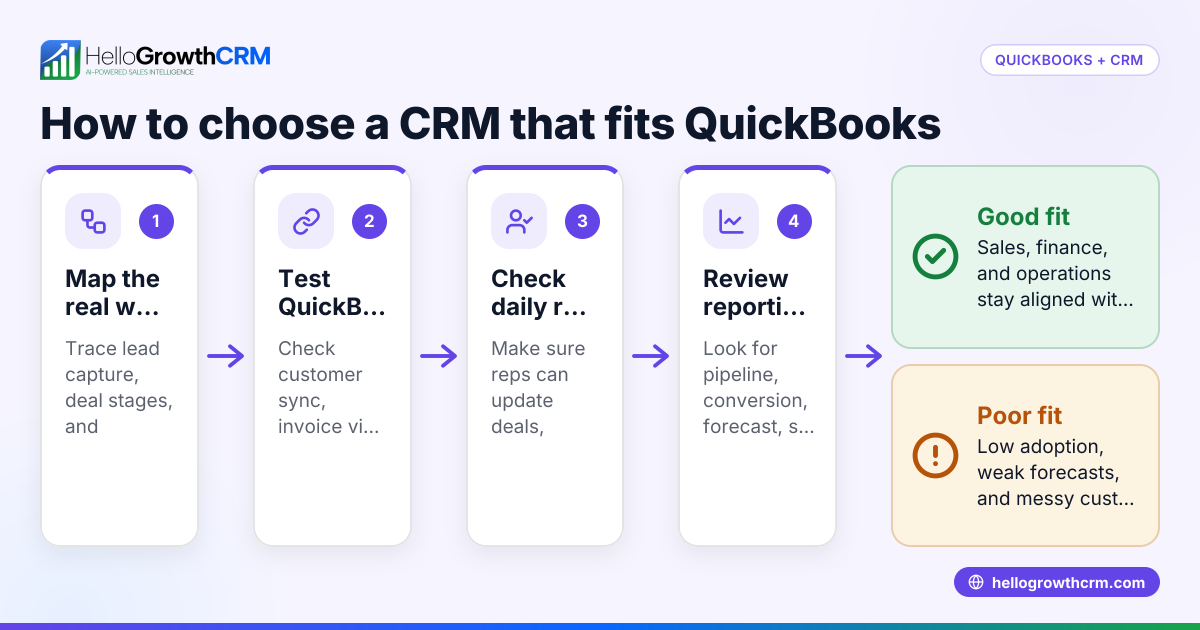
- Before choosing a CRM, map your sales process, finance workflow, and handoff points between teams.
Why QuickBooks Online users in Canada need a CRM built for sales
QuickBooks Online is strong for accounting. It helps Canadian businesses manage books, invoices, tax tracking, and cash flow visibility. But it is not built to run a B2B sales team.
Sales teams need lead capture, deal tracking, reminders, outreach, forecasting, and activity history in one place. Founders and sales leaders also need a clear view of pipeline health before revenue hits the books.
That is where a CRM matters.
If your team is using QuickBooks Online as a partial customer database, a spreadsheet for pipeline, and inboxes for follow-up, the process breaks down fast. Reps miss tasks. Finance and sales work from different records. Reporting becomes manual. Customer handoffs get messy.
The best CRM for QuickBooks Online Canada solves that gap. It keeps sales work in the CRM and finance work in QuickBooks Online, with the right data flowing between both systems.
What makes the best CRM for QuickBooks Online Canada?
The best option is not the one with the longest feature list. It is the one that matches how your team sells, bills, and reports in Canada.
A practical CRM should help you:
- Capture leads from forms, email, and inbound channels.
- Score and prioritise opportunities.
- Manage each deal through a clear pipeline.
- Track calls, emails, meetings, and next steps.
- Reduce manual admin with automation.
- Sync the right customer and invoice data with QuickBooks Online.
- Forecast revenue before finance closes the month.
For many growing teams, this means choosing an AI CRM that helps reps act faster, not just log more fields.
Start with workflow, not software
Many companies shop for tools before they document process. That creates problems later.
Before you compare platforms, answer these questions:
- How does a lead become a qualified opportunity?
- When does a contact become a customer?
- Who creates the invoice in QuickBooks Online?
- When should sales see payment or invoice status?
- What data belongs in CRM versus accounting?
- What should happen automatically?
A CRM should support those answers. It should not force your team into extra steps that nobody will follow after month one.
Why the QuickBooks connection matters
The QuickBooks Online connection matters because sales and finance depend on the same customer reality.
Sales needs to know whether an account is active, overdue, or already billed. Finance needs clean customer details and fewer duplicate records. Leadership needs a reliable view of booked revenue versus open pipeline.
A weak setup creates confusion. A good setup creates shared visibility.
Which QuickBooks Online data should sync with your CRM?
Sync only the data that improves action. Usually that means customers, company details, invoice status, and selected billing history. Keep sales activity, notes, and opportunity management in the CRM. Keep accounting records and finance controls in QuickBooks Online.
Not every field should move between systems.
A simple rule for sync design
Use this rule: sync data that helps a team make a better decision in the moment.
For example, a rep may need to know:
- whether an account already exists in QuickBooks Online
- whether an invoice is open or paid
- the billing entity name
- the primary finance contact
- whether there is a recent transaction history
A rep usually does not need every accounting detail on the deal screen.
The goal is clarity. If your integration pushes too much finance data into the CRM, reps ignore it. If it pushes too little, finance and sales still work in silos.
Avoid duplicate customer records
Duplicate records are one of the biggest causes of reporting errors.
This often happens when:
- sales creates a company in the CRM with one name
- finance creates the customer in QuickBooks Online with another variation
- multiple contacts use different email domains
- bilingual naming conventions create inconsistencies
Set rules for account naming, primary contacts, and ownership before syncing. This small step saves hours later.
What features should Canadian B2B teams prioritise?
The best CRM for QuickBooks Online Canada should support your full revenue process, not just contact management.
Pipeline management that sales will actually use
A useful pipeline view should show:
- stage
- deal value in CAD ($)
- expected close date
- owner
- next activity
- risk or confidence level
This sounds basic, but many teams still manage deals through scattered notes and inboxes. A CRM should make next steps obvious and easy to update.
Good pipeline management also helps leadership see stalled deals, overstuffed stages, and weak follow-up patterns.
AI lead scoring and prioritisation
Most growing teams do not have a lead volume problem. They have a prioritisation problem.
An AI lead scoring system can help reps focus on the accounts and contacts most likely to move. That is especially useful when inbound leads come from several sources and not every lead deserves immediate attention.
The value is not in the score alone. The value is in what the team does next.
For example, scoring can help your team:
- route stronger leads faster
- identify deals that need follow-up now
- reduce time spent on poor-fit prospects
- support cleaner handoffs to account executives
Automation that reduces admin
A CRM should remove low-value work.
Useful automations include:
- lead assignment
- task creation after form fills
- follow-up reminders
- stage-based email sequences
- alerts when a deal stalls
- handoff triggers after close
That is where email automation becomes practical. It helps teams stay consistent without relying on every rep to remember every step.
Automation should feel simple. If it takes too long to build or maintain, your team will stop trusting it.
How important is CASL and privacy compliance when choosing a CRM?
Very important. Your CRM stores personal and business contact data, sales history, and outreach activity. In Canada, your setup should support practical compliance with CASL for commercial email and good data handling under PIPEDA. If you do business in Quebec, Quebec Law 25 also matters.
A CRM does not make you compliant by itself. But it should help your team manage consent, contact records, and communication history clearly.
What to check in the system
Look for the ability to:
- store contact source information
- record opt-ins and opt-outs
- manage unsubscribes consistently
- control user access by role
- keep an audit trail of activity
- maintain organised customer records
These basics matter in real operations. They also matter when your team grows and more people touch the same data.
Bilingual workflows may matter
Many Canadian B2B teams serve customers in English and French. If that applies to your business, your CRM process should support language preferences in contact records, email workflows, and sales handoffs.
This improves the customer experience and reduces avoidable confusion.
What does a strong QuickBooks Online CRM setup look like?
A strong setup keeps sales in the CRM, finance in QuickBooks Online, and shared customer data aligned. Reps can see the right billing context without becoming bookkeepers. Finance keeps control of accounting data while leadership gets better visibility across pipeline and revenue.
A practical model for small and mid-sized teams
For most B2B teams, the cleanest model looks like this:
- Lead enters CRM
The lead is captured from a form, inbox, referral, or import. - Sales qualifies and advances the opportunity
The rep tracks activity, updates stage, and adds next steps. - Customer record is standardised
Account name, contact details, and owner are reviewed for duplicates. - Closed-won triggers finance handoff
The team sends the right information to finance or syncs approved customer data. - QuickBooks Online manages invoicing
Finance creates invoices and manages accounting records there. - CRM reflects selected billing visibility
Sales can see useful status information without editing finance data.
This approach keeps ownership clear.
What leaders should be able to report on
With the right setup, leaders should be able to answer:
- How much pipeline is expected this month and quarter?
- Which reps are following up consistently?
- Which stages are slowing deals down?
- How much closed revenue has moved into billing?
- Which customer accounts have recent sales activity and finance activity?
A dedicated sales forecasting tool inside the CRM makes this much easier than stitching together spreadsheets after the fact.
Should your CRM include managed RevOps?
Yes, if your team lacks time or in-house process depth. Managed RevOps helps you set up stages, fields, automation, reporting, and handoffs properly. That matters more than buying a CRM with dozens of features your team never adopts.
Technology alone does not fix broken process.
Why implementation matters so much
Most CRM problems are not software problems. They are process problems.
Teams fail when they:
- import messy data
- skip field design
- use too many pipeline stages
- overbuild automation
- ignore finance handoffs
- rely on one internal admin who is already overloaded
This is why some teams benefit from managed RevOps. The goal is to make the CRM useful in daily work, not just technically live.
Signs you need extra help
You may need outside support if:
- reps are not updating deals
- reports do not match finance expectations
- duplicates keep returning
- nobody owns admin changes
- automation breaks often
- leadership does not trust the dashboard
A better setup often starts with simpler rules, not more software.
How do you choose the best CRM for QuickBooks Online Canada?
Choose the CRM that fits your sales process, sync needs, and reporting goals in Canada. It should support clean handoffs between sales and finance, reduce admin work, and help your team use the system every day. If the workflow is clumsy, adoption will drop.
Use this shortlist before you decide
When comparing options, ask these questions:
- Does it support your real sales process?
Your team should be able to move deals without workarounds. - Does it connect cleanly with QuickBooks Online?
The sync should be useful, not noisy. - Can reps work quickly in it?
Fast updates matter more than fancy dashboards. - Does it help with prioritisation and follow-up?
AI and automation should improve action. - Can leadership trust the reporting?
Forecasts and pipeline views should reflect reality. - Does it support Canadian operating needs?
That includes practical handling of consent, privacy, and bilingual customer needs where relevant.
A note on adoption
The best CRM is often the one your team actually uses after 90 days.
That means:
- fewer clicks
- clearer stages
- better reminders
- useful reporting
- clean integrations
- simple training
If sales reps avoid the system, finance will still be disconnected and leadership will still lack visibility.
Where HelloGrowthCRM fits
HelloGrowthCRM is built for growing B2B sales teams that need one system for lead capture, AI scoring, pipeline management, outreach, automation, and reporting. It is designed to help teams move faster without adding more admin work.
If you use QuickBooks Online, the value comes from keeping sales execution in the CRM while connecting the customer and revenue context your team needs. You can explore the core features and review current integrations to see if the setup matches your workflow.
For teams that want both software and help improving process, that combination can be more useful than buying a tool alone.
Common mistakes when picking a CRM for QuickBooks Online
A lot of teams make the same avoidable mistakes.
Choosing based only on accounting sync
QuickBooks Online integration is important. But it should not be the only buying factor.
If the CRM is weak at daily sales work, reps will still live in email and spreadsheets. Then your integration adds little value.
Trying to mirror accounting inside the CRM
A CRM should not become a second accounting system.
The more finance detail you force into the CRM, the harder it becomes for reps to stay focused. Keep the CRM action-oriented.
Ignoring data governance
Field rules, ownership, naming standards, and duplicate prevention are not exciting. But they are essential.
Without them, reporting quality drops fast.
Overcomplicating automation
More automation is not always better.
Start with a few high-impact workflows. Test them. Then expand carefully.
Final checklist for Canadian buyers
Before you choose the best CRM for QuickBooks Online Canada, review this checklist:
- Your pipeline stages match how your team actually sells.
- Account and contact naming rules are documented.
- Finance and sales agree on what data should sync.
- The CRM supports clear follow-up and task management.
- Reporting includes pipeline, activity, and forecast views.
- Consent and contact history can be tracked properly.
- The system can support English and French workflows if needed.
- Leadership can see both open opportunities and customer revenue context.
- The tool feels easy enough for daily use.
- Implementation ownership is clear.
That is what separates a useful CRM from one that becomes another underused subscription.
Start a free trial to see how HelloGrowthCRM works for your sales process, or book a demo if you want to map your QuickBooks Online workflow first.
Frequently asked questions
Is QuickBooks Online enough for a B2B sales team in Canada?
Usually not. QuickBooks Online is built for accounting, not pipeline management, lead follow-up, or sales forecasting. Most B2B teams need a CRM to manage opportunities and customer relationships properly.
What is the best CRM for QuickBooks Online Canada?
The best choice depends on your sales process, integration needs, and reporting goals. In general, choose a CRM that supports pipeline management, automation, forecasting, and a clean QuickBooks Online connection for shared customer visibility.
Should invoice data appear inside the CRM?
Some invoice visibility can be useful. Sales reps may need to know whether an account is active or has open invoices. But detailed accounting control should stay in QuickBooks Online.
Do Canadian businesses need to think about CASL when choosing a CRM?
Yes. If your team sends commercial email, CASL matters. Your CRM should help you manage contact records, unsubscribes, and communication history in a clear and organised way.
Frequently Asked Questions
Ready to put this into practice?
Set up your pipeline, WhatsApp follow-ups, and AI lead scoring in minutes — free, no credit card.
Try HelloGrowthCRM freeGet CRM tips in your inbox
Join thousands of sales professionals who get weekly insights on CRM strategy, AI automation, and pipeline optimization.

The HelloGrowthCRM team publishes guides on CRM strategy, AI sales tools, and revenue operations for small business sales teams.