HelloGrowthCRM software
Built for real small-business sales teams
HelloGrowthCRM helps reps qualify faster, follow up on time, and close more deals—with practical automation in one place.
- AI lead scoring and pipeline visibility
- Built-in dialer, WhatsApp, and email automation
- Sales forecasting and RevOps-ready reporting
If your B2B sales team in the United States uses QuickBooks, the best CRM is one that connects sales activity to cash flow without adding more admin work. It should help reps capture leads, manage follow-up, forecast revenue, and keep customer records clean while giving finance and RevOps the data they need.
Key takeaways
- The best CRM for QuickBooks B2B sales team United States buyers want is simple to use and strong on integrations.
- A good fit should connect sales, finance, and operations without forcing reps to update five different tools.
- QuickBooks integration matters most for customer records, invoices, payment status, and cleaner handoffs after a deal closes.
- AI can help with lead scoring, task suggestions, forecasting, and data hygiene, but only if the workflow stays practical.
- US teams should also check email and calling compliance, reporting, SOC 2 expectations, and total setup effort.
- Before you buy, map your sales process from lead capture to invoice collection and test the CRM against that path.
Why QuickBooks users need a CRM built for B2B sales
QuickBooks is a strong finance system for many small and mid-sized US businesses. It helps with invoicing, payment tracking, expenses, and accounting workflows. But it is not built to run a full B2B sales motion.
A sales team needs more than customer balances and invoice records. Reps need lead capture, pipeline stages, follow-up reminders, email history, call notes, and clear ownership. Sales leaders need forecast visibility. RevOps needs clean process control. Founders need a reliable view of what is likely to close this month.
That is where a CRM matters. The right CRM fills the gap between first touch and closed-won. It also creates a better handoff into finance once the deal is ready for billing.
For many US companies, that handoff breaks down in predictable ways:
- Sales closes a deal but finance gets incomplete customer details.
- Customer records live in spreadsheets, inboxes, and QuickBooks at the same time.
- Reps do not know whether an invoice was sent or paid.
- Sales leaders cannot trust the pipeline because activity is not logged.
- Forecasts rely on gut feel instead of stage movement and real buyer signals.
A CRM connected to QuickBooks helps solve those issues. It gives sales one place to work and gives finance cleaner information after the deal is signed.
What should the best CRM for QuickBooks B2B sales team United States buyers include?
It should connect QuickBooks to your sales workflow, not the other way around. The best fit gives reps a simple daily workspace, gives leaders useful forecasts, and gives finance accurate customer and deal data with less manual entry.
From there, the details matter. A manufacturing company in Detroit will not always need the same setup as a software firm in Chicago or a distributor in Houston. But the core requirements are similar.
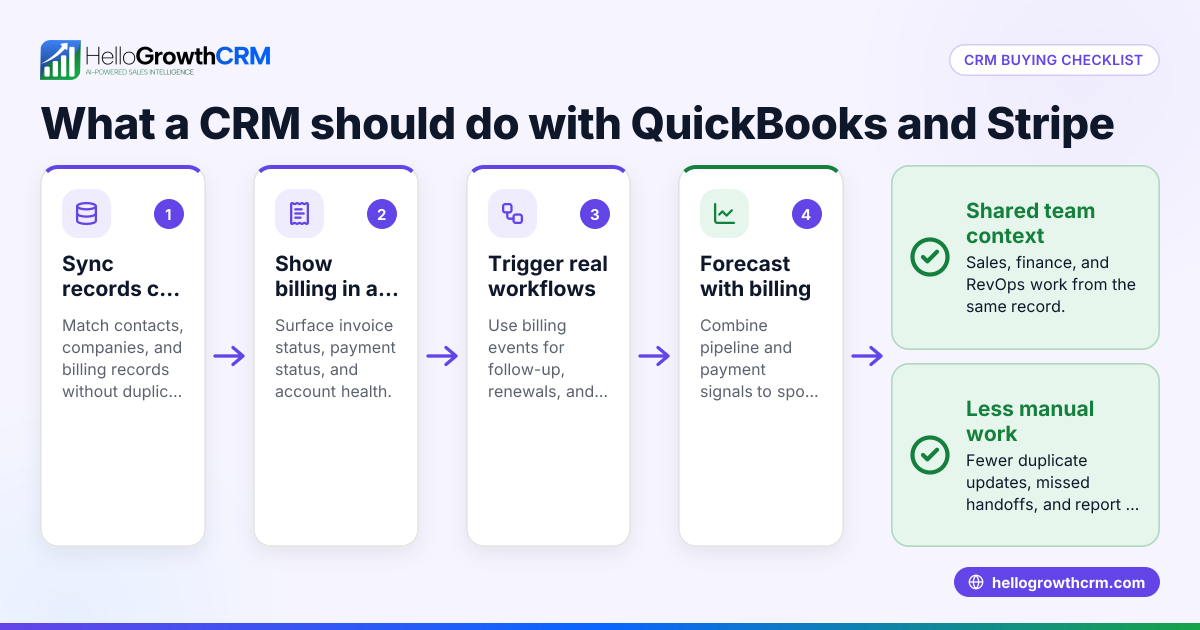
1. Strong QuickBooks integration
Start with the handoff between sales and accounting. Your CRM should make it easier to pass customer data, billing details, and order context into QuickBooks.
Look for these basics:
- Account and contact sync
- Deal or closed-won data passed to finance
- Invoice visibility inside the CRM
- Payment status visibility for sales and account managers
- Fewer duplicate records
- Clear field mapping between systems
The goal is not to turn your CRM into accounting software. The goal is to help your team see what matters without bouncing between tools all day.
This is especially useful when account executives, customer success, and finance all touch the same customer after the sale. If your team uses QuickBooks plus Stripe or a quoting tool, make sure the CRM can fit that stack through solid integrations.
2. A pipeline your team will actually use
A CRM fails when reps avoid it. That usually happens when the system is slow, cluttered, or built around admin work instead of selling.
A good pipeline should let your team:
- Move deals quickly between stages
- See next steps clearly
- Log calls, emails, and notes in one place
- Assign tasks and owners
- Spot stalled deals fast
- Filter by rep, segment, source, or close date
If a rep in Houston has to click through six screens just to update one opportunity, adoption will suffer. If a sales manager in Chicago cannot see which deals have gone quiet for 14 days, coaching will suffer too.
The best CRM is often the one that feels obvious after a week of use.
3. AI that helps, not AI for show
A lot of teams now ask for AI. That is reasonable. But not all AI features are useful.
The most practical AI tools for B2B sales teams are the ones that reduce manual work and improve prioritization. Good examples include:
- Lead scoring based on fit and engagement
- Suggested next actions
- Automatic data capture from emails and forms
- Activity summaries
- Forecast support based on pipeline behavior
- Duplicate detection and data cleanup
This is where an AI CRM can help. It should make the system easier to use, not harder to trust.
If you are searching for an ai best crm, focus on one question: does the AI improve daily decisions for reps and managers? If the answer is no, it is just another feature list item.
What QuickBooks data should your CRM show?
Your CRM should show enough QuickBooks data to help sales and account teams act wisely. That usually means customer status, invoice context, and payment visibility. It does not mean forcing finance work into the CRM or replacing QuickBooks as the source of truth.
Under that rule, the most useful data is the data that changes what sales does next.
Useful QuickBooks fields to surface in the CRM
For many US B2B companies, the following fields are enough:
- Customer name and legal billing entity
- Open invoices
- Paid and unpaid status
- Recent invoice dates
- Contract or order value where relevant
- Billing contact details
- Credit or account notes if your process requires them
This context helps account managers prepare for renewal or expansion conversations. It also helps sales avoid awkward outreach when a customer has unresolved billing issues.
For example, if a customer in Detroit has several open invoices, your account team may want to coordinate with finance before pushing an upsell. If the invoice was paid last week, that may be the right time to restart a paused expansion discussion.
What your CRM should not try to do
Do not ask your CRM to become your accounting system. Keep QuickBooks as the source of truth for finance records, invoice creation, and accounting workflows.
Instead, use the CRM to support sales behavior. The system should answer practical questions like:
- Is this customer active?
- Has billing started?
- Are there open invoices?
- Who owns the relationship?
- What is the next commercial step?
That line matters. It keeps implementation simpler and reduces confusion between teams.
How important is automation for a US sales team?
Very important. Automation keeps follow-up consistent, reduces missed handoffs, and cuts manual entry. For US B2B teams, it also helps standardize outreach and reporting across email, calling, and pipeline updates without asking reps to become full-time admins.
Automation is not just about saving time. It also protects process quality.
Where automation helps most
For B2B sales teams using QuickBooks, the best automation points are usually:
- Lead capture
Route inbound leads from forms, chat, or email into the CRM. - Lead qualification
Score and assign leads by fit, source, territory, or product line. - Follow-up
Trigger reminders, tasks, or outreach when no activity happens. - Deal progression
Move records into the right stage based on defined actions. - Closed-won handoff
Send clean customer and deal data into finance workflows. - Post-sale visibility
Show invoice or payment status to the account owner.
This is where tools like email automation and AI lead scoring can create real value. The key is keeping the workflow visible and editable. Sales leaders should be able to understand what happens and why.
Automation should support US compliance basics
If your team does outbound email or calling in the United States, your CRM should support compliant workflows. That includes clean opt-out handling for email and thoughtful calling processes that respect TCPA considerations where they apply.
A CRM will not replace legal advice. But it should make it easier to enforce your own rules, track consent signals, and maintain clear outreach records.
What reporting should sales leaders expect?
Sales leaders should expect clear pipeline, activity, conversion, and forecast reporting. The right CRM should help managers coach reps, spot risk early, and compare pipeline quality against revenue targets without rebuilding reports in spreadsheets every Friday.
That short answer matters because reporting is often where CRM buying decisions become expensive.
The reports that matter most
For US B2B sales teams, start with these:
- Pipeline by stage
- Pipeline by rep
- Stage conversion rates
- Win rate by source or segment
- Sales cycle length
- Activity by rep
- Stalled opportunities
- Forecast by close month
- Closed-won versus target
- Lead response time
These reports help leaders answer practical questions. Are reps following up fast enough? Is one stage leaking? Are inbound leads from a certain channel better quality? Is the quarter at risk?
A useful sales forecasting setup should also show confidence, not just totals. If every deal is marked at 90% probability, the forecast is not helping.
Why forecast accuracy matters more when you use QuickBooks
When your accounting stack runs through QuickBooks, a cleaner forecast can improve planning across the business. Founders can time hiring decisions better. Finance can see expected cash flow more clearly. Operations can prepare for demand with less guesswork.
This is especially important in businesses with long sales cycles or large deal sizes. A single delayed deal can shift monthly collections in a meaningful way. Your CRM should help you spot that risk before month-end.
How do you evaluate CRM fit before buying?
Map your real sales process, test the QuickBooks connection, and watch how quickly a rep can do common tasks. If the CRM looks powerful in a demo but feels slow in daily use, adoption will drop and your data will get worse over time.
That simple test saves a lot of money.
A practical 7-step evaluation process
- Document your current workflow
Write down how leads arrive, how deals move, and what happens after close. - List your must-have QuickBooks use cases
Be specific. Do you need invoice visibility, customer sync, or finance handoff fields? - Test with real scenarios
Use sample opportunities from your actual business. A software company and a distributor will have different needs. - Check rep usability
Ask one rep and one manager to complete everyday tasks. Time them. - Review reporting depth
Make sure your core pipeline and forecast reports are available without heavy custom work. - Assess setup support
Many teams need help with field mapping, workflows, and cleanup. This is where managed RevOps can be useful. - Confirm security and buyer expectations
If your customers ask about data handling, access control, or SOC 2, your CRM choice should support those conversations.
Questions to ask during evaluation
Use direct questions:
- What QuickBooks data can sales see inside the CRM?
- How are duplicates handled?
- How does the system manage lead routing?
- Can we automate post-close handoffs?
- What does forecasting use to predict outcomes?
- How long does a typical setup take for a small US B2B team?
- What will reps need to do manually each day?
These questions reveal whether the system is designed for practical adoption or just polished demos.
Common mistakes US teams make when choosing a CRM for QuickBooks
The biggest mistake is buying for feature volume instead of workflow fit. The second biggest is ignoring adoption. A CRM that sales ignores will not improve forecasting, handoffs, or QuickBooks visibility no matter how good the integration sounds.
Here are the most common errors.
Choosing finance convenience over sales usability
Finance teams care about accuracy. Sales teams care about speed. You need both. But if the CRM is designed around back-office control and not rep behavior, your pipeline data will decay fast.
The result is predictable. Managers stop trusting the reports. Reps work from inboxes and notes. QuickBooks still gets incomplete customer context.
Over-customizing too early
Many teams try to design the perfect system before they understand what reps will really use. That creates extra fields, extra stages, and extra clicks.
Start simple. You can add complexity later if the process is stable.
Ignoring post-sale workflows
The handoff to finance and account management matters. If the CRM only helps before signature, your team will still lose time after the deal closes.
Think through what happens after closed-won:
- Who confirms billing details?
- Who sees invoice status?
- Who owns the account next?
- What triggers upsell or renewal workflows?
Forgetting data quality
A CRM and QuickBooks connection only works well if customer records stay clean. Duplicate accounts, missing billing contacts, and inconsistent naming can break trust quickly.
The right system should make data hygiene easier through validation, automation, and visibility.
Where HelloGrowthCRM fits
HelloGrowthCRM is built for growing B2B sales teams that want one system for lead capture, pipeline management, outreach, automation, and forecasting. For teams that rely on QuickBooks and want stronger sales execution without adding more admin work, that can be a practical fit.
It is especially useful if you want AI support without turning the CRM into a science project. HelloGrowthCRM combines pipeline management, communications, automation, and reporting with an adoption-focused design. You can explore the core features and review current pricing based on your team’s needs.
The broader point is this: the best CRM is the one your team uses every day, with enough QuickBooks visibility to improve handoffs and decision-making.
If you want a better way to connect sales activity, customer context, and revenue operations, start a free trial or book a demo.
Frequently asked questions
Does QuickBooks replace the need for a CRM?
No. QuickBooks is built for accounting and billing workflows. A CRM is built for lead management, pipeline tracking, outreach, and forecasting. Most B2B sales teams need both.
Can a CRM show invoice status from QuickBooks?
Yes, many CRM setups can surface invoice or payment context from QuickBooks. The exact fields depend on the integration and your workflow design. Keep QuickBooks as the accounting source of truth.
Is AI necessary in a CRM for B2B sales?
Not always, but it can be very useful. The best AI features help with lead prioritization, workflow automation, summaries, and forecasting. If AI adds noise instead of clarity, it is not worth paying for.
Frequently Asked Questions
Ready to put this into practice?
Set up your pipeline, WhatsApp follow-ups, and AI lead scoring in minutes — free, no credit card.
Try HelloGrowthCRM freeGet CRM tips in your inbox
Join thousands of sales professionals who get weekly insights on CRM strategy, AI automation, and pipeline optimization.

The HelloGrowthCRM team publishes guides on CRM strategy, AI sales tools, and revenue operations for small business sales teams.