HelloGrowthCRM software
Built for real small-business sales teams
HelloGrowthCRM helps reps qualify faster, follow up on time, and close more deals—with practical automation in one place.
- AI lead scoring and pipeline visibility
- Built-in dialer, WhatsApp, and email automation
- Sales forecasting and RevOps-ready reporting
A call center dialer application automates the process of making outbound calls by dialing numbers from a list and tracking call results. This helps sales and support teams connect with leads or customers faster and more efficiently than manual dialing. Small businesses often seek dialer apps to reduce time spent on dialing, avoid missed calls, and keep better records of interactions.
Why this comes up / what goes wrong
Many small businesses rely on manual dialing through phones or basic spreadsheets to manage their outbound calls. This approach often leads to slow follow-up, lost leads, and inconsistent tracking of call outcomes. When salespeople juggle calling lists across multiple tools like text messages, email, and spreadsheets, it becomes difficult to prioritize leads or measure team performance. A call center dialer application addresses these challenges by centralizing calls and logging outcomes automatically.
Step-by-step
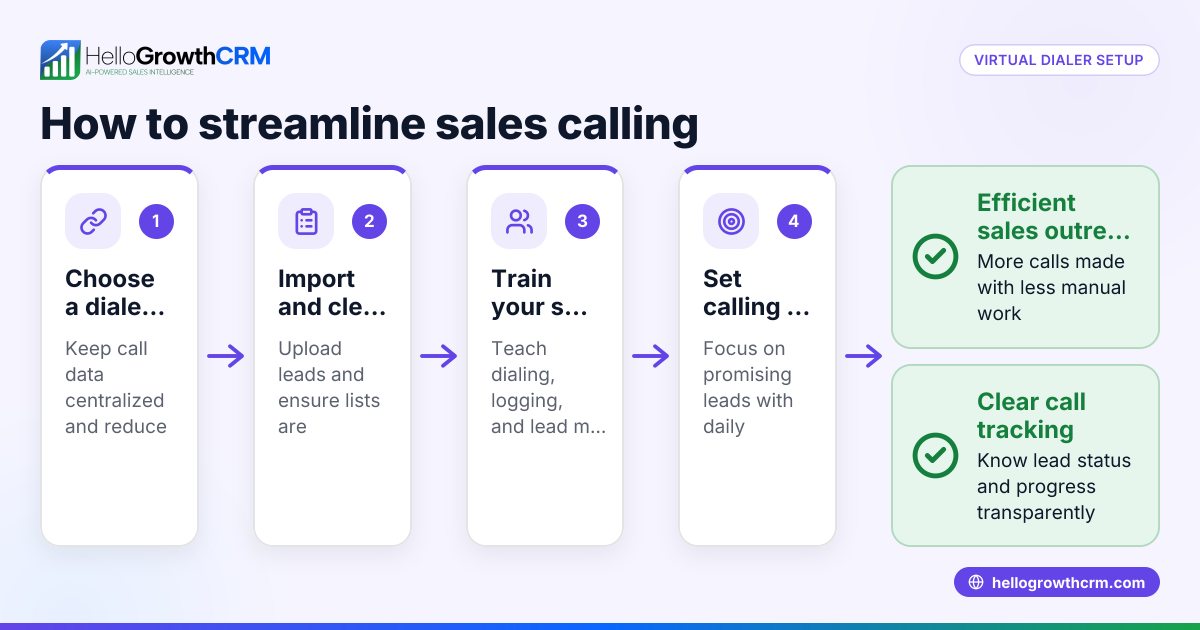
- Identify your calling needs: Determine the volume of outbound calls your team makes daily and the type of calls (sales, support, follow-up).
- Choose a dialer application: Look for software that integrates with your existing CRM or contact list and supports your calling volume.
- Set up call lists: Import or create lists of leads or customers to call within the dialer app.
- Configure dialing mode: Select from manual dialing, preview dialing, or power dialing based on your team’s workflow.
- Train your team: Ensure everyone understands how to use the dialer, log call outcomes, and update lead statuses.
- Monitor call outcomes: Regularly check call logs and reports to track success rates and identify bottlenecks.
- Adjust and optimize: Refine calling lists and scripts based on performance data.
For more on dialer features, see the built-in CRM dialer section below.
Example (fictional figures)
A B2B software reseller in Denver, Colorado, wants to improve outbound sales calls. They make 500 calls monthly, with a manual dialing process.
- Current calls per day: 25
- Average call duration: 3 minutes
- Manual dialing time per call: 30 seconds
Manual dialing time per day: 25 calls × 0.5 minutes = 12.5 minutes
Total call time per day: 25 calls × 3 minutes = 75 minutes
Total time spent per day on calls + dialing: 75 minutes + 12.5 minutes = 87.5 minutes
Using a dialer app with power dialing reduces dialing time to near zero, allowing the team to focus on calls.
If the dialer cuts dialing time by 12.5 minutes daily, monthly savings are: 12.5 minutes × 20 workdays = 250 minutes = 4 hours 10 minutes saved monthly
This time saved can be used for more calls or follow-ups, potentially increasing sales.
Common mistakes
- Not integrating with CRM: Using a dialer separate from your CRM leads to fragmented data. Prevent this by choosing a dialer integrated with your CRM.
- Ignoring call outcome logging: Failing to record call results wastes insights. Always log outcomes to track lead progress.
- Overloading agents with too many calls: Too many calls reduce call quality. Balance call volume with agent capacity.
- Skipping team training: Without proper training, agents may misuse the dialer. Provide clear instructions and practice sessions.
- Neglecting compliance: Ensure your dialer respects call time regulations and do-not-call lists to avoid penalties.
Learn how to avoid these pitfalls by reviewing HelloGrowthCRM for the United States.
Doing this in HelloGrowthCRM
HelloGrowthCRM includes a built-in dialer that lets reps work from within the CRM. Reps call directly from the CRM, and every call outcome is logged on the lead record automatically. This keeps your call history tied to contacts and deals, making follow-up easier and data more reliable. For details, visit the built-in CRM dialer page.
Frequently asked questions
What is the difference between a manual dialer and a power dialer? A manual dialer requires the agent to dial each number one by one, while a power dialer automatically calls numbers from a list and connects answered calls to agents, reducing downtime between calls.
Can a call center dialer application handle text messages and emails? Some dialer apps integrate with messaging and email sequences to streamline communication, but core dialers focus on voice calls. HelloGrowthCRM offers combined WhatsApp and SMS CRM features to complement calling workflows (WhatsApp and SMS CRM).
Is training necessary to use a dialer application? Yes. Proper training ensures agents understand how to use the dialer effectively, log call outcomes correctly, and comply with regulations.
How does a dialer improve sales follow-up? By automating dialing and logging calls, a dialer reduces delays, prevents missed leads, and provides data to prioritize high-potential prospects.
Can small teams benefit from a call center dialer? Absolutely. Even small teams gain efficiency and better lead management by using a dialer integrated with their CRM.
Key takeaways
- A call center dialer application automates outbound calls and logs outcomes to improve efficiency.
- Small businesses often struggle with manual dialing and scattered data, which dialers solve.
- Choose a dialer that integrates with your CRM and suits your call volume.
- Proper setup, training, and monitoring are essential for success.
- HelloGrowthCRM’s built-in dialer lets reps call and log outcomes directly inside the CRM.
Start improving your outbound calls today. Start on the Free Forever plan (200 leads, no credit card) with HelloGrowthCRM and see how the built-in dialer can help your team.
Ready to put this into practice?
Set up your pipeline, WhatsApp follow-ups, and AI lead scoring in minutes — free, no credit card.
Try HelloGrowthCRM freeGet CRM tips in your inbox
Join thousands of sales professionals who get weekly insights on CRM strategy, AI automation, and pipeline optimization.

The HelloGrowthCRM team publishes guides on CRM strategy, AI sales tools, and revenue operations for small business sales teams.