HelloGrowthCRM software
Built for real small-business sales teams
HelloGrowthCRM helps reps qualify faster, follow up on time, and close more deals—with practical automation in one place.
- AI lead scoring and pipeline visibility
- Built-in dialer, WhatsApp, and email automation
- Sales forecasting and RevOps-ready reporting
Cloud based payment solutions allow small businesses to process payments using software hosted on the internet rather than relying on physical point-of-sale terminals or local software installations. These solutions enable accepting payments via credit cards, debit cards, digital wallets, and bank transfers through online stores, mobile devices, or invoicing. They help businesses speed up cash flow, reduce hardware costs, and improve payment tracking.
This article covers why small businesses seek cloud payment options, a step-by-step guide to choosing and setting one up, a realistic example with numbers, common mistakes to avoid, and how HelloGrowthCRM helps manage quotes, invoices, and payments from one platform.
Why this comes up / what goes wrong
Many small business owners face challenges with slow, complicated, or disconnected payment processes. Traditional payment methods often require physical equipment like card readers, manual reconciliation of payments and invoices, or separate software for invoicing and sales tracking. This can delay cash flow and increase administrative work.
Small businesses selling products or services online, on the phone, or on the go need flexible cloud-based payment solutions that integrate with their sales and customer management tools. Without these, follow-up on payments can be inconsistent, invoices may be overlooked, and revenue can be lost.
Step-by-step
- Assess your payment needs: Identify which payment types you want to accept (credit cards, ACH bank transfers, digital wallets) and where (online store, in-person mobile payments, invoices). Review your average transaction size and sales volume to understand costs.
- Research cloud payment providers: Look for providers that offer secure, PCI-compliant payment processing with clear fee structures. Check if they support integration with your CRM or invoicing software to automate payment tracking.
- Check integration capabilities: Choose a payment solution that can connect with your existing sales or CRM systems. Integration helps automate invoice creation, payment status updates, and follow-up tasks.
- Set up merchant accounts and payment gateways: Follow the provider’s instructions to create merchant accounts and link your business bank account for receiving funds.
- Test payment processing: Run test transactions to ensure payments process correctly, appear in your system, and trigger the right follow-up actions.
- Train your team: Make sure sales and accounting staff know how to send payment links, track invoice statuses, and follow up on unpaid invoices.
- Monitor and reconcile payments regularly: Use your CRM or payment dashboard to verify all payments are recorded and to follow up promptly on overdue invoices.
For more on integrating payments with sales follow-up, see built-in CRM dialer and WhatsApp and SMS CRM.
Example (fictional figures)
Sarah owns a plumbing company in Austin, Texas. She decides to switch to a cloud based payment solution to speed up invoice payments and improve cash flow.
- Monthly sales: $50,000
- Average invoice amount: $1,000
- Current average payment delay: 30 days
Sarah selects a cloud payment provider charging 2.9% plus $0.30 per transaction.
Calculating fees on $50,000 monthly sales: $50,000 × 2.9% = $1,450 Number of transactions = $50,000 ÷ $1,000 = 50 Transaction fees = 50 × $0.30 = $15 Total fees = $1,450 + $15 = $1,465
By sending invoices with payment links directly from her CRM, Sarah reduces payment delays from 30 days to 10 days, improving her cash flow and reducing manual follow-up.
Common mistakes
- Choosing a provider without integration options: Prevent by confirming your CRM or invoicing software compatibility before signing up.
- Ignoring transaction fees: Carefully review fee structures, including percentage and per-transaction fees, to avoid unexpected costs.
- Not training staff: Provide clear instructions and resources so your team can confidently send payment links and track payments.
- Failing to reconcile payments: Regularly check payment reports in your CRM or payment dashboard to catch missed or delayed payments.
- Using multiple unconnected tools: Consolidate payment processing, invoicing, and sales follow-up in one platform to reduce errors and save time.
Doing this in HelloGrowthCRM
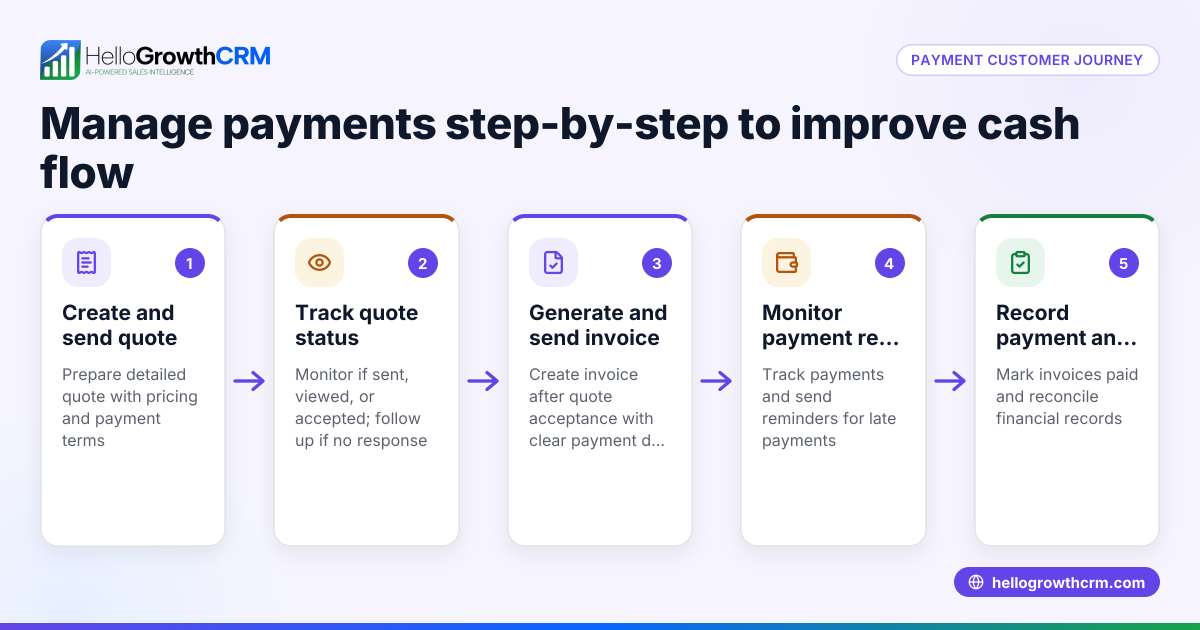
HelloGrowthCRM lets you create and send quotes, proposals, and invoices directly from the deal record. You can track the status of these documents (sent, viewed, accepted) on the same screen as your follow-up tasks. Payments received are reconciled automatically to invoices and deals, streamlining your sales and payment workflow. Learn more about this at built-in CRM dialer.
Frequently asked questions
What are the benefits of cloud based payment solutions for small businesses? They simplify accepting payments anywhere, speed up cash flow, reduce the need for hardware, and integrate with sales and accounting tools for better tracking and follow-up.
Are cloud payment solutions secure? Reputable providers comply with PCI standards and use encryption to protect payment data. Always choose PCI-compliant solutions to keep your transactions secure.
Can cloud payment solutions handle recurring payments? Many providers support recurring billing and subscriptions, which is useful for service businesses with ongoing contracts.
How do I choose the right cloud payment provider? Consider fees, payment methods supported, integration options with your CRM or invoicing software, security features, and customer support.
Can I send invoices and payment links directly from my CRM? Yes, HelloGrowthCRM allows you to send quotes, proposals, and invoices with payment tracking all from the same deal screen, helping you follow up efficiently.
Key takeaways
- Cloud based payment solutions let you accept and manage payments online without physical terminals.
- Choose providers that integrate with your CRM and invoicing tools to automate payment tracking.
- Test payment processing thoroughly and train your team for smooth adoption.
- Avoid using multiple disconnected tools by consolidating payment and sales workflows.
- HelloGrowthCRM supports quotes, invoices, and payment tracking directly linked to deals.
Start simplifying your sales and payment process now. Start on the Free Forever plan (200 leads, no credit card).
Ready to put this into practice?
Set up your pipeline, WhatsApp follow-ups, and AI lead scoring in minutes — free, no credit card.
Try HelloGrowthCRM freeGet CRM tips in your inbox
Join thousands of sales professionals who get weekly insights on CRM strategy, AI automation, and pipeline optimization.

The HelloGrowthCRM team publishes guides on CRM strategy, AI sales tools, and revenue operations for small business sales teams.