HelloGrowthCRM software
Built for real small-business sales teams
HelloGrowthCRM helps reps qualify faster, follow up on time, and close more deals—with practical automation in one place.
- AI lead scoring and pipeline visibility
- Built-in dialer, WhatsApp, and email automation
- Sales forecasting and RevOps-ready reporting
The correct email format for business communication consists of five essential parts: a subject line, greeting, body, closing, and signature. Using this format helps ensure your message is clear, professional, and easy to respond to.
Why this comes up / what goes wrong
Small-business owners often send emails quickly without a clear structure, leading to confusion or missed information. When sales teams manage leads through text messages, email, and spreadsheets, they risk losing track of replies or failing to follow up promptly. This can harm client relationships and reduce sales effectiveness. Many need a straightforward, ready-to-use email format to improve communication and avoid these issues.
Step-by-step
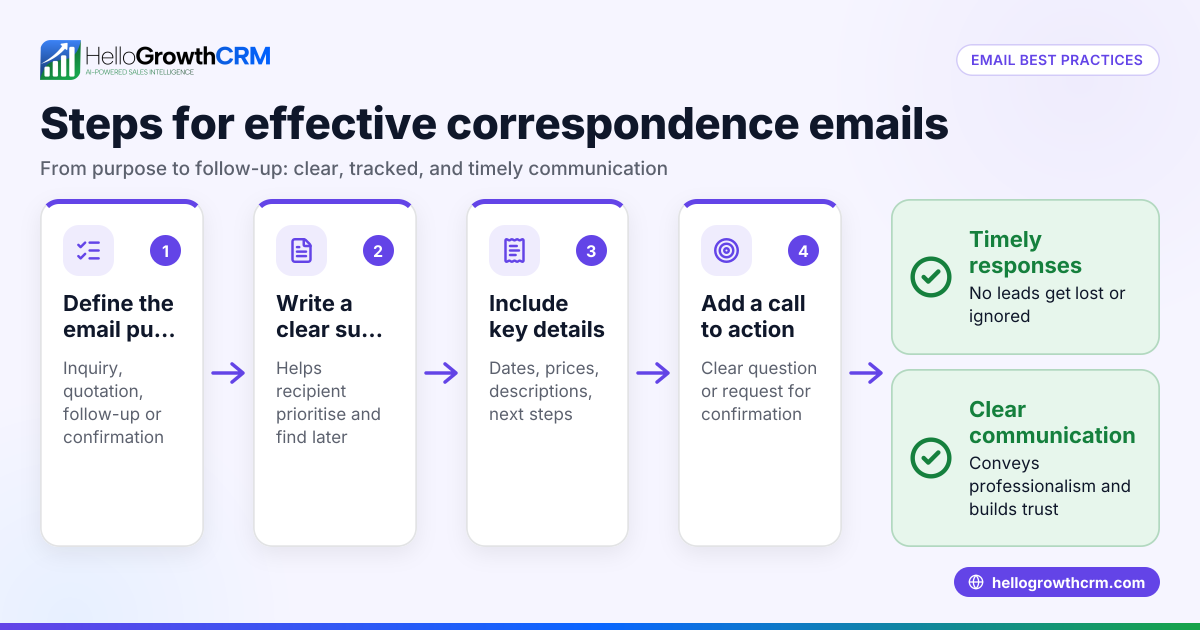
- Write a clear subject line. Make it brief but descriptive to show the email’s purpose. For example, "Quotation for Lawn Care Services – July 2026." Avoid vague or all-caps subjects. Check spelling.
- Start with a professional greeting. Use the recipient’s name if possible, such as "Dear Mr. Smith," or "Hi Sarah,". Avoid overly casual greetings like "Hey" or "Hi there."
- Compose the body. Begin by referencing any previous contact or the purpose of the email. Use short paragraphs or bullet points to organize information. Be polite and to the point. Include any necessary details clearly.
- Include a clear call to action or next step. State what you want the recipient to do, such as "Please confirm if you would like to proceed" or "Let me know if you have any questions."
- Close politely. Use phrases like "Best regards," "Sincerely," or "Thank you," followed by your full name.
- Add a signature. Include your job title, company name, phone number, and email address. This makes it easy for the recipient to contact you.
- Proofread before sending. Check for spelling, grammar, and formatting errors. Confirm all names, dates, and figures are correct.
- Use CC or BCC appropriately. CC people who should openly see the email; use BCC to protect privacy when sending to multiple recipients who do not know each other.
- Attach files carefully. Double-check that attachments are included and named clearly.
- Follow up if no reply. Use automated sequences or reminders to maintain communication without manual tracking.
Example (fictional figures)
A landscaping contractor in Charlotte, North Carolina, sends a quotation email on 07/15/2026.
Subject line: "Quotation for Lawn Care Services – July 2026"
Dear Mr. Thompson,
Thank you for considering GreenScape for your lawn care needs. Please find below the quotation for the services discussed.
- Lawn mowing (weekly): $150 per visit
- Hedge trimming (monthly): $100 per visit
- Seasonal fertilization (quarterly): $250 per treatment
Total estimated monthly cost: $150 × 4 (weekly visits) = $600 $100 × 1 (monthly visit) = $100 $250 × 0.25 (one quarterly treatment per month) = $62.50 $600 + $100 + $62.50 = $762.50
Please let me know if you would like to proceed or have any questions.
Best regards,
Jane Doe GreenScape Landscaping Phone: (704) 555-1234 Email: jane.doe@greenscape.com
Sent on 07/15/2026.
Common mistakes
- Vague subject lines. Prevent by summarizing the email content clearly and specifically.
- Forgetting to personalize the greeting. Always use the recipient’s name to avoid seeming generic or careless.
- Writing long, unorganized paragraphs. Break content into short paragraphs or bullet points for readability.
- Missing attachments. Double-check attachments before sending.
- Not proofreading. Use spell check and read aloud to catch errors.
- Ignoring follow-up. Use automated sequences to ensure timely follow-up without manual effort.
Doing this in HelloGrowthCRM
HelloGrowthCRM helps manage your email communication with features like the HelloMail shared inbox, where replies to quotation emails are visible to the whole team on the deal. This avoids lost or duplicated follow-ups and keeps everyone aligned. You can also set up sequences and campaigns to automate a five-step follow-up over two weeks that stops automatically when the prospect replies. Learn more about email automation and sequences and WhatsApp and SMS CRM for integrated communication. For US businesses, see HelloGrowthCRM for the United States.
Frequently asked questions
What is the correct email format for business communication? The correct format includes a subject line, a professional greeting, a concise body with clear points, a polite closing, and a signature with your contact details. This structure helps ensure your message is clear and professional.
How do I check if my email format is correct? Review your email for a clear subject line, proper greeting, organized body, polite closing, and complete signature. Proofread carefully for spelling and grammar errors and confirm any attachments are included.
Can I automate email follow-ups to ensure timely replies? Yes, tools like HelloGrowthCRM’s sequences and campaigns allow you to automate multi-step follow-ups over a set period. These stop automatically when the prospect replies, saving time and improving response rates.
Should I use CC or BCC in business emails? Use CC to openly include people who need to be informed. Use BCC to protect recipients’ privacy when sending to multiple recipients who don’t know each other.
What common mistakes should I avoid in email formatting? Avoid vague subject lines, missing attachments, overly casual greetings, long unorganized paragraphs, and neglecting follow-ups. Proofreading helps prevent many errors.
Key takeaways
- Use a clear, concise subject line that reflects the email’s purpose.
- Personalize greetings and organize the body with short paragraphs or bullet points.
- Include a polite closing and a full signature with contact details.
- Proofread carefully and double-check attachments before sending.
- Automate follow-ups with sequences to maintain timely communication.
- Use shared inbox features to keep your team aligned on email replies.
Start improving your email communication by using the correct format and managing follow-ups efficiently. Start on the Free Forever plan (200 leads, no credit card).
Ready to put this into practice?
Set up your pipeline, WhatsApp follow-ups, and AI lead scoring in minutes — free, no credit card.
Try HelloGrowthCRM freeGet CRM tips in your inbox
Join thousands of sales professionals who get weekly insights on CRM strategy, AI automation, and pipeline optimization.

The HelloGrowthCRM team publishes guides on CRM strategy, AI sales tools, and revenue operations for small business sales teams.