HelloGrowthCRM software
Built for real small-business sales teams
HelloGrowthCRM helps reps qualify faster, follow up on time, and close more deals—with practical automation in one place.
- AI lead scoring and pipeline visibility
- Built-in dialer, WhatsApp, and email automation
- Sales forecasting and RevOps-ready reporting
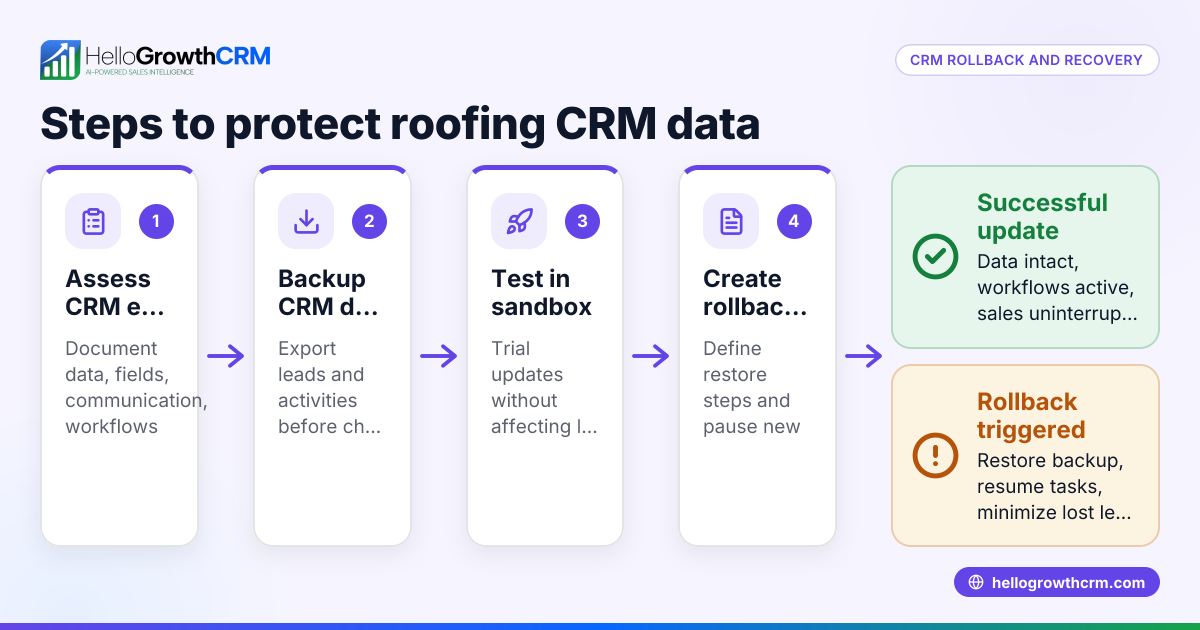
For roofing businesses, CRM event logging and incident response means tracking every customer interaction and incident related to roofing projects in one place and responding quickly to issues. This article explains why event logging and incident response matter for roofing systems, provides a step-by-step guide to implement them, highlights common mistakes, and shows how HelloGrowthCRM can help streamline these tasks.
Why this comes up / what goes wrong
Roofing contractors and service providers often face challenges managing customer communications, incident reports, and follow-ups. Incidents such as roof damage, leaks, or installation errors require timely responses to maintain customer satisfaction and avoid costly disputes. Without a proper event logging system in a CRM, details can be lost or delayed, leading to slow follow-up, missed appointments, or incomplete records.
Business owners and accountants in roofing services need a reliable way to capture all events—from initial inquiries and site visits to incident reports and resolution steps. They want to avoid juggling text messages, emails, and spreadsheets that don’t communicate well internally. A CRM designed for event logging and incident response helps organize this data, assign tasks, and track progress efficiently.
Step-by-step
- Choose a CRM that supports event logging and communication tracking.
- Check that it can capture messages and notes from multiple channels like WhatsApp, SMS, and email.
- Ensure it logs every interaction on the customer record for easy reference.
- Set up standardized event categories relevant to roofing.
- Examples include "Roof Inspection Scheduled," "Incident Reported," "Repair Completed," and "Follow-up Call."
- This helps organize and filter events quickly.
- Log every customer interaction and incident promptly.
- Include details such as date, time, issue description, photos if applicable, and responsible team member.
- Use mobile messaging workflows to capture WhatsApp or SMS conversations automatically.
- Assign follow-up tasks with clear due dates and owners.
- Turn each incident or customer request into a task with a deadline.
- Use task boards to visualize daily calls, site visits, and repairs.
- Automate follow-up sequences for incident resolution.
- Create multi-step workflows that send reminders and check-ins via WhatsApp, SMS, or email.
- Stop the sequence once the customer responds to avoid spamming.
- Review and update incident status regularly.
- Keep the CRM records current with progress notes and resolution details.
- Use reports to identify recurring issues or delays in response.
- Train your team on CRM usage and incident protocols.
- Ensure everyone knows how to log events and handle incident follow-ups.
- Encourage consistent use to avoid data gaps.
These steps help roofing businesses respond faster and keep all incident details in one place, improving customer trust and operational efficiency. For local service businesses, these practices are essential to manage complex projects and customer expectations effectively. Learn more about managing local service businesses with CRM on our Local service businesses page.
Example (fictional figures)
A roofing company in Mississauga, Ontario, called "Maple Leaf Roofing," handles a roof leak incident reported on 2024-04-10. They use a CRM to log the event and manage response:
- Incident reported: 2024-04-10
- Customer: John Smith
- Issue: Leak in the attic after heavy rain
- Photos attached
- Task assigned to technician: Inspection scheduled for 2024-04-12
Costs and follow-up:
Inspection cost estimate: C$300 Repair cost estimate: C$1,200
Calculation of total expected cost:
C$300 + C$1,200 = C$1,500
Follow-up sequence:
- Inspection reminder sent 2024-04-11 via WhatsApp
- Technician visit logged 2024-04-12
- Repair scheduled and confirmed 2024-04-15
- Post-repair follow-up message sent 2024-04-20
This structured logging and follow-up ensure no details are missed and the customer stays informed.
Common mistakes
- Not logging incidents immediately: Leads to forgotten details and slow response. Prevent by making event logging a priority with mobile access.
- Using multiple unconnected tools: Causes scattered data and confusion. Use a CRM that integrates messaging and task management.
- Failing to assign clear follow-up tasks: Results in missed deadlines. Assign tasks with due dates and owners.
- Ignoring customer replies: Stops communication flow. Automate sequences that pause on customer response.
- Overlooking training: Team members may underuse the CRM. Provide regular training and updates.
Avoid these mistakes by choosing a CRM tailored for local service businesses with strong communication and task features. See how HelloGrowthCRM supports these needs on our HelloGrowthCRM for Canada page.
Doing this in HelloGrowthCRM
HelloGrowthCRM helps roofing businesses with WhatsApp and SMS conversations logged automatically on each lead record, ensuring all communication is captured. Follow-ups become tasks with due dates shown on activity boards, so the team knows exactly what calls or visits to make each day. Automated sequences run multi-step follow-ups over two weeks and stop immediately when the customer replies, preventing over-contacting. These features keep incident logging and response organised and timely. Learn more about WhatsApp and SMS CRM features at WhatsApp and SMS CRM.
Frequently asked questions
What is CRM event logging for roofing systems? CRM event logging means recording all customer interactions, incidents, and service activities related to roofing projects in a single system. It helps track issues and responses clearly.
Why is incident response important for roofing businesses? Quick and documented incident response improves customer satisfaction, prevents disputes, and helps manage repairs efficiently.
How can I automate follow-ups for roofing incidents? Using CRM sequences, you can set multi-step messages via WhatsApp, SMS, or email that run automatically until the customer replies.
What should I log in the CRM after a roofing incident? Log the date, description, photos, assigned technician, status updates, and follow-up tasks.
Can a CRM handle WhatsApp conversations for roofing customers? Yes, some CRMs like HelloGrowthCRM log WhatsApp chats directly on the lead record, making communication easy to track.
How do task boards help with incident response? Task boards show daily follow-ups and calls in a visual list, so teams don’t miss deadlines or appointments.
Key takeaways
- Log every roofing event and incident promptly in a CRM.
- Use task boards to assign and track follow-ups with due dates.
- Automate multi-step follow-ups with sequences that stop on reply.
- Integrate WhatsApp and SMS conversations for complete communication history.
- Train your team to use the CRM consistently for better incident management.
- Avoid scattered tools by choosing a CRM built for local service businesses.
Managing roofing system incidents with a CRM helps keep your team organised and responsive. Start managing your leads and incidents efficiently with HelloGrowthCRM. Start on the Free Forever plan (200 leads, no credit card).
Ready to put this into practice?
Set up your pipeline, WhatsApp follow-ups, and AI lead scoring in minutes — free, no credit card.
Try HelloGrowthCRM freeGet CRM tips in your inbox
Join thousands of sales professionals who get weekly insights on CRM strategy, AI automation, and pipeline optimization.

The HelloGrowthCRM team publishes guides on CRM strategy, AI sales tools, and revenue operations for small business sales teams.