HelloGrowthCRM software
Built for real small-business sales teams
HelloGrowthCRM helps reps qualify faster, follow up on time, and close more deals—with practical automation in one place.
- AI lead scoring and pipeline visibility
- Built-in dialer, WhatsApp, and email automation
- Sales forecasting and RevOps-ready reporting
A customer support chatbot is an automated software tool that interacts with customers to answer questions, resolve issues, and provide assistance without human intervention. This article explains why small businesses use chatbots, how to set one up step-by-step, common mistakes to avoid, and how HelloGrowthCRM supports customer service management after the sale.
Why this comes up / what goes wrong
Small-business owners often struggle to provide timely and consistent customer support. They may handle customer questions and complaints through phone calls, emails, text messages, or social media messages. When the team is small, this can lead to slow response times, missed inquiries, and frustrated customers. Customers expect quick, accurate answers at any time, including outside business hours. Manual support systems can overwhelm staff, reduce productivity, and cause lost sales or negative reviews. A customer support chatbot helps by automating routine interactions, enabling faster replies, and freeing up staff to focus on more complex support issues.
Step-by-step
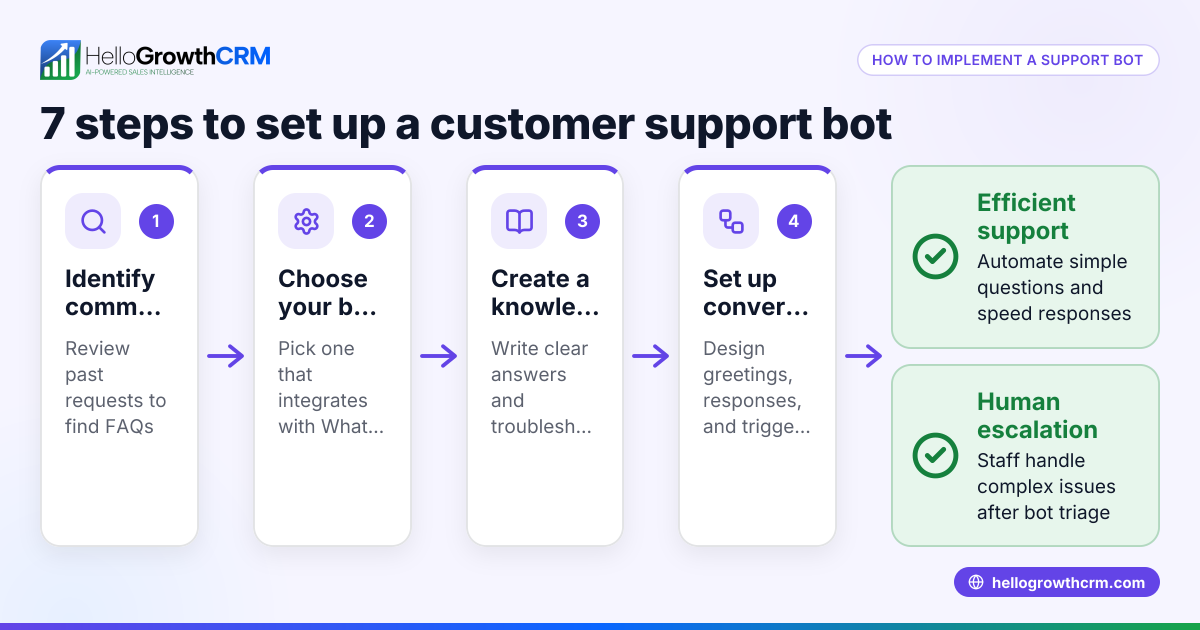
- Identify common customer questions and issues. Review your current support channels to find the most frequent inquiries, such as product details, pricing, order status, or troubleshooting.
- Choose a chatbot platform or software. Select a solution that fits your business size and integrates easily with your website, CRM, or messaging apps.
- Design the chatbot conversation flow. Plan how the chatbot will greet customers, ask clarifying questions, provide answers, and escalate to a human agent when needed.
- Set up integrations. Connect the chatbot to your customer database or CRM to personalize responses, track interactions, and maintain customer history.
- Test the chatbot thoroughly. Simulate various customer scenarios to verify the chatbot responds correctly and escalates complex issues properly.
- Launch the chatbot on your website or messaging channels. Monitor its performance, collect customer feedback, and track metrics such as response time and resolution rate.
- Train your team on chatbot management and escalation procedures. Ensure staff know how to take over conversations smoothly when the chatbot escalates.
- Review chatbot conversations regularly. Use insights to improve responses, update the knowledge base, and refine the conversation flow.
For more on managing customer data and support, see customer health score.
Example (fictional figures)
GreenLeaf Landscaping in Charlotte, North Carolina, implemented a customer support chatbot on 04/01/2026 to handle common questions about their services, pricing, and scheduling.
- Identified 10 common questions.
- Chatbot setup cost: $1,200 (one-time).
- Monthly subscription: $100.
- Estimated time saved per month: 30 hours.
- Average hourly wage of support staff: $25.
Calculation of monthly savings:
30 hours × $25 = $750 saved monthly on support labor.
Payback period:
$1,200 ÷ $750 = 1.6 months to recover initial setup cost.
After 6 months, the chatbot reduced response times and increased customer satisfaction, allowing staff to focus on sales follow-up and complex support tickets.
Common mistakes
- Ignoring chatbot training and updates. Prevent this by regularly reviewing chatbot conversations and updating responses to reflect new information or common questions.
- Making the chatbot too complex. Keep it focused on handling frequent issues well, and escalate to human agents for more complicated requests.
- Not integrating with existing systems. Ensure your chatbot connects to your CRM or customer database for personalized service and proper tracking.
- Failing to inform customers about chatbot use. Clearly communicate when customers are interacting with a bot and provide an easy way to reach a human agent.
- Neglecting to monitor chatbot performance. Use analytics and customer feedback to identify gaps and continuously improve the chatbot.
For more on integrating messaging channels, see WhatsApp and SMS CRM.
Doing this in HelloGrowthCRM
HelloGrowthCRM helps small businesses manage customer service efficiently after the sale by keeping service requests and support tickets on the same customer record as the deal. It offers a branded self-service customer portal where customers can find answers independently, a referral program to track customer referrals, and a knowledge base to support common questions. This centralizes customer interactions and helps teams manage support more effectively. Learn more about HelloGrowthCRM for the United States at hellogrowthcrm.com/usa.
Frequently asked questions
What is the difference between a chatbot and live chat? A chatbot is an automated tool designed to handle basic questions and routine tasks without human intervention. Live chat connects customers directly to a human support agent. While chatbots can operate 24/7 and handle repetitive queries quickly, complex or sensitive issues usually require live support.
Can a chatbot handle multiple communication channels? Yes, many chatbots support communication through websites, WhatsApp, SMS, and email. Using a platform that integrates these channels with your CRM, such as HelloGrowthCRM's WhatsApp and SMS CRM, can centralize customer messages and improve response efficiency.
How do I measure if my chatbot is effective? Measure response time, resolution rate, customer satisfaction scores, and the number of escalations to human agents. Regularly reviewing these metrics helps you improve chatbot accuracy and usefulness.
Will a chatbot replace my customer support team? No, chatbots assist by handling routine inquiries and freeing your team to focus on complex or high-value interactions. They improve efficiency but do not replace the empathy and problem-solving skills of human agents.
How do I keep my chatbot updated with new information? Regularly review chatbot conversations to identify new questions or issues. Update the chatbot’s knowledge base and conversation flows accordingly. Training your team to manage and maintain the chatbot ensures it stays accurate and helpful.
Key takeaways
- A customer support chatbot automates frequent customer interactions, saving time and improving response speed.
- Setup requires identifying common questions, designing conversation flows, integrating with systems, testing, and ongoing monitoring.
- Keep chatbots focused and simple, with clear escalation paths to human agents.
- Integrating chatbots with your CRM and messaging platforms like WhatsApp and SMS centralizes customer communication.
- HelloGrowthCRM supports customer service with integrated tickets, a customer portal, referrals, and a knowledge base.
- Regular review and training keep your chatbot effective and aligned with customer needs.
Start improving your customer support with a chatbot and manage your customer service efficiently using HelloGrowthCRM. Start on the Free Forever plan (200 leads, no credit card).
Ready to put this into practice?
Set up your pipeline, WhatsApp follow-ups, and AI lead scoring in minutes — free, no credit card.
Try HelloGrowthCRM freeGet CRM tips in your inbox
Join thousands of sales professionals who get weekly insights on CRM strategy, AI automation, and pipeline optimization.

The HelloGrowthCRM team publishes guides on CRM strategy, AI sales tools, and revenue operations for small business sales teams.