HelloGrowthCRM software
Built for real small-business sales teams
HelloGrowthCRM helps reps qualify faster, follow up on time, and close more deals—with practical automation in one place.
- AI lead scoring and pipeline visibility
- Built-in dialer, WhatsApp, and email automation
- Sales forecasting and RevOps-ready reporting
Creating a customer payment link allows Canadian small business owners to request payments quickly and securely by sending a direct URL customers can use to pay online. This simplifies payment collection compared to manual invoicing or bank transfers. This article covers why payment links are useful, step-by-step instructions, a realistic example, common mistakes, and how HelloGrowthCRM helps manage quotes and payments.
Why this comes up / what goes wrong
Small businesses in Canada often request payments using email, text messages, or spreadsheets, which can delay payments and cause errors. Customers may forget or find the payment process confusing. A customer payment link provides a simple clickable URL that directs customers to a secure payment page with the exact amount due. This reduces delays and errors. However, without clear instructions, business owners may create links with wrong amounts, missing details, or insecure URLs, leading to confusion or lost payments.
Step-by-step
- Choose a payment platform: Pick a Canadian-friendly payment processor that supports creating payment links, such as Stripe, PayPal, or Square. Confirm it handles Canadian dollars (C$) and fits your business.
- Register and verify your account: Create your business account on the platform and complete any required identity verification.
- Create a new payment link:
- Log in to your payment platform dashboard.
- Navigate to "Payment Links" or "Request Money" section.
- Select "Create new payment link".
- Enter payment details:
- Input the amount in Canadian dollars.
- Add a clear description or invoice number to identify the payment.
- Optionally set quantity, expiry date, or other fields.
- Generate the payment link: Click the button to create the link. The platform will provide a URL.
- Test the payment link: Open the link in a private browser window to verify the amount and description are correct and the page loads securely.
- Send the payment link to your customer: Share the URL via email, WhatsApp, SMS, or your CRM messaging tools.
- Monitor payment status: Check your payment platform dashboard regularly for completed or pending payments.
Ensure the link uses HTTPS for security and never share payment links publicly.
Example (fictional figures)
A staffing agency in Halifax, Nova Scotia, wants to request payment for temporary staffing services.
- Invoice date: 2024-06-15
- Amount: C$4,500
- Description: "Temporary staffing services May 2024, Invoice #12345"
Steps:
- Log in to payment platform.
- Select "Create Payment Link".
- Enter amount: C$4,500
- Enter description: "Temporary staffing services May 2024, Invoice #12345"
- Generate link: https://pay.example.com/abc123 (fictional)
- Test link opens payment page showing C$4,500 and description.
- Send link to client via WhatsApp.
Calculation:
C$4,500 (amount entered) = C$4,500 (total to be paid)
The client clicks the link and pays C$4,500 online.
Common mistakes
- Entering incorrect payment amount: Double-check the amount before generating the link to avoid undercharging or overcharging.
- Omitting or unclear description: Always include an invoice number or service description to help customers and records.
- Not testing the payment link: Click the link yourself to confirm it works and shows correct details.
- Sharing payment links publicly: Send links privately to prevent unauthorized use.
- Ignoring currency settings: Confirm the platform is set to Canadian dollars to avoid currency conversion issues.
- Failing to track payment status: Use your payment dashboard or CRM to monitor payment completion.
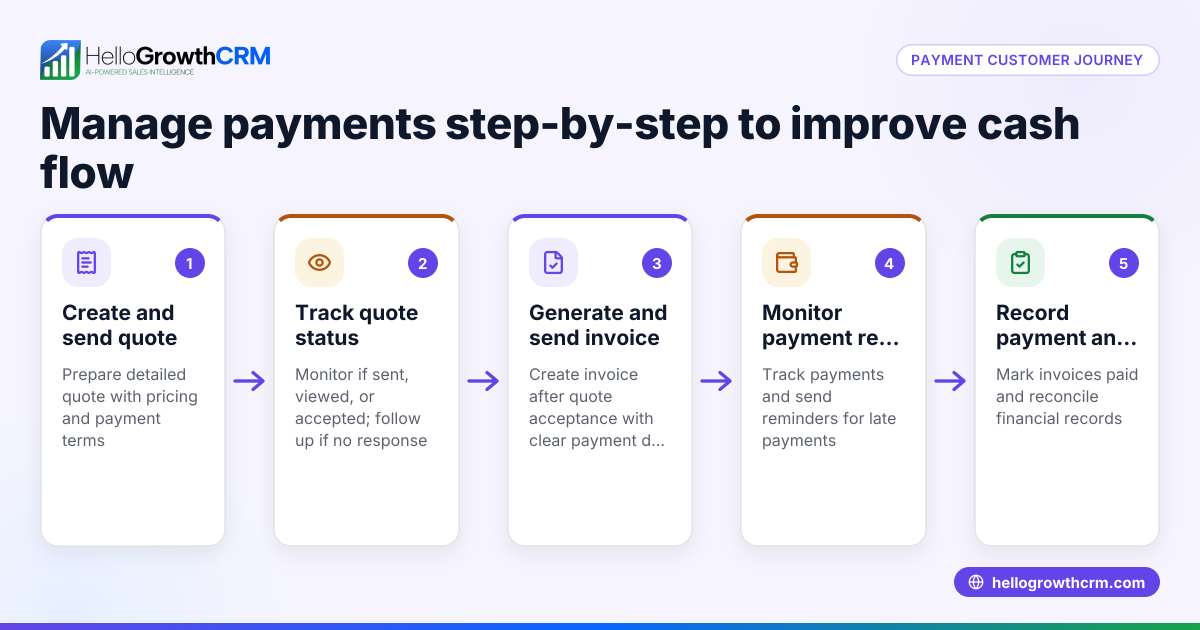
Using a CRM can help reduce these errors. For example, HelloGrowthCRM links quotes, proposals, invoices, and payments received directly to the deal record, keeping payment status visible alongside follow-up tasks. Learn more about HelloGrowthCRM for Canada.
Doing this in HelloGrowthCRM
HelloGrowthCRM provides built-in quoting and proposal tools to build, send, and track commercial documents from a deal record. It lets you generate invoices tied to closed deals and reconcile payments received. The quotation status (sent, viewed, accepted) appears on the same screen as your follow-up task, helping keep payment requests and reminders organised. After the sale, service requests stay on the same customer record as the deal, supporting ongoing communication and support. Discover how HelloGrowthCRM supports your sales and payment processes with its WhatsApp and SMS CRM features.
Frequently asked questions
Can I create payment links for recurring payments? Some payment platforms support recurring payment links or subscriptions. Check if your provider offers this feature. Otherwise, send a new payment link each billing cycle.
Are payment links secure for customers? Yes, payment links use HTTPS encryption and are hosted by trusted payment processors. Always verify the link begins with "https://" before sending it.
Can I customize the payment link URL? Most platforms generate a random URL for security. Some allow branded or custom domains with advanced plans.
How do I handle taxes when creating payment links? Include tax amounts in the total payment or add them to the description. Your payment platform or invoicing tool may support tax line items, but always confirm your tax obligations separately. NEEDS EXPERT REVIEW
Can I integrate payment links with my CRM? Yes, some CRMs integrate quoting, invoicing, and payment tracking, helping manage payments alongside customer communications and sales pipelines.
What payment methods do payment links usually support? Common methods include credit cards, debit cards, and digital wallets like Apple Pay or Google Pay, depending on the payment platform.
Key takeaways
- Choose a Canadian-friendly payment platform that supports payment links.
- Enter accurate payment amounts and clear descriptions.
- Always test the payment link before sending it to customers.
- Send payment links privately and track payment status.
- Use CRM tools like HelloGrowthCRM to link quotes, invoices, and payments in one place.
- Secure payment links use HTTPS and trusted payment processors.
Creating and sending customer payment links saves time and improves cash flow by making it easy for customers to pay you directly. To try managing your sales pipeline and payments in one place, start on the Free Forever plan (200 leads, no credit card).
Ready to put this into practice?
Set up your pipeline, WhatsApp follow-ups, and AI lead scoring in minutes — free, no credit card.
Try HelloGrowthCRM freeGet CRM tips in your inbox
Join thousands of sales professionals who get weekly insights on CRM strategy, AI automation, and pipeline optimization.

The HelloGrowthCRM team publishes guides on CRM strategy, AI sales tools, and revenue operations for small business sales teams.