HelloGrowthCRM software
Built for real small-business sales teams
HelloGrowthCRM helps reps qualify faster, follow up on time, and close more deals—with practical automation in one place.
- AI lead scoring and pipeline visibility
- Built-in dialer, WhatsApp, and email automation
- Sales forecasting and RevOps-ready reporting
Creating a quotation for a customer in Canada is a key step for small and mid-sized businesses to clearly communicate pricing and terms before closing a sale. A well-prepared quotation helps avoid confusion, speeds up decision-making, and sets clear expectations for both parties.
Why this comes up / what goes wrong
Many Canadian small business owners struggle with creating quotations that are clear, complete, and professional. Without a proper quotation, customers may hesitate to commit, misinterpret pricing, or compare unfavourably with competitors. Common issues include missing tax details, vague descriptions of products or services, no expiry date, or inaccurate totals. These mistakes can delay sales and harm customer trust. A clear, accurate quotation helps ensure smooth communication and faster sales cycles.
Step-by-step
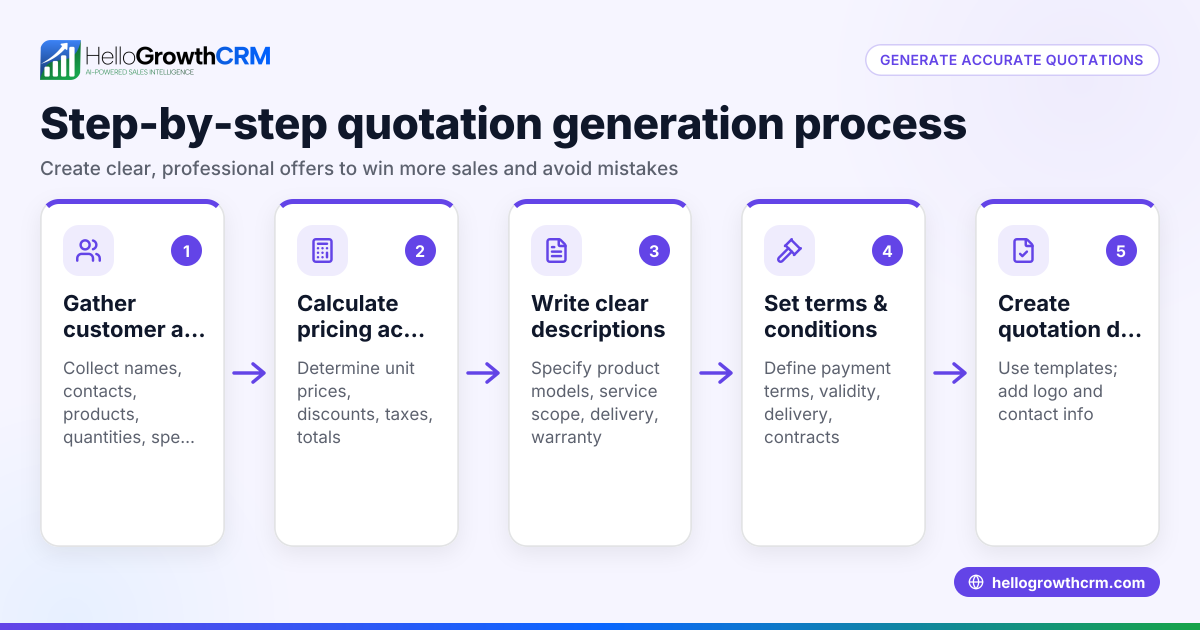
- Prepare your business details: Include your business name, full address, phone number, email, and business number if registered. This identifies you clearly.
- Add customer information: Write the customer's full name or company name, address, and contact details to personalise the quotation.
- Assign a unique quotation number and date: Use a sequential numbering system for tracking (e.g., Q-2024-001) and the current date in YYYY-MM-DD format.
- List products or services: For each item, describe it clearly, state the quantity, unit price, and any discounts. Be precise to avoid confusion.
- Calculate applicable taxes: Add GST, HST, or PST depending on your and the customer's province. State the tax type and rate applied clearly.
- Calculate totals: Add the subtotal (sum of all items before tax), the total tax amount, and any extra charges to get the final total.
- Add terms and conditions: Specify payment terms (e.g., payment due in 30 days), quotation validity period (e.g., valid for 30 days), delivery timelines, and any other relevant policies.
- Review thoroughly: Double-check all numbers, descriptions, and contact details for accuracy.
- Send the quotation: Deliver the quotation via email, PDF, or your preferred communication method.
- Track and follow up: Keep a record of sent quotations and their status to manage follow-up efficiently. Using a CRM can help with this; see HelloGrowthCRM for Canada.
Example (fictional figures)
A bilingual insurance agency in Laval, Quebec, prepares a quotation on 2024-06-20 for a commercial client.
- Business name: Laval Insurance Experts
- Customer: Maple Leaf Construction Ltd., 123 Main St, Toronto, ON
- Quotation number: Q-2024-045
Items:
- Commercial liability insurance policy, 1 unit, C$4,000
- Property insurance add-on, 1 unit, C$1,200
Subtotal calculation:
C$4,000 + C$1,200 = C$5,200
Taxes (assumed HST 13% for Ontario):
C$5,200 × 13% = C$676
Total:
C$5,200 + C$676 = C$5,876
Terms:
Payment due within 30 days; quotation valid for 30 days from 2024-06-20.
This clear breakdown helps Maple Leaf Construction understand the cost and terms before deciding.
Common mistakes
- Omitting tax details: Forgetting to include GST, HST, or PST rates and amounts causes confusion and possible compliance issues. Always verify the customer's province and apply the correct tax.
- Unclear product or service descriptions: Vague wording can lead to disputes or misunderstandings. Use specific, detailed descriptions.
- No expiry date on the quotation: Without a validity period, customers may delay decisions or expect outdated prices. Always state how long the quotation is valid.
- Incorrect calculations: Errors in totaling items or taxes can cause undercharging or overcharging. Double-check all math.
- Not tracking quotations: Losing track of sent quotations or their acceptance status hinders timely follow-up. Use tools like CRM systems to track and manage quotations effectively; see customer health score.
Doing this in HelloGrowthCRM
HelloGrowthCRM includes a built-in quoting and proposal tool that allows you to create, send, and track quotations directly from the deal record. You can see the quotation's status (sent, viewed, accepted) on the same screen as your follow-up tasks, helping sales teams act quickly. After the sale, service requests remain linked to the same customer record, simplifying ongoing support. For founders without a sales manager, HelloGrowthCRM's Managed RevOps service assigns a revenue specialist to work the follow-up queue weekly. Learn more about these features at WhatsApp and SMS CRM.
Frequently asked questions
How do I create a customer database in Canada? Start by collecting customer names, contact details, and purchase history. Use spreadsheets or CRM software to organise and update records securely. Ensure compliance with Canadian privacy laws when storing personal data.
What taxes should I include in a Canadian quotation? Include GST, HST, or PST depending on your and your customer's province. The rates vary by location. Clearly state the type and rate of tax applied on your quotation.
Can I send quotations by WhatsApp or SMS? Yes, with CRM tools like HelloGrowthCRM, you can send quotations via WhatsApp and SMS sequences, improving response times and follow-up.
How long should a quotation be valid? Typically, quotations are valid for 30 days, but this can vary. Clearly state the expiry date to avoid misunderstandings.
What if a customer wants changes after receiving a quotation? You can update the quotation and resend it. Track changes and communicate clearly to keep records accurate.
Key takeaways
- Include all business and customer details clearly on the quotation.
- List items, prices, taxes, and totals with precise calculations.
- State terms such as payment deadlines and quotation validity.
- Avoid common errors like missing taxes or unclear descriptions.
- Track quotations and follow up efficiently using CRM tools.
- Use HelloGrowthCRM to create, send, and monitor quotations and follow-up tasks.
Creating professional quotations today helps improve your sales process and customer confidence. To try a tool that supports quotations and follow-up, Start on the Free Forever plan (200 leads, no credit card).
Ready to put this into practice?
Set up your pipeline, WhatsApp follow-ups, and AI lead scoring in minutes — free, no credit card.
Try HelloGrowthCRM freeGet CRM tips in your inbox
Join thousands of sales professionals who get weekly insights on CRM strategy, AI automation, and pipeline optimization.

The HelloGrowthCRM team publishes guides on CRM strategy, AI sales tools, and revenue operations for small business sales teams.