HelloGrowthCRM software
Built for real small-business sales teams
HelloGrowthCRM helps reps qualify faster, follow up on time, and close more deals—with practical automation in one place.
- AI lead scoring and pipeline visibility
- Built-in dialer, WhatsApp, and email automation
- Sales forecasting and RevOps-ready reporting
Managing multiple contacts at the same company is essential for small and mid-sized US businesses to avoid lost leads and confusion. When sales or support teams communicate with different people at one company, tracking each contact’s details, role, and interaction history ensures smooth follow-up and stronger relationships.
Why this comes up / what goes wrong
Small-business owners often face challenges when more than one person at a client company handles different parts of the buying or service process. For example, one contact may be in charge of purchasing, another in operations, and a third in finance. Without a system to organize these contacts under one company record, teams risk:
- Sending duplicate emails or messages
- Missing key decision-makers
- Losing track of who said what and when
- Wasting time updating multiple spreadsheets or notes
This confusion slows sales cycles and frustrates prospects. Managing multiple contacts correctly means associating each contact with their company, specifying their role, and recording communication details.
Step-by-step
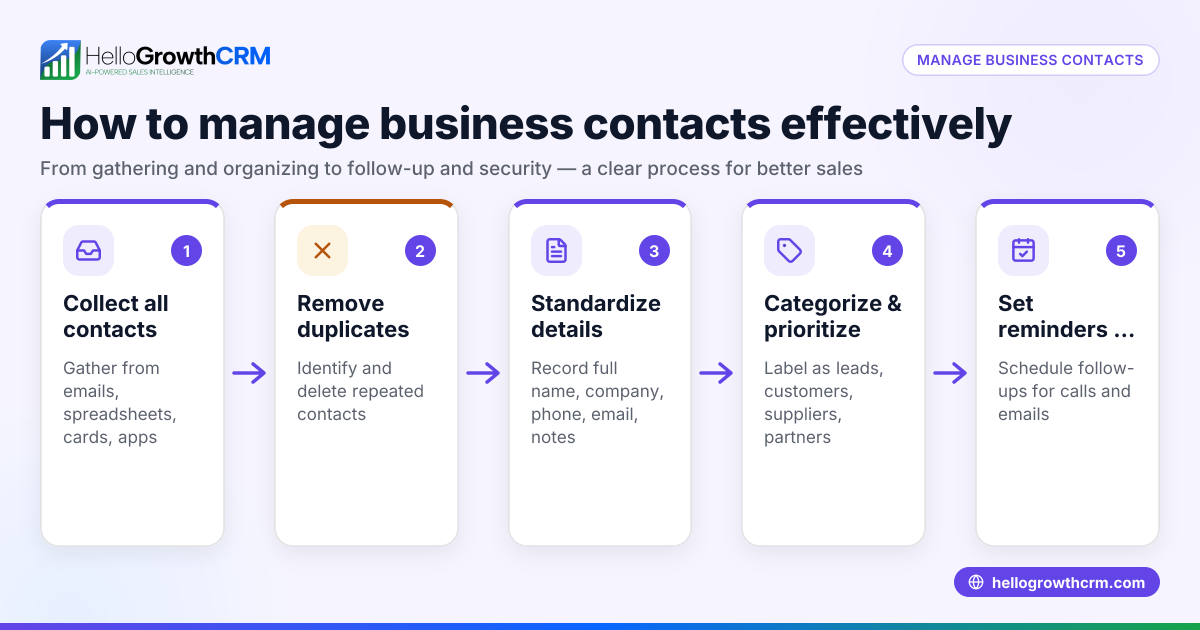
- Create a Company Record
- Start by entering the company name, address, phone, and website into your CRM or contact management system.
- Check existing records to avoid duplicates.
- Add Each Contact Under the Company
- For each person, record their full name, job title, direct phone number, email, and preferred communication method (email, phone, WhatsApp, SMS).
- Link each contact to the company record so all contacts are grouped.
- Specify Roles and Responsibilities
- Add notes or a custom field indicating each contact’s role (e.g., Purchasing Manager, IT Lead, CFO).
- This helps your team know whom to approach for specific topics.
- Track Communication History Separately for Each Contact
- Log calls, emails, messages, and meetings under the individual contact’s record.
- This avoids mixing conversations and keeps follow-ups relevant.
- Set Follow-Up Tasks and Reminders
- Assign tasks linked to the specific contact and company.
- Use reminders to ensure timely follow-up with the right person.
- Regularly Review and Update Contact Information
- Contacts change roles or leave companies; update records promptly.
- Confirm contact details during communications.
- Use Tags or Labels for Easy Filtering
- Apply tags like "Decision Maker" or "Technical Contact" to filter contacts quickly.
- Avoid Duplicate Entries
- Before adding a new contact, search the database to ensure they are not already listed.
By following these steps, you create an organized, searchable system that improves team coordination and customer experience.
Example (fictional figures)
A two-location dental practice in Columbus, Ohio, called "BrightSmiles Dental," has three key contacts:
- Dr. Emily White, Owner
- Sarah Jones, Office Manager
- Mark Lee, Billing Specialist
Step 1: Create the company record:
- Company: BrightSmiles Dental
- Address: 123 Main St, Columbus, OH 43215
- Phone: (614) 555-1234
- Website: www.brightsmilesohio.com
Step 2: Add contacts:
- Emily White, Owner, emily.white@brightsmilesohio.com, (614) 555-5678, prefers WhatsApp
- Sarah Jones, Office Manager, sarah.jones@brightsmilesohio.com, (614) 555-8765, prefers email
- Mark Lee, Billing Specialist, mark.lee@brightsmilesohio.com, (614) 555-4321, prefers phone
Step 3: Specify roles:
- Emily White: Decision Maker
- Sarah Jones: Scheduling and Operations
- Mark Lee: Billing and Payments
Step 4: Log communications separately:
- Call with Sarah on 05/01/2024 about appointment scheduling
- WhatsApp message to Emily on 05/02/2024 about contract terms
Step 5: Set follow-ups:
- Reminder to call Mark on 05/10/2024 for invoice confirmation
This structure ensures all team members know whom to contact and when, preventing missed opportunities.
Common mistakes
- Mixing contacts in one record
- Prevent by always creating separate contact entries linked to the company.
- Not updating contact roles
- Prevent by reviewing roles quarterly or during key communications.
- Ignoring communication preferences
- Prevent by asking contacts how they prefer to be reached and noting it.
- Failing to track communication history per contact
- Prevent by logging each interaction under the correct contact.
- Duplicate entries for the same contact
- Prevent by searching before adding new contacts.
- No follow-up task assignments
- Prevent by setting reminders linked to contacts and companies.
Using a CRM with features like a built-in dialer and WhatsApp/SMS integration can streamline these steps. For example, a built-in CRM dialer lets you call contacts directly, while a WhatsApp and SMS CRM helps manage messaging preferences.
Frequently asked questions
How many contacts should I keep per company? Keep as many contacts as are relevant to your sales or support process. Focus on decision-makers, influencers, and users who impact purchasing or service delivery.
How do I avoid confusion when contacts change roles or leave? Regularly update your records by confirming details during communications and removing or archiving outdated contacts.
Can I manage multiple contacts at one company without a CRM? Yes, but it requires disciplined use of spreadsheets or documents with clear columns for roles, contact info, and communication logs. A CRM automates and simplifies this.
What is the best way to track communication preferences? Add a field in each contact’s record specifying their preferred channel (email, phone, WhatsApp, SMS) and check it before outreach.
How can I share contact information with my sales team? Use a shared system or CRM where all team members can access updated company and contact information in real time.
Why use a CRM with WhatsApp and SMS features? Because many US small businesses communicate via these channels, integrating them into your CRM ensures you track conversations and follow-ups without switching apps. See HelloGrowthCRM for the United States for options.
Key takeaways
- Create one company record and link all contacts to it.
- Record detailed contact info, roles, and communication preferences.
- Track communication history separately for each contact.
- Set follow-up tasks linked to contacts and companies.
- Regularly update contact details and roles.
- Avoid duplicates by searching before adding contacts.
Start organizing your contacts today to improve sales and customer service. Start on the Free Forever plan (200 leads, no credit card).
Ready to put this into practice?
Set up your pipeline, WhatsApp follow-ups, and AI lead scoring in minutes — free, no credit card.
Try HelloGrowthCRM freeGet CRM tips in your inbox
Join thousands of sales professionals who get weekly insights on CRM strategy, AI automation, and pipeline optimization.

The HelloGrowthCRM team publishes guides on CRM strategy, AI sales tools, and revenue operations for small business sales teams.