HelloGrowthCRM software
Built for real small-business sales teams
HelloGrowthCRM helps reps qualify faster, follow up on time, and close more deals—with practical automation in one place.
- AI lead scoring and pipeline visibility
- Built-in dialer, WhatsApp, and email automation
- Sales forecasting and RevOps-ready reporting
A multi channel contact center helps your small or mid-sized business manage customer conversations across multiple platforms—such as phone calls, emails, SMS, and chat—without losing track. Instead of juggling separate tools, it centralizes communication, making it easier to respond quickly and keep your sales or support team coordinated.
Why this comes up / what goes wrong
Small businesses often start with simple communication methods like emails, text messages, or phone calls handled separately. This can lead to missed messages, slow responses, and lost sales opportunities. As your business grows, customers expect quick replies on their preferred channel. Without a unified system, your team may struggle to track conversations, causing frustration and lost leads.
A multi channel contact center solves this by consolidating all interactions into one platform. This reduces delays, prevents leads from slipping through the cracks, and improves customer satisfaction. It also helps sales leaders forecast and manage pipelines more effectively.
Step-by-step
- Identify Your Communication Channels
- List all the channels your customers use to contact you (phone, email, SMS, WhatsApp, chat).
- Check which channels are most popular and critical to your business.
- Choose a Contact Center Solution
- Look for a system that supports all your channels in one interface.
- Verify it integrates with your existing tools like web forms or email.
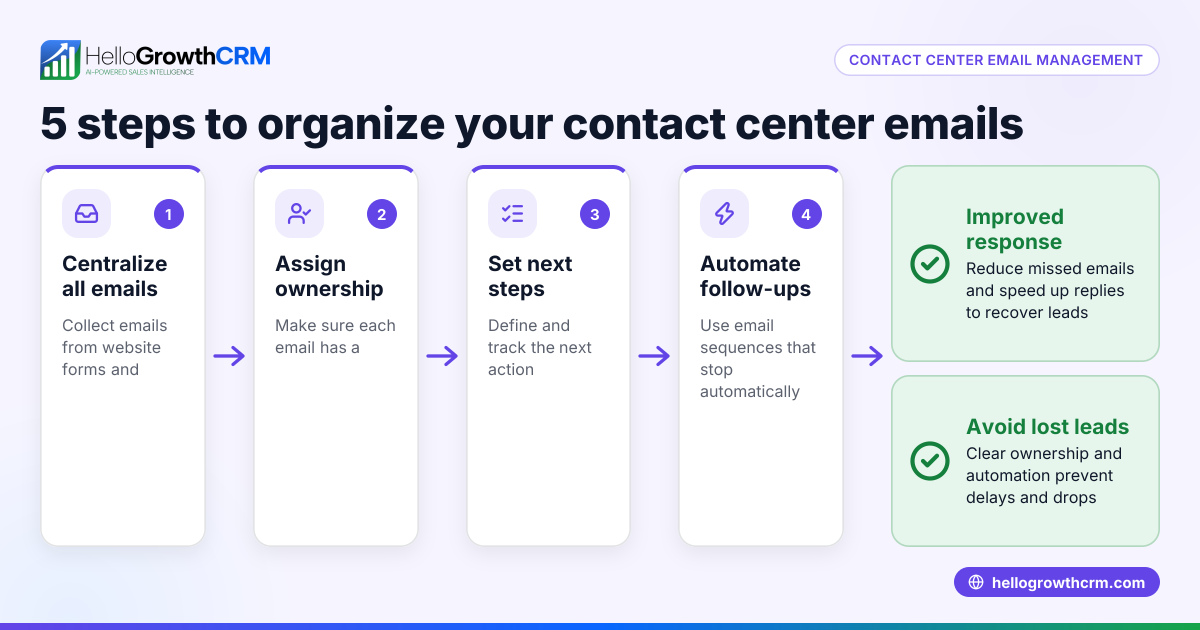
- Set Up Centralized Lead Capture
- Connect your website forms and messaging apps to the contact center.
- Ensure every new inquiry enters the system automatically.
- Train Your Team
- Teach your sales and support staff how to respond using the contact center.
- Emphasize the importance of timely follow-up across all channels.
- Implement Workflow and Task Management
- Use pipeline boards or task lists to track each lead’s status.
- Assign follow-up tasks and deadlines to team members.
- Monitor and Optimize
- Review response times and lead conversion rates.
- Adjust staffing or processes based on performance data.
Example (fictional figures)
GreenLeaf Landscaping in Charlotte, North Carolina, started with phone calls and emails but lost leads due to slow replies. They decided on a multi channel contact center that included SMS and WhatsApp.
- Monthly leads before: 150
- Lead conversion rate before: 10%
- Sales per converted lead: $2,000
- Monthly revenue before: 150 × 10% × $2,000 = $30,000
After implementing the contact center:
- Monthly leads increased to 200 due to better capture
- Conversion rate improved to 15% from faster replies
- Sales per converted lead stayed $2,000
- New monthly revenue: 200 × 15% × $2,000 = $60,000
This doubled their revenue by capturing more leads and closing more sales.
Common mistakes
- Ignoring Channel Preferences
- Mistake: Using only one or two channels when customers prefer others.
- Prevention: Identify and support all key channels your customers use.
- Not Training the Team Properly
- Mistake: Team members don’t know how to use the contact center tools.
- Prevention: Provide hands-on training and documentation.
- Failing to Assign Follow-Ups
- Mistake: Leads fall through due to no clear ownership.
- Prevention: Use task boards and assign responsibilities clearly.
- Overcomplicating the System
- Mistake: Adding too many channels or features at once.
- Prevention: Start with essential channels and expand gradually.
- Neglecting Performance Monitoring
- Mistake: Not tracking response times or conversion rates.
- Prevention: Regularly review reports and adjust workflows.
Frequently asked questions
What is the difference between a multi channel and an omnichannel contact center? A multi channel contact center handles multiple communication channels independently, while an omnichannel center integrates these channels to provide a seamless customer experience across platforms. Multi channel is often simpler and suits small businesses starting to expand their communication.
Can a small business afford a multi channel contact center? Yes, many solutions are designed for small to mid-sized businesses and scale with your needs. Choosing a platform that integrates common channels like phone, email, SMS, and WhatsApp can fit within modest budgets and improve sales efficiency.
How does a multi channel contact center improve sales follow-up? By centralizing all customer messages, your team can respond faster and avoid losing leads. Automated lead capture from web forms and messaging apps ensures no inquiry is missed, increasing conversion chances.
Is it difficult to train staff on a multi channel contact center? Training depends on the complexity of the system. Selecting a user-friendly platform and providing clear steps for handling each channel can make training straightforward and quick.
Can multi channel contact centers integrate with CRM tools? Many contact center solutions offer integrations with CRM systems to sync customer data, track interactions, and manage pipelines. This helps sales leaders forecast and manage teams more effectively.
For more on managing sales communications, see WhatsApp and SMS CRM and learn about the built-in CRM dialer. Also, check out HelloGrowthCRM for the United States for context on CRM tools tailored to US businesses.
Key takeaways
- A multi channel contact center centralizes customer communications across phone, email, SMS, and chat.
- Small businesses use it to avoid missed leads and slow follow-up.
- Set up involves identifying channels, choosing a solution, training staff, and monitoring performance.
- Common mistakes include ignoring channel preferences, poor training, and no follow-up assignment.
- Regular review and gradual expansion keep the system effective.
Start improving your sales follow-up with a multi channel contact center today. You can Start on the Free Forever plan (200 leads, no credit card) to try managing your leads more efficiently.
Ready to put this into practice?
Set up your pipeline, WhatsApp follow-ups, and AI lead scoring in minutes — free, no credit card.
Try HelloGrowthCRM freeGet CRM tips in your inbox
Join thousands of sales professionals who get weekly insights on CRM strategy, AI automation, and pipeline optimization.

The HelloGrowthCRM team publishes guides on CRM strategy, AI sales tools, and revenue operations for small business sales teams.