HelloGrowthCRM software
Built for real small-business sales teams
HelloGrowthCRM helps reps qualify faster, follow up on time, and close more deals—with practical automation in one place.
- AI lead scoring and pipeline visibility
- Built-in dialer, WhatsApp, and email automation
- Sales forecasting and RevOps-ready reporting
A sales lead tracker Excel template for India lets you systematically capture and track your sales enquiries in one place. It typically includes columns for lead details, source, contact dates, follow-up status, and outcome. This helps small business owners avoid losing leads due to missed calls or slow follow-up, a common problem when leads are managed informally on WhatsApp or notebooks.
Why this comes up / what goes wrong
Small and mid-sized Indian businesses often get leads from multiple sources like IndiaMART, JustDial, or website forms. Without a structured tool, leads pile up in WhatsApp chats or scattered Excel files. This causes delays in follow-up, forgotten enquiries, and lost sales opportunities. Business owners search for a "sales lead tracker Excel template India" because they want a ready-to-use, simple format that works for their sales team and helps track progress clearly.
Step-by-step
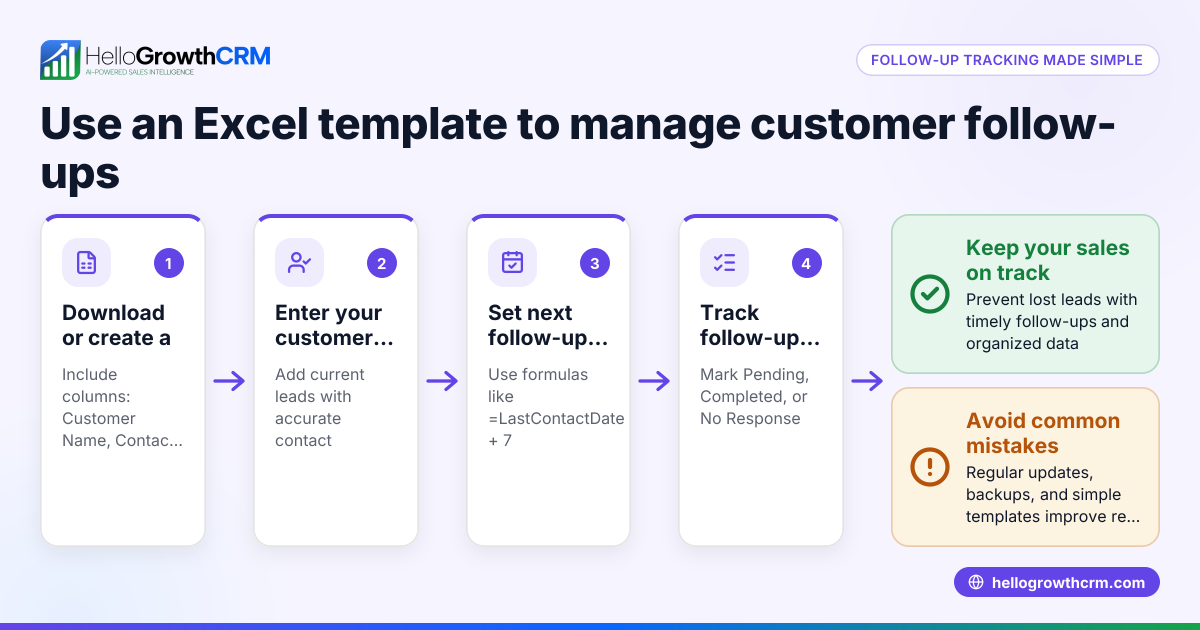
- Download or create the Excel template: Use free sales templates from trusted sources or create one with columns for Lead Name, Contact Number, Lead Source, Date of Enquiry, Follow-up Date, Lead Status, and Remarks. Check that columns are clearly labelled.
- Enter lead details immediately: As soon as you get a lead, enter all available information in the sheet. Check for spelling accuracy and complete contact details to avoid confusion later.
- Set follow-up dates: Assign a next follow-up date for each lead to ensure timely contact. Use conditional formatting or filters to highlight overdue follow-ups.
- Update lead status regularly: Mark leads as New, Contacted, Interested, Quoted, or Closed. Check that status updates are consistent and reflect real progress.
- Review and prioritise leads: Sort or filter leads by follow-up date or status daily. Check for any leads missed or delayed in follow-up.
- Backup your file: Save a copy regularly and consider storing it on a shared drive or cloud service so the sales team can access the latest version.
- Analyse lead sources and conversion: Add summary tables or charts to see which sources bring the most leads and which convert best. Check formulas for accuracy.
For ready templates and calculators, you can also explore free sales tools and templates available without signup at free sales tools and calculators.
Example (fictional figures)
A Delhi-based SME receives a lead from IndiaMART on 01/03/2024 for a product enquiry worth ₹1,50,000.
- Lead Name: Rajesh Sharma
- Contact Number: 9876543210
- Lead Source: IndiaMART
- Date of Enquiry: 01/03/2024
- Follow-up Date: 03/03/2024
- Lead Status: New
On 03/03/2024, the sales executive calls Rajesh and sends a quote.
- Lead Status updated to: Quoted
- Remarks: Sent quotation via WhatsApp
Rajesh confirms order on 10/03/2024.
- Lead Status updated to: Closed - Won
- Order Value: ₹1,50,000
This example shows how lead status and follow-up dates help track progress clearly.
Common mistakes
- Not updating the tracker daily: Leads pile up and follow-ups are missed. Prevent by setting a daily review routine.
- Incomplete or incorrect lead details: Causes confusion and wasted calls. Prevent by verifying contact info at entry.
- Ignoring follow-up dates: Leads go cold. Prevent by using reminders or conditional formatting in Excel.
- Using multiple unlinked spreadsheets: Leads get duplicated or lost. Prevent by centralising data in one file or switching to a CRM.
- No assignment of lead owner: Leads get ignored. Prevent by assigning responsibility to specific salespersons.
- No backup of the tracker file: Data loss risk. Prevent by saving copies on cloud storage.
For more on avoiding these errors and managing leads digitally, see the sales templates section.
Doing this in HelloGrowthCRM
HelloGrowthCRM offers free sales tools, templates and calculators you can download without an account from free sales tools and calculators. Instead of manual entry, every enquiry from a form, call or WhatsApp automatically lands as a lead with an assigned owner and a next step, so nothing is missed. The AI lead scoring feature helps telecallers prioritise calling the leads most likely to convert first, speeding up your sales process. Learn more about AI lead scoring and how HelloGrowthCRM supports Indian SMBs at HelloGrowthCRM for India.
Frequently asked questions
Can I customize the sales lead tracker Excel template for my business? Yes, Excel templates are flexible. You can add or remove columns, change status categories, and include formulas or filters suited to your sales process. Make sure to keep the format simple for easy updating by your sales team.
How often should I update the sales lead tracker? Ideally, update it daily or immediately after every customer interaction. This keeps information current and helps avoid missed follow-ups. Set reminders or assign a team member to monitor the tracker regularly.
Can I use WhatsApp to manage leads instead of Excel? WhatsApp is common but lacks organisation and tracking features. Leads can get lost in chats or forgotten. Using a structured Excel tracker or a CRM like HelloGrowthCRM helps keep leads organised and follow-ups timely.
Is there a free tool for sales lead tracking besides Excel? Yes, HelloGrowthCRM provides free sales tools, including templates and calculators, plus automated lead capture and AI lead scoring to prioritise calls. This reduces manual work and improves conversion chances.
How do I avoid duplicate leads in my Excel tracker? Check for duplicate phone numbers or email IDs before entering new leads. Use Excel’s conditional formatting or data validation features to highlight duplicates. Alternatively, use a CRM that automatically prevents duplicates.
Key takeaways
- Use a clear, simple Excel template with columns for lead details, source, follow-up dates, and status.
- Enter and update lead information daily to avoid missed opportunities.
- Assign follow-up dates and owners to ensure accountability.
- Backup your tracker regularly and centralise data to prevent loss or duplication.
- Consider using HelloGrowthCRM’s free sales tools and AI lead scoring to automate and prioritise lead management.
Start managing your sales leads more effectively today. You can Start on the Free Forever plan (200 leads, no credit card) with HelloGrowthCRM to move beyond manual tracking and improve your sales follow-up.
Ready to put this into practice?
Set up your pipeline, WhatsApp follow-ups, and AI lead scoring in minutes — free, no credit card.
Try HelloGrowthCRM freeGet CRM tips in your inbox
Join thousands of sales professionals who get weekly insights on CRM strategy, AI automation, and pipeline optimization.

The HelloGrowthCRM team publishes guides on CRM strategy, AI sales tools, and revenue operations for small business sales teams.