HelloGrowthCRM software
Built for real small-business sales teams
HelloGrowthCRM helps reps qualify faster, follow up on time, and close more deals—with practical automation in one place.
- AI lead scoring and pipeline visibility
- Built-in dialer, WhatsApp, and email automation
- Sales forecasting and RevOps-ready reporting
A small business contact manager is a system designed to help you keep track of all your customer and prospect contacts in one place. It organizes details like phone numbers, emails, communication history, and follow-up tasks to prevent leads from slipping through the cracks. For small businesses that often rely on text messages, emails, or spreadsheets, a contact manager brings order and efficiency to sales and customer relationships.
Why this comes up / what goes wrong
Many small business owners start without a dedicated contact manager, using scattered methods like phone contacts, email inboxes, or spreadsheets. This often leads to lost leads, missed follow-ups, and confusion about customer status. When your team grows or sales volume increases, these problems worsen, causing lost revenue and frustration. A contact manager solves this by centralizing contact data and tracking interactions systematically.
Step-by-step
- Choose your contact management method: Decide whether to use a dedicated contact manager software, a CRM, or a simple spreadsheet. For growing small businesses, a CRM that integrates communication channels is ideal.
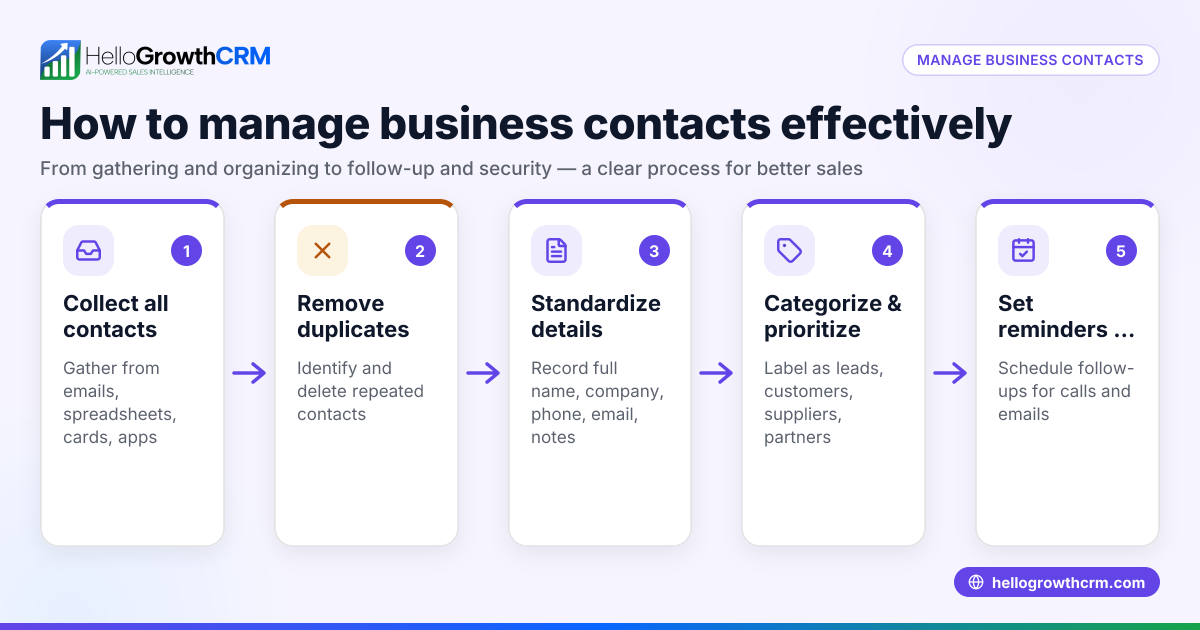
- Gather all existing contacts: Collect contacts from phones, emails, spreadsheets, and business cards. Ensure you have complete information like full names, phone numbers, emails, and notes.
- Import or enter contacts into your system: If using software, import contacts via CSV or manual entry. Check for duplicates and merge them.
- Categorize contacts: Assign tags or groups such as leads, customers, vendors, or partners. This helps in filtering and targeted communication.
- Record communication history: Log phone calls, emails, WhatsApp or SMS messages, and meetings with each contact. This history helps track progress and plan next steps.
- Set reminders and follow-up tasks: Schedule follow-ups with deadlines to ensure timely contact. Use task boards or calendar alerts.
- Regularly update contacts: Keep contact details and status current as relationships evolve.
- Train your team: Make sure everyone who interacts with customers knows how to use the contact manager consistently.
- Review and clean your contact list periodically: Remove outdated or inactive contacts to maintain accuracy.
- Consider integrating with other tools: Link your contact manager with web forms, email marketing, or sales tools to automate lead capture and communication.
Using a system like a free CRM for small business can simplify many of these steps and help your team collaborate.
Example (fictional figures)
Phoenix Home Realty is a residential real estate team in Phoenix, Arizona, managing 1,000 contacts, including buyers, sellers, and partners, as of 03/15/2026.
- They start with 1,000 contacts scattered across phones and spreadsheets.
- They import all contacts into their new contact manager software.
- They categorize 600 as active leads, 300 as clients, and 100 as partners.
- They set follow-up reminders for 600 leads, planning to contact 50 leads weekly.
Calculations for weekly contact workload:
50 leads × 1 week = 50 contacts per week
They log each interaction, noting client preferences and next steps.
This organized system helps Phoenix Home Realty avoid missed opportunities and improves their sales pipeline visibility.
Common mistakes
- Not centralizing contacts: Keeping contacts scattered causes lost leads. Prevent this by consolidating contacts into one system.
- Ignoring follow-up reminders: Without scheduled tasks, follow-ups slip. Use reminders and task boards to stay on track.
- Failing to update contact info: Outdated data wastes time and causes errors. Regularly review and update contacts.
- Inconsistent team usage: If only some team members use the manager, data becomes unreliable. Train everyone and enforce consistent use.
- Overcomplicating categories: Too many tags or groups confuse users. Keep categorization simple and meaningful.
- Not integrating communication channels: Managing calls, emails, and messages separately wastes effort. Use tools that unify these channels, such as a WhatsApp and SMS CRM.
Frequently asked questions
What is the difference between a contact manager and a CRM? A contact manager primarily stores and organizes contact information. A CRM (Customer Relationship Management) system includes these features plus tools for tracking sales pipelines, automating communication, and analyzing performance. Many small businesses benefit from CRM systems that include contact management.
Can I use a spreadsheet as a contact manager? Yes, spreadsheets can work for very small or simple contact lists. However, they lack automation, communication tracking, and reminders, which become important as your business grows.
How do I keep my contact manager secure? Use software with password protection, regular backups, and secure cloud storage. Limit access to authorized team members only.
Is it necessary to integrate WhatsApp or SMS into my contact manager? Integrating messaging channels like WhatsApp and SMS helps centralize communication and speeds up follow-up, especially if your team uses these channels frequently. Consider a WhatsApp and SMS CRM if this applies.
How often should I update my contact list? Review and update your contacts at least quarterly to remove outdated information and add new data. Regular updates keep your sales process accurate.
What is a good starting point for small businesses new to contact managers? Start with a simple, user-friendly system that fits your current business size and sales volume. Many small businesses begin with a free CRM for small business to test features without upfront cost.
Key takeaways
- A small business contact manager organizes and tracks all customer and prospect information.
- Centralizing contacts prevents lost leads and missed follow-ups.
- Step-by-step setup includes gathering, importing, categorizing, and maintaining contacts.
- Avoid common mistakes like scattered data, ignored reminders, and inconsistent team use.
- Integrating communication channels improves efficiency.
- Regular updates and team training keep your contact manager effective.
Start managing your contacts efficiently today by exploring a free CRM for small business designed for US businesses. It can help you capture leads, track communication, and grow your sales pipeline without complexity.
Ready to put this into practice?
Set up your pipeline, WhatsApp follow-ups, and AI lead scoring in minutes — free, no credit card.
Try HelloGrowthCRM freeGet CRM tips in your inbox
Join thousands of sales professionals who get weekly insights on CRM strategy, AI automation, and pipeline optimization.

The HelloGrowthCRM team publishes guides on CRM strategy, AI sales tools, and revenue operations for small business sales teams.