HelloGrowthCRM software
Built for real small-business sales teams
HelloGrowthCRM helps reps qualify faster, follow up on time, and close more deals—with practical automation in one place.
- AI lead scoring and pipeline visibility
- Built-in dialer, WhatsApp, and email automation
- Sales forecasting and RevOps-ready reporting
VoIP call recording means capturing and storing the audio of phone calls made using internet-based phone systems instead of traditional phone lines. This technology is useful for small businesses that rely on phone communication for sales, support, or customer service. Recording calls allows you to review conversations for accuracy, improve training, and ensure compliance with regulations.
Why this comes up / what goes wrong
Small-business owners often look into VoIP call recording when they want to improve customer service or sales effectiveness but face challenges such as inconsistent call documentation, missed follow-ups, or disputes about what was said. Without recording, it’s hard to verify call details or train staff effectively. Many small businesses run sales and support calls through a mix of text messages, email, and spreadsheets, making it difficult to keep track of conversations or measure sales performance. This scattered approach can lead to lost leads and slow follow-up, which hurts revenue and customer satisfaction.
VoIP call recording helps by creating a reliable record of calls that can be reviewed to train employees, resolve disputes, and improve scripts. It also supports compliance with legal requirements where certain calls must be recorded or consent obtained.
Step-by-step
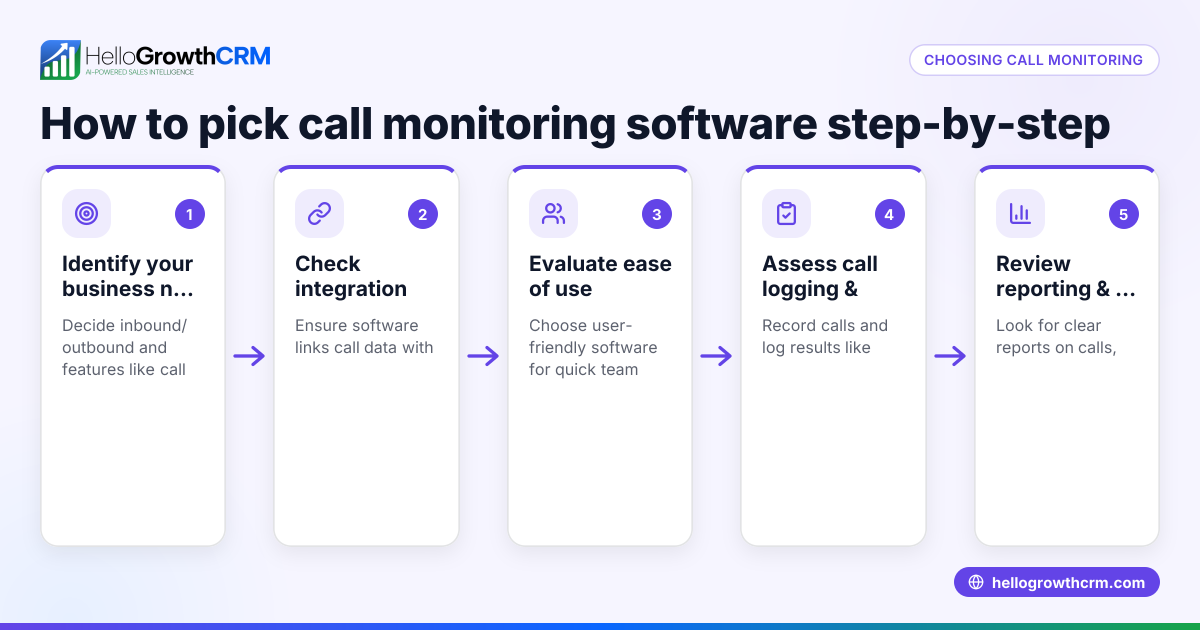
- Choose a VoIP provider with call recording features: Research providers that offer reliable call recording compliant with US laws. Check if recordings are stored securely and accessible when needed.
- Understand legal requirements: In the US, call recording laws vary by state. Know if you need one-party or two-party consent before recording calls. Always notify callers if required.
- Set up call recording on your VoIP system: Follow your provider’s instructions to enable recording for inbound, outbound, or both types of calls.
- Organize and store recordings: Establish a secure system to store recordings for easy retrieval. Consider cloud storage solutions for scalability and backup.
- Train your team: Make sure staff know when and how calls are recorded and how to access recordings for quality checks or dispute resolution.
- Review and use recordings regularly: Use recorded calls for coaching, improving scripts, and verifying details to boost sales and service quality.
- Integrate call data with your CRM: Use tools like HelloGrowthCRM’s built-in dialer to log call outcomes automatically, keeping your sales pipeline updated and reducing manual work.
Example (fictional figures)
A plumbing company in Austin, Texas, wants to improve its customer service by recording sales calls. They estimate 200 calls monthly with an average sale value of $1,200.
Assumed cost for VoIP call recording service: $50/month Estimated increase in sales conversion by reviewing calls: 5%
Current monthly revenue: 200 calls × $1,200 = $240,000
Expected increase in revenue: $240,000 × 5% = $12,000
Net gain after service cost: $12,000 - $50 = $11,950
By investing $50 monthly in call recording, the company could potentially increase revenue by nearly $12,000, making the investment highly cost-effective.
Common mistakes
- Not informing callers about recording: This can violate state laws. Prevent by always providing clear notification at the start of the call.
- Ignoring legal requirements: Different states have different consent rules. Consult legal advice to ensure compliance with one-party or two-party consent laws.
- Poor storage and organization of recordings: Losing or misplacing recordings wastes effort. Use secure, searchable storage solutions.
- Failing to review recorded calls: Recording calls without reviewing them misses the benefit. Schedule regular reviews for coaching and quality assurance.
- Using multiple disconnected tools: Managing calls via text, email, and spreadsheets causes inefficiency and errors. Use integrated tools like HelloGrowthCRM’s built-in dialer to log calls and outcomes automatically.
- Not training staff on call recording policies: Ensure your team understands when calls are recorded and how to handle recordings properly.
Doing this in HelloGrowthCRM
HelloGrowthCRM includes a built-in dialer that lets your sales reps call directly from the CRM. Each call’s outcome is logged on the lead’s record, keeping your call history organized and easy to review. This helps you track your team’s activity without juggling separate tools. Learn more about the built-in CRM dialer and how HelloGrowthCRM supports sales teams in the United States with WhatsApp and SMS CRM.
Frequently asked questions
Is VoIP call recording legal in the US? Legality depends on state laws. Some states require one-party consent, others require all parties to consent before recording. Always inform callers if required to avoid legal issues.
Can I record calls automatically or manually? Both options are common. Automatic recording captures all calls, while manual lets you choose which calls to record. Decide based on your business needs and compliance.
How long should I keep recorded calls? Retention periods vary by industry and regulation. Keep recordings long enough to meet compliance and business needs, then securely delete them to protect privacy.
Do I need special equipment for VoIP call recording? No special hardware is needed. Call recording is usually a software feature provided by your VoIP service or CRM system.
How can call recording improve sales? By reviewing calls, managers can coach reps on techniques, identify customer objections, and refine scripts, leading to higher conversion rates.
How does integrating call data with a CRM help my business? Using a CRM with a built-in dialer like HelloGrowthCRM helps organize call outcomes and track leads efficiently, reducing manual data entry and improving sales follow-up. Learn more about the built-in CRM dialer.
Key takeaways
- VoIP call recording captures internet-based phone conversations for review and compliance.
- Know your state’s legal requirements and always notify callers if needed.
- Set up recording through your VoIP provider and organize recordings securely.
- Avoid common mistakes like neglecting legal consent and failing to use recordings.
- Use integrated tools like HelloGrowthCRM’s built-in dialer to log call outcomes directly in your CRM.
Start improving your sales calls and customer service by recording and reviewing your conversations. Start on the Free Forever plan (200 leads, no credit card).
Ready to put this into practice?
Set up your pipeline, WhatsApp follow-ups, and AI lead scoring in minutes — free, no credit card.
Try HelloGrowthCRM freeGet CRM tips in your inbox
Join thousands of sales professionals who get weekly insights on CRM strategy, AI automation, and pipeline optimization.

The HelloGrowthCRM team publishes guides on CRM strategy, AI sales tools, and revenue operations for small business sales teams.