HelloGrowthCRM software
Built for real small-business sales teams
HelloGrowthCRM helps reps qualify faster, follow up on time, and close more deals—with practical automation in one place.
- AI lead scoring and pipeline visibility
- Built-in dialer, WhatsApp, and email automation
- Sales forecasting and RevOps-ready reporting
Call queuing is a system that manages incoming phone calls by placing callers in a virtual line when all your sales or support agents are busy. Instead of callers hearing a busy signal or being disconnected, they wait their turn, which improves customer experience and reduces lost sales opportunities. This article covers why call queuing is important for small businesses, how to set it up, common mistakes to avoid, a worked example with realistic figures, and how to use a CRM’s built-in dialer to manage calls effectively.
Why this comes up / what goes wrong
Small business owners often struggle to handle multiple calls at the same time, especially with small sales or support teams. Without call queuing, customers may get busy signals or unanswered calls, leading to lost leads and frustrated prospects. For example, a landscaping contractor in Charlotte, North Carolina, might get several calls during peak season but only have two team members available to answer. Without a queuing system, some callers will get busy signals or hang up, causing lost business. Call queuing organizes calls so each caller waits in order, ensuring no one is missed.
Step-by-step
- Analyze Your Call Volume and Staff Availability: Count how many calls you get simultaneously during busy periods and how many agents can answer calls. Check if your current phone system supports queuing.
- Select a Call Queuing Solution: Choose a phone system or CRM that offers call queuing features compatible with your business needs and budget.
- Set Queue Parameters: Configure maximum queue length, average wait time, and customize hold messages or music to keep callers informed and engaged.
- Train Your Team: Make sure agents know how to handle queued calls, including answering promptly and logging call outcomes.
- Monitor Queue Performance: Regularly review reports on queue length, wait times, and call drop rates to identify issues and adjust staffing or settings.
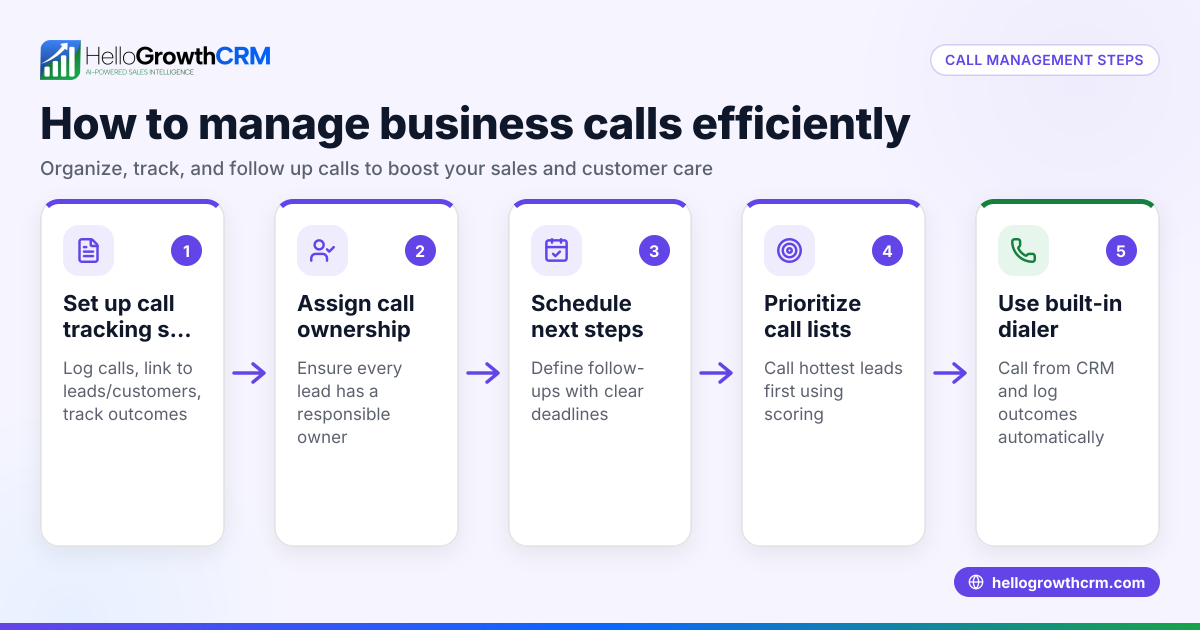
- Use a CRM with a Built-in Dialer: Manage calls efficiently by working call lists inside the CRM, logging call results automatically, and keeping full call histories tied to leads. Learn more about the built-in CRM dialer.
Example (fictional figures)
A landscaping company in Charlotte, North Carolina, receives 20 calls per hour during peak season. They have 3 sales agents available to answer calls. Each call lasts about 6 minutes.
Calculate total agent capacity per hour:
3 agents × 60 minutes = 180 agent-minutes
Calculate how many calls agents can handle per hour:
180 agent-minutes ÷ 6 minutes per call = 30 calls
Since 20 calls per hour is less than 30, agents can handle the volume if calls are evenly spaced. However, calls often come in bursts.
Assuming bursts of 7 calls come in simultaneously:
- Agents available: 3
- Callers in queue: 7 - 3 = 4
Without call queuing, the extra 4 callers get busy signals or hang up.
With call queuing, those 4 callers wait in line until an agent is free, reducing lost leads and improving customer satisfaction.
Common mistakes
- Not setting a maximum queue length: This can cause callers to wait too long and hang up. Prevent by limiting queue size to a reasonable number.
- Ignoring hold messages: Silence or repetitive tones frustrate callers. Use informative or friendly hold messages to keep callers engaged.
- Understaffing during peak times: Too few agents cause long wait times. Prevent by analyzing call patterns and scheduling enough staff.
- Not logging call outcomes: Missing call data leads to lost follow-ups. Prevent by using a CRM that logs call results.
- Failing to monitor queue metrics: Without tracking, problems go unnoticed. Regularly review queue length, wait times, and call abandonment.
- Using separate tools for calls and CRM: This causes manual errors and inefficiency. Prevent by integrating calls and CRM with a built-in dialer. See how HelloGrowthCRM supports this with its built-in CRM dialer.
Doing this in HelloGrowthCRM
HelloGrowthCRM includes a built-in dialer that lets your sales team call directly from the CRM. Reps can work through call lists and log the outcome of each call on the lead record automatically. This keeps a full call history tied to contacts and deals, making follow-up easier and reducing lost leads. Learn more about the built-in CRM dialer and how HelloGrowthCRM supports US businesses on the HelloGrowthCRM for the United States page. You can also combine call management with WhatsApp and SMS CRM for multichannel outreach.
Frequently asked questions
What is the difference between call queuing and call forwarding? Call queuing places incoming calls in a waiting line until an agent is free, while call forwarding redirects calls to another number or voicemail immediately. Queuing keeps callers on hold in order, whereas forwarding sends them elsewhere without waiting.
Can small businesses set up call queuing without expensive phone systems? Yes, many cloud-based phone services and CRMs offer affordable call queuing features suitable for small businesses. Look for solutions that integrate with your current tools to reduce complexity.
How long should callers wait in a queue before voicemail is offered? A typical wait time before voicemail or callback options can vary depending on the service provider and situation. This balances customer patience with efficient service.
Does HelloGrowthCRM support call queuing directly? HelloGrowthCRM provides a built-in dialer for making and logging calls but does not include call queuing features. You can pair it with phone systems that offer queuing.
How does call queuing improve sales follow-up? By ensuring every caller waits their turn and gets answered, call queuing reduces missed leads. When combined with a CRM’s call logging, sales teams can track and follow up on every inquiry.
Key takeaways
- Call queuing places incoming calls in a waiting line when agents are busy, preventing busy signals.
- It improves customer experience and reduces lost sales opportunities.
- Setup involves analyzing call volume, choosing a system, configuring queues, training staff, and monitoring.
- Common mistakes include not limiting queue length, ignoring hold messages, understaffing, poor call logging, and lack of monitoring.
- Using a CRM with a built-in dialer helps log call outcomes and manage follow-up efficiently.
Start managing your calls better by trying the built-in dialer and CRM features. Start on the Free Forever plan (200 leads, no credit card).
Ready to put this into practice?
Set up your pipeline, WhatsApp follow-ups, and AI lead scoring in minutes — free, no credit card.
Try HelloGrowthCRM freeGet CRM tips in your inbox
Join thousands of sales professionals who get weekly insights on CRM strategy, AI automation, and pipeline optimization.

The HelloGrowthCRM team publishes guides on CRM strategy, AI sales tools, and revenue operations for small business sales teams.