HelloGrowthCRM software
Built for real small-business sales teams
HelloGrowthCRM helps reps qualify faster, follow up on time, and close more deals—with practical automation in one place.
- AI lead scoring and pipeline visibility
- Built-in dialer, WhatsApp, and email automation
- Sales forecasting and RevOps-ready reporting
A custom email domain means your email address uses your own website’s domain name, for example, jane@smithaccountants.co.uk, rather than a generic domain like Gmail.com. Using a custom domain makes your business look more professional and trustworthy to clients. This guide covers why small businesses seek custom email domains, a step-by-step setup process, common errors to avoid, and how HelloGrowthCRM can support your email management.
Why this comes up / what goes wrong
Many small business owners in the UK start with personal email accounts like Gmail or Outlook for their business communications. While these are easy and free, they often look unprofessional and can reduce customer confidence. For example, a client receiving a quote from jane.smith@gmail.com may question the legitimacy of the business.
Additionally, managing sales and customer communications across personal email accounts, WhatsApp, and spreadsheets can cause lost leads and slow responses. Business owners want a consistent, branded email address linked to their website domain to improve credibility and make follow-up easier.
Step-by-step
- Choose and register your domain name: Pick a domain that matches your business name or brand, such as smithaccountants.co.uk. Use a UK domain registrar like 123 Reg or GoDaddy. Check availability and purchase the domain.
- Select an email hosting provider: Many domain registrars offer email hosting, or you can choose dedicated services like Microsoft 365 or Google Workspace. (learn.microsoft.com) Confirm that the provider supports custom domain email addresses.
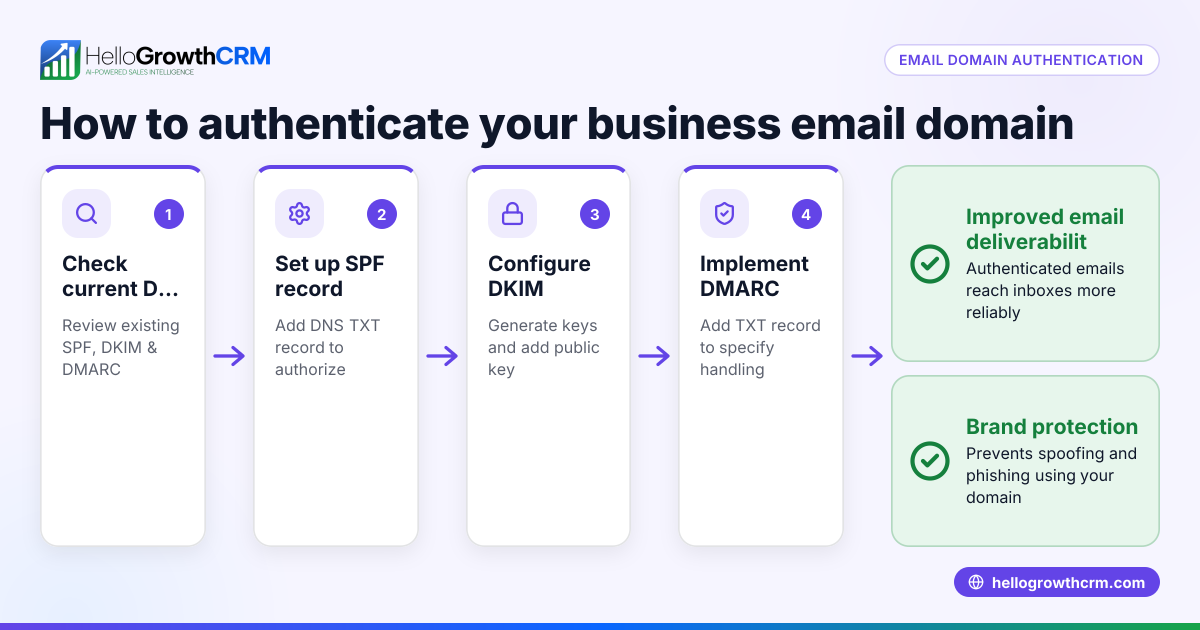
- Set up DNS records: Log in to your domain registrar’s control panel and add MX (Mail Exchange) records as instructed by your email hosting provider. This directs emails to your hosting service.
- Create your email accounts: Within your email hosting dashboard, create the email addresses you need, such as info@smithaccountants.co.uk or jane@smithaccountants.co.uk.
- Configure your email client: Set up your email accounts on your preferred email clients or devices using the server settings provided.
- Test sending and receiving: Send test emails to and from your new custom domain email to ensure everything works correctly.
- Update your business contacts and marketing materials: Replace old email addresses with your new custom domain email on your website, business cards, and social media.
- Consider integrating with CRM tools: Use platforms like HelloGrowthCRM to manage your emails, sequences, and customer follow-up efficiently.
Example (fictional figures)
Smith & Co Accountants, a small practice in Birmingham, decides to set up a custom email domain on 10/04/2026.
- Domain registration: £15 per year
- Email hosting (Microsoft 365 Business Basic): £4.50 per user per month
- They create 3 email accounts: info@smithaccountants.co.uk, jane@smithaccountants.co.uk, support@smithaccountants.co.uk
Annual hosting cost calculation: £4.50 × 3 users = £13.50 per month £13.50 × 12 months = £162 per year
Total first-year cost: £15 (domain) + £162 (hosting) = £177
This investment gives Smith & Co a professional email presence and improves client trust.
Common mistakes
- Using a domain name that is hard to spell or remember: Choose a simple, clear domain to avoid losing emails or customers.
- Skipping DNS setup or entering incorrect MX records: Follow instructions carefully to ensure emails route properly.
- Not testing email functionality before switching: Always test sending and receiving to avoid downtime.
- Continuing to use old email addresses publicly: Update all business materials to avoid confusion.
- Ignoring email management tools: Without a CRM or shared inbox, emails can get lost or delayed. Use tools like HelloGrowthCRM for better tracking.
- Not securing your email accounts: Use strong passwords and enable two-factor authentication where possible.
Doing this in HelloGrowthCRM
HelloGrowthCRM offers a HelloMail shared inbox feature that lets your team manage inbound emails from leads and customers without switching to a separate email client. For example, replies to a quotation email are visible to the whole team on the deal, preventing lost messages. Additionally, HelloGrowthCRM’s sequences and campaigns automate multi-step follow-ups over two weeks, stopping as soon as a prospect replies. This helps keep your sales pipeline moving smoothly and ensures timely responses. Learn more about email automation and sequences.
Frequently asked questions
What is the benefit of a custom email domain for my business? A custom email domain makes your business look professional and trustworthy, which can increase customer confidence and improve brand recognition. It also helps separate personal and business communications.
Can I use my existing email provider with a custom domain? Some providers allow this, but most require you to use an email hosting service that supports custom domains. You can forward emails from your domain to your existing account, but this is less professional and can cause delays.
How long does it take to set up a custom email domain? Setting up the domain and email hosting can take a few hours to a couple of days, depending on DNS propagation times. Testing and updating materials may take longer.
Do I need technical skills to set up a custom email domain? Basic technical skills help, especially for DNS setup. Many registrars and hosting providers offer guides and support. You can also hire IT support if needed.
How can I manage emails from my custom domain more efficiently? Using a CRM like HelloGrowthCRM with a shared inbox and automated sequences helps your team respond quickly and keeps all communications organised. See HelloGrowthCRM for the United Kingdom and WhatsApp and SMS CRM for more.
Key takeaways
- A custom email domain uses your business’s website domain for professional email addresses.
- Setting one up involves registering a domain, choosing email hosting, configuring DNS, and creating accounts.
- Avoid mistakes like poor domain choice, incorrect DNS setup, and not updating your contacts.
- HelloGrowthCRM’s shared inbox and email sequences help manage customer emails and follow-ups efficiently.
- Investing in a custom email domain builds trust and improves your business’s communication.
Start building your professional email presence today. Start on the Free Forever plan (200 leads, no credit card).
Ready to put this into practice?
Set up your pipeline, WhatsApp follow-ups, and AI lead scoring in minutes — free, no credit card.
Try HelloGrowthCRM freeGet CRM tips in your inbox
Join thousands of sales professionals who get weekly insights on CRM strategy, AI automation, and pipeline optimization.

The HelloGrowthCRM team publishes guides on CRM strategy, AI sales tools, and revenue operations for small business sales teams.