HelloGrowthCRM software
Built for real small-business sales teams
HelloGrowthCRM helps reps qualify faster, follow up on time, and close more deals—with practical automation in one place.
- AI lead scoring and pipeline visibility
- Built-in dialer, WhatsApp, and email automation
- Sales forecasting and RevOps-ready reporting
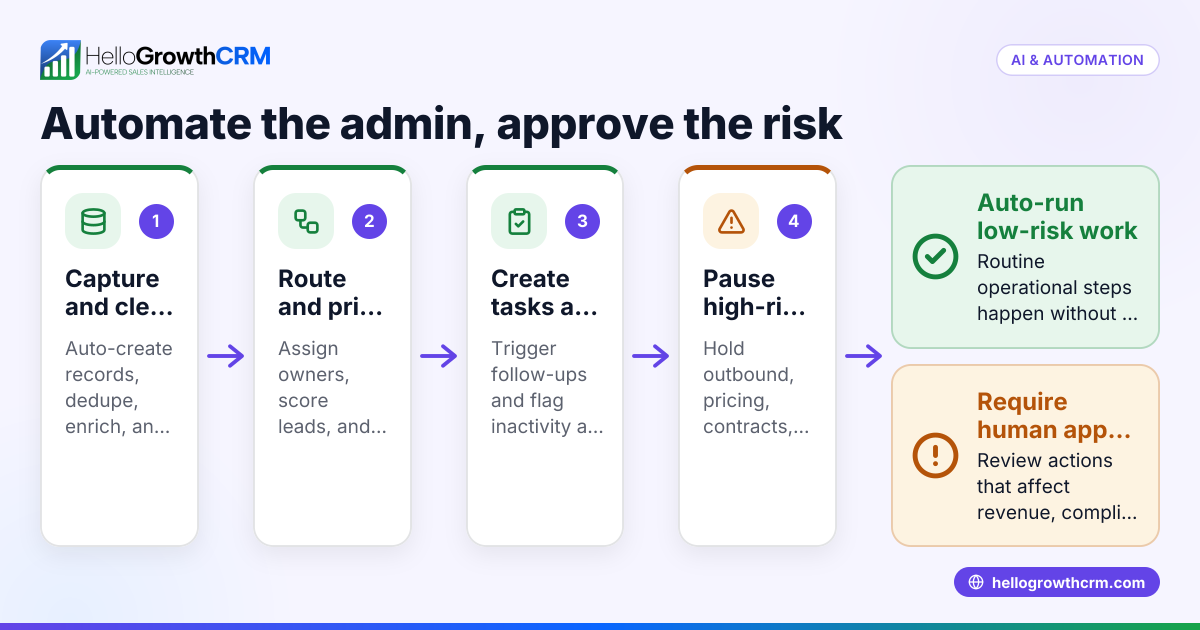
Automating customer approvals in your CRM ensures your small or mid-sized business handles approvals quickly and accurately without manual follow-up or lost requests. When a customer request requires approval—such as a contract, discount, or special order—an automated CRM workflow notifies the right person, tracks status, and updates records automatically to keep sales moving.
Why this comes up / what goes wrong
Small-business owners often track customer approvals using emails, phone calls, or spreadsheets. This manual process causes delays, missed approvals, and confusion in sales teams. For example, a plumbing company in Austin might have a discount approval request buried in an email inbox, delaying the sale and frustrating the customer. Without automation, follow-ups are inconsistent and approval statuses are unclear, causing lost revenue and poor customer experience. Automating approvals creates a clear, trackable process so no request slips through the cracks and sales reps know exactly where each approval stands.
Step-by-step
- Identify approval triggers: List the customer actions or deal stages that require approval, such as discount requests, contract signings, or special orders.
- Create an approval workflow: In your CRM, build an automated workflow that triggers when those approval conditions are met.
- Assign approvers: Specify the team members or roles responsible for granting approval to ensure accountability.
- Set up notifications: Configure automatic alerts via email, WhatsApp, or SMS to notify approvers immediately when their action is needed.
- Add approval status tracking: Use custom fields or tags in the CRM to track approval stages like pending, approved, or rejected.
- Automate reminders and escalations: Set automatic follow-ups or escalation alerts if an approval is not completed within a set timeframe.
- Update records automatically: Configure the workflow to update the customer or deal record and notify the sales rep once approval is granted.
- Test the workflow: Run test cases to confirm that triggers, notifications, status updates, and reminders work as expected.
- Train your team: Ensure sales and approval teams understand the new process and consistently use the CRM for approvals.
For better insight, link approval status to your customer health score to monitor how approvals affect customer satisfaction and sales outcomes.
Example (fictional figures)
A plumbing company in Austin, Texas, receives a customer request on 05/15/2024 for a $15,000 special installation that requires manager approval for a 10% discount.
Step 1: Customer submits request; CRM triggers approval workflow.
Step 2: Manager receives WhatsApp notification to review the request.
Step 3: Manager approves the discount.
Step 4: CRM updates deal value to reflect the discount.
Calculation: $15,000 × 10% = $1,500 $15,000 - $1,500 = $13,500
Step 5: Sales rep receives SMS notification that approval is complete.
This automation reduces approval time from days to minutes and keeps all communications logged for transparency.
Common mistakes
- Not defining clear approval triggers: Prevent this by mapping all customer actions that need approval before building workflows.
- Assigning approvals to too many or too few people: Prevent delays by specifying exact approvers to avoid bottlenecks.
- Ignoring follow-up reminders: Automate reminders and escalation paths to keep approvals on track.
- Failing to update CRM records after approval: Link workflow steps to automatically update deal or customer status.
- Not training the team: Provide clear instructions and support to ensure everyone uses the automated process.
- Overlooking communication channels: Use multiple notification methods like email, WhatsApp, and SMS to reach approvers promptly, supported by WhatsApp and SMS CRM.
Doing this in HelloGrowthCRM
HelloGrowthCRM helps automate customer approvals by letting sales reps call approvers directly using its built-in dialer, logging call outcomes on lead records. WhatsApp conversations with leads and approvers are logged automatically, and follow-up messages can be sent as WhatsApp or SMS messages. Additionally, AI agents in Beta draft follow-up messages after calls for reps to review and send, speeding up communication. Learn more at HelloGrowthCRM for the United States.
Frequently asked questions
How can I notify approvers automatically in my CRM? Set up automated notifications via email, SMS, or WhatsApp within your CRM workflow. This ensures approvers get instant alerts without manual messaging.
Can I track approval status inside the CRM? Yes, create custom fields or tags in your CRM to mark approval stages like pending, approved, or rejected, keeping everything visible to your team.
What if an approval is delayed? Configure automatic reminders or escalation workflows to notify managers if an approval is overdue, preventing bottlenecks.
Can AI help automate follow-ups after approval calls? AI agents can draft follow-up messages after calls, which reps review and send, saving time and ensuring consistent communication.
Is it possible to log WhatsApp conversations related to approvals? Yes, with WhatsApp and SMS CRM features, all WhatsApp chats with leads and approvers are logged on the lead record for full context.
Key takeaways
- Automate approval workflows triggered by customer actions or deal stages.
- Assign specific approvers and notify them via email, SMS, or WhatsApp.
- Track approval status clearly in CRM fields or tags.
- Use reminders and escalations to avoid delays.
- Update customer and deal records automatically after approvals.
- Communicate efficiently with built-in dialer, WhatsApp, SMS, and AI agents.
Start automating your customer approvals today to speed up sales and reduce errors. Start on the Free Forever plan (200 leads, no credit card).
Ready to put this into practice?
Set up your pipeline, WhatsApp follow-ups, and AI lead scoring in minutes — free, no credit card.
Try HelloGrowthCRM freeGet CRM tips in your inbox
Join thousands of sales professionals who get weekly insights on CRM strategy, AI automation, and pipeline optimization.

The HelloGrowthCRM team publishes guides on CRM strategy, AI sales tools, and revenue operations for small business sales teams.