HelloGrowthCRM software
Built for real small-business sales teams
HelloGrowthCRM helps reps qualify faster, follow up on time, and close more deals—with practical automation in one place.
- AI lead scoring and pipeline visibility
- Built-in dialer, WhatsApp, and email automation
- Sales forecasting and RevOps-ready reporting
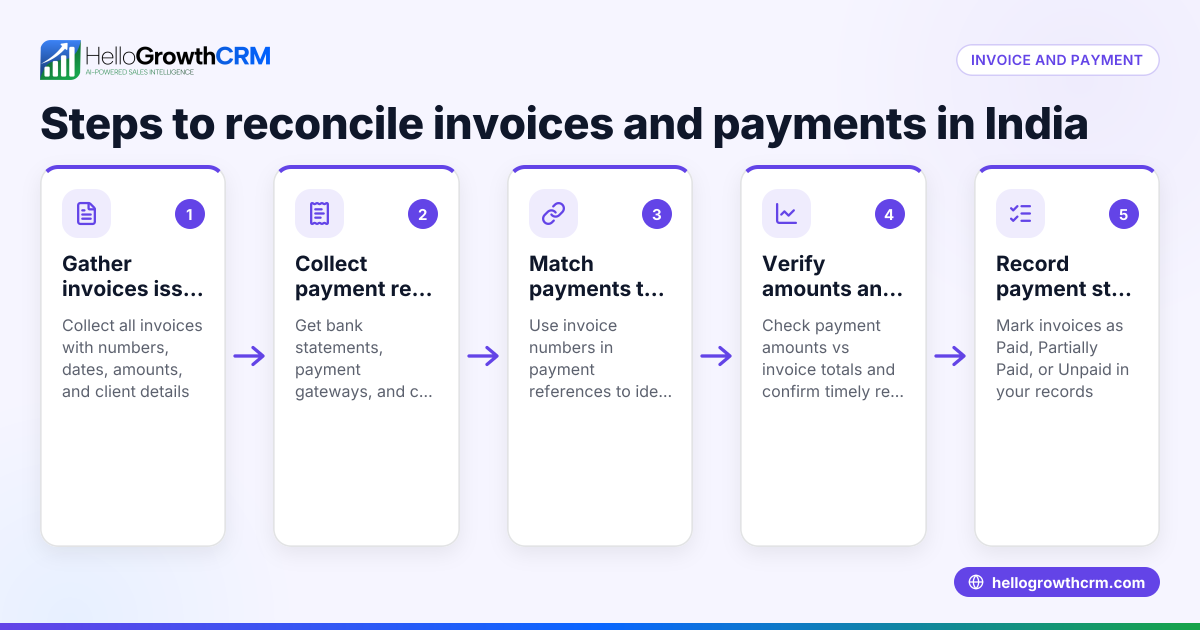
Creating a proper business invoice in India requires including specific details to ensure clarity and compliance. This guide provides you with exact steps to prepare an invoice, a realistic example with Indian currency and tax calculations, common mistakes to avoid, and how HelloGrowthCRM’s quoting and invoice tracking features can help streamline your sales process.
Why this comes up / what goes wrong
Many small business owners in India face challenges when creating invoices. They often run their sales using WhatsApp and spreadsheets, which can lead to missing or incorrect invoice details, causing payment delays or disputes. Without a clear invoice that includes GST information and payment terms, customers may hesitate to pay or question charges. Business owners want a simple, foolproof method to create invoices that cover all necessary fields and tax details.
Step-by-step
- Write your business details: Include your registered business name, address, phone number, and email at the top of the invoice. If your business is registered under GST, add your GSTIN.
- Assign a unique invoice number: Use a sequential numbering system (e.g., INV-2024-001) to keep track of invoices easily.
- Add the invoice date: Clearly state the date the invoice is issued.
- Include buyer details: Write the customer's name, address, and GSTIN if applicable.
- List each product or service: For every item, provide a clear description, the HSN code (for goods) or SAC code (for services) if GST registered, the quantity sold, and the unit price.
- Calculate taxable value per item: Multiply the quantity by the unit price for each line item.
- Apply GST rates: Depending on the transaction, apply CGST and SGST or IGST rates. Calculate the tax amount for each.
- Calculate totals: Add taxable values and tax amounts to get the total invoice value.
- State payment terms: Specify the due date for payment, accepted payment methods (like UPI or bank transfer), and any advance or balance payment details.
- Add additional notes: Include any warranty, return policy, or delivery terms relevant to the sale.
Before sending, verify all fields for accuracy and completeness to avoid confusion or delays.
Example (fictional figures)
Invoice Date: 15/05/2024 Invoice Number: INV-2024-001
| Item Description | HSN Code | Quantity | Unit Price (₹) | Taxable Value (₹) |
|---|---|---|---|---|
| Steel Rods | 7207 | 10 | 5,000 | 5,000 × 10 = 50,000 |
| Welding Service | 998313 | 1 | 15,000 | 15,000 × 1 = 15,000 |
Taxable Value Total = ₹50,000 + ₹15,000 = ₹65,000
Assumed GST Rate: 18% (9% CGST + 9% SGST)
CGST = ₹65,000 × 9% = ₹5,850 SGST = ₹65,000 × 9% = ₹5,850
Total GST = ₹5,850 + ₹5,850 = ₹11,700
Invoice Total = ₹65,000 + ₹11,700 = ₹76,700
Payment Terms: Due within 30 days by UPI or bank transfer.
Common mistakes
- Skipping GSTIN or entering incorrect GST details: Always confirm GSTINs for both parties to avoid tax compliance issues.
- Not using sequential invoice numbers: This complicates tracking and auditing; keep a clear numbering sequence.
- Mistakes in tax calculations: Double-check GST rates and tax math to prevent disputes.
- Incomplete buyer details or vague product descriptions: This can delay payment; be specific.
- No payment terms stated: Customers need clear deadlines and payment options.
- Sending invoices without review: Always proofread to catch errors or omissions.
Prevent these errors by following the step-by-step process carefully and reviewing the invoice before sending.
Doing this in HelloGrowthCRM
HelloGrowthCRM offers built-in quoting and proposal tools that let you create, send, and track commercial documents like invoices directly from a deal record. The quotation goes out from the deal and its status—sent, viewed, accepted—is visible alongside follow-up tasks. You can manage invoices and payments received efficiently, helping your sales and telecalling teams avoid delays and lost leads. Learn more about HelloGrowthCRM’s WhatsApp and SMS CRM and the built-in CRM dialer for smooth sales workflows.
Frequently asked questions
How to make a proforma invoice in India? A proforma invoice is a preliminary document sent before the final invoice. It includes estimated prices, quantities, and terms but is not a demand for payment. Create it like a business invoice but clearly mark it as "Proforma Invoice" to avoid confusion.
Is GST mandatory on all invoices in India? GST must be shown on invoices if your business is registered under GST and the transaction is taxable. For unregistered businesses or exempt supplies, GST details may not be needed. NEEDS EXPERT REVIEW
What is the difference between invoice and bill? In India, invoice and bill are often used interchangeably. Technically, an invoice is a formal request for payment from the seller, while a bill is the document the buyer receives. Both contain similar information.
Can I create invoices on WhatsApp? While you can share invoice details via WhatsApp, it’s best to prepare a formal invoice document first. HelloGrowthCRM’s quoting and proposal tools let you send and track invoices efficiently through integrated messaging.
Do I need to include HSN or SAC codes on invoices? If your business is registered under GST, including HSN codes for goods or SAC codes for services on invoices is mandatory for proper tax classification.
Key takeaways
- Include all essential fields: business and buyer details, invoice number, date, item descriptions, quantities, prices, and taxes.
- Use sequential invoice numbers and accurate GST details for compliance.
- Clearly state payment terms to avoid delays.
- Review your invoice carefully before sending.
- HelloGrowthCRM helps create, send, and track invoices from deals, improving sales follow-up.
Start creating your business invoices today with confidence. To manage your sales, quotes, and invoices efficiently, Start on the Free Forever plan (200 leads, no credit card).
Ready to put this into practice?
Set up your pipeline, WhatsApp follow-ups, and AI lead scoring in minutes — free, no credit card.
Try HelloGrowthCRM freeGet CRM tips in your inbox
Join thousands of sales professionals who get weekly insights on CRM strategy, AI automation, and pipeline optimization.

The HelloGrowthCRM team publishes guides on CRM strategy, AI sales tools, and revenue operations for small business sales teams.