HelloGrowthCRM software
Built for real small-business sales teams
HelloGrowthCRM helps reps qualify faster, follow up on time, and close more deals—with practical automation in one place.
- AI lead scoring and pipeline visibility
- Built-in dialer, WhatsApp, and email automation
- Sales forecasting and RevOps-ready reporting
To manage payment follow ups effectively for your small business in the USA, create a clear schedule of reminders, track invoices and communications carefully, and assign responsibility for follow-up tasks. This article covers why payment follow ups matter, detailed step-by-step instructions, a worked example with dollar amounts and calculations, common mistakes to avoid, and how HelloGrowthCRM can help streamline the process.
Why this comes up / what goes wrong
Small business owners often juggle many roles and lack a structured follow-up system. Without organized tracking, invoices can be overlooked, payments delayed, and follow-ups inconsistent. Many rely on spreadsheets, email threads, or text messages that are prone to errors and missed deadlines. This leads to cash flow issues and wasted time chasing payments.
Step-by-step
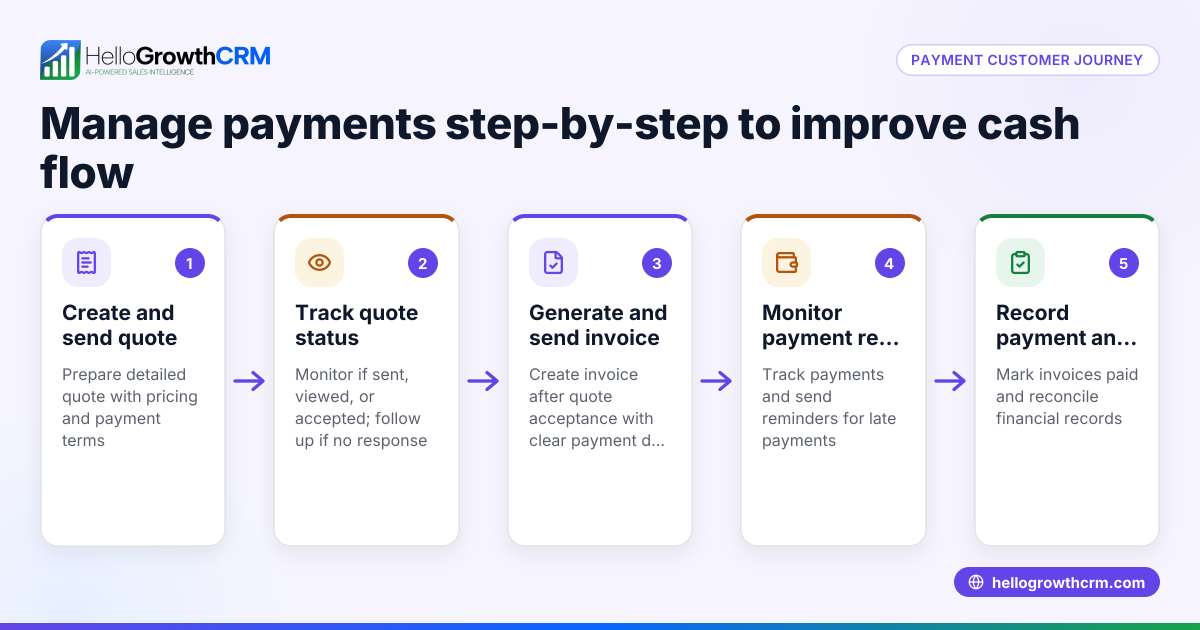
- Prepare and send a clear invoice or proposal. Include payment terms, due date, accepted payment methods, and contact details. Double-check the invoice for accuracy before sending.
- Record the invoice and due date. Use a tracking system like a spreadsheet, calendar, or CRM to log invoice number, amount, client, and due date. Confirm the client received the invoice.
- Schedule your first payment reminder. Set a reminder a few days before the due date to send a polite message confirming the upcoming payment deadline.
- Follow up immediately after the due date if unpaid. Contact the client by phone or email, referencing the invoice and due date. Be polite but clear about the need for payment.
- Send a second reminder 7-10 days after the due date if still unpaid. Escalate the tone slightly, restating the overdue amount and any applicable late fees.
- Assign responsibility for follow-ups. Designate a team member or yourself to manage follow-up tasks weekly. Keep a task list to avoid missed actions.
- Document all communications. Record calls, emails, and messages related to each invoice to maintain a clear history.
- Consider payment plans or negotiation if delays persist. Offer options to help the client pay while protecting your cash flow.
- Review your follow-up process monthly. Adjust timing, messaging, or responsibilities based on results.
To keep follow-ups organized and visible, use tools like sales task boards.
Example (fictional figures)
A B2B software reseller in Denver, Colorado, issues an invoice on 03/01/2024 for $12,500 with a 30-day payment term.
- Invoice date: 03/01/2024
- Due date: 03/31/2024
- Amount: $12,500
Step 1: Send invoice on 03/01/2024.
Step 2: Record invoice and due date in tracking system.
Step 3: Schedule reminder for 03/28/2024 (3 days before due date).
Step 4: On 03/28/2024, send reminder email: “Your payment of $12,500 is due on 03/31/2024.”
Step 5: On 04/01/2024, call client to confirm payment status.
Step 6: No payment received by 04/07/2024, send second reminder: “Your payment of $12,500 was due on 03/31/2024 and is now 7 days overdue. Please arrange payment promptly.”
Step 7: Record all communications.
Step 8: Client requests a payment plan; agree to two installments of $6,250 on 04/15/2024 and 05/15/2024.
Step 9: Calculate total payment and verify installments: $6,250 + $6,250 = $12,500
This example shows clear deadlines, reminders, documented follow-up actions, and explicit arithmetic.
Common mistakes
- Not tracking invoices and due dates systematically. Prevent by using a dedicated tool or spreadsheet.
- Delaying the first follow-up until well after the due date. Prevent by scheduling reminders before and right after due dates.
- Using inconsistent or overly aggressive messaging. Prevent by preparing polite, clear templates and escalating tone gradually.
- Relying on memory instead of documented tasks. Prevent by creating follow-up tasks with due dates, using tools like sales task boards.
- Not assigning follow-up responsibility. Prevent by designating a team member or yourself to own payment follow-ups weekly.
- Failing to record communications. Prevent by logging all calls, emails, and messages to maintain history.
Doing this in HelloGrowthCRM
HelloGrowthCRM helps small businesses manage payment follow ups with integrated features. You can create and send quotes, proposals, and invoices directly from a deal record. The quotation or invoice status—sent, viewed, accepted—is visible on the same screen as your follow-up task, making it easy to track payment progress. Each follow-up becomes a task with a due date, and your day’s calls and reminders appear as a list, not a memory test. For founders without a sales manager, Managed RevOps support can assign someone to work the follow-up queue weekly, ensuring no payment is missed. Learn more about these features at HelloGrowthCRM for the United States.
Frequently asked questions
How soon should I follow up after sending an invoice? Send a reminder a few days before the due date and follow up immediately after the due date if payment is not received.
What if the customer says they can’t pay on time? Consider negotiating a payment plan or partial payment to maintain cash flow while accommodating the customer.
Is it better to follow up by phone or email? Start with a polite email reminder, then use phone calls for overdue payments or if you don’t get a response.
How can I keep track of multiple payment follow-ups? Use task management tools like sales task boards or a CRM to schedule and track each follow-up.
Can automation help with payment follow-ups? Yes, email automation and sequences can schedule reminders automatically; see email automation and sequences for details.
Key takeaways
- Prepare clear invoices with payment terms and due dates.
- Track invoices and schedule reminders before and after due dates.
- Assign responsibility for timely follow-ups and document all communications.
- Use polite, escalating messages and offer payment plans if needed.
- Avoid relying on memory by using task boards or CRM tools.
- HelloGrowthCRM offers quotes, proposals, invoices, and follow-up task tracking on the same screen.
Managing payment follow ups keeps your cash flow steady and your customer relationships professional. To get started with organized follow-ups today, try HelloGrowthCRM’s Free Forever plan with 200 leads and no credit card required at free CRM for small business.
Ready to put this into practice?
Set up your pipeline, WhatsApp follow-ups, and AI lead scoring in minutes — free, no credit card.
Try HelloGrowthCRM freeGet CRM tips in your inbox
Join thousands of sales professionals who get weekly insights on CRM strategy, AI automation, and pipeline optimization.

The HelloGrowthCRM team publishes guides on CRM strategy, AI sales tools, and revenue operations for small business sales teams.