HelloGrowthCRM software
Built for real small-business sales teams
HelloGrowthCRM helps reps qualify faster, follow up on time, and close more deals—with practical automation in one place.
- AI lead scoring and pipeline visibility
- Built-in dialer, WhatsApp, and email automation
- Sales forecasting and RevOps-ready reporting
An online booking app lets your customers schedule appointments or services directly through a website or link without back-and-forth calls or messages. This article covers why small businesses seek these apps, step-by-step evaluation guidance, a practical example, common mistakes to avoid, and how scheduling works in HelloGrowthCRM.
Why this comes up / what goes wrong
Small business owners often lose leads or waste time because scheduling happens by phone calls, emails, or text messages that require multiple back-and-forths. This slows down the sales process and increases the chance of errors like double bookings or missed appointments. For example, a salon owner might spend hours daily coordinating appointments by text, risking lost customers. Without a centralized booking system, teams struggle to track availability and follow-up effectively, leading to lost revenue and poor customer experience.
Step-by-step
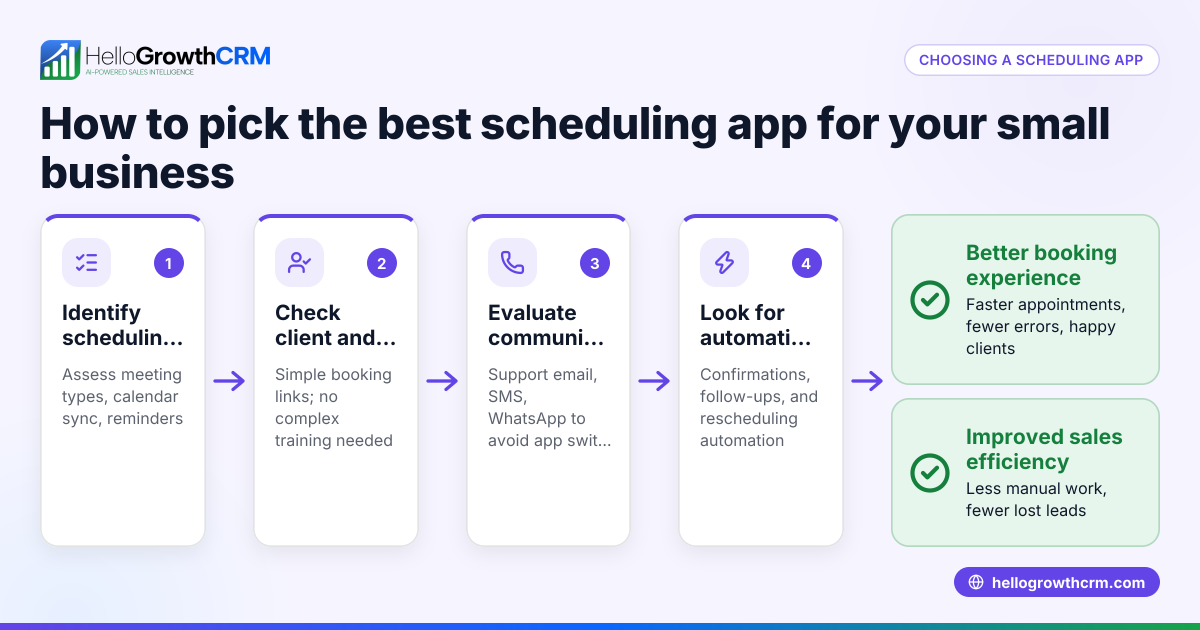
- Identify your booking needs. Determine what types of appointments or services you offer, how long they last, and whether you need to collect specific information from customers (e.g., contact details, service preferences).
- Check integration options. See if the app integrates with your existing tools like your website, calendar apps, or CRM. Integration reduces manual data entry and errors.
- Evaluate ease of use. Test how easy it is for customers to book a slot. A good app should allow customers to pick a time from available slots without complicated steps.
- Assess team collaboration features. Confirm if the app supports multiple team members’ calendars and prevents double bookings.
- Review notifications and reminders. Automated reminders reduce no-shows. Check if the app sends confirmations and reminders via email, SMS, or messaging apps.
- Consider customization and branding. Your booking page should reflect your business style and allow you to customize fields and messages.
- Check pricing and limits. Understand the app’s pricing tiers, any limits on bookings or users, and whether there’s a free plan to start with.
- Look for support and reliability. Reliable customer support and uptime are crucial for a smooth booking experience.
For scheduling integrated with your sales and messaging workflows, check the meeting scheduler.
Example (fictional figures)
A residential real-estate team in Phoenix, Arizona, wants to reduce lost leads from slow appointment scheduling. They decide to use an online booking app to let prospects pick viewing times directly.
- The team estimates they get 50 leads monthly.
- Before, some leads were lost due to delayed scheduling.
- Average sale value per lead is $300,000.
If the booking app helps recover even 5 lost leads monthly:
Leads recovered monthly = 5 leads
Potential revenue recovered monthly = 5 × $300,000 = $1,500,000
This example shows how an online booking app can impact revenue by speeding up and simplifying scheduling.
Common mistakes
- Choosing an app without mobile-friendly booking pages. Prevent by testing booking on different devices.
- Ignoring integration with calendars or CRM. Prevent by checking integration options early.
- Overlooking customer notifications. Prevent by ensuring the app sends automatic reminders.
- Selecting complex or confusing booking flows. Prevent by testing the customer booking experience.
- Not considering team member availability to avoid double bookings. Prevent by choosing apps that support multiple calendars.
- Skipping free trials or demos. Prevent by trying before committing.
Learn more about managing customer contacts and messages with a WhatsApp and SMS CRM to complement your booking app.
Doing this in HelloGrowthCRM
HelloGrowthCRM includes scheduling and booking where a prospect picks a slot from a link instead of back-and-forth messages on WhatsApp. This shortens the path from interest to conversation and keeps scheduling within your sales workflow. The scheduling feature is available on Free and all paid tiers. Learn more about the meeting scheduler.
Frequently asked questions
What is an online booking app? An online booking app allows customers to schedule appointments or services through a website or link without needing to call or message back and forth. It streamlines the booking process and reduces errors.
How does an online booking app save time for small businesses? By automating appointment scheduling and integrating with calendars, it eliminates manual coordination and reduces no-shows through automated reminders.
Can I customize the booking page to match my brand? Many apps let you customize fields, colors, and messages so the booking experience fits your business style.
Do online booking apps work with multiple team members? Good apps support multiple calendars and show only available slots to prevent double bookings.
Is there a free option to try online booking apps? Several apps offer free plans or trials. The scheduling feature is included on HelloGrowthCRM’s Free plan, letting you start without a credit card.
How do I integrate an online booking app with my CRM? Look for apps that offer direct integration or API connections to sync bookings with your customer database and sales pipeline.
See more about using HelloGrowthCRM for the United States at HelloGrowthCRM for the United States.
Key takeaways
- An online booking app lets customers pick appointment times directly, reducing lost leads.
- Evaluate apps by your booking needs, integrations, ease of use, and team features.
- Avoid common mistakes like ignoring mobile experience and lack of notifications.
- Use free trials to test before committing.
- Scheduling links in HelloGrowthCRM let prospects book slots directly, streamlining sales conversations.
Start simplifying your scheduling and sales process today. Start on the Free Forever plan (200 leads, no credit card).
Ready to put this into practice?
Set up your pipeline, WhatsApp follow-ups, and AI lead scoring in minutes — free, no credit card.
Try HelloGrowthCRM freeGet CRM tips in your inbox
Join thousands of sales professionals who get weekly insights on CRM strategy, AI automation, and pipeline optimization.

The HelloGrowthCRM team publishes guides on CRM strategy, AI sales tools, and revenue operations for small business sales teams.