HelloGrowthCRM software
Built for real small-business sales teams
HelloGrowthCRM helps reps qualify faster, follow up on time, and close more deals—with practical automation in one place.
- AI lead scoring and pipeline visibility
- Built-in dialer, WhatsApp, and email automation
- Sales forecasting and RevOps-ready reporting
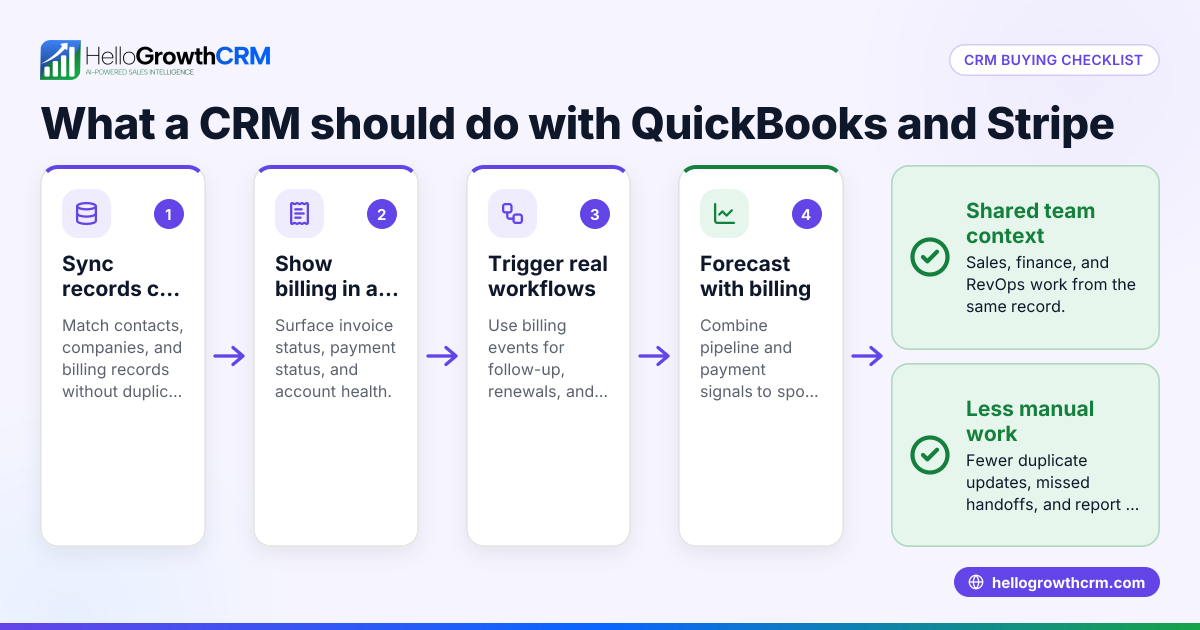
Stripe CRM integration means linking your Stripe payment platform with your CRM system to automatically sync payment and customer data. This connection allows small and mid-sized UK businesses to keep sales and payment information in one place, improving lead follow-up and financial tracking.
Why this comes up / what goes wrong
Many UK small businesses use Stripe to accept online payments but manage sales leads and customer interactions separately, often using spreadsheets, WhatsApp, or email. This separation causes slow follow-up, missed opportunities, and errors when reconciling payments with sales efforts. Business owners search for "Stripe CRM integration" to find ways to connect these systems, reduce manual data entry, and gain a clearer view of their sales pipeline and payment status.
Step-by-step
- Identify your CRM and Stripe capabilities: Check if your CRM supports Stripe integration directly or through third-party connectors. Confirm what data will sync, such as payments, refunds, and customer information.
- Choose the integration method: Options include native CRM connectors, middleware platforms like Zapier, or custom API development. Consider your budget, technical skills, and the level of automation you need.
- Set up API keys in Stripe: Log in to your Stripe dashboard and generate API keys needed for authentication with your CRM or integration tool. Ensure these keys have the correct permissions.
- Configure the CRM integration: Enter Stripe API keys and set data sync preferences in your CRM or integration platform. Test the connection to confirm data flows correctly.
- Map data fields between Stripe and CRM: Ensure payment, customer, and transaction data in Stripe correspond correctly to CRM fields (for example, customer name, payment amount, payment status).
- Test with sample transactions: Process test payments in Stripe and verify they appear correctly in your CRM lead or customer records.
- Train your team: Show sales and finance teams how payment data appears in the CRM and how to use it for timely follow-ups and reporting.
- Monitor and troubleshoot regularly: Check for syncing errors or missing data and adjust settings as needed to maintain smooth operation.
For more details on integration options, see integrations.
Example (fictional figures)
A small accountancy practice in Birmingham wants to link Stripe payments to their CRM to track client payments against proposals.
- On 15/03/2024, a client pays £2,400 via Stripe.
- The Stripe API sends payment data to the CRM.
- The CRM updates the client record with payment amount £2,400 and status "Paid".
- Later, the client makes a refund of £400.
- The refund data is also synced to the CRM, updating the payment status.
Calculation: £2,400 (initial payment) - £400 (refund) = £2,000 (net payment recorded in CRM)
This setup allows the practice to see which clients have paid, track refunds, and follow up on unpaid or partially paid invoices directly from the CRM.
Common mistakes
- Not verifying API permissions: Incorrect API key permissions can block data syncing. Prevent this by double-checking API key scopes in Stripe.
- Ignoring data field mismatches: Poor field mapping causes lost or incorrect data in the CRM. Prevent this by carefully matching Stripe fields to CRM fields before going live.
- Skipping test transactions: Not testing integration can lead to surprises after launch. Prevent this by running test payments and refunds to confirm data accuracy.
- Overlooking team training: Staff may not use payment data effectively if untrained. Prevent this by providing clear instructions and demonstrations.
- Relying on manual updates after integration: Manual steps defeat the purpose of integration. Prevent this by automating syncing fully and monitoring regularly.
Learn more about avoiding integration pitfalls in integrations.
Doing this in HelloGrowthCRM
HelloGrowthCRM supports API and integrations that bring enquiries from platforms like IndiaMART and JustDial directly into the CRM as leads, making it easier to manage new contacts. Its WhatsApp and SMS features log conversations with leads on their records, allowing follow-ups via messaging channels your customers already use. Additionally, HelloGrowthCRM offers AI agents (in Beta on Growth plans) that draft follow-up messages after calls, so your sales reps only need to review and send, saving time and improving response speed. For details, see WhatsApp and SMS CRM and integrations.
Frequently asked questions
Can I connect Stripe to any CRM? Most CRMs offer some form of Stripe integration, either native or via third-party tools. Check your CRM's documentation or integration marketplace to confirm Stripe support.
Is technical knowledge needed to set up Stripe CRM integration? Basic technical skills help, especially for API key setup and field mapping. Some CRMs provide step-by-step wizards, and middleware platforms can simplify the process without coding.
Will payment data sync automatically in real time? This depends on the integration method. Native integrations often sync in near real-time, while some middleware or custom setups may sync periodically.
Can I track refunds and disputes in the CRM? If your integration supports it, refund and dispute data from Stripe can also be logged in the CRM, helping your team manage customer issues effectively.
Does HelloGrowthCRM integrate with Stripe? While HelloGrowthCRM supports many integrations including IndiaMART and JustDial, Stripe integration depends on your chosen setup or custom API work. Explore its integration capabilities at integrations.
How do I keep my team engaged with payment data in the CRM? Use messaging features like WhatsApp and SMS within HelloGrowthCRM to follow up quickly and keep conversations logged. Training your team on these tools improves responsiveness and lead management.
Key takeaways
- Stripe CRM integration connects payment data with sales and customer records, improving visibility.
- Choose integration methods based on your CRM capabilities, budget, and technical skills.
- Test thoroughly with real and refund transactions before going live.
- Train your team to use payment data effectively and automate syncing.
- Avoid common mistakes like incorrect API permissions and poor field mapping.
- HelloGrowthCRM supports integrations, WhatsApp/SMS messaging, and AI agents to enhance lead and customer management.
Start streamlining your sales and payment workflows today. Start on the Free Forever plan (200 leads, no credit card).
Ready to put this into practice?
Set up your pipeline, WhatsApp follow-ups, and AI lead scoring in minutes — free, no credit card.
Try HelloGrowthCRM freeGet CRM tips in your inbox
Join thousands of sales professionals who get weekly insights on CRM strategy, AI automation, and pipeline optimization.

The HelloGrowthCRM team publishes guides on CRM strategy, AI sales tools, and revenue operations for small business sales teams.