Schedule & Track Every Site Visit Without Back-and-Forth
Book property site visits with WhatsApp confirmation messages. Sync visits to your calendar. Assign site agents. Send pre-visit reminder sequences. Automate post-visit follow-up. Track outcomes (Interested/Not Interested/Follow-up needed). Built for real estate teams managing multiple property viewings.
Quick answer
How do I set up the reminder sequences?
Also answered on this page
- What happens after a buyer marks their visit outcome
- Can I assign multiple site agents to the same visit
Why teams evaluate site visit scheduler
Site Visit Scheduler usually becomes important when a repeated part of the revenue workflow is creating too much manual work, too little visibility, or too much tool-switching. Teams are rarely shopping for a feature in isolation. They are usually trying to make one meaningful workflow cleaner, faster, and easier to inspect.
That is why buyers usually look beyond the headline capability and inspect the surrounding details: WhatsApp booking confirmations and calendar sync, Site agent assignment with notification, Pre-visit reminder sequences (24h and 2h), Post-visit follow-up automation triggered by outcome. Those details determine whether the feature actually improves day-to-day execution or simply adds another surface area to manage.
Where site visit scheduler fits in the workflow
Most teams adopt this capability as part of practical motions such as reduce no-shows, instant post-visit follow-up, site agent coordination. The value tends to show up fastest when the workflow is tied to a clear owner, a clear next action, and a visible outcome that managers can review later.
It also matters how this page connects to the rest of the stack. For many teams, tools such as WhatsApp Business API, Google Calendar, Slack, Email are what make the feature operational instead of theoretical because they keep data, communication, and handoffs in sync.
What a strong rollout looks like for site visit scheduler
The best rollout usually starts small: one high-value workflow, one clear ownership model, and one review rhythm for adoption. Once the team is consistently using the feature, managers can expand into deeper automation, reporting, or cross-functional handoffs without rebuilding the foundation.
In practice, that means evaluating not only what the feature can do, but also whether the team can maintain the process around it. Ease of use, reporting trust, and manager visibility matter just as much as the feature checklist itself.
- Use it first for reduce no-shows if that is the workflow creating the most friction today.
- Use it first for instant post-visit follow-up if that is the workflow creating the most friction today.
- Use it first for site agent coordination if that is the workflow creating the most friction today.
- Use it first for buyer journey visibility if that is the workflow creating the most friction today.
How It Works
Get started in three simple steps
Key Features
Use Cases
Reduce no-shows
Automated reminders significantly reduce buyers who forget or cancel visits. That keeps your site agents busy and on schedule.
What teams care about
- Fast adoption with less manual cleanup for managers and reps.
- Clear visibility into workflow execution, outcomes, and accountability.
- Reliable handoffs into the CRM record so downstream teams keep full context.
Deep dive
Open the sections that matter most instead of scrolling through a long uninterrupted text block.
Why real estate teams need site visit scheduling software
Real estate teams spend significant time coordinating property viewings. Buyers and agents are in different time zones. Visits get scheduled but buyers forget or cancel. Follow-up after visits is inconsistent. And tracking visit outcomes is manual or non-existent.
A dedicated site visit scheduler removes the back-and-forth and automates the post-visit follow-up so teams can focus on closing deals.
What visit scheduling software should include
The best site visit scheduling software should handle booking (ideally through buyer-preferred channels like WhatsApp), agent assignment, automated reminders, and post-visit automation. It should also track outcomes and generate performance metrics.
HelloGrowthCRM was built for this workflow. That means visits stay synchronized, reminders are automatic, and follow-up happens without manual work.
How visit automation improves closing rates
When you reduce no-shows with reminders and automate post-visit follow-up, buyer conversion rates improve. Buyers feel the process is professional and responsive. Agents stay focused on selling instead of scheduling.
The data also matters. By tracking visit outcomes, you learn which properties convert best, which agents close most deals, and which time slots work best.
Scaling site visits across multiple properties
As teams grow and manage more properties, manual visit coordination becomes impossible. A scheduling system that automates agent assignment, reminders, and follow-up makes it easy to scale without adding administrative overhead.
HelloGrowthCRM helps teams manage visits at scale so they can grow without growing headcount.
Real estate teams spend significant time coordinating property viewings. Buyers and agents are in different time zones. Visits get scheduled but buyers forget or cancel. Follow-up after visits is inconsistent. And tracking visit outcomes is manual or non-existent.
A dedicated site visit scheduler removes the back-and-forth and automates the post-visit follow-up so teams can focus on closing deals.
Buyer playbook
Compare, launch, and govern the workflow with an interactive overview instead of four long generic essays.
How teams evaluate site visit scheduler
The best pages help buyers understand fit quickly instead of forcing them through long walls of copy.
Check whether the product covers the capabilities you actually care about, such as WhatsApp booking confirmations and calendar sync, Site agent assignment with notification, Pre-visit reminder sequences (24h and 2h), Post-visit follow-up automation triggered by outcome.
Test if it supports real execution scenarios like Reduce no-shows, Instant post-visit follow-up, Site agent coordination.
Confirm the workflow stays connected to WhatsApp Business API, Google Calendar, Slack, Email so reporting and handoffs remain reliable.
Frequently Asked Questions
Explore More
Related Products
Free Tools & Calculators
WhatsApp Template Generator
Draft WhatsApp message templates for intros, follow-ups, payments and support. Free.
Lead Scoring Calculator
Build a custom scoring model with weights.
CRM ROI Calculator
Calculate the revenue impact of adopting a CRM.
Pipeline Calculator
Model your pipeline stages and conversion rates.
Competitor Comparisons
Geolocation & Geo-Tagging for Field Teams
GPS check-in and live rep tracking — all inside your CRM.
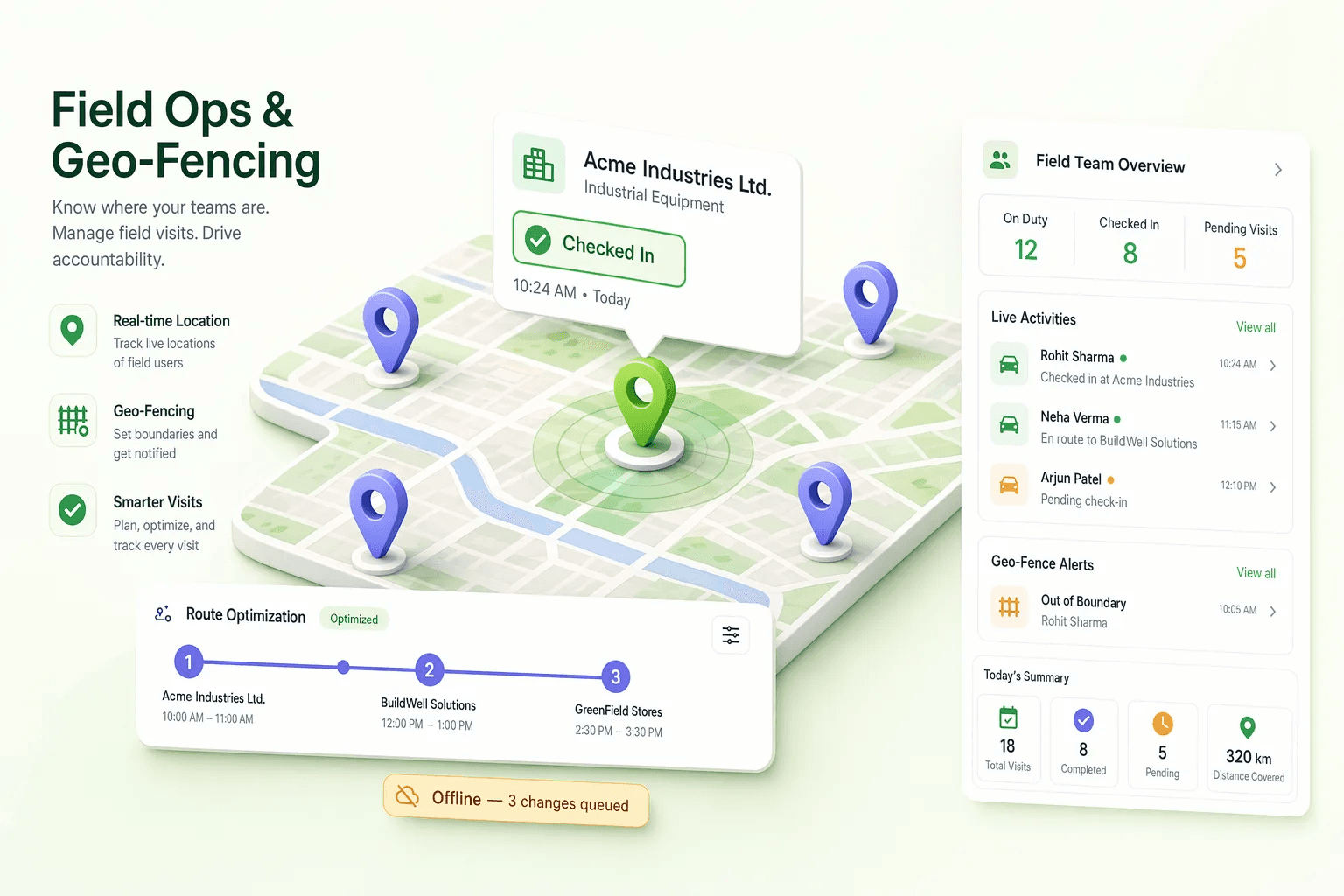
GPS coordinates are automatically captured when a field rep checks in at a customer location — no manual address entry.
Confirm reps are actually on-site before allowing check-in. Configurable radius per location type.
Suggest optimal visit order for multi-stop field days based on rep location and appointment schedule.
Every CRM contact record shows a visit history with GPS-tagged timestamps — full audit trail of field activity.
See where field reps are in real time on a map overlay. Spot gaps in coverage or reps who need support.
Why geo-tagging matters for field ops:
What is Field Ops CRM Management?
HelloGrowthCRM's field operations module gives sales managers complete visibility and control over their field teams — scheduling visits, tracking GPS locations, assigning nearest-rep tasks, monitoring attendance, and capturing visit outcomes — all from the same CRM their team uses for pipeline management. Field reps work from the mobile app; managers monitor from the web dashboard.
Indian field sales teams — in FMCG, real estate, financial services, and manufacturing — operate across large geographic territories with limited direct supervision. The traditional management model relies on end-of-day call reports and gut feel about whether reps actually visited the customers they claimed. HelloGrowthCRM's field ops replaces this with objective GPS-verified visit data, eliminating disputes, improving accountability, and giving managers real-time intelligence to make routing and assignment decisions during the day.
Key Capabilities
- GPS Visit Logging: Reps check in at customer locations from the mobile app. HelloGrowthCRM records GPS coordinates, timestamps the check-in, and logs the visit to the contact's CRM record automatically.
- Live Location Map for Managers: Managers see a real-time map showing every active field rep's current location and their visit trail for the day. No need to call reps to ask where they are.
- Geo-Aware Visit Assignment: Assign urgent visits to the nearest available rep based on current GPS location — not territory lines. Reduces travel time for time-sensitive appointments.
- Daily Visit Schedule Push: Reps receive their visit schedule for the day via WhatsApp each morning with Google Maps links for each customer location. Optimised routing reduces fuel costs and maximises visits per day.
- Offline Mobile Access: Customer records, visit history, and daily schedules are cached for offline use. Reps work in areas without connectivity; all data syncs on reconnection.
- GPS Mileage Calculation: Track distance travelled per rep per day using GPS route data. Managers verify and approve mileage reimbursements in the CRM — feeds directly into the expense management module.
- Visit Outcome Capture: After each visit, reps log the outcome — order taken, follow-up needed, complaint raised, relationship visit — with a voice-to-text note from mobile. Outcome data is immediately visible to managers in the deal pipeline.
- Admin Field-Ops Oversight: Admins get one view of reps' field visits alongside the leads that have not been answered yet, so nothing slips between visits.
How Indian Field Teams Use It
- FMCG Distributor with 40 Field Reps: A Maharashtra FMCG distributor uses HelloGrowthCRM's field ops to verify that reps are visiting their assigned retailer beat each day. The live map replaced daily WhatsApp check-in messages. Managers identified that 3 reps were consistently skipping specific areas — when addressed, order fill rate from those areas improved in 4 weeks.
- Pharmaceutical Distributor Medical Reps: A Chennai pharma distributor tracks medical representative (MR) visits to clinics and hospitals using GPS auto check-in. The system verifies visit frequency commitments made to pharma companies — providing documented proof of coverage for principal reporting and incentive claim purposes.
- Real Estate Field Sales: A Hyderabad real estate company with reps covering site visits, competitor project surveys, and broker meetings uses HelloGrowthCRM field ops to optimise daily schedules. Route optimisation reduced average rep travel time by 90 minutes per day — effectively adding one extra customer interaction per rep per day across the team.
What a Field Visit Record Holds
Every Field Visit is a record, not a message in a group chat. The rep checks in on arrival with GPS, adds photos and the visit outcome, and checks out when they leave, so the visit shows how long they were on site as well as where. When the signal drops, the app keeps working offline and syncs the visit when the phone reconnects.
- GPS check-in and check-out: arrival and departure are stamped with location and time.
- Photos and outcomes: what the rep saw and what was agreed, attached to the visit.
- Photo report and export: a visit's photos and notes as a shareable report, and visit data as an export.
- Customer notification: the customer can be told the visit took place.
- Field Visit Map: managers see the day's visits on a map.
- Field Visit Reports: visits by rep and outcome over any period.
Teams that also move stock can pair visits with Material Tracking (stock balances, locations and movements), so a site visit and the material sent to that site sit in the same system.
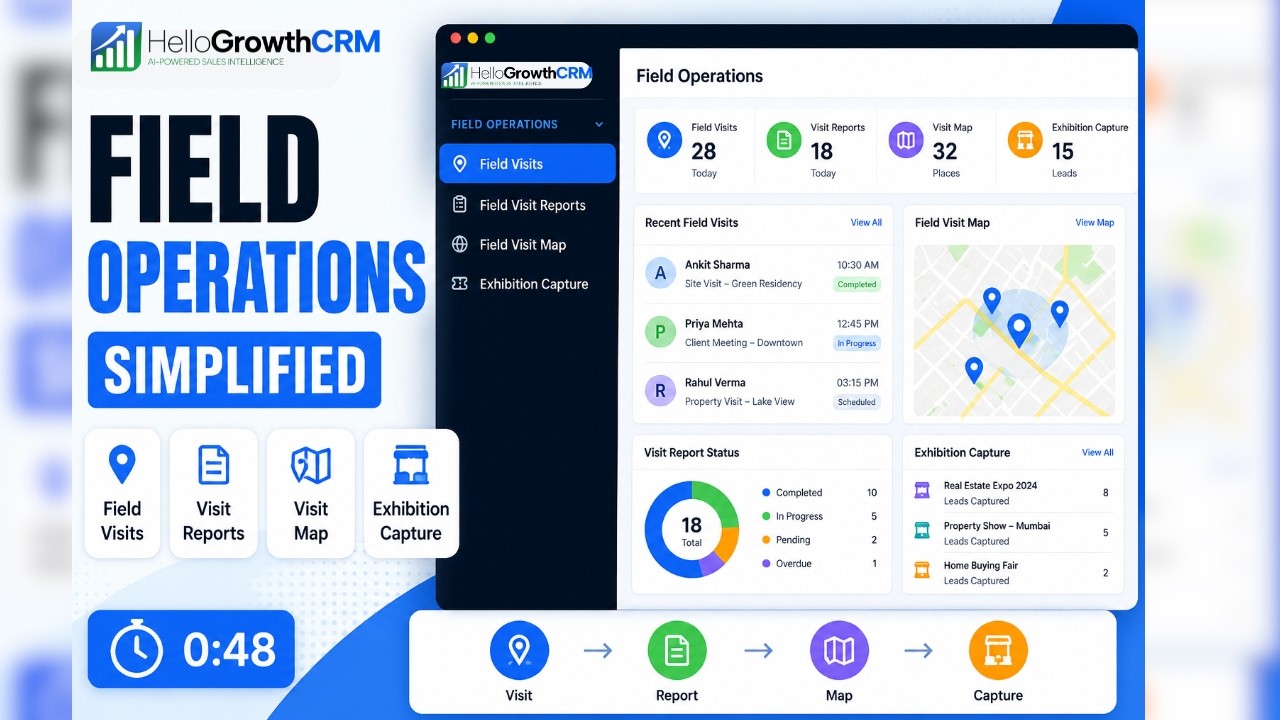
Watch: Field Operations in HelloGrowthCRM
A 48-second look at field operations in HelloGrowthCRM — how reps track visits, tasks, and leads from their phone while managers follow along from the dashboard.
Frequently Asked Questions
- How does HelloGrowthCRM's geolocation tracking work for field reps?
- HelloGrowthCRM's mobile app records GPS coordinates when a rep logs a visit or checks in at a customer location. Managers see a live map of where each field rep has been during the day, with timestamps for each location.
- Can managers assign field visits to nearby reps in HelloGrowthCRM?
- Yes. The geo-aware assignment feature shows which reps are currently nearest to a new visit requirement — helping managers assign based on proximity rather than fixed territory lines. This reduces travel time and allows urgent visits to be covered without a rep driving across the city.
- Does HelloGrowthCRM's field ops feature work offline?
- Yes. The HelloGrowthCRM mobile app caches customer records and visit schedules for offline access. Reps can log visits, add notes, and update deal stages without a data connection. All changes sync to the CRM automatically when connectivity is restored.
- How does HelloGrowthCRM calculate mileage and reimbursement for field reps?
- HelloGrowthCRM records GPS route data for each rep's day and calculates total distance travelled. Managers can review the route on a map and approve mileage reimbursements directly within the platform. The calculated distance feeds into the expense management module for GST-compliant reimbursement claims.
Field ops features are available on HelloGrowthCRM's Growth and Enterprise plans. Compare plans. Pair with expense management for full field sales cost tracking, or learn how field sales teams use HelloGrowthCRM.