HelloGrowthCRM software
Built for real small-business sales teams
HelloGrowthCRM helps reps qualify faster, follow up on time, and close more deals—with practical automation in one place.
- AI lead scoring and pipeline visibility
- Built-in dialer, WhatsApp, and email automation
- Sales forecasting and RevOps-ready reporting
A CRM for B2B SaaS companies in the United States should do three things well: capture demand fast, move trial users into real sales conversations, and give leadership a forecast they can trust. If your team handles demo requests, free trials, and multi-touch follow-ups, you need a system built for speed, clean data, and consistent execution.
Key takeaways
- The best CRM for US B2B SaaS teams connects demo requests, trials, outreach, and forecasting in one workflow.
- Speed matters. Routing new demo requests in minutes can improve meeting rates and reduce lead leakage.
- Trial follow-up works best when sales, marketing, and RevOps share the same data and handoff rules.
- Forecast accuracy depends on stage discipline, activity tracking, and clear exit criteria for each opportunity.
- US teams should support email and phone outreach with attention to rules like CAN-SPAM and TCPA.
- An AI CRM can help teams prioritize accounts, automate admin work, and keep pipelines current.
Why CRM matters for B2B SaaS companies in the United States
US SaaS buyers expect a fast response. They submit a demo form on Tuesday morning and want a useful reply that day. If your team is slow, a competitor gets the meeting.
That is why CRM for B2B SaaS companies United States buyers can rely on is not just a contact database. It is the operating system for revenue. It captures intent, routes leads, tracks every touch, and shows leaders what is likely to close.
For many B2B SaaS teams, the problem is not lead volume. The problem is process. Demo requests live in one tool. Trial signups live in another. Sales notes sit in inboxes or spreadsheets. Forecast calls become a debate about opinions instead of a review of evidence.
A good CRM fixes that. It gives your team one place to manage inbound demand, trial conversion, pipeline progression, and revenue reporting. It also helps founders and sales leaders spot issues early. You can see whether a drop in pipeline comes from fewer demo requests, weak follow-up, poor qualification, or stalled deals.
This matters even more in the United States, where buyers often expect polished vendor operations. Procurement teams may ask about SOC 2. Finance may want a smooth handoff to QuickBooks or Stripe. Enterprise prospects may want clear records of meetings, emails, and next steps before they sign.
What should a CRM for US B2B SaaS teams handle?
It should handle the full path from first touch to forecast. That includes three core workflows.
1. Demo request capture and routing
When a prospect asks for a demo, your CRM should collect the form, enrich the lead where possible, assign an owner, and trigger fast follow-up. If someone from a Chicago software buyer submits a form at 10:15 AM, the right rep should know right away.
The process should also support qualification. Team size, use case, industry, and company fit should shape routing and priority. High-fit accounts need fast action. Lower-fit leads may need automation first.
2. Trial onboarding and follow-up
Many SaaS teams lose trial users after signup because no one owns the next step. The CRM should create a structured motion. That means welcome outreach, activation milestones, tasks for account executives or SDRs, and alerts when a user shows buying intent.
For example, if a trial account invites multiple users, connects key data, or views pricing, that should be visible to sales. If a trial account goes quiet, the CRM should trigger the right follow-up sequence.
3. Forecasting and pipeline management
Leadership needs more than total pipeline value. They need a realistic view of what can close this month and this quarter. Your CRM should show stage movement, win risk, activity levels, and deal age.
This is where process matters. If reps skip stage definitions or fail to log next steps, the forecast gets weak. A strong CRM keeps those fields current and makes inspection easier for managers.
How do you manage demo requests in a CRM?
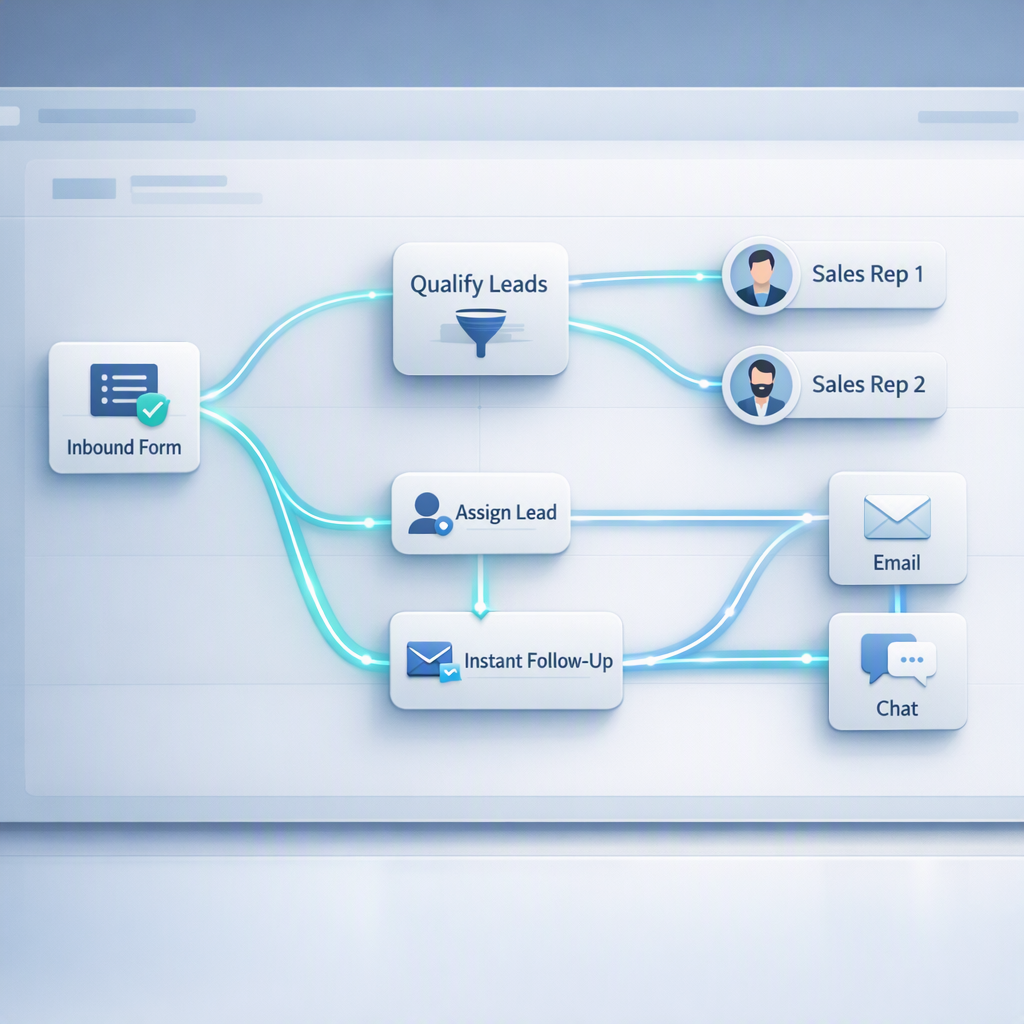
Use one workflow: capture the form, qualify the lead, assign an owner, create the first task, and track response time. The goal is simple. Every demo request gets a fast, visible next step with no manual handoff.
Under that short answer, the practical setup looks like this:
Build a clean inbound demo workflow
A strong demo workflow usually includes these steps:
- Capture every form in one place
Your site forms should feed directly into the CRM. Do not rely on inbox forwarding or manual imports. - Standardize key fields
Collect only what your team needs to qualify quickly. Common fields include company name, work email, role, team size, and use case. - Route by simple rules
Assign leads based on territory, segment, company size, product line, or account ownership. Keep the rules easy to audit. - Trigger immediate tasks
The assigned rep should get a task, alert, or sequence enrollment right away. - Track speed to lead
Response time is one of the easiest places to improve conversion. If your average first response is six hours, fix that before adding more tools. - Measure show rate and pipeline creation
A demo request is not success. Track meetings booked, meetings held, qualified pipeline created, and closed revenue.
Add lead scoring without creating more admin
Inbound volume can be uneven. Some weeks you get ten strong requests. Other weeks you get fifty mixed leads. This is where AI lead scoring can help.
The best scoring model supports rep judgment. It does not replace it. It should help the team prioritize likely buyers based on fit and behavior. That gives high-intent leads faster attention and keeps lower-intent leads in nurture until they are ready.
Make handoffs visible
A common SaaS problem is hidden ownership. Marketing thinks sales is working the lead. Sales thinks the lead is too early. Meanwhile, the buyer hears nothing.
Your CRM should show clear owner, lead status, last activity, and next action. Managers should be able to spot stuck leads in minutes.
What is the best way to follow up with trial users?
Create a clear trial sales motion with timed outreach, activation triggers, and ownership rules. Trial users should never sit unworked. The CRM should tell your team who signed up, what they did, and what follow-up happens next.
Now expand that into an operating model your team can run.
Separate product activity from sales action
A free trial can generate many signals. Some matter more than others. Logging in once is not the same as adding users or completing setup.
Your CRM should surface the events that indicate buying intent. Common examples include:
- Account creation
- First login
- Team invite sent
- Integration connected
- Key feature used
- Pricing page viewed
- Trial nearing expiration
Sales should not chase every low-value action. Instead, decide which signals trigger outreach and which signals support nurture.
Use a simple follow-up cadence
Trial follow-up should feel helpful, not aggressive. A practical cadence for many US B2B SaaS teams includes:
- Day 0: Welcome email and trial setup help
- Day 1: Rep outreach for qualified accounts
- Day 3: Helpful use-case message based on role or industry
- Day 5: Check progress and offer a live walkthrough
- Day 7: Share value milestone or customer proof point
- Near trial end: Clear next-step ask
The exact timing depends on your product and average sales cycle. The main point is consistency. If every rep invents a different process, conversion becomes hard to manage.
Tools like email automation can make this easier by standardizing messages and reducing manual work. Your reps still personalize where it matters, but the baseline process stays intact.
Match follow-up to trial type
Not all trials should get the same treatment.
- Product-led, low ACV trials: Use more automation and light rep touch.
- High-intent enterprise trials: Use rapid rep engagement and tighter qualification.
- Partner or referral trials: Route with context so reps know the source and likely use case.
For example, a Houston software company evaluating your platform for a 40-person sales team may deserve a live walkthrough in the first week. A solo consultant testing features may be better served through automated education first.
Where SaaS CRM setups usually break
Most CRM problems in SaaS are process problems. The tool reflects the mess already in the business. If your setup is weak, reporting becomes noisy and reps stop trusting the system.
Common failure points
Too many fields at the top of funnel
If your demo form asks for too much, conversion drops. If your rep has to fill 20 fields after every call, CRM usage drops. Start with the few fields your team truly uses.
No stage exit criteria
Forecasting fails when one rep marks a deal as “proposal” after a first call while another waits for legal review. Each stage should mean the same thing across the team.
Hidden activity in inboxes
If rep activity lives in personal email and call notes are missing, managers cannot inspect deals well. Integration and logging matter.
Trial and sales data are disconnected
If product usage sits outside the CRM, reps miss important signals. The best setup pulls trial behavior into the same record sales works from.
Forecasts built on hope
A pipeline report is not a forecast. Forecasts should reflect stage quality, next step strength, buyer engagement, and deal history.
How can an ai crm improve forecasting?
An ai crm helps by spotting patterns humans miss, flagging stale deals, and highlighting risk across the pipeline. It does not make forecasting perfect, but it can make forecast reviews faster, more consistent, and less dependent on rep optimism.
That short answer matters because many sales leaders spend hours each week rebuilding the truth from messy notes.
Forecasting starts with clean stage discipline
Even advanced tools cannot save a messy process. Start with these basics:
- Define each stage clearly
Every stage needs a specific buyer action or milestone. - Require a next step and date
Opportunities without a next meeting or action are harder to trust. - Track age by stage
Old deals should trigger review. A deal that sits too long usually carries more risk. - Inspect activity quality
Five emails do not equal momentum. Look for buyer replies, meetings, and concrete progress. - Review pipeline weekly
Forecast accuracy improves when managers inspect early, not at quarter end.
Use forecasting views leaders actually need
A B2B SaaS leadership team usually wants several views:
- Current quarter commit
- Best case pipeline
- Pipeline coverage by segment
- New pipeline created this month
- Stage conversion by rep
- Slippage from prior forecast
With sales forecasting, teams can make these views easier to maintain and easier to discuss. The point is not more dashboards. The point is faster decisions.
Tie the forecast to the revenue process
The forecast should connect to reality across the business. If bookings close, finance may need a clean customer record for invoicing through Stripe or QuickBooks. If implementation starts, customer success needs a reliable handoff. If enterprise buyers ask security questions, sales should know where that process stands.
A strong CRM keeps those handoffs from breaking the customer experience.
A practical CRM workflow for US B2B SaaS teams
If you are building or rebuilding your CRM process, keep it simple. Start with the workflows that touch revenue first.
Step 1: Map your buyer journey
Write down the exact path from first touch to closed won. Include:
- Demo request
- Trial signup
- Qualification
- Meeting held
- Trial activation
- Proposal
- Security or procurement review
- Closed won or closed lost
This shows where ownership changes and where data must move with the buyer.
Step 2: Define required fields and stages
Keep your data model tight. Focus on fields that support action or reporting. For many teams, that means source, segment, owner, stage, close date, amount, and next step.
Step 3: Automate the repetitive work
Use automation for assignment, reminders, sequences, and alerts. Keep humans focused on live conversations and deal strategy.
That is where a platform with features built for lead capture, pipeline management, and communication can reduce admin for the team.
Step 4: Connect your key systems
At minimum, most SaaS companies need CRM connectivity with forms, calendar, email, calling, and finance tools. In some cases, product usage data matters too. Strong integrations reduce duplicate entry and reporting gaps.
Step 5: Review adoption every week
Do not assume rollout means success. Check:
- Are leads assigned correctly?
- Are reps logging next steps?
- Are trial accounts getting follow-up?
- Are stages moving on time?
- Is the forecast changing for valid reasons?
Step 6: Get RevOps involved early
Many SaaS teams wait too long to clean up process. If your team lacks internal bandwidth, managed RevOps can help design rules, reporting, and workflows that your sales team will actually use.
What US B2B SaaS buyers expect from your process
In the United States, many software buyers judge your company by how you sell. Slow follow-up, repeated questions, and poor coordination can create doubt before a contract is even sent.
Buyers want speed and clarity
A prospect wants to know:
- Who owns the conversation?
- What happens after the demo?
- How long will evaluation take?
- What does onboarding look like?
- Is your company organized?
Your CRM should help your team answer those questions with confidence.
Compliance and communication matter
US teams often rely on email and phone outreach. Make sure your process supports compliance with laws like CAN-SPAM for commercial email and TCPA where applicable for calling and texting practices. Keep consent and communication history visible.
Enterprise deals need better internal coordination
As deal size grows, more teams get involved. Security, legal, finance, and operations may all have a say. Your CRM should show where the deal stands, what blockers exist, and what the rep needs from internal teams.
Choosing the right CRM for a growing SaaS sales team
The best CRM is the one your team uses daily because it makes work easier, not heavier. For many SaaS companies, that means one system for inbound lead capture, follow-up, pipeline management, outreach, and reporting.
Look for these traits:
- Fast setup for core workflows
- Clean pipeline views
- Strong activity tracking
- Lead prioritization
- Automation for repetitive tasks
- Forecasting managers can trust
- Support for email, calling, and team collaboration
If your current setup still depends on spreadsheets, disconnected tools, and manual forecast updates, the real cost is not just software. It is missed meetings, slow follow-up, and weak visibility.
Ready to put this into practice?
Set up your pipeline, WhatsApp follow-ups, and AI lead scoring in minutes — free, no credit card.
Try HelloGrowthCRM freeGet CRM tips in your inbox
Join thousands of sales professionals who get weekly insights on CRM strategy, AI automation, and pipeline optimization.

The HelloGrowthCRM team publishes guides on CRM strategy, AI sales tools, and revenue operations for small business sales teams.