HelloGrowthCRM software
Built for real small-business sales teams
HelloGrowthCRM helps reps qualify faster, follow up on time, and close more deals—with practical automation in one place.
- AI lead scoring and pipeline visibility
- Built-in dialer, WhatsApp, and email automation
- Sales forecasting and RevOps-ready reporting
A small business contact list is a structured collection of your customers', leads', and prospects' contact details and relevant information. It helps you organize communications, follow up efficiently, and grow your sales pipeline. This article explains why having a contact list matters for small businesses, how to create one step-by-step, common mistakes to avoid, and answers frequent questions about managing contacts effectively.
Why this comes up / what goes wrong
Small business owners often face challenges managing their contacts because information is scattered across text messages, emails, spreadsheets, and notes. Without a centralized contact list, it becomes difficult to track conversations, remember follow-up tasks, or know which leads to prioritize. This disorganization slows down sales efforts, causes missed opportunities, and wastes time. Team members may also duplicate outreach or lose track of customer preferences, harming relationships and revenue.
Step-by-step
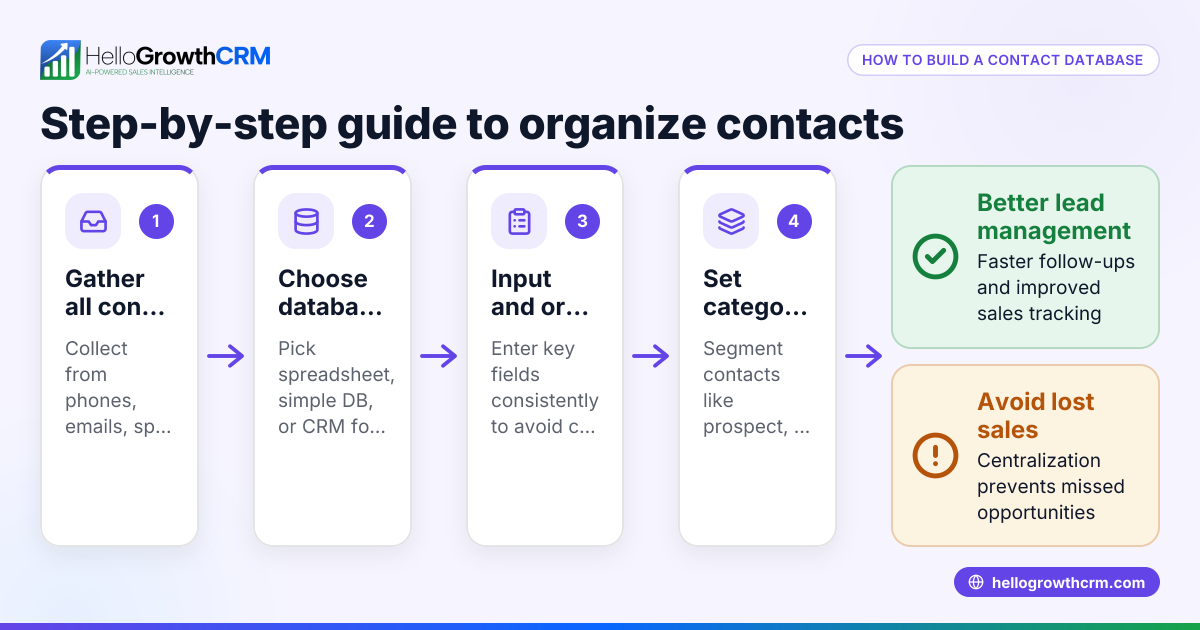
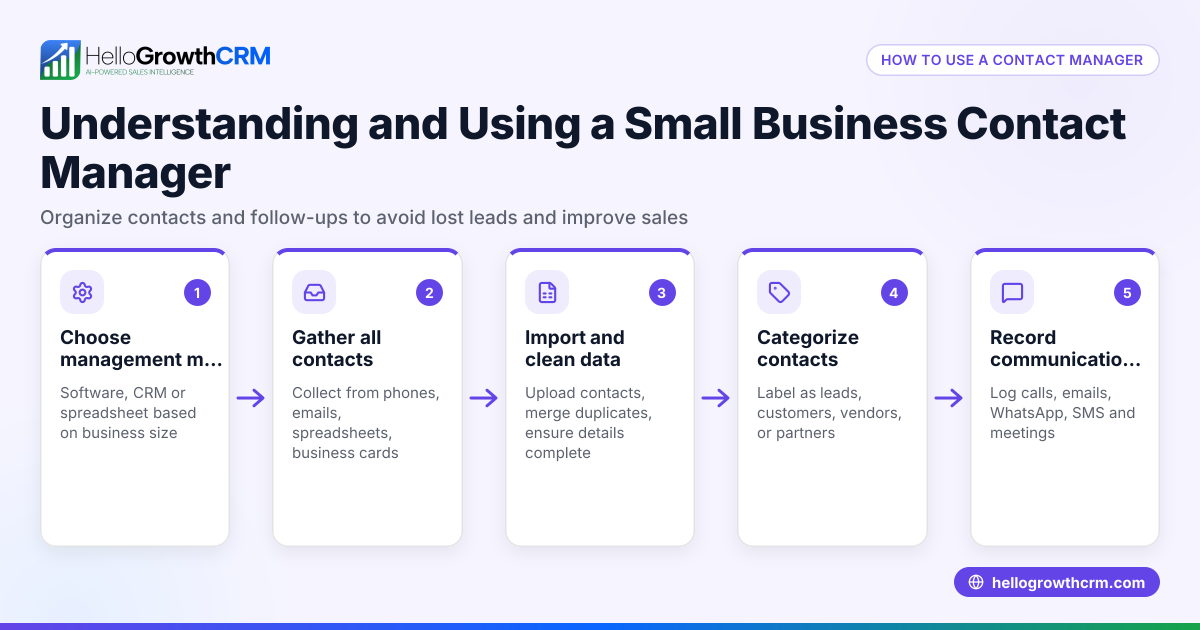
- Gather all existing contact information: Collect contacts from your phone, email inbox, spreadsheets, business cards, and any web forms you use. Check for duplicates and outdated entries. Having a single source of truth is key.
- Choose a format or tool for your contact list: Decide whether you want to use a spreadsheet, a simple database, or a CRM system. For small and growing businesses, a CRM that supports WhatsApp and SMS can help streamline follow-up and keep communications in one place. Learn about options like HelloGrowthCRM for the United States.
- Standardize the data fields: Ensure each contact has consistent fields such as full name, company, phone number, email, preferred communication channel, and notes on interactions. This consistency helps sorting and filtering later.
- Import or enter the contacts into your chosen system: If using a spreadsheet, create columns for each data field. If using a CRM, import contacts using the tool’s import feature. Check for errors after importing.
- Segment your contacts: Group them by category such as leads, customers, suppliers, or by sales stage. This helps tailor your communication and prioritize follow-up efforts.
- Set reminders and follow-up tasks: Regularly review your contact list and schedule follow-ups to maintain engagement and move leads through your sales pipeline.
- Keep the list updated: Add new contacts promptly and remove or archive outdated ones. Regular maintenance prevents clutter and keeps your sales process efficient.
- Secure your contact list: Protect sensitive customer data by using password-protected tools or software compliant with data privacy standards.
For growing sales teams, consider a solution that integrates WhatsApp and SMS communications directly into your CRM to avoid losing leads due to slow or scattered follow-up. See WhatsApp and SMS CRM for more.
Example (fictional figures)
Consider a residential real estate team in Phoenix, Arizona, aiming to organize its contact list to improve lead follow-up and sales tracking.
- They gather 500 contacts from past clients, website inquiries, and open house visitors.
- They remove 50 duplicates and 30 outdated contacts with no recent interaction.
- They have 420 valid contacts remaining.
- They segment these into 200 active leads, 150 past clients, and 70 referral partners.
- They schedule follow-up calls every two weeks for the 200 active leads.
This process helps the team focus on qualified contacts rather than an unorganized list.
Common mistakes
- Not consolidating contacts from all sources: Prevent this by gathering contacts from every channel before building your list.
- Using inconsistent or incomplete data fields: Standardize fields like phone number format and email to avoid confusion.
- Failing to segment contacts: Group contacts logically to target communications effectively.
- Neglecting regular updates and cleanups: Schedule periodic reviews to remove inactive contacts and add new ones.
- Ignoring data security: Use secure tools and limit access to protect customer information.
- Relying solely on spreadsheets for growing teams: Consider a CRM with communication features to improve follow-up speed and tracking. Check out a free CRM for small business that supports these needs.
Frequently asked questions
What is a small business contact list used for? It organizes your customers’ and leads’ contact details to help you manage communications, schedule follow-ups, and track sales progress.
How do I keep my contact list up to date? Regularly add new contacts, update existing ones after interactions, and remove outdated or inactive entries. Set reminders for periodic reviews.
Can I use a spreadsheet for my contact list? Yes, spreadsheets work well for small volumes, but as your business grows, a CRM that integrates multiple communication channels like WhatsApp and SMS improves efficiency. See HelloGrowthCRM for the United States for options.
How do I protect my contact list data? Use password-protected software or cloud services with strong security measures. Limit access to authorized team members only.
How do I segment my contact list? Group contacts by type (lead, customer), source, sales stage, or communication preference to tailor your outreach.
Key takeaways
- A small business contact list centralizes customer and lead information for better management.
- Collect contacts from all sources and standardize data fields.
- Segment contacts to prioritize follow-up and personalize communication.
- Regularly update and clean your list to maintain accuracy.
- Use secure tools and consider a CRM with WhatsApp and SMS integration for growing teams.
Start organizing your contacts today to avoid losing leads and improve sales. You can start on the Free Forever plan (200 leads, no credit card) to manage your contacts efficiently.
Ready to put this into practice?
Set up your pipeline, WhatsApp follow-ups, and AI lead scoring in minutes — free, no credit card.
Try HelloGrowthCRM freeGet CRM tips in your inbox
Join thousands of sales professionals who get weekly insights on CRM strategy, AI automation, and pipeline optimization.

The HelloGrowthCRM team publishes guides on CRM strategy, AI sales tools, and revenue operations for small business sales teams.