HelloGrowthCRM software
Built for real small-business sales teams
HelloGrowthCRM helps reps qualify faster, follow up on time, and close more deals—with practical automation in one place.
- AI lead scoring and pipeline visibility
- Built-in dialer, WhatsApp, and email automation
- Sales forecasting and RevOps-ready reporting
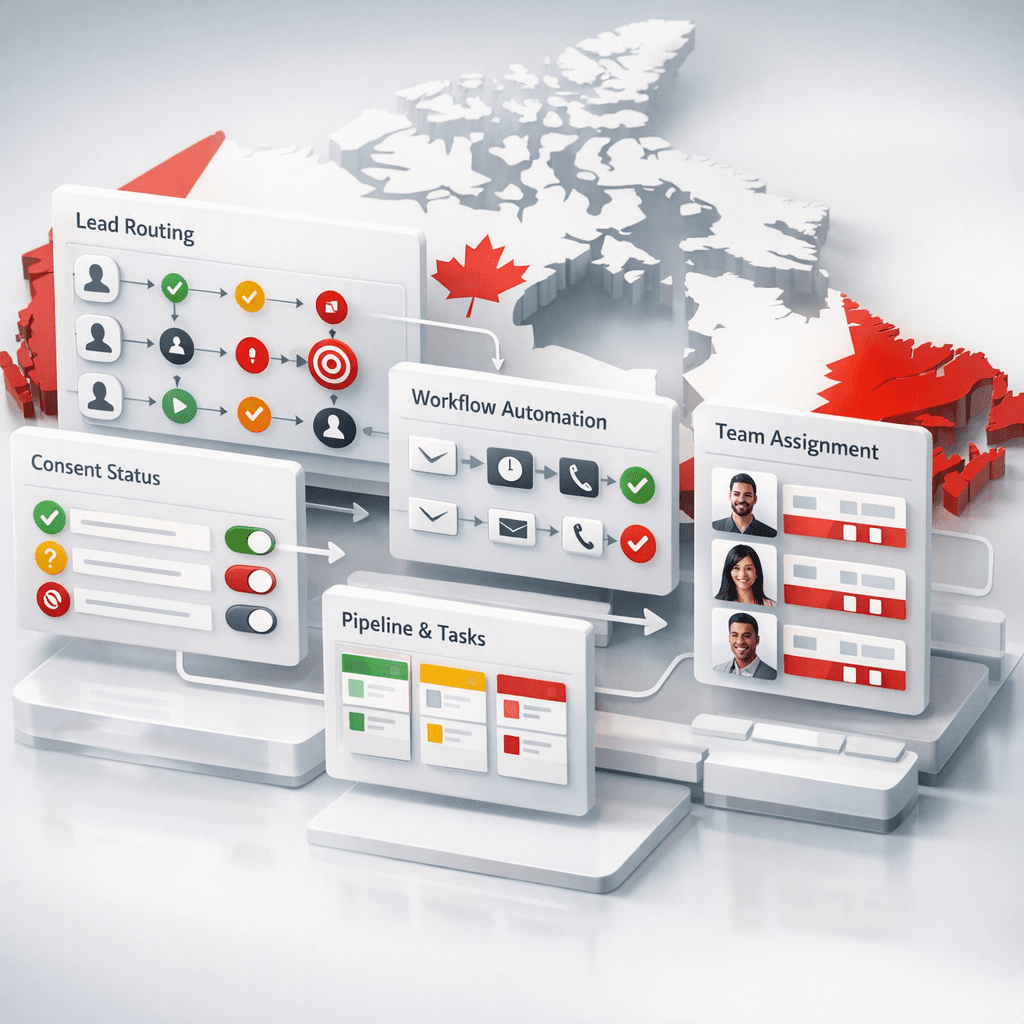
A CASL-compliant CRM lead routing in Canada setup is a sales workflow that captures lead source and consent, routes records by territory and fit, and controls follow-up messages so Canadian B2B teams can move fast without creating avoidable risk under CASL, PIPEDA, or Quebec Law 25.
Key Takeaways
- Canadian B2B teams need lead routing rules tied to consent status, not just speed-to-lead.
- CASL, PIPEDA, and Quebec Law 25 affect how you capture, store, and use lead data in your CRM.
- HelloGrowthCRM can centralize form capture, routing, task creation, consent fields, and follow-up guardrails in one workflow.
- Bilingual EN/FR workflows matter for Montreal and Quebec-based teams, especially at handoff and template level.
- Finance and sales ops should align CRM data with CAD quoting, invoicing, and customer records through tools like QuickBooks and other All Integrations.
Why CASL-compliant CRM lead routing matters for Canadian B2B sales teams
CASL-compliant CRM lead routing matters for Canadian B2B sales teams because the wrong workflow can turn a normal follow-up into a compliance problem, while the right workflow helps reps respond faster, preserve proof of consent, and keep territory assignment, outreach, and reporting consistent across Canada.
Most lead routing articles focus on round-robin logic. That is not enough in Canada. Your CRM needs to answer four questions before a rep sends anything:
- Where did the lead come from?
- What consent exists, if any?
- What can sales send now?
- Which rep or queue should own the next action?
In practice, that means your routing model should combine fit, geography, language, and consent status. Inside HelloGrowthCRM, that usually starts with custom fields, Territory Management, and Sales Task Boards, not just a simple assignment rule.
For Canadian teams, the legal context matters:
- Canada's anti-spam law sets rules for commercial electronic messages. The CRTC explains CASL requirements and enforcement here: Canada's Anti-Spam Legislation (CASL).
- PIPEDA governs how many organizations collect, use, and disclose personal information in commercial activity: PIPEDA overview.
In one rollout we did with a 12-person sales team selling into Toronto and Vancouver, the biggest issue was not poor lead volume. It was that marketing-qualified leads entered the CRM with no usable proof of source or opt-in. Reps were fast, but auditability was weak. We fixed it by making consent metadata mandatory before any automated email sequence could start.
What compliance risks should your CRM workflow control in Canada?
The main compliance risks your CRM workflow should control in Canada are unverified consent, unclear lead source, over-automation of sales email, poor retention of proof, and collecting more personal data than needed, especially when Quebec prospects, bilingual communications, and third-party integrations are involved.
A safe workflow is not only about blocking sends. It is about evidence and process design. If a prospect replies to an inbound inquiry, your team may have a valid business reason to continue the conversation. But if your CRM cannot show source, time, form, and notice language, your ops team will struggle to defend that process later.
The five workflow risks I see most often
- No source capture: Records enter from web forms, imports, events, or Zapier without a normalized source field.
- No consent object: Teams store a checkbox value, but not the date, form version, capture method, or policy reference.
- Sequence-first automation: Sales starts Email Automation before legal logic is checked.
- Language mismatch: Quebec leads receive English-only templates or notices without a French workflow path.
- Integration leakage: Data syncs into finance or ad systems without a clear minimization rule.
When I have audited pipelines like this, the fastest fix is a simple field architecture. Add:
- Lead source
- Original capture channel
- Consent status
- Consent timestamp
- Consent evidence URL or form ID
- Preferred language
- Province
- Routing region
- Follow-up eligibility
Those fields then power routing, reporting, and automation in your AI CRM.
A sourced benchmark on the Canadian market
Canada reported $2.1 billion in penalties, compensation, and settlements from privacy breaches over six years, according to the Office of the Privacy Commissioner of Canada and Deloitte research summarized by the regulator: Privacy and Data Breaches.
What should a CASL-safe lead routing workflow include?
A CASL-safe lead routing workflow should include source capture, consent tracking, language and territory rules, task-based first response, controlled outbound automation, and clear audit history so a manager can see who contacted whom, when, why, and under what communication basis.
Think of the workflow in three layers: capture, assignment, and action.
1. Capture layer
This is where you collect only what you need and preserve evidence. HelloGrowthCRM can accept records from forms, chat, manual entry, events, imports, and integration syncs through HubSpot, Salesforce, Gmail, or OpenAI-assisted workflows.
Best practice fields at capture:
- Name
- Work email
- Company
- Province
- Language preference
- Inquiry type
- Product interest
- Consent status
- Consent proof reference
2. Assignment layer
This is where AI Lead Scoring, region, segment, and rep capacity meet compliance. A Toronto SaaS lead with explicit form opt-in can route differently from a Montreal channel lead that needs a French-speaking rep and a manual first touch.
3. Action layer
This is where risk rises. I strongly recommend that the first action for many inbound Canadian B2B leads is a task or call, not an automatic email blast. Use CRM Dialer, Meeting Scheduler, and Smart Inbox to keep the interaction documented without over-triggering email.
Comparison table: risky vs CASL-safer CRM workflow design
| Workflow element | Risky setup | CASL-safer setup in HelloGrowthCRM |
|---|---|---|
| Lead source | Free-text source field | Standardized source picklist plus original capture channel |
| Consent | Single checkbox only | Status, timestamp, form ID, notice version, evidence link |
| Routing | Round-robin only | Territory + fit + language + consent-aware routing |
| First follow-up | Auto-sequence for every lead | Task or call first for uncertain consent cases |
| Quebec leads | Same templates for all | EN/FR branching with Quebec-specific review |
| Reporting | Volume only | Volume, speed-to-lead, consent completeness, send eligibility |
| Audit trail | Hard to reconstruct | Full activity log, owner history, and workflow records |
How to set up CASL-compliant CRM lead routing and follow-up workflows in HelloGrowthCRM
To set up CASL-compliant CRM lead routing and follow-up workflows in HelloGrowthCRM, build your process in order: define legal states, create required fields, map intake sources, route by territory and language, restrict automation by consent status, and monitor exceptions with weekly RevOps review.
Step 1: Define your communication states
Create simple statuses your team can use consistently. I suggest: New, Review Needed, Reachable by Task/Call, Reachable by Approved Email, Nurture Hold, and Do Not Send. If reps cannot understand the statuses in five seconds, simplify them.
Step 2: Create required consent and source fields
In Features, set mandatory fields for source, consent status, timestamp, province, and language on every inbound lead record. Add a hidden field for form version or campaign ID when possible.
Step 3: Normalize all lead capture paths
Map website forms, event lists, partner submissions, and imports into one schema. If you use Zapier, make sure the same source and consent fields are passed every time. Do not allow CSV uploads without field validation.
Step 4: Set routing rules by geography and language
Use region splits for Toronto/GTA, Vancouver/BC, Montreal/Quebec, and Rest of Canada. Then add a bilingual rule so Quebec leads route to EN/FR-capable reps or a review queue before outreach starts.
Step 5: Separate task automation from email automation
Create an immediate task for first response. Only allow Email Automation when the record meets your approved communication rule. This protects speed-to-lead while reducing unnecessary email risk.
Step 6: Add lead scoring after compliance gates
Run AI Lead Scoring on fit and intent, but do not let score override consent logic. A high-intent lead still needs the right outreach path.
Step 7: Build manager alerts for edge cases
Use Slack notifications for records missing source, missing language, or conflicting consent values. This keeps exceptions small before they become a process problem.
Step 8: Track pipeline and follow-up outcomes
Measure speed-to-first-task, speed-to-first-call, meeting-booked rate, and stage-velocity in days. Add Sales Forecasting and AI Pipeline Management once the data quality is stable.
What pipeline design works best for Toronto, Montreal, and Vancouver teams?
The best pipeline design for Toronto, Montreal, and Vancouver teams uses one national process with regional routing rules, bilingual branching for Quebec, and clear entry criteria between stages so forecasting stays clean while local reps can work within provincial and market differences.
A common mistake is building a separate pipeline for every city. That makes reporting messy. For most Canadian B2B teams under 50 reps, one shared pipeline works better:
- Inquiry
- Qualified
- Discovery Scheduled
- Discovery Completed
- Solution Fit Confirmed
- Proposal
- Negotiation
- Closed Won/Lost
Then layer local rules on top.
Toronto and GTA
Toronto teams often handle higher inbound volume and more SDR/AE specialization. Use queue-based triage and response-time SLAs. Meeting Scheduler can shorten handoff time when inbound demand spikes.
Montreal and Quebec
Montreal requires the most language discipline. Keep EN and FR templates separate. Use a required preferred-language field. For Quebec records, add a review checkpoint if your legal or marketing team wants extra scrutiny under Law 25-related practices.
Vancouver and Western Canada
Vancouver teams often cover broader territories. Capacity-based routing matters more. Territory Management plus AI Deal Insights helps managers spot overloaded reps before lead response time drops.
In one implementation for a Canadian IT services company, we used one pipeline but three routing pools: GTA, Quebec bilingual, and West. Forecast accuracy improved because stage definitions stayed common, while assignment logic stayed local.
How should Canadian teams handle consent tracking, bilingual workflows, and finance integrations?
Canadian teams should handle consent tracking, bilingual workflows, and finance integrations by keeping legal evidence inside the CRM record, branching communication by language early, and syncing only needed customer and revenue data to accounting systems like QuickBooks Online or Xero.
Consent tracking that sales can actually use
Your reps do not need a legal memo in every record. They need a simple status and proof link. Good CRM design hides complexity but preserves evidence. Store:
- What the lead did
- When they did it
- Where they did it
- What notice was shown
- What your team is allowed to do next
If you want maturity beyond basic fields, pair this with Managed RevOps and a monthly audit.
Bilingual EN/FR workflow design
Bilingual support is not just translation. It affects routing, template approval, and handoff quality.
Use these rules:
- Default from form language where possible
- Let reps manually update preferred language
- Keep EN and FR templates version-controlled
- Review Quebec outbound sequences separately
- Track language-based conversion rates
QuickBooks Online or Xero notes for CAD operations
For SMB teams quoting and invoicing in CAD, sync only what accounting needs. Sales does not need to push every marketing field into finance. Keep the customer account, billing entity, tax details, and closed-won value clean. HelloGrowthCRM teams often connect QuickBooks after Closed Won to avoid polluting finance with early-stage leads.
If you need to model CRM value first, use the CRM ROI Calculator before changing your full stack.
Common mistakes to avoid when building CASL-safe follow-up automation
The most common mistakes in CASL-safe follow-up automation are sending too much too early, mixing marketing and sales logic, skipping language controls, and treating compliance fields as optional admin work instead of core pipeline data that protects conversion and reporting quality.
Avoid these pitfalls:
- Using one global sequence for all inbound leads
- Letting reps overwrite source fields freely
- Syncing duplicate records from multiple systems
- Failing to review Quebec workflows
- Measuring reply rate without checking send eligibility
- Overbuilding before your team proves adoption
This approach works best for teams under 50 reps. Above that, expect more formal data governance, admin roles, and legal review cycles. If your motion includes channel partners, field events, and multiple product lines, add stricter deduplication and record ownership logic.
If you want to move faster without building this alone, start with a Demo or explore a Free Trial of HelloGrowthCRM. Canadian sales teams can use HelloGrowthCRM to route leads, track consent-ready fields, manage bilingual follow-up, and connect pipeline data to forecasting and finance workflows in one system.
About the author
Jordan McLean is a Revenue Operations Lead at HelloGrowthCRM with 11 years of experience in B2B SaaS sales systems, CRM design, and pipeline operations. He has led CRM and automation rollouts for Canadian teams across Toronto, Montreal, and Vancouver. A recent project involved rebuilding lead routing and consent tracking for a 12-person SaaS sales team selling across Canada with bilingual inbound workflows and CAD-based reporting. This article is informed by that hands-on work, and HelloGrowthCRM is the product he helps bring to market.
Frequently Asked Questions
Q: What does CASL-compliant CRM lead routing mean in Canada?
A: CASL-compliant CRM lead routing in Canada means assigning leads inside your CRM using rules that also track consent, source, and allowed follow-up actions. It helps sales teams respond quickly while keeping records that support compliant outreach and cleaner audit trails.
Q: Can a Canadian sales rep email every inbound lead automatically?
A: No, a Canadian sales rep should not email every inbound lead automatically without checking the lead’s source and communication basis first. A safer design is to trigger a task or call first when consent details are incomplete or unclear.
Q: How does PIPEDA affect CRM lead management?
A: PIPEDA affects CRM lead management by shaping how your business collects, uses, and stores personal information in commercial activity. In practice, that means collecting only needed data, documenting purpose, and protecting access and retention inside your CRM process.
Q: Do Quebec B2B sales teams need separate CRM workflows?
A: Quebec B2B sales teams do not always need separate CRM workflows, but they usually need separate language branches and stronger review controls. A shared national pipeline with Quebec-specific routing and EN/FR templates is often the best balance.
Q: What fields should I add to a CRM for CASL-safe follow-up?
A: The best CRM fields for CASL-safe follow-up are lead source, consent status, consent timestamp, province, preferred language, and evidence reference. Those fields let managers control routing, automation, and reporting without relying on rep memory.
Q: Should lead routing prioritize speed or compliance?
A: Lead routing should prioritize both speed and compliance, but compliance logic must gate what kind of follow-up happens first. Fast task creation and call routing can preserve speed-to-lead without forcing risky email automation.
Q: Can HelloGrowthCRM support bilingual Canadian sales workflows?
Frequently Asked Questions
Ready to put this into practice?
Set up your pipeline, WhatsApp follow-ups, and AI lead scoring in minutes — free, no credit card.
Try HelloGrowthCRM freeGet CRM tips in your inbox
Join thousands of sales professionals who get weekly insights on CRM strategy, AI automation, and pipeline optimization.

The HelloGrowthCRM team publishes guides on CRM strategy, AI sales tools, and revenue operations for small business sales teams.