HelloGrowthCRM software
Built for real small-business sales teams
HelloGrowthCRM helps reps qualify faster, follow up on time, and close more deals—with practical automation in one place.
- AI lead scoring and pipeline visibility
- Built-in dialer, WhatsApp, and email automation
- Sales forecasting and RevOps-ready reporting
The HelloGrowthCRM pipeline audit template is a structured pipeline review framework inside HelloGrowthCRM that helps sales teams find stalled deals, missing follow-ups, inactive owners, and forecast risks fast by combining required fields, activity alerts, stage-age rules, and manager-ready views into one repeatable weekly process.
Key Takeaways
- HelloGrowthCRM’s pipeline audit template turns pipeline hygiene into a repeatable weekly workflow, not a manual spreadsheet exercise.
- The template works best when you track stage age, next step date, last activity date, owner activity, and close-date confidence together.
- Managers can use saved views, AI Pipeline Management, and AI Deal Insights to spot risk in minutes.
- Workflow rules can auto-flag deals with no next meeting, no owner activity, or stale close dates before forecast calls.
- The template is practical for SDR, AE, and sales manager reviews, especially on teams that need cleaner forecast discipline.
- You can start with a simple setup, then expand into Sales Forecasting, Sales Task Boards, and Managed RevOps as your process matures.
What is the HelloGrowthCRM pipeline audit template?
The HelloGrowthCRM pipeline audit template is a preset audit system that checks whether every active deal has the right stage, recent activity, a clear next step, an engaged owner, and a believable close date, so managers can review pipeline quality and forecast risk without digging through each record manually.
At a practical level, this template is not just a report. It is a combination of:
- deal fields
- saved filters
- activity rules
- risk alerts
- review dashboards
- manager workflows
That matters because most pipeline problems are not hard to find. They are just hard to see in one place. A rep may log calls in one view, update stages in another, and forget the next step entirely. The audit template pulls those weak signals together.
Inside HelloGrowthCRM, teams usually pair this template with AI CRM features that surface stale deals automatically. They also connect daily work tools like Email Automation, Meeting Scheduler, and Smart Inbox so activity data is captured without extra admin.
In my experience, the biggest pipeline review mistake is treating pipeline value as pipeline quality. I have audited pipelines where the total amount looked healthy, but 30% of open deals had no future meeting booked and no meaningful activity in the prior 14 days. The number was real. The forecast was not.
A strong audit template helps teams answer five questions fast:
- Which deals are old for their stage?
- Which deals have no next step?
- Which owners have gone quiet?
- Which close dates are slipping without explanation?
- Which forecast commits are weak?
Harvard Business Review has repeatedly emphasized that sales performance improves when managers focus on the quality of selling activities and coaching, not just output numbers. That is exactly the problem a pipeline audit template solves.
Why pipeline audits matter for stalled deals and forecast accuracy
Pipeline audits matter because stalled deals and weak follow-up habits quietly distort conversion rates, stage coverage, and forecast confidence, which means teams often discover risk too late; a structured weekly audit catches dead deals, false commit dates, and rep inactivity before they damage revenue planning.
A pipeline can look full while still being fragile. That happens when old deals remain open, close dates keep rolling forward, or reps move opportunities without real buyer progress.
This is where HelloGrowthCRM is stronger than a static spreadsheet. You can combine stage-level controls with AI Lead Scoring, Revenue Attribution, and Sales Forecasting to understand both current risk and likely impact.
According to Gartner’s CRM topic page, CRM effectiveness depends on improving seller productivity and decision quality, not simply storing account records.
Here are the common signs a pipeline needs auditing:
- Deals sit too long in one stage
- Next step fields are blank
- Last contact date is stale
- Close dates move more than once
- Opportunity amount changes late in cycle
- Owner activity drops near quarter end
- Commit deals have no meeting scheduled
When I run weekly reviews with managers, I look at stage age first, not deal amount. Large deals attract attention, but stage-age in days often predicts trouble sooner. If a proposal-stage deal has no reply for 12 business days and no future meeting, it is usually not “active.” It is just still open.
This works especially well for teams under 50 reps. Above that, you will likely need stricter territory rules, role-based dashboards, and tighter integrations across tools like Slack, Gmail, and Microsoft Teams.
Which fields should your pipeline audit template include?
The best pipeline audit template should include fields that show deal progress, rep activity, buyer engagement, and forecast confidence, because those four dimensions reveal whether an opportunity is truly moving or simply aging in the system without a credible path to close.
At minimum, I recommend these audit fields in HelloGrowthCRM:
| Field | What it tells you | Recommended rule |
|---|---|---|
| Deal stage | Current pipeline position | Required on all open deals |
| Stage entered date | How long the deal has sat in stage | Auto-captured |
| Stage age in days | Stalled deal signal | Alert if above stage threshold |
| Next step | Rep’s stated action | Required before stage change |
| Next step date | Timing of planned action | Alert if blank or overdue |
| Last activity date | Recency of owner action | Alert if inactive for 7-14 days |
| Last meaningful contact | Buyer engagement signal | Separate from internal notes |
| Close date | Forecast timing | Flag if moved more than once |
| Forecast category | Commit, best case, pipeline | Required for manager review |
| Opportunity amount | Revenue impact | Track changes by audit log |
| Decision criteria / MEDDPICC notes | Qualification quality | Required for late stages |
| Owner | Accountability | Flag inactive owners |
Core fields to make mandatory
The fastest win is to require these fields before a deal enters later stages:
- next step
- next step date
- close date
- amount
- decision process note
- primary contact
- forecast category
If your team uses Proposal Builder or CRM Dialer, tie those actions back to the record. That gives managers context beyond a generic “activity completed” log.
Helpful custom fields for managers
Many teams also add custom fields such as:
- close date moved count
- champion identified
- procurement started
- legal review status
- risk reason
- competitor present
- mutual action plan status
In one rollout we did with a 12-person sales team, adding just two fields — “next customer event” and “risk reason” — cut weekly pipeline review time by nearly half because managers stopped asking the same clarification questions on every deal.
What alerts and workflow rules should you set up in HelloGrowthCRM?
The most useful HelloGrowthCRM audit alerts are simple workflow rules that flag stale stage age, missing next steps, overdue follow-ups, quiet owners, and repeated close-date pushes, because these patterns usually show pipeline decay earlier than win-rate reports or end-of-month forecast misses.
A good pipeline audit should feel proactive. Reps should get nudges before managers find issues in the weekly call.
Here are the highest-value workflow rules to set up in HelloGrowthCRM:
1. Missing next step alert
Trigger: open deal with blank next step or next step date
Action: notify owner and create task in Sales Task Boards
This is the single most useful rule for most teams. If there is no next step, there is no controlled deal.
2. Stage-age threshold alert
Trigger: deal exceeds expected days in stage
Action: mark as at-risk and notify manager
Suggested starting thresholds:
- Discovery: 10 days
- Demo: 14 days
- Proposal: 12 days
- Negotiation: 10 days
These vary by motion. Use your own medians if you have enough history.
3. Owner inactivity alert
Trigger: no logged call, email, meeting, or note for 7 business days
Action: remind owner and add to manager review view
If your team uses WhatsApp & SMS CRM or Google Meet, include those channels too. Otherwise, activity may look lower than it is.
4. Close date slip alert
Trigger: close date moved more than once in 14 days
Action: require slip reason and manager approval for commit forecast
This protects forecast integrity. It also forces better rep judgment.
5. No future meeting alert
Trigger: proposal or negotiation stage with no scheduled meeting
Action: create follow-up task and flag for review
This is one of the clearest signs of a soft pipeline.
6. AI risk summary
Trigger: high-value or late-stage deal hits any risk condition
Action: generate summary using AI Deal Insights or route to Deal Risk Agent
For teams that want more automation, Agentic AI Hub can centralize these signal-based actions.
HelloGrowthCRM pipeline audit template vs a spreadsheet audit
HelloGrowthCRM pipeline audit templates beat spreadsheet audits because they update from live deal data, enforce required fields, trigger alerts automatically, and support manager workflows, while spreadsheets rely on manual exports, stale snapshots, and inconsistent rep updates that usually miss urgent follow-up gaps.
A spreadsheet still has a place. It is fine for a one-time cleanup or a very small team. But it breaks down fast when managers need daily visibility.
| Criteria | HelloGrowthCRM pipeline audit template | Spreadsheet audit |
|---|---|---|
| Data freshness | Live | Manual export |
| Required fields | Enforced in workflow | Easy to skip |
| Alerts | Automatic | Manual checking |
| Rep accountability | Owner-level visibility | Harder to track |
| Forecast controls | Built into pipeline process | Separate analysis |
| Collaboration | Shared views and tasks | Version issues |
| Scale | Better for growing teams | Better for ad hoc use |
A spreadsheet often creates two systems of truth. The CRM says one thing. The audit sheet says another. That slows decisions and creates debate instead of action.
If you are comparing setup options, start with the audit template inside HelloGrowthCRM and validate ROI with the CRM ROI Calculator. If your process is still forming, the RevOps Maturity Assessment can help you see whether your team is ready for stricter pipeline controls.
How to set up the HelloGrowthCRM pipeline audit template: Step-by-Step
Setting up the HelloGrowthCRM pipeline audit template means defining the right deal fields, creating risk rules, building saved views, and assigning manager review actions so stalled deals, overdue follow-ups, and forecast risks appear automatically in one place every week.
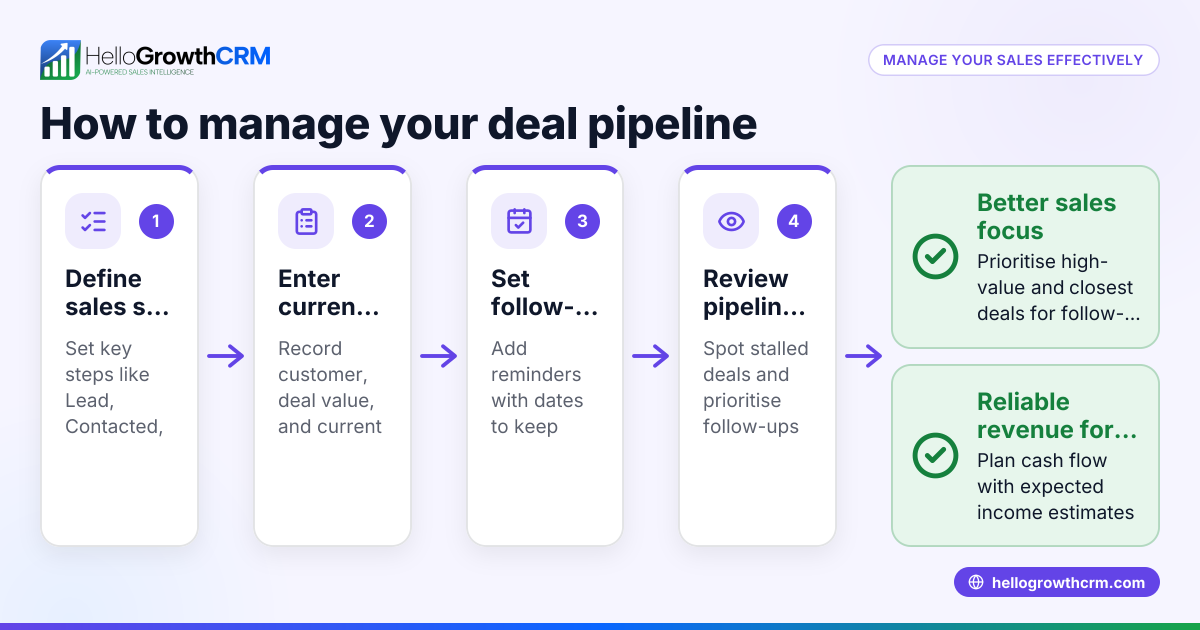
- Define your stage rules
Set expected time-in-stage limits for each pipeline stage. Use historical medians if possible. If not, start with rough thresholds and refine after 30 days. - Add required audit fields
Make next step, next step date, close date, forecast category, and primary contact mandatory on active deals. Add custom fields for slip reason and risk reason where needed. - Create saved audit views
Build views for stalled deals, no-next-step deals, owner inactivity, and slipped close dates. Keep each view simple so managers can act fast. - Turn on workflow alerts
Configure alerts for overdue follow-ups, stage-age breaches, and no activity windows. Route notifications through Slack or email so reps see them quickly. - Connect activity sources
Sync Gmail, Calendly, calling, and meeting tools so last activity data stays reliable. Bad activity capture ruins good audit logic. - Add AI summaries for managers
Use AI Pipeline Management and AI Sales Copilot to summarize risk patterns before the weekly review. - Run a weekly manager review
Review only exception deals first. Do not inspect every deal equally. Focus on late-stage, high-value, and stale opportunities. - Tighten rules after two cycles
Watch for false positives. If too many healthy deals get flagged, adjust thresholds. Audit systems work best when reps trust the logic.
How managers can use the template in weekly pipeline reviews
Managers should use the HelloGrowthCRM pipeline audit template as an exception-based review tool that prioritizes risky deals first, because weekly reviews are most effective when they focus on stale stages, missing actions, and forecast changes rather than listening to every deal update in sequence.
A good weekly review is short, sharp, and evidence-based. The audit template gives managers a clean agenda.
A practical weekly review flow
Use this order:
- Commit deals with risk alerts
- Late-stage deals with no future meeting
- Deals with stage age above threshold
- Deals with owner inactivity
- Deals with repeated close-date slips
For each flagged deal, ask:
- What is the buyer’s next committed action?
- When did the last meaningful customer interaction happen?
- What changed since the last review?
- Is the current stage still accurate?
- Does the forecast category still hold?
When I have audited pipelines like this, the strongest managers do not ask for story-heavy updates. They ask for evidence. A booked meeting. A confirmed legal review. A pricing discussion with procurement. A named champion. That keeps reviews objective.
Example use case
Imagine a sales manager with eight AEs and 140 open deals. By Monday morning, HelloGrowthCRM shows:
- 17 deals with no next step date
- 11 deals above stage-age threshold
- 9 proposal-stage deals with no future meeting
- 6 commit deals with a slipped close date
- 4 owners with low activity last week
Instead of reviewing 140 deals, the manager reviews 27 exception records. That is the real value of the template. It cuts noise and improves coaching quality.
If your team wants a faster rollout, book a Demo or start a Free Trial to see how the audit views, alerts, and forecast controls work in a live environment.
HelloGrowthCRM gives sales teams a practical way to find stalled deals and missing follow-ups before they hurt the forecast. If you want cleaner pipeline reviews, better rep accountability, and faster action on deal risk, explore the platform’s Features, check Pricing, or start a Free Trial today.
About the author
Riya Mehta is a Sales Operations Lead at HelloGrowthCRM with 9 years of experience in B2B SaaS revenue operations, pipeline governance, and forecast management. She has led CRM redesigns for SMB and mid-market sales teams and regularly helps managers build cleaner review processes inside HelloGrowthCRM. One project that shaped this article was a pipeline cleanup for a 12-person account executive team, where structured next-step rules and stage-age alerts improved weekly forecast reviews within one quarter.
Frequently Asked Questions
Q: What is a pipeline audit template in HelloGrowthCRM?
A: A pipeline audit template in HelloGrowthCRM is a structured set of fields, filters, and alerts that checks deal quality, follow-up discipline, and forecast risk. It helps managers review exceptions fast instead of manually inspecting every open opportunity.
Q: How does HelloGrowthCRM find stalled deals?
A: HelloGrowthCRM finds stalled deals by tracking stage age, last activity date, missing next steps, and absent future meetings against preset rules. When a deal crosses a threshold, the system can flag it for the owner or manager automatically.
Q: Which fields matter most in a pipeline audit?
Frequently Asked Questions
Ready to put this into practice?
Set up your pipeline, WhatsApp follow-ups, and AI lead scoring in minutes — free, no credit card.
Try HelloGrowthCRM freeGet CRM tips in your inbox
Join thousands of sales professionals who get weekly insights on CRM strategy, AI automation, and pipeline optimization.

The HelloGrowthCRM team publishes guides on CRM strategy, AI sales tools, and revenue operations for small business sales teams.