Customer Health Scoring for Post-Sale Teams
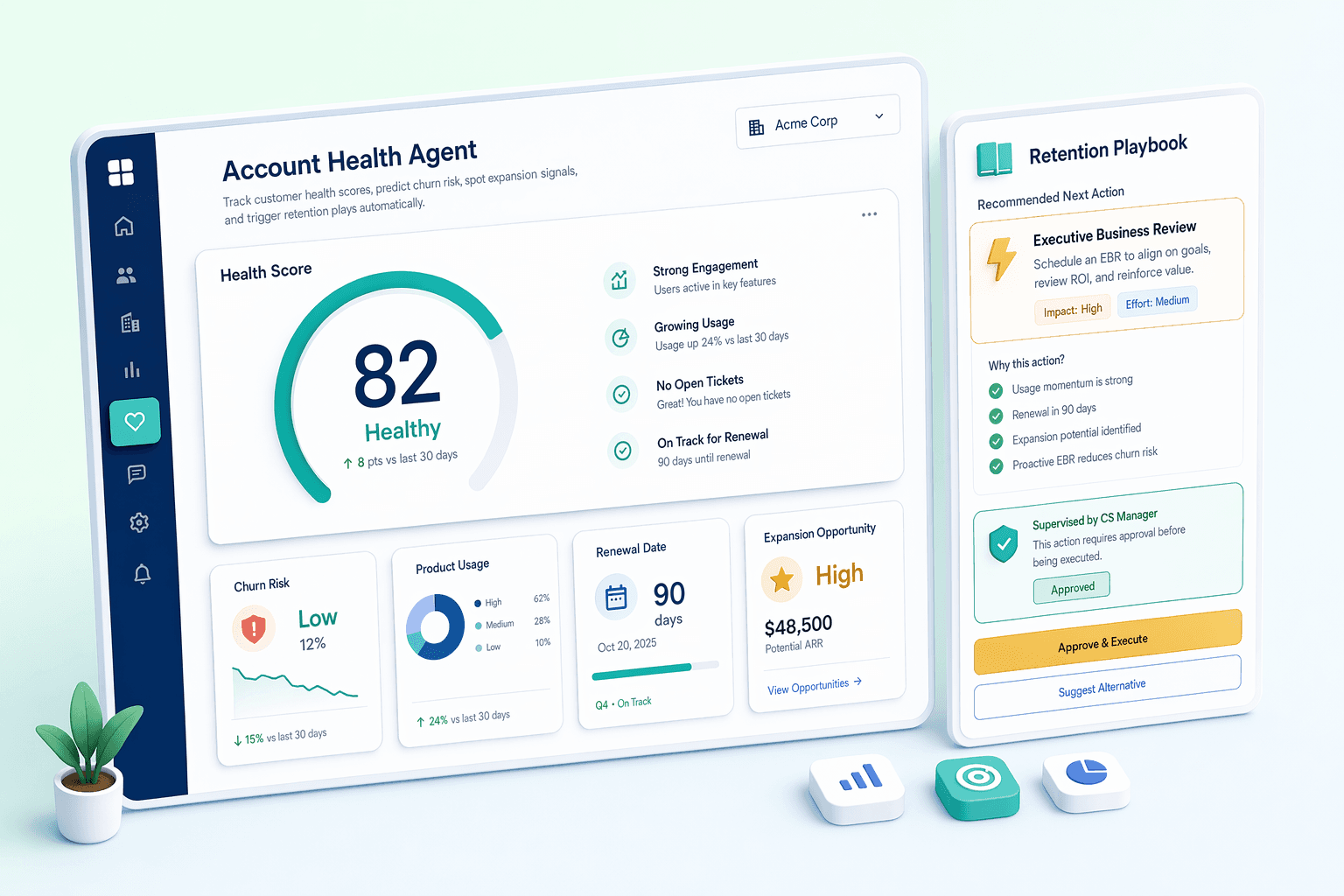
Predict churn before it happens. Spot expansion before your competitors do. AI monitors usage, support, sentiment, and payments to give every account a Healthy / At Risk / Critical rating.
By Rushabh Shah, Founder, HelloGrowthCRM · Reviewed by HelloGrowthCRM RevOps Team, Revenue Operations · Last updated July 2026
Key takeaways
- A customer health score condenses usage, support, sentiment, payments, and engagement into one Healthy / At Risk / Critical rating per account.
- Its purpose is early warning: catch a quietly declining account while you can still save it, not at renewal when the decision is made.
- The score updates continuously from real behavior, so it covers every account equally — including the quiet ones nobody is watching.
- Tier changes trigger playbooks — tasks, sequences, or Slack alerts — so the first person to notice a struggling customer is you.
- A health score is a prioritization signal, not a verdict; it points to accounts that need a human conversation, it does not replace one.
Quick answer
What data does the health score use?
Also answered on this page
- How is this different from a simple NPS dashboard
- Can I customize the health scoring model
- What happens when an account's health changes
Why teams evaluate customer health scoring
Customer Health Scoring usually becomes important when a repeated part of the revenue workflow is creating too much manual work, too little visibility, or too much tool-switching. Teams are rarely shopping for a feature in isolation. They are usually trying to make one meaningful workflow cleaner, faster, and easier to inspect.
That is why buyers usually look beyond the headline capability and inspect the surrounding details: Customer health score (Healthy / At Risk / Critical), Churn prediction with risk drivers, Expansion opportunity detection, Product usage monitoring. Those details determine whether the feature actually improves day-to-day execution or simply adds another surface area to manage.
Where customer health scoring fits in the workflow
Most teams adopt this capability as part of practical motions such as prevent churn proactively, identify expansion revenue, prioritize cs resources. The value tends to show up fastest when the workflow is tied to a clear owner, a clear next action, and a visible outcome that managers can review later.
It also matters how this page connects to the rest of the stack. For many teams, tools such as Intercom, Zendesk, Stripe, Slack are what make the feature operational instead of theoretical because they keep data, communication, and handoffs in sync.
What a strong rollout looks like for customer health scoring
The best rollout usually starts small: one high-value workflow, one clear ownership model, and one review rhythm for adoption. Once the team is consistently using the feature, managers can expand into deeper automation, reporting, or cross-functional handoffs without rebuilding the foundation.
In practice, that means evaluating not only what the feature can do, but also whether the team can maintain the process around it. Ease of use, reporting trust, and manager visibility matter just as much as the feature checklist itself.
- Use it first for prevent churn proactively if that is the workflow creating the most friction today.
- Use it first for identify expansion revenue if that is the workflow creating the most friction today.
- Use it first for prioritize cs resources if that is the workflow creating the most friction today.
- Use it first for prepare for renewals if that is the workflow creating the most friction today.
How It Works
Get started in three simple steps
Key Features
Use Cases
Prevent Churn Proactively
Receive alerts the moment an account's health drops, giving CSMs time to intervene before the customer decides to leave.
What teams care about
- Fast adoption with less manual cleanup for managers and reps.
- Clear visibility into workflow execution, outcomes, and accountability.
- Reliable handoffs into the CRM record so downstream teams keep full context.
Deep dive
Open the sections that matter most instead of scrolling through a long uninterrupted text block.
What Is a Customer Health Score?
A customer health score is a single rating that summarizes how likely an account is to stay, churn, or grow — usually expressed as Healthy, At Risk, or Critical. It rolls up signals you already generate about each customer (how much they use the product, how often they contact support, how they answer surveys, whether they pay on time) into one number a team can act on at a glance.
The reason it exists is timing. Customers rarely announce that they are leaving; they drift. Usage slips, a couple of support tickets turn sour, an invoice runs late, a monthly call gets skipped. Each signal on its own is easy to miss, and the account that no one has thought about recently is exactly the one most likely to churn. A health score stacks those quiet signals together so the decline shows up while there is still time to intervene.
The table below shows the main signal categories a health score reads and what a change in each typically indicates.
| Signal | Healthy direction | Warning direction |
|---|---|---|
| Product usage | Steady or growing | Declining or dormant |
| Support tickets | Low volume, positive tone | Rising volume, negative tone |
| NPS / CSAT | High, stable | Falling or newly negative |
| Payments | On time | Late or failed invoices |
| Engagement | Replies, attends calls | Slow replies, skipped meetings |
How customer health scoring works, step by step
Health scoring starts with signals you already generate. Every account in HelloGrowthCRM accumulates activity: emails opened and answered, calls logged through the built-in dialer, support conversations, invoice and payment status, and renewal dates. Individually these are anecdotes; together they form a pattern.
The scoring model weighs those signals against thresholds you control. Falling usage plus a rising ticket count plus a late invoice is a very different situation than falling usage alone, and the score reflects that. Each account lands in one of three tiers — Healthy, At Risk, or Critical — with the specific drivers listed, so you know why the score moved, not just that it did.
Tier changes trigger action. An account dropping to At Risk can create a task for the account owner, start a check-in email sequence, or post an alert to Slack. The goal is simple: the first person to notice a struggling customer should be you, not your customer's new vendor.
How the Score Is Built — A Worked Example
It helps to see how separate signals combine into one tier. The illustrative account below looks fine on the surface — the customer still logs in — but the pattern underneath is deteriorating, and the score reflects the combination rather than any single line.
| Signal | Reading this month | Effect on score |
|---|---|---|
| Product usage | Down 40% vs. prior 3 months | Pulls toward At Risk |
| Support tickets | 3 tickets, frustrated tone | Pulls toward At Risk |
| Last NPS | Dropped from 9 to 6 | Slight negative |
| Payment | Latest invoice 12 days late | Negative |
| Overall | Still logging in weekly | Net tier: At Risk, flagged for check-in |
Small-business scenarios for health scoring
A marketing agency with 40 retainer clients uses health scores to catch quiet unhappiness. Clients rarely announce they are shopping around — they just respond more slowly, skip a monthly call, and pay an invoice late. When those signals stack up, the account lead gets a task to schedule a review meeting before renewal season, not during it.
A SaaS reseller tracks onboarding health for every new customer's first 90 days. Accounts that miss early milestones get flagged Critical, and the team runs a rescue playbook — extra training call, owner check-in — because customers who never activate are the ones who churn at the first renewal.
An IT services firm uses expansion signals in the other direction: accounts with growing activity, fast payments, and positive interactions get flagged as expansion-ready, so upgrade conversations happen when the customer is happiest rather than when the sales team needs the revenue.
Tracking customer health in spreadsheets vs. in your CRM
The spreadsheet version of health scoring is a quarterly exercise: someone exports the customer list, colors rows red, yellow, and green from memory, and the file is stale before the meeting ends. It captures opinions about accounts, not behavior — and it systematically misses the quiet accounts nobody has thought about recently, which are precisely the ones most likely to churn.
CRM-based scoring inverts this. The score updates continuously from real activity, covers every account equally — including the ones nobody is watching — and keeps the evidence attached. When a score drops, you can open the account and see the missed calls, the unanswered emails, and the aging invoice that caused it. That turns a debate about gut feel into a conversation about what to do next.
| Aspect | Spreadsheet | CRM health score |
|---|---|---|
| Update frequency | Quarterly, manual | Continuous, automatic |
| Based on | Opinion and memory | Actual behavior signals |
| Coverage | Accounts someone remembers | Every account equally |
| Evidence | None attached | Drivers linked to the record |
| Action | Discussed in a meeting | Triggers a playbook |
Best Practices for Customer Health Scoring
A health score is only useful if it drives action and stays trustworthy. Standalone customer-success platforms are built and priced for enterprise CS teams; for a small business the practical checklist is shorter, and a few habits keep the score honest.
Score automatically from data you already collect — activity, payments, support — rather than grading accounts by hand.
Tune weights and thresholds per segment or plan type, since a healthy enterprise account looks different from a healthy self-serve one.
Make sure every score shows its drivers, so the next action is obvious.
Route tier changes to the tools your team actually watches — tasks, sequences, Slack, or WhatsApp.
Keep renewal dates and health context on the same record so renewal prep is one glance.
Review the drivers before acting; treat the score as a starting point for a human conversation.
Common Mistakes With Health Scores
Health scoring goes wrong when the model is set once and never revisited, or when the score is treated as truth instead of a prompt. These are the patterns that erode trust in the number.
Overweighting a single signal (usually product usage) so the score misses relationship and payment risk.
Setting thresholds once and never recalibrating as your customer base changes.
Generating scores but building no playbook, so At Risk accounts get flagged and then ignored.
Using one model for every segment when enterprise and self-serve accounts behave differently.
Treating the score as a verdict and skipping the conversation that reveals the real cause.
Watching only the loud, complaining accounts while quiet, disengaged ones churn unnoticed.
Drawbacks & Limits (Honest View)
A health score is a probability, not a certainty. It is built from proxies for satisfaction — logins, tickets, payments — and those proxies can mislead. A power user who quietly decides to switch may look perfectly Healthy until the day they give notice, and a low-usage account may be entirely content with a light-touch product. The score narrows where to look; it does not remove the need to actually talk to customers, and teams that treat it as gospel will be surprised by the accounts it could never see inside.
There are practical limits too. The score is only as good as the data feeding it: if support, billing, or product usage is not connected, the model is working with a partial picture and will be less reliable. Small customer bases give the model fewer patterns to learn from, so early scores should be read as directional. And any scoring system needs periodic recalibration as your product, pricing, and customer mix change — a model tuned a year ago can quietly drift out of step with reality. These are manageable, but they mean health scoring is a discipline to maintain, not a dashboard to set and forget.
Evidence: Why Early Churn Warning Pays Off
The argument for health scoring is that catching risk early and prioritizing the right accounts protects revenue you already earned. The widely cited industry benchmarks below are external figures, not HelloGrowthCRM measurements.
$8.71 — Average return for every $1 invested in CRM when customer data is captured and acted on (Source: Nucleus Research)
~15-20% — Improvement in accuracy when AI assists prediction versus manual, gut-feel assessment (Source: McKinsey)
~25% — Productivity gain reported by teams using AI in their sales and revenue workflows (Source: Gartner)
Account Health Agent as a Churn Prevention System
Customer churn is typically visible in the data weeks before a customer formally cancels. Product usage drops. Support ticket sentiment shifts negative. NPS responses get shorter and less enthusiastic. Renewal conversations get delayed. The Account Health Agent monitors all of these signals simultaneously and synthesizes them into a single health score per account — Healthy, At Risk, or Critical — updated continuously as new signals arrive.
The agent's value is not in the score itself but in the intervention it triggers. When an account transitions from Healthy to At Risk, the agent can automatically create a customer success task, alert the account owner via Slack, and enroll the account in a re-engagement sequence — all without a CSM having to notice the change. This automated early warning and response system is what converts health scoring from a reporting tool into a churn prevention engine.
Expansion Revenue Detection and Account Growth Signals
The Account Health Agent is designed for both retention and expansion. Accounts that show consistent high product usage, positive sentiment across support interactions, and frequent feature adoption are flagged as expansion-ready — signals that the customer has found value and is likely receptive to an upsell conversation. The agent surfaces these accounts in an expansion opportunities list with the specific signals that triggered the flag, giving account managers the right context to initiate an upsell conversation.
Expansion timing is as important as expansion identification. An account flagged as expansion-ready three months before their renewal date gives the account team enough time to build the business case, involve additional stakeholders, and align the upsell with the renewal process. The Account Health Agent tracks renewal dates and cross-references them with expansion signals to prioritize accounts where the timing of an expansion conversation is most favorable.
A customer health score is a single rating that summarizes how likely an account is to stay, churn, or grow — usually expressed as Healthy, At Risk, or Critical. It rolls up signals you already generate about each customer (how much they use the product, how often they contact support, how they answer surveys, whether they pay on time) into one number a team can act on at a glance.
The reason it exists is timing. Customers rarely announce that they are leaving; they drift. Usage slips, a couple of support tickets turn sour, an invoice runs late, a monthly call gets skipped. Each signal on its own is easy to miss, and the account that no one has thought about recently is exactly the one most likely to churn. A health score stacks those quiet signals together so the decline shows up while there is still time to intervene.
The table below shows the main signal categories a health score reads and what a change in each typically indicates.
Common health signals and what they suggest
| Signal | Healthy direction | Warning direction |
|---|---|---|
| Product usage | Steady or growing | Declining or dormant |
| Support tickets | Low volume, positive tone | Rising volume, negative tone |
| NPS / CSAT | High, stable | Falling or newly negative |
| Payments | On time | Late or failed invoices |
| Engagement | Replies, attends calls | Slow replies, skipped meetings |
Buyer playbook
Compare, launch, and govern the workflow with an interactive overview instead of four long generic essays.
How teams evaluate customer health scoring
The best pages help buyers understand fit quickly instead of forcing them through long walls of copy.
Check whether the product covers the capabilities you actually care about, such as Customer health score (Healthy / At Risk / Critical), Churn prediction with risk drivers, Expansion opportunity detection, Product usage monitoring.
Test if it supports real execution scenarios like Prevent Churn Proactively, Identify Expansion Revenue, Prioritize CS Resources.
Confirm the workflow stays connected to Intercom, Zendesk, Stripe, Slack so reporting and handoffs remain reliable.
Frequently Asked Questions
Related Features
AI Deal Insights
AI-powered deal health scoring with risk explanations and next-best-action recommendations.
Smart Inbox
Unified communications hub that pulls every customer touchpoint into one prioritized feed.
Revenue Attribution
Multi-touch attribution showing which channels and campaigns drive pipeline and closed revenue.
Explore More
Related Products
Free Tools & Calculators
WhatsApp Template Generator
Draft WhatsApp message templates for intros, follow-ups, payments and support. Free.
Lead Scoring Calculator
Build a custom scoring model with weights.
CRM ROI Calculator
Calculate the revenue impact of adopting a CRM.
Pipeline Calculator
Model your pipeline stages and conversion rates.