HelloGrowthCRM software
Built for real small-business sales teams
HelloGrowthCRM helps reps qualify faster, follow up on time, and close more deals—with practical automation in one place.
- AI lead scoring and pipeline visibility
- Built-in dialer, WhatsApp, and email automation
- Sales forecasting and RevOps-ready reporting
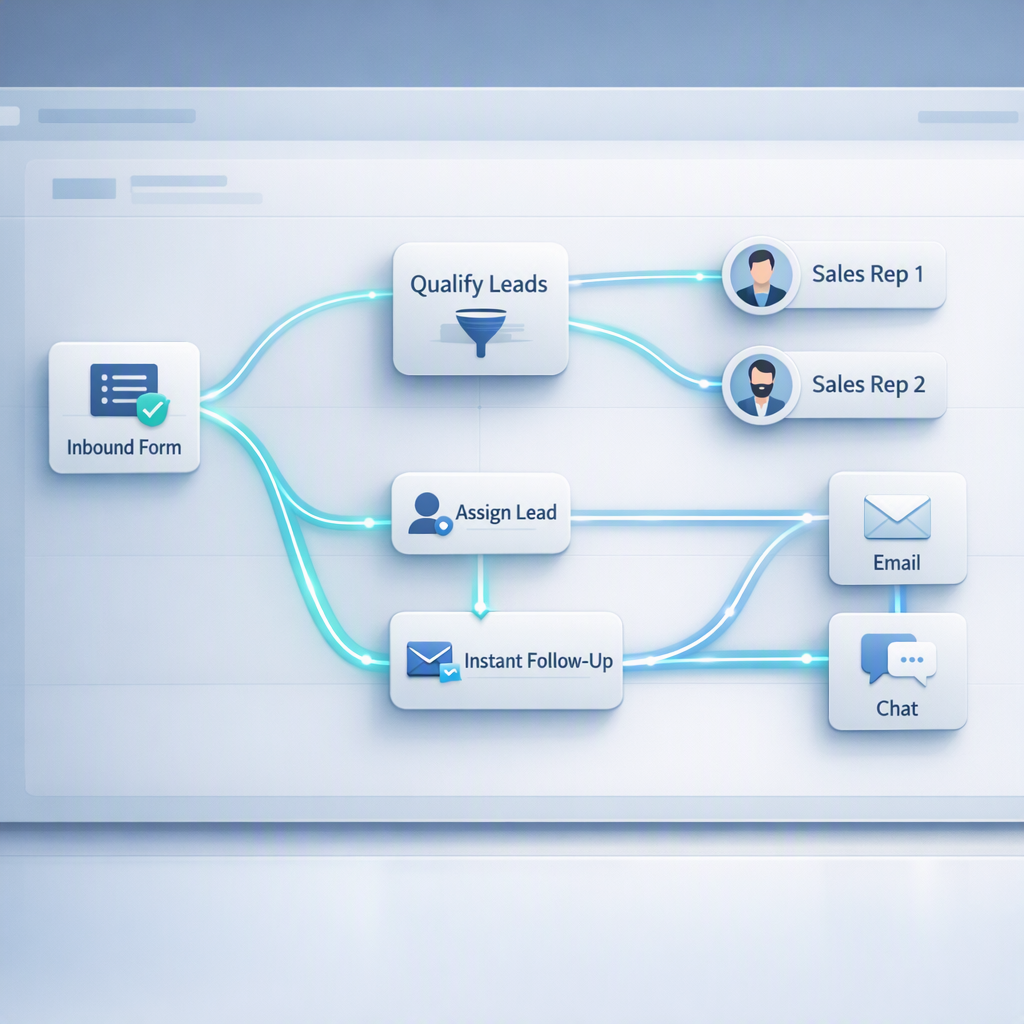
AI follow-up automation for demo requests is the use of CRM workflows, AI scoring, routing rules, and personalized messaging to respond to inbound demo leads instantly, qualify them accurately, and move each request to the right rep or sequence without manual delays that hurt conversion.
Key Takeaways
- Start by automating speed-to-lead, qualification, routing, and rep task creation before you automate complex multichannel nurture.
- The best demo request workflows use firmographic, behavioral, and intent signals together, not just form fields.
- Personalization should come from CRM data, page context, and lead source, not generic AI-written filler.
- Managed RevOps helps teams deploy automation faster by fixing routing logic, lifecycle stages, and reporting gaps first.
- HelloGrowthCRM combines AI CRM, AI Lead Scoring, and Meeting Scheduler workflows so teams can automate follow-up without losing control.
Why AI follow-up automation for demo requests matters
AI follow-up automation for demo requests matters because inbound demo leads are usually high intent, but they cool off fast when teams respond late, route badly, or send generic replies. A strong CRM workflow protects speed-to-lead, raises meeting rates, and keeps reps focused on qualified opportunities.
Most teams do not lose demo requests because they lack leads. They lose them in the first 15 minutes after the form fill.
In practice, four problems show up again and again:
- No instant confirmation or meeting option
- Weak qualification before rep assignment
- Poor territory or account routing
- Delayed rep action after assignment
This is where an AI CRM helps. Instead of one static autoresponder, you can trigger different actions based on source, company size, region, product interest, and existing account ownership. Inside HelloGrowthCRM, teams often combine AI Pipeline Management, Smart Inbox, and Sales Task Boards to make sure no request stalls after submission.
A widely cited review in the Harvard Business Review found that firms that tried to contact potential customers within an hour were nearly seven times as likely to qualify the lead as firms that waited even an hour longer, and more than 60 times as likely as companies that waited 24 hours or more (HBR).
That is the business case in one data point. Fast, relevant follow-up wins.
What to automate first in your CRM
What to automate first in your CRM for demo requests is the small set of workflows that directly affect response time, qualification accuracy, rep ownership, and meeting booking. Start with these core moves before building advanced nurture logic, because these first automations create the biggest lift with the least complexity.
1. Instant confirmation and calendar handoff
Every demo request should trigger an immediate response. The message should confirm receipt, set expectations, and offer a booking path. If your process requires qualification first, say that clearly.
Good first-response automation includes:
- Lead name and company
- Product or page context
- Region-specific scheduling link
- Backup contact path if no slots are open
If your team uses Meeting Scheduler with Google Meet or Microsoft Teams, you can reduce the time between form fill and booked meeting.
2. Lead qualification scoring
Not every demo request deserves the same speed or rep time. Use AI Lead Scoring to rank requests based on ICP fit and buying intent.
Useful inputs include:
- Employee count
- Industry
- Country or territory
- Use case selected
- Ad or campaign source
- Repeat visits to pricing or product pages
- Existing account match
- Form language and urgency terms
In one rollout we did with a 12-person sales team, the biggest improvement came from separating “high-fit now” from “needs qualification” within minutes. That one rule change stopped enterprise requests from sitting in a generic queue.
3. Routing and ownership assignment
After scoring, route the request to the right owner. Routing should account for:
- Territory
- Named accounts
- Existing opportunities
- Segment
- Product line
- Language coverage
This is where many teams need Managed RevOps. The workflow itself is easy. The hard part is cleaning ownership rules and lifecycle definitions.
4. Rep task and SLA creation
Do not rely on the rep noticing an email. Create a task with an SLA, a due time, and an escalation path. You can send Slack alerts through the Slack integration and add fallback logic if the task is not completed.
Which triggers and signals make automation smarter
The triggers and signals that make demo request automation smarter are the ones that combine explicit form data with behavior, account context, and source quality. This mix helps your CRM decide who needs instant rep outreach, who should self-book, and who should enter a qualification path.
Use explicit and implicit signals together
Explicit signals come from the form. Implicit signals come from behavior.
Strong explicit signals:
- Company size
- Job title
- Product interest
- Region
- Timeline
- CRM or tool stack
Strong implicit signals:
- Visited Pricing or product pages
- Viewed multiple pages in one session
- Opened previous emails
- Came from branded search or partner traffic
- Returned within 7 days
When I have audited pipelines like this, I usually find that teams over-weight one field like “company size” and ignore path-to-conversion behavior. A 50-person buyer who visited pricing twice and requested a demo from a comparison page can be more sales-ready than a larger company with weak engagement.
Add account and ownership context
Before assigning a lead, check whether the domain already exists in the CRM. If there is an open deal, a customer success owner, or a named account plan, your automation should respect that.
This is one reason to connect Gmail, HubSpot, or Salesforce records when needed. You need one source of truth for ownership.
Include source quality in the score
Not all demo requests come from the same level of intent. Add source weighting for:
- Organic high-intent pages
- Retargeting campaigns
- Review sites
- Partner referrals
- Webinar follow-up
- Broad social traffic
Gartner notes that B2B buying is increasingly complex and non-linear, which makes signal-based orchestration more important than simple stage rules (Gartner).
How to personalize automated follow-up without sounding generic
To personalize automated follow-up without sounding generic, use CRM context, page-level intent, and role-based value points instead of broad AI copy. The goal is not to make every email long. The goal is to make the first response feel relevant, timely, and easy to act on.
Personalize with structured fields, not just generated text
AI should fill in useful context. It should not invent fake familiarity.
Use these personalization layers:
- First name and company
- Form topic or requested use case
- Page or campaign source
- Region and language
- Segment-specific proof point
- Correct booking link or rep owner
For example, a request from a sales manager on a forecasting page should not get the same first email as an operations leader asking about WhatsApp workflows. HelloGrowthCRM teams can use Sales Forecasting, WhatsApp & SMS CRM, or Email Automation page context to shape the response.
Build response paths by scenario
You do not need dozens of branches. Start with 4-5 core paths:
| Scenario | Trigger logic | First response | Owner action |
|---|---|---|---|
| High-fit inbound | ICP score high + pricing/demo page | Instant rep intro + booking link | Call within SLA |
| Mid-fit lead | Moderate score + unclear use case | Qualification email + scheduler | Review in queue |
| Existing account | Domain match with account owner | Assigned owner outreach | Coordinate internally |
| Partner or referral | Referral source detected | Fast human response | Named rep follow-up |
| Out-of-region | No local owner or unsupported market | Expectation-setting reply | Route to shared team |
That table is often enough for a first version.
Keep AI messaging grounded
Do not let AI write vague lines like “I noticed your company is transforming revenue workflows.” Buyers ignore that.
Better copy is simple:
- “Thanks for requesting a demo of HelloGrowthCRM.”
- “You mentioned lead routing and follow-up automation.”
- “Here is the fastest way to book time with the right specialist.”
If you want AI assistance for reps after assignment, AI Sales Copilot and AI Deal Insights can prepare context without sending robotic messages.
Where teams usually break their demo request workflows
Teams usually break demo request workflows at handoffs, data quality, and exception handling, not at the form itself. Most failures happen after the lead enters the CRM, when routing rules conflict, tasks are missed, or personalization depends on incomplete data.
Common failure points
Watch for these issues:
- Duplicate records across systems
- No fallback owner if routing fails
- Wrong time zone in booking links
- Missing campaign source values
- Overlapping territory rules
- No SLA reporting
- Generic templates for every segment
A good CRM ROI Calculator or RevOps Maturity Assessment can help quantify the cost of these gaps before you rebuild the workflow.
Know the limits of automation
Automation works best for teams with clear ownership and fewer edge cases. For teams under 50 reps, a well-designed workflow can cover most inbound demo traffic. Above that, expect more routing exceptions, account hierarchies, and regional compliance needs.
You also should not automate every follow-up touch. High-value enterprise requests often need a fast human call, not a five-email sequence.
How to deploy AI follow-up automation for demo requests: Step-by-Step
To deploy AI follow-up automation for demo requests, start by defining lead stages and ownership rules, then connect scoring, routing, and response workflows inside your CRM. Launch a simple first version, monitor SLA and booking rates, and only then add more channels or AI-driven branching.
- Map the inbound path
List every demo source, form, landing page, and booking path. Include paid, organic, partner, and product-led entry points. - Define qualification criteria
Set your ICP and intent rules. Use fields like segment, employee range, region, use case, and behavioral signals. - Create score thresholds
Build clear cutoffs for high-fit, review-needed, and nurture. If needed, use the Lead Scoring Calculator to model weighting before launch. - Set routing rules
Route by territory, named account, product line, or language. Add fallback queues for missing data or unsupported regions. - Write scenario-based first responses
Draft 4-5 email or message variants tied to lead scenario. Connect them to Email Automation or WhatsApp if that matches your sales motion. - Attach meeting and rep tasks
Let qualified leads self-book or trigger a rep task immediately. Use due times, reminders, and escalation rules. - Connect notifications and systems
Sync alerts to Slack, mailboxes to Gmail, and any supporting apps through Zapier or All Integrations. - Track SLA and conversion metrics
Monitor first-response time, contact rate, meeting-booked rate, no-show rate, and stage conversion by source. - Review exceptions every week
Audit failed routes, duplicate records, and low-quality AI outputs. This is where most improvement opportunities appear in month one.
When managed RevOps helps more than DIY automation
Managed RevOps helps more than DIY automation when your team has inconsistent lifecycle stages, unclear ownership, multiple tools, or weak reporting. In those cases, adding AI workflows without fixing the operating model usually creates faster chaos rather than better conversion.
Teams often assume they have an automation problem. In reality, they have a systems design problem.
Managed RevOps is especially useful when:
- Marketing and sales disagree on MQL or demo qualification
- Territories or named accounts change often
- CRM data is incomplete or duplicated
- Multiple calendars, inboxes, and tools are involved
- Leadership wants source-to-revenue reporting
HelloGrowthCRM’s Managed RevOps team helps align stages, routing logic, lead scoring, automation, and reporting in one rollout. If you already know your process gaps, you can explore Features. If you need a live walkthrough, book a Demo.
AI can speed execution. RevOps makes sure the process deserves to be automated.
If you want to automate demo request follow-up without sending generic outreach or missing high-intent buyers, HelloGrowthCRM gives you the tools in one place: AI CRM, AI Lead Scoring, scheduling, routing, and RevOps support. Start with a Free Trial or book a Demo to see how your workflow can work in production.
About the author
Arjun Mehta is a Sales Operations Lead at HelloGrowthCRM with 10 years of experience in B2B SaaS revenue operations, CRM design, and automation strategy. He has led CRM and routing rollouts across inbound sales teams, including a project for a global SaaS company that rebuilt demo request assignment rules across three regions and cut response delays caused by ownership conflicts. This article draws on hands-on work in lead scoring, SLA design, and inbound conversion reporting.
Frequently Asked Questions
Q: What is AI follow-up automation for demo requests?
A: AI follow-up automation for demo requests is the use of CRM workflows and AI signals to respond, qualify, route, and schedule inbound demo leads automatically. It helps teams reduce response delays, assign the right owner, and send more relevant first-touch outreach.
Q: What should I automate first after a demo form submission?
A: What you should automate first after a demo form submission is the instant confirmation, lead scoring, routing, and rep task creation. Those four automations affect speed-to-lead and meeting conversion more than advanced nurture sequences do.
Q: Can AI personalize demo follow-up without sounding robotic?
A: Yes, AI can personalize demo follow-up without sounding robotic when it uses real CRM context instead of generic filler text. Good personalization comes from role, source, page intent, product interest, and account ownership, not from long AI-written paragraphs.
Q: How fast should sales follow up on a demo request?
A: Sales should follow up on a demo request as fast as possible, ideally within minutes of submission. The highest-performing teams use automation to confirm receipt instantly and create a same-session path to booking or live rep outreach.
Q: Do I need lead scoring for demo request automation?
A: Yes, you need lead scoring for demo request automation if you want to prioritize rep time and route leads accurately. Even simple scoring helps separate high-fit buyers from lower-fit inquiries that need qualification before a live demo.
Q: When does managed RevOps make sense for automation projects?
A: Managed RevOps makes sense for automation projects when your CRM stages, routing rules, and reporting are inconsistent. It is especially useful when teams use multiple systems or when ownership logic is too messy for a clean DIY launch.
Q: What metrics should I track for demo request follow-up automation?
A: The metrics you should track for demo request follow-up automation are first-response time, contact rate, meeting-booked rate, no-show rate, and conversion by source or segment. These metrics show whether automation is improving speed, quality, and pipeline impact.
Q: Is HelloGrowthCRM a good fit for automating demo request workflows?
A: HelloGrowthCRM is a good fit for automating demo request workflows if you want AI scoring, routing, scheduling, and RevOps support in one system. It is especially useful for B2B teams that need faster deployment with fewer handoff gaps.
Frequently Asked Questions
Ready to put this into practice?
Set up your pipeline, WhatsApp follow-ups, and AI lead scoring in minutes — free, no credit card.
Try HelloGrowthCRM freeGet CRM tips in your inbox
Join thousands of sales professionals who get weekly insights on CRM strategy, AI automation, and pipeline optimization.

The HelloGrowthCRM team publishes guides on CRM strategy, AI sales tools, and revenue operations for small business sales teams.