HelloGrowthCRM software
Built for real small-business sales teams
HelloGrowthCRM helps reps qualify faster, follow up on time, and close more deals—with practical automation in one place.
- AI lead scoring and pipeline visibility
- Built-in dialer, WhatsApp, and email automation
- Sales forecasting and RevOps-ready reporting
AI follow-up for demo requests is the use of CRM-based automation, lead scoring, routing logic, and AI-generated outreach to contact inbound demo leads within minutes, qualify intent from form and behavior signals, and book the right meeting with the right rep before high-intent buyers lose momentum.
B2B teams usually do not lose demo requests because they lack forms. They lose them in the gap between form submit and first useful response. That gap is where speed, qualification, and booking rules matter most.
Key Takeaways
- AI follow-up for demo requests works best when it combines speed-to-lead, qualification, routing, and scheduling in one CRM workflow.
- The first goal is not a long nurture. It is to get a qualified buyer to the right meeting fast.
- The strongest rules use both declared data, like company size, and behavioral data, like page views or email replies.
- Good automation should escalate uncertain leads to humans instead of forcing every case through a rigid bot flow.
- HelloGrowthCRM helps teams run these workflows with AI CRM, AI Lead Scoring, Meeting Scheduler, and AI Pipeline Management.
- Fast follow-up only works if the handoff is clean. Routing, ownership, and SLA alerts matter as much as the message itself.
What is AI follow-up for demo requests?
AI follow-up for demo requests is a CRM workflow that automatically responds to inbound demo leads, scores their fit and intent, assigns them to the right owner, and pushes them toward a booked meeting using rules, data enrichment, and personalized outreach within minutes of form submission.
At a practical level, this is not just an auto-reply email. It is a decision engine inside your CRM.
A solid workflow usually includes:
- Instant acknowledgement
- Lead scoring
- Qualification prompts
- Territory or segment routing
- Calendar booking
- Rep alerts
- Fallback sequences if no meeting is booked
In HelloGrowthCRM, these actions can sit inside one system instead of being split across point tools. Teams often pair Email Automation with AI Lead Scoring, Meeting Scheduler, and Smart Inbox so inbound demo requests move from form fill to booked call without manual triage.
From experience, this is where many CRM setups fail. When I have audited inbound workflows, the common issue was not weak lead volume. It was that demo requests entered the CRM with no firm owner, no response SLA, and no booking path. Buyers waited. Reps guessed. Pipeline suffered.
Harvard Business Review has repeatedly covered the business impact of faster, better sales response and process discipline in modern B2B selling. The point is simple. Delay kills intent.
Why does speed matter so much after a demo request?
Speed matters after a demo request because the buyer has already raised their hand, and every extra minute increases drop-off, competitive distraction, and internal context switching; the best AI follow-up rules preserve buying intent by delivering a relevant next step before the prospect moves on.
This is especially true for global B2B teams. Buyers submit forms across time zones. If your process depends on a rep seeing a Slack ping and replying later, you create avoidable loss.
One widely cited benchmark found that responding within five minutes makes companies far more likely to connect with a lead than waiting longer, according to InsideSales research summarized by Lead Connect.
That does not mean every buyer needs a human call in five minutes. It means every buyer needs useful movement in five minutes. AI can provide that movement.
What “fast” should mean in practice
For demo requests, fast usually means:
- Instant confirmation on submit
- First personalized outreach in under 1 minute
- Qualification review or AI score in under 2 minutes
- Routing to the correct owner in under 3 minutes
- Booking path offered immediately
- Human follow-up if unbooked within 15 to 60 minutes
In one rollout we did with a 12-person sales team, changing only the inbound demo workflow cut median first-touch time from hours to under three minutes. The biggest gain came from routing and scheduling logic, not from better copy.
Speed without qualification creates noise
Fast is not enough if the wrong rep gets the wrong lead.
If enterprise buyers land in an SMB queue, or partners get treated like direct prospects, your process feels broken. That is why speed and qualification should run together inside the CRM.
This is where Territory Management and Sales Task Boards help. They turn fast response into accountable execution.
Which rules should you set for AI follow-up on demo requests?
The best AI follow-up rules for demo requests cover four jobs in order: confirm the inquiry, score fit and intent, route the lead to the right path, and get a meeting booked; every rule should reduce delay, remove manual triage, or improve match quality between buyer and rep.
Most teams overbuild here. They create dozens of branches before proving the core path works. Start with a lean ruleset.
Rule 1: Trigger immediately on form submit
The first trigger should fire as soon as the demo form is submitted.
That trigger should:
- Create or update the CRM record
- Stamp source and campaign data
- Assign a lead status
- Launch an acknowledgement email
- Start scoring and routing logic
If you use paid campaigns or partner referrals, connect source data with Revenue Attribution so your team can later see which channels drive booked meetings, not just raw form fills.
Rule 2: Score both fit and intent
Do not use one score for everything.
Use at least two dimensions:
- Fit score: company size, industry, geo, role, use case, tech stack
- Intent score: pricing page visits, return sessions, email reply, high-value page depth, demo form detail quality
HelloGrowthCRM teams often use AI Lead Scoring to separate “good company, weak timing” from “average fit, urgent need.” That difference shapes follow-up.
Rule 3: Route by segment, not just geography
Basic territory routing is useful. Segment routing is better.
Examples:
- Enterprise account executive for 500+ employees
- SMB rep for under 100 employees
- Partner manager for consultants or agencies
- Customer success for expansion requests
- Solutions consultant for technical evaluations
Rule 4: Offer the right booking option
The booking path should match qualification level.
For example:
- High-fit, high-intent lead: direct calendar link to assigned rep
- High-fit, unclear use case: short discovery booking
- Low-fit or student/vendor inquiry: alternate path, not sales calendar
This is where Meeting Scheduler matters. The goal is not just to share a calendar. The goal is to present the right meeting type.
Rule 5: Escalate exceptions to humans
AI rules should not force certainty where data is weak.
Escalate when:
- Company data is missing
- Intent signals conflict
- Account ownership is ambiguous
- Strategic account match is detected
- Lead replies with technical or procurement questions
Gartner’s CRM topic page highlights that CRM value comes from process consistency and better commercial execution, not from automation for its own sake.
What signals should your CRM track for better qualification and booking?
Your CRM should track a mix of form data, firmographic signals, behavioral intent, engagement outcomes, and operational timing so AI can decide who should respond, what should be said next, and whether the lead should be pushed to booking, nurtured, or reviewed by a human.
A good model uses visible and invisible signals together.
Declared signals from the demo form
These are the easiest starting point:
- Name and work email
- Company name
- Job title
- Team size
- Country or region
- Primary use case
- CRM or tools used today
- Timeline to buy
Keep your form short. Ask only what changes routing or meeting type.
Behavioral signals after the form fill
These often show urgency better than the form itself:
- Pricing page revisit
- Product page depth
- Return visit within 24 hours
- Email open and click
- Reply sentiment
- Calendar click without booking
- Content viewed before submit
In HelloGrowthCRM, AI Deal Insights and AI Sales Copilot can help reps understand these patterns once a lead becomes an active opportunity.
Operational signals your team should not ignore
These are often missing from dashboards, but they matter:
- Time to first response
- Time to first human touch
- Time to first booking offer
- Time to owner assignment
- Booked rate by source
- No-show rate by segment
- Unworked demo requests after 15 minutes
When I review pipeline leakage, operational signals usually explain more than copy performance. If first-touch SLA is broken, better email templates will not save the process.
AI follow-up vs manual follow-up: which works better for demo requests?
AI follow-up works better for most demo requests when speed, volume, and time-zone coverage matter, while manual follow-up works better for edge cases and strategic accounts; the highest-performing B2B teams use AI for immediate response and qualification, then bring humans in for exceptions and high-value conversations.
This is not an either-or decision. It is a workflow design choice.
| Approach | Best for | Strengths | Risks | Recommended use |
|---|---|---|---|---|
| Fully manual follow-up | Low volume, founder-led sales | High context, flexible judgment | Slow response, inconsistent routing, missed SLAs | Early-stage teams with very low inbound volume |
| AI-first with human assist | Most B2B SaaS teams | Fast response, consistent scoring, strong booking flow | Needs clear rules and exception handling | Default model for scaling demo requests |
| Fully automated booking path | Simple products, clear ICP | 24/7 speed, low admin overhead | Wrong meetings if qualification is weak | Use only when ICP and use case are tightly defined |
For most teams, the middle option wins. HelloGrowthCRM is built for that model. You can start with AI CRM and layer in CRM Dialer, WhatsApp & SMS CRM, or Slack alerts where human follow-up adds value.
How to set up AI follow-up for demo requests: Step-by-Step
Setting up AI follow-up for demo requests means mapping your ideal inbound journey, defining qualification and routing rules, connecting those rules to outreach and scheduling actions, and then measuring response time, booked rate, and routing accuracy so the workflow improves over time instead of becoming another static automation.
- Map the inbound journey
Start with the path from form submit to meeting booked. Define every handoff, message, owner, and SLA. - Define your qualification model
Separate fit from intent. Use fields like employee count, role, region, and buying timeline. - Create routing logic
Assign leads by segment, territory, account owner, or product line. Avoid round-robin if account context matters. - Write the first-response sequence
Send an instant acknowledgement. Then send a personalized follow-up that offers a clear booking path. - Connect scheduling to qualification
Use different meeting links or meeting types based on score and use case. This prevents poor calendar matches. - Build exception paths
Flag strategic accounts, missing data, and conflicting signals for human review. AI should support judgment, not replace it blindly. - Set SLA alerts and fallback tasks
If no meeting is booked within a set time, create tasks, send manager alerts, or trigger a second channel like Gmail or WhatsApp. - Track the right metrics
Measure response time, booked rate, no-show rate, and routed-to-right-owner rate. Review weekly at first.
A simple workflow example
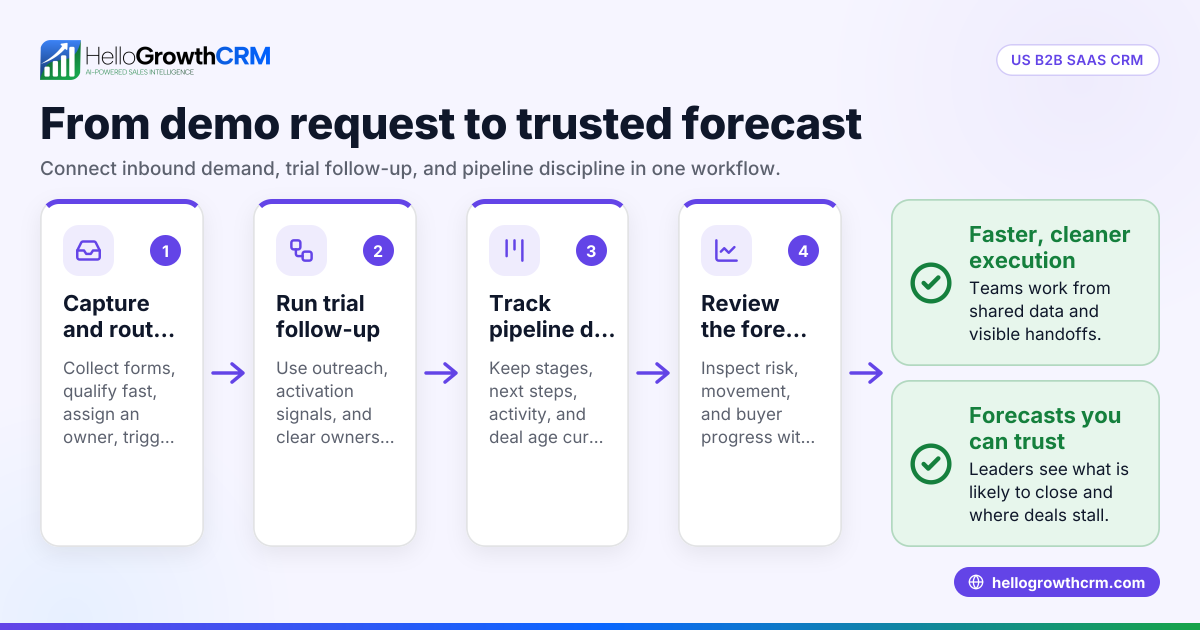
A practical baseline flow looks like this:
- Form submitted
- Record created in CRM
- Instant confirmation email sent
- AI score calculated
- Owner assigned by segment and territory
- Meeting link offered
- Rep alerted
- Follow-up reminder sent if unbooked
- Human escalation if no response or unclear qualification
You can support this with All Integrations, Zapier, and OpenAI if you need to connect external enrichment or custom AI logic.
What mistakes cause teams to lose demo requests even with automation?
Teams lose demo requests with automation when rules are too shallow, ownership is unclear, booking is treated as optional, or the system optimizes for activity instead of conversion; poor automation does not remove friction, it hides it behind fast but low-quality follow-up.
These are the most common failure points I see.
Mistake 1: Treating every demo request the same
Not every inbound lead deserves the same path.
A VP from a target account should not get the same flow as a student researcher or vendor pitch.
Mistake 2: Using long forms to pre-qualify everything
Long forms lower conversion. They also create stale data.
Ask for what changes routing. Learn the rest through follow-up and enrichment.
Mistake 3: No clear owner after the AI handoff
If the CRM score updates but no person is accountable, nothing improved.
Use Sales Task Boards and manager alerts to make ownership visible.
Mistake 4: No fallback for non-bookers
Many strong buyers click but do not book right away.
They may need:
- A reminder email
- A rep call attempt
- A text or WhatsApp prompt
- A different meeting type
- A timezone-friendly option
Mistake 5: Automating without measurement
If you do not track booked rate by source, score band, and owner, you cannot improve the rules.
This is why many teams pair automation with a CRM ROI Calculator or a RevOps Maturity Assessment before scaling changes.
HelloGrowthCRM helps B2B teams automate demo request follow-up without losing control of qualification, routing, or booking. You can combine AI CRM, AI Lead Scoring, Meeting Scheduler, and Managed RevOps to build a fast inbound engine that still feels human. If you want to see how it fits your process, explore Features, review Pricing, book a Demo, or start a Free Trial.
About the author
Arjun Mehta is a Revenue Operations Lead at HelloGrowthCRM with 11 years of experience in B2B SaaS sales systems, pipeline design, and CRM automation. He has led inbound routing and qualification projects across SMB and mid-market teams, including one rebuild of a global demo-request workflow that cut response times from hours to minutes for a multi-region sales org. This article draws from those rollout patterns, plus ongoing work with AI-assisted qualification and booking inside HelloGrowthCRM.
Frequently Asked Questions
Q: What is AI follow-up for demo requests?
A: AI follow-up for demo requests is a CRM-based process that automatically responds to inbound demo leads, scores intent and fit, routes them correctly, and pushes them toward booking. It helps teams move faster without relying on manual triage for every form submission.
Q: How fast should you respond to a demo request?
A: You should respond to a demo request immediately, with a useful next step delivered within minutes of form submission. For most B2B teams, that means instant acknowledgement, quick scoring, and a booking path before the prospect loses context.
Q: Can AI qualify demo requests accurately?
A: AI can qualify demo requests accurately when it uses clear fit and intent signals, plus human review for edge cases. It works best as a first-pass decision layer, not as a blind replacement for rep judgment on strategic or unusual accounts.
Q: What fields should a demo request form include?
Frequently Asked Questions
Ready to put this into practice?
Set up your pipeline, WhatsApp follow-ups, and AI lead scoring in minutes — free, no credit card.
Try HelloGrowthCRM freeGet CRM tips in your inbox
Join thousands of sales professionals who get weekly insights on CRM strategy, AI automation, and pipeline optimization.

The HelloGrowthCRM team publishes guides on CRM strategy, AI sales tools, and revenue operations for small business sales teams.