Intelligent Call Routing — Direct Every Call to the Right Rep
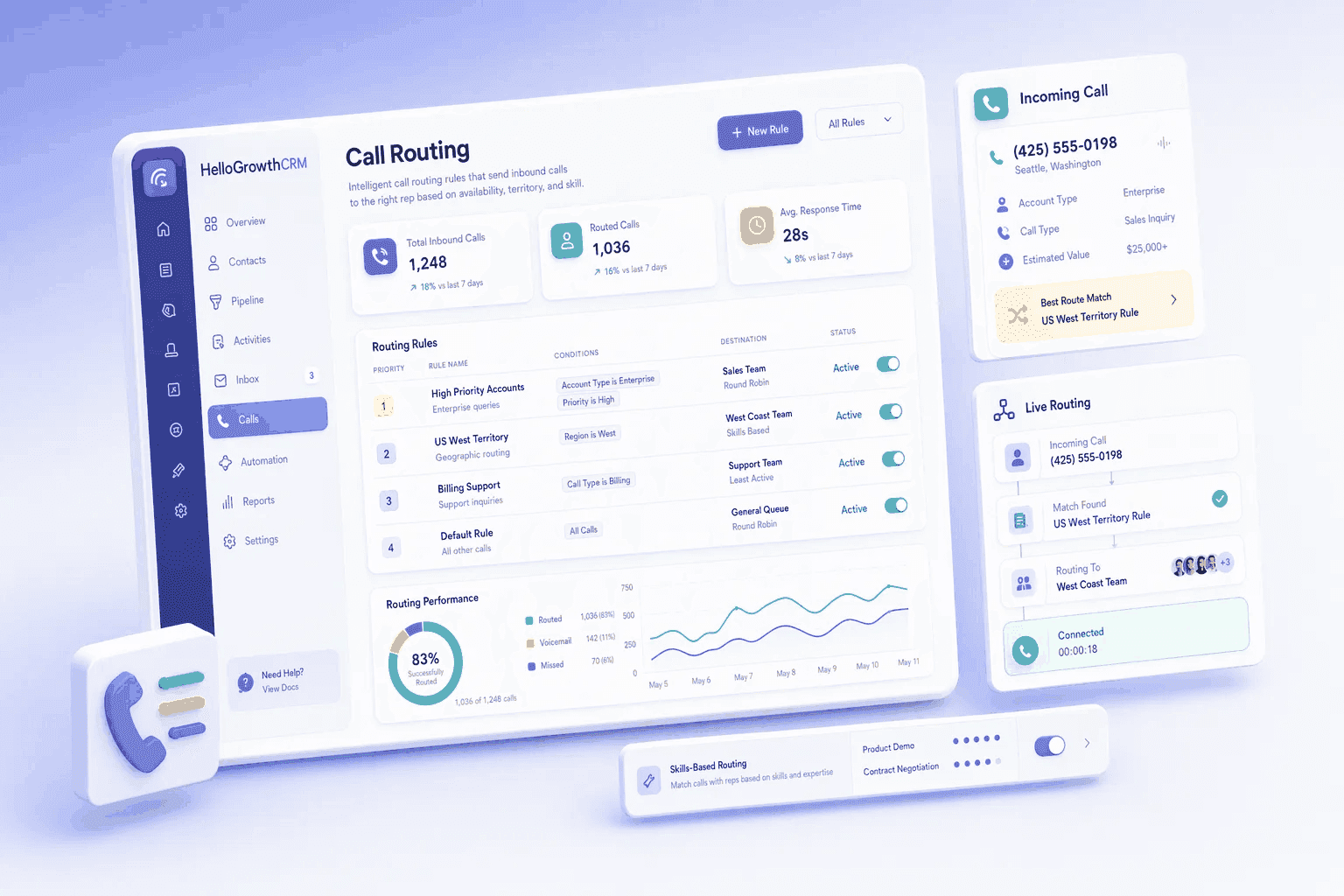
Route inbound calls to the correct sales rep or team based on IVR selection, caller ID, CRM record match, business hours, or availability. No missed calls. No wrong transfers.
Quick answer
Can I route calls based on CRM record data?
Also answered on this page
- What happens if all reps are busy
- Does call routing support IVR menus
- Can I set up time-based routing (business hours)
Why teams evaluate call routing
Call Routing usually becomes important when a repeated part of the revenue workflow is creating too much manual work, too little visibility, or too much tool-switching. Teams are rarely shopping for a feature in isolation. They are usually trying to make one meaningful workflow cleaner, faster, and easier to inspect.
That is why buyers usually look beyond the headline capability and inspect the surrounding details: CRM record match routing (route to deal owner), Skills-based routing, Round-robin queue distribution, Business hours and holiday routing. Those details determine whether the feature actually improves day-to-day execution or simply adds another surface area to manage.
Where call routing fits in the workflow
Most teams adopt this capability as part of practical motions such as inbound sales call routing, customer support tier routing, after-hours voicemail. The value tends to show up fastest when the workflow is tied to a clear owner, a clear next action, and a visible outcome that managers can review later.
It also matters how this page connects to the rest of the stack. The strongest implementations keep data, communication, and handoffs in sync instead of forcing the team to rebuild the process across disconnected tools.
What a strong rollout looks like for call routing
The best rollout usually starts small: one high-value workflow, one clear ownership model, and one review rhythm for adoption. Once the team is consistently using the feature, managers can expand into deeper automation, reporting, or cross-functional handoffs without rebuilding the foundation.
In practice, that means evaluating not only what the feature can do, but also whether the team can maintain the process around it. Ease of use, reporting trust, and manager visibility matter just as much as the feature checklist itself.
- Use it first for inbound sales call routing if that is the workflow creating the most friction today.
- Use it first for customer support tier routing if that is the workflow creating the most friction today.
- Use it first for after-hours voicemail if that is the workflow creating the most friction today.
- Use it first for geographic call distribution if that is the workflow creating the most friction today.
How It Works
Get started in three simple steps
Key Features
Use Cases
Inbound sales call routing
Route all inbound sales calls to available reps with skills matching the caller's request.
What teams care about
- Fast adoption with less manual cleanup for managers and reps.
- Clear visibility into workflow execution, outcomes, and accountability.
- Reliable handoffs into the CRM record so downstream teams keep full context.
Deep dive
Open the sections that matter most instead of scrolling through a long uninterrupted text block.
Why intelligent call routing is critical for inbound sales
Most inbound sales calls fail because they either go to the wrong person, go unanswered, or sit in a generic queue. That kills conversion because reps hate cold transfers, and callers hate being transferred. Intelligent call routing solves this by directing every call to the right person immediately.
When routing is smart — based on CRM records, skills, and availability — calls get answered faster, transferred less, and connected with more qualified reps. That directly increases conversion and reduces call abandonment.
How CRM-aware call routing works
HelloGrowthCRM call routing doesn't just ring phones randomly. It matches the caller to a CRM record and can route directly to the rep assigned to that opportunity. If that rep is busy, it uses skills-based routing or round-robin distribution to find the next best match.
Your business hours and holiday rules ensure calls don't go to voicemail during slow periods or send customers to the wrong queue. The result is faster connections, fewer transfers, and better customer experience.
Most inbound sales calls fail because they either go to the wrong person, go unanswered, or sit in a generic queue. That kills conversion because reps hate cold transfers, and callers hate being transferred. Intelligent call routing solves this by directing every call to the right person immediately.
When routing is smart — based on CRM records, skills, and availability — calls get answered faster, transferred less, and connected with more qualified reps. That directly increases conversion and reduces call abandonment.
Buyer playbook
Compare, launch, and govern the workflow with an interactive overview instead of four long generic essays.
How teams evaluate call routing
The best pages help buyers understand fit quickly instead of forcing them through long walls of copy.
Check whether the product covers the capabilities you actually care about, such as CRM record match routing (route to deal owner), Skills-based routing, Round-robin queue distribution, Business hours and holiday routing.
Test if it supports real execution scenarios like Inbound sales call routing, Customer support tier routing, After-hours voicemail.
Confirm the workflow stays connected to the rest of your sales stack so reporting and handoffs remain reliable.
Frequently Asked Questions
Explore More
What HelloGrowthCRM Does and Does Not Do With Calls
HelloGrowthCRM is a sales CRM with a built-in dialer. It is not a cloud telephony platform, so it does not run IVR menus, an inbound call queue or skills-based call routing. If you need those, they come from your telephony provider.
What it does do is keep the follow-up joined up. New leads are assigned to a rep by routing rules, calls from the dialer are logged against the lead, and the outcome of a call can start the next step, such as a task, a WhatsApp message, an SMS or an email.
Key Capabilities
- Lead Routing Rules: Match new leads on fields such as city, state and country and assign them to the rep who covers that area. A background job applies the rules about once a minute.
- Built-In Dialer: Call from the lead or deal record. The call is logged against the lead and the recording is archived with it.
- Call Outcome Automation: Lead automation can trigger on call outcome and then create a task, send a WhatsApp message, SMS or email, assign or tag the lead, or change its status.
- AI Calling Logs: AI calls log a transcript and outcome to the lead. The transcript and outcome come from the voice provider.
- Follow-Up Due Triggers: Automation can also trigger when a lead has had no activity for a set number of days or when a follow-up comes due, so quiet leads are not forgotten.
Setting Up a Simple Call Follow-Up Loop
Start with the split that matches how your team is organised. If reps cover different states or cities, write one routing rule per area so a new enquiry reaches the right rep without a manager deciding. Keep the rules few and review them when a rep joins or leaves.
Then decide what should happen after a call. A common pattern is a rule on call outcome that creates a follow-up task when the lead did not pick up, and one that sends a WhatsApp message or email when the call went well. Because every call is logged against the lead, a manager can open the record and see the history without pulling a telephony report.
Frequently Asked Questions
- Does HelloGrowthCRM route inbound calls with IVR menus or call queues?
- No. HelloGrowthCRM does not have an IVR builder, an inbound call queue or skills-based call routing. Inbound call handling stays with your telephony provider. What HelloGrowthCRM adds is the CRM side: leads are assigned to reps by routing rules, calls placed from the built-in dialer are logged against the lead, and call outcomes can trigger follow-up.
- How are new leads assigned to reps?
- Lead routing rules match fields such as city, state and country and assign a matching new lead to the rep the rule points to. A background job applies the rules about once a minute.
- Can a call outcome trigger a follow-up?
- Yes. Lead automation can trigger on call outcome. The actions available are an automatic call, a WhatsApp message, an SMS, an email, assigning the lead, tagging it, creating a task and changing the lead status. WhatsApp sequences need approved Meta templates.
- What is logged when a call is made?
- Calls placed from the built-in dialer are logged against the lead and recordings are archived with it. AI calls also log a transcript and outcome supplied by the voice provider. HelloGrowthCRM does not run speech-to-text on stored recordings.
Compare plans. Pair with the CRM dialer for outbound calling, see lead routing, or learn how insurance teams manage call volumes.