HelloGrowthCRM software
Built for real small-business sales teams
HelloGrowthCRM helps reps qualify faster, follow up on time, and close more deals—with practical automation in one place.
- AI lead scoring and pipeline visibility
- Built-in dialer, WhatsApp, and email automation
- Sales forecasting and RevOps-ready reporting
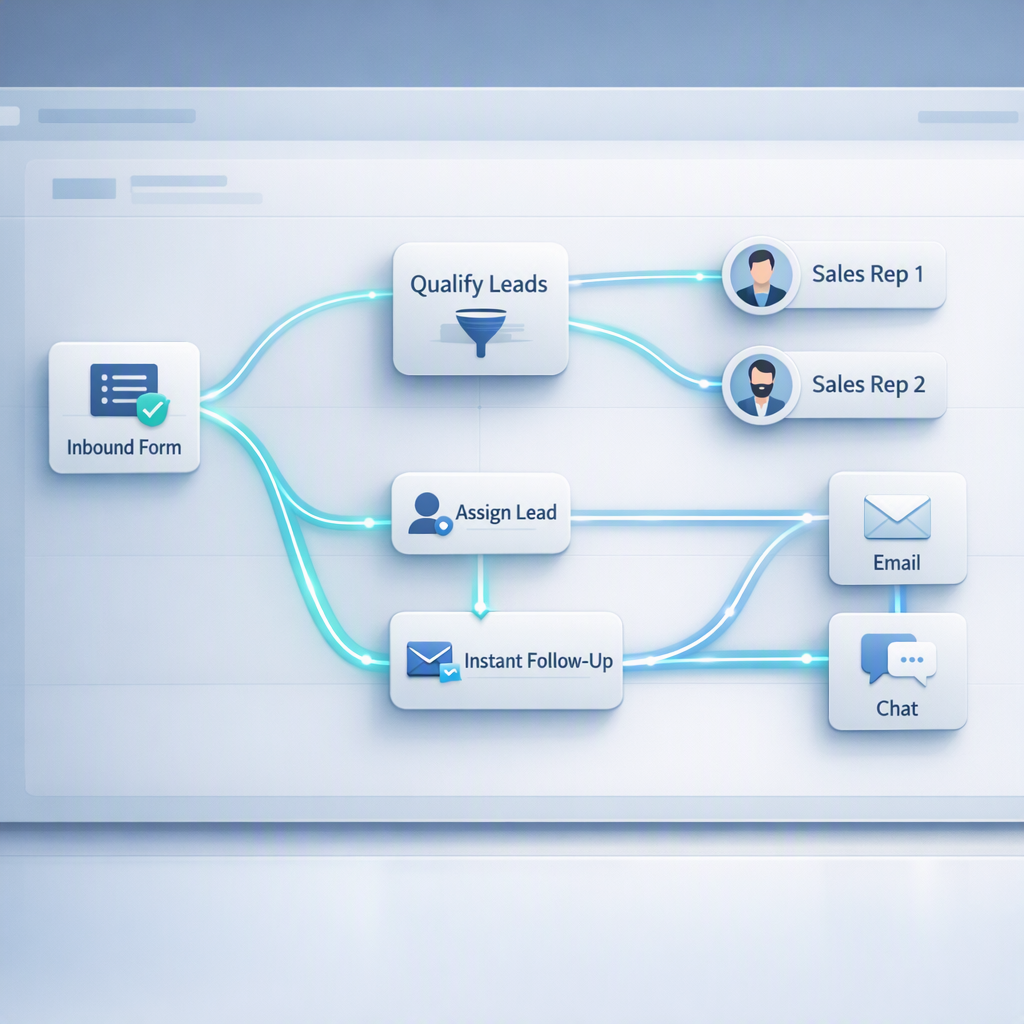
HelloGrowthCRM lead routing template is a prebuilt workflow that automatically captures inbound demo requests, enriches each lead with firmographic and behavioral data, assigns the record to the right owner using rule-based logic, and triggers immediate follow-up so revenue teams can respond faster without manual triage.
Key Takeaways
- HelloGrowthCRM’s lead routing template helps teams assign demo requests in seconds, not hours.
- The template combines form capture, enrichment, routing, and follow-up in one workflow.
- Good routing rules use clear fields like region, company size, account owner, and intent.
- Faster assignment improves speed-to-lead and reduces missed handoffs between marketing and sales.
- HelloGrowthCRM makes this practical with AI CRM, AI Lead Scoring, and Email Automation working together.
- Teams can start with simple rules, then add round-robin, territory, and account-based logic as volume grows.
What is the HelloGrowthCRM lead routing template?
The HelloGrowthCRM lead routing template is a ready-made automation that routes inbound demo requests based on your sales rules, enriches records before assignment, and launches follow-up tasks or sequences instantly, so your team gets qualified leads to the right rep with less admin work and fewer response delays.
At a practical level, the template sits between your demo form and your pipeline. When a prospect submits a request, the workflow can:
- create or update the contact and company
- enrich the lead with available data
- check for existing account ownership
- score the lead based on fit and intent
- assign the record to the correct rep or queue
- trigger an email, task, or meeting workflow
This is the kind of workflow sales ops teams usually build manually across forms, spreadsheets, chat alerts, and CRM rules. HelloGrowthCRM bundles that into one setup using Features, All Integrations, and workflow tools tied directly to your pipeline.
In one rollout we did with a 12-person sales team, the biggest issue was not lead volume. It was inconsistent routing. Demo requests from existing accounts went to SDRs, enterprise leads went to SMB reps, and round-robin logic ignored territory. Once we mapped ownership, segment, and SLA rules in one routing template, response time dropped and rep confidence improved within the first week.
Why demo request routing matters for response time and conversion
Demo request routing matters because inbound demand is most valuable when sales responds quickly, with the right owner, and with the right context; when routing is delayed or inaccurate, teams lose buyer intent, create duplicate outreach, and waste rep time correcting bad assignments after the lead has already cooled.
This is not just an efficiency problem. It is a revenue problem.
Harvard Business Review reported that firms that tried to contact potential customers within an hour were nearly seven times as likely to qualify the lead as those that tried even an hour later, and more than 60 times as likely as companies that waited 24 hours or longer, according to research summarized by Harvard Business Review.
That is why routing should never stop at “assign owner.” Good routing includes the context the rep needs to act fast.
What gets lost in manual triage
When teams rely on inbox monitoring or spreadsheet review, four things usually break:
- Ownership clarity: No one knows who should follow up.
- Data quality: Records lack company, source, or segment detail.
- Speed: Leads sit in a queue during handoffs.
- Consistency: High-value accounts get treated like low-fit form fills.
When I have audited pipelines like this, I usually find the same pattern. Marketing thinks leads are being worked. Sales thinks leads are low quality. The real issue is the operating system between capture and first touch.
What better routing looks like
A strong routing system should answer these questions in seconds:
- Is this a net-new lead or an existing account?
- Which territory or segment does it belong to?
- Is there already an account owner?
- How urgent is follow-up based on score or intent?
- What exact action should happen next?
HelloGrowthCRM connects these actions to AI Pipeline Management, Smart Inbox, and Meeting Scheduler, so the lead does not just get assigned. It gets worked.
What the template automates inside HelloGrowthCRM
The HelloGrowthCRM lead routing template automates the full inbound handoff by linking form capture, enrichment, assignment logic, alerts, and next-step execution in one workflow, which helps teams remove manual queue management and create a repeatable process that sales, marketing, and revops can trust.
Most teams evaluating HelloGrowthCRM want to know whether this is a light notification rule or a true operating workflow. It is the second.
Core automation layers
The template can automate these actions:
- Capture: Pull demo requests from native forms or connected sources like HubSpot, Salesforce, Zapier, or Calendly.
- Deduplication: Match against existing contacts, accounts, and open opportunities.
- Enrichment: Add company attributes and lead context before assignment.
- Scoring: Prioritize with AI Lead Scoring.
- Routing: Assign by owner, territory, segment, region, or round-robin.
- Follow-up: Trigger Email Automation, tasks, alerts, or rep prompts through Slack.
Typical fields used in routing
In HelloGrowthCRM, teams usually route demo requests using a mix of:
- geography or territory
- employee count or ARR band
- industry
- account owner
- lead source
- product interest
- form language
- score threshold
- named account list status
If you already use account coverage rules, Territory Management makes this cleaner. If you need prioritization before assignment, AI Deal Insights and Sales Task Boards help reps act on the right records first.
Which routing rules should you set first?
The best routing rules to set first are account ownership, market segment, geography, and fallback round-robin rules, because those four rules solve most assignment errors quickly while keeping the workflow easy to audit, maintain, and explain across sales, marketing, and operations teams.
Start simple. Complexity should come later.
The four rules that cover most teams
#### 1. Existing account owner wins
If the demo request comes from an account already owned by an AE or CSM, route it to that person first. This avoids awkward handoffs and protects account continuity.
#### 2. Segment by company size or plan fit
If your sales motion changes by size, route SMB, mid-market, and enterprise separately. This works especially well when paired with Pricing tiers or qualification rules.
#### 3. Territory or region assignment
For global teams, route by region, country, or named territory. This matters when language, time zone, or legal coverage changes by market.
#### 4. Fallback round-robin
If no ownership or territory rule applies, use a round-robin pool. Keep this as a fallback, not the primary logic, unless your sales org is very simple.
Add these rules later
Once the basics are working, you can add:
- named accounts and strategic account routing
- partner-sourced lead paths
- product-line ownership
- lead score thresholds
- meeting-booked vs form-fill logic
- after-hours queue handling with AI Voice Agent
For broader guidance on CRM strategy, Gartner notes that CRM supports customer-facing processes across sales, marketing, and service, which is why routing should be designed as a cross-functional workflow, not just a sales rule set, according to Gartner’s CRM topic overview.
Manual lead triage vs HelloGrowthCRM lead routing template
Manual lead triage and the HelloGrowthCRM lead routing template differ mainly in speed, consistency, and operational visibility; manual processes depend on people checking queues and interpreting rules, while the template applies the same logic automatically and records each routing decision for easier reporting and optimization.
Here is the clearest way to compare the two approaches:
| Area | Manual triage | HelloGrowthCRM lead routing template |
|---|---|---|
| Assignment speed | Minutes to hours | Seconds after form submission |
| Data enrichment | Done later or skipped | Built into the routing workflow |
| Existing account matching | Often missed | Checked before assignment |
| Rule consistency | Depends on the reviewer | Applied the same way every time |
| Follow-up | Rep remembers next step | Automated email, task, or alert |
| Auditability | Hard to trace | Workflow history is visible |
| Scale | Breaks as volume grows | Easier to maintain across teams |
This is also where HelloGrowthCRM is different from a generic automation stack. You do not need to stitch routing, scoring, and pipeline actions across multiple point tools. The workflow can live close to your records, rep tasks, and forecasting motions through Sales Forecasting and Revenue Attribution.
Because HelloGrowthCRM is our product, I should be clear about the limitation too. If your routing logic depends on highly custom legal entities, deep product-line hierarchies, or hundreds of exception rules, setup will take more planning. For teams under roughly 50 reps, this template is usually fast to deploy. Larger orgs should expect a more formal revops design phase, often with help from Managed RevOps.
How to set up the HelloGrowthCRM lead routing template: Step-by-Step
Setting up the HelloGrowthCRM lead routing template means connecting your inbound source, defining assignment logic, enriching records, and automating the first follow-up path, so every demo request moves from submission to owner action in one controlled workflow instead of a manual handoff.
- Connect your demo request source
Start with your website form, scheduler, or connected system. If needed, use Google Meet, Microsoft Teams, or Calendly integrations to capture booking signals too. - Map contact and company fields
Match required fields like name, email, company, country, and product interest. Clean field mapping early so routing rules do not break later. - Set deduplication logic
Tell HelloGrowthCRM how to match incoming requests to existing contacts or accounts. Use email domain, contact email, and account ownership as primary checks. - Add enrichment before assignment
Enrich the lead record with company and behavioral context first. This gives routing rules better inputs and helps AI Lead Scoring prioritize accurately. - Build routing rules in order
Place highest-priority logic first. A common sequence is existing account owner, named account, territory, segment, then fallback round-robin. - Define SLA-based follow-up actions
Trigger the right next step after assignment. That might be an instant confirmation email, a rep task, a Smart Inbox alert, or a booking prompt via Meeting Scheduler. - Notify the right team
Send real-time alerts to reps or managers through email or Slack. Keep notifications short and tied to action, not just awareness. - Test edge cases before going live
Submit test leads for each region, segment, and ownership path. Also test duplicates, missing data, and out-of-hours submissions. - Monitor routing outcomes weekly
Review assignment accuracy, response time, and conversion by route. Tools like the Pipeline Health Score and CRM ROI Calculator help quantify impact.
A practical rollout tip
In one implementation, we launched with only three rules and one fallback queue. That was enough to stabilize inbound flow. We added score-based priority and strategic account routing in week two. That phased approach reduced errors because reps could validate ownership logic before more automation went live.
How to measure whether your routing template is working
You can tell whether your routing template is working by tracking assignment accuracy, speed-to-lead, first-touch completion, meeting conversion, and no-owner rates, because those metrics show whether leads are reaching the right rep quickly enough and whether automation is improving pipeline outcomes instead of just moving records around.
Do not measure routing by “workflow ran successfully.” Measure business outcomes.
Metrics that matter most
Track these five metrics first:
- Median time from form submit to owner assignment
- Median time from assignment to first rep activity
- Percent of demo requests with no owner after 15 minutes
- Meeting booked rate by route path
- Duplicate or reassigned lead rate
If your team needs a structure for this, use the RevOps Maturity Assessment to benchmark process gaps and then refine routing.
Common warning signs
Your template likely needs work if you see:
- too many manual reassignments
- enterprise leads landing in SMB queues
- existing customers routed as net-new
- long delays outside business hours
- rep complaints about poor-fit assignments
For teams leaning into automation, AI Sales Copilot and Post-Call Agent can extend the workflow beyond assignment into follow-up quality and deal hygiene.
If you are evaluating a practical way to improve demo response times, HelloGrowthCRM gives you more than a basic assignment rule. It gives you a connected workflow for capture, enrichment, ownership, and action. Explore Features, review Pricing, or start a Free Trial to see how the lead routing template works in your own sales process. If you want a guided walkthrough, book a Demo.
About the author
Raman Khanna is a Sales Operations Lead at HelloGrowthCRM with 10 years of experience in B2B SaaS revenue operations. He has led CRM redesigns, inbound routing projects, and forecasting process rollouts for sales teams ranging from 8 to 120 reps. One project that shaped this article was a global demo-routing rebuild for a multi-region SaaS company, where his team replaced manual queue triage with rule-based assignment and cut missed handoffs across three territories.
Frequently Asked Questions
Q: What is the HelloGrowthCRM lead routing template?
A: The HelloGrowthCRM lead routing template is a prebuilt automation for assigning inbound demo requests, enriching lead records, and launching follow-up tasks or messages automatically. It helps sales teams respond faster and keeps assignment rules consistent across regions, segments, and account owners.
Q: How does HelloGrowthCRM assign demo requests automatically?
A: HelloGrowthCRM assigns demo requests automatically by checking routing rules such as existing account ownership, territory, segment, and fallback round-robin logic. It can also enrich the record first so the assignment uses better data than a raw form submission alone.
Q: Can the template route leads to existing account owners?
A: Yes, the template can route leads to existing account owners by matching the incoming request to known contacts, company domains, or linked accounts. This is one of the most important rules because it avoids duplicate outreach and protects account continuity.
Q: Does the HelloGrowthCRM lead routing template include lead enrichment?
A: Yes, the HelloGrowthCRM lead routing template includes lead enrichment as part of the workflow before assignment. That means reps get more context at handoff, and downstream scoring, qualification, and follow-up actions can run with better inputs.
Q: What follow-up actions can run after a lead is assigned?
A: The follow-up actions after a lead is assigned can include confirmation emails, rep tasks, Slack alerts, meeting scheduling prompts, and automated sequences. The goal is to make sure assignment leads directly to action instead of leaving the lead waiting in a rep queue.
Q: Is this template useful for small sales teams or only large ones?
A: This template is useful for both small and large sales teams, but the setup depth depends on routing complexity. Small teams often start with ownership and round-robin rules, while larger teams usually add territory, segment, and named-account logic.
Q: How long does it take to set up the HelloGrowthCRM lead routing template?
Frequently Asked Questions
Ready to put this into practice?
Set up your pipeline, WhatsApp follow-ups, and AI lead scoring in minutes — free, no credit card.
Try HelloGrowthCRM freeGet CRM tips in your inbox
Join thousands of sales professionals who get weekly insights on CRM strategy, AI automation, and pipeline optimization.

The HelloGrowthCRM team publishes guides on CRM strategy, AI sales tools, and revenue operations for small business sales teams.