HelloGrowthCRM software
Built for real small-business sales teams
HelloGrowthCRM helps reps qualify faster, follow up on time, and close more deals—with practical automation in one place.
- AI lead scoring and pipeline visibility
- Built-in dialer, WhatsApp, and email automation
- Sales forecasting and RevOps-ready reporting
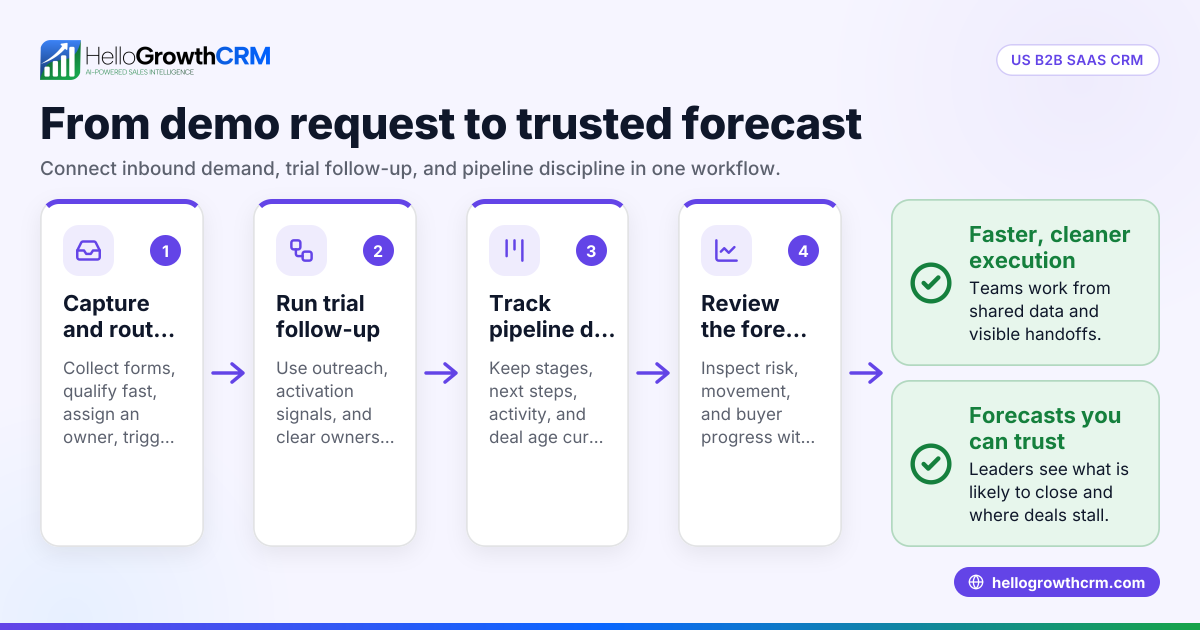
HelloGrowthCRM workflow builder templates are prebuilt automation flows that capture demo requests, route each lead to the right owner, trigger instant follow-up across email and meeting channels, and move every inquiry into a trackable pipeline so sales teams reduce manual admin and respond faster.
Key Takeaways
- HelloGrowthCRM workflow builder templates help teams automate demo request capture, owner assignment, follow-up, and pipeline creation from one place.
- The fastest win is instant speed-to-lead. New demo requests can trigger confirmations, task creation, and rep alerts in seconds.
- Templates reduce missed handoffs by standardizing routing rules, SLA alerts, and stage updates across your sales process.
- Teams can connect routing workflows with Meeting Scheduler, Email Automation, Smart Inbox, and AI Pipeline Management.
- The best setup starts simple. Use one demo routing template first, then add enrichment, scoring, and fallback logic after you validate conversion lift.
What are HelloGrowthCRM workflow builder templates?
HelloGrowthCRM workflow builder templates are ready-made automation blueprints that let revenue teams launch common sales workflows without building logic from scratch. For demo requests, they capture the form, assign ownership, send immediate follow-up, create records, and keep the lead visible inside a managed pipeline.
If you sell with a lean team, this matters a lot. Demo requests are high-intent leads. They should not sit in an inbox, spreadsheet, or chat thread. With HelloGrowthCRM, the workflow starts the second a prospect submits a form on your site, ad landing page, or partner page.
The main job of these templates is to replace repetitive work with reliable rules. Instead of asking reps to:
- check inbound forms
- decide who owns the lead
- send a confirmation email
- create a deal
- update pipeline stages
- remind themselves to follow up
the system does it for them inside one workflow.
This is where the product becomes more than a simple CRM. You can pair workflow templates with AI CRM, AI Lead Scoring, Sales Task Boards, and Revenue Attribution so every inbound demo request is both actionable and measurable.
In one rollout we did with a 12-person sales team, the biggest issue was not lead volume. It was inconsistency. Some reps replied in five minutes. Others replied the next day. After we standardized the workflow with assignment rules and auto-follow-up, managers could finally see every request in one funnel and coach from real data.
Why demo request routing and instant follow-up matter
Demo request routing and instant follow-up matter because buyers who ask for a demo are already signaling strong purchase intent, and delays create unnecessary drop-off. A workflow template protects that intent by assigning the right rep fast, confirming the request immediately, and keeping the next action visible.
Harvard Business Review has long covered how speed and consistency shape sales outcomes, especially for inbound demand where the buyer expects immediate engagement. While exact conversion rates vary by market, the operating principle is consistent: the faster and more relevant the response, the better the odds of a live conversation.
This is not just about speed. It is also about fit and control. Good routing should answer four questions immediately:
Which rep should own this lead?
Use geography, company size, industry, product line, language, or account ownership. If you already segment territories, Territory Management can keep these rules clean.
What should happen in the first 60 seconds?
The system should send a confirmation, create a lead or deal, notify the owner, and offer a calendar booking path through Meeting Scheduler.
What if the assigned rep does not act?
You need SLA timers, manager alerts, and reassignment rules. This is where workflow templates save teams from silent failure.
How will the team track conversion?
Every request should enter a visible pipeline with defined stages, timestamps, and next steps. Pipeline Health Score can help you audit whether those stages are healthy.
When I have audited pipelines like this, missed conversions usually come from one of three gaps:
- no standard owner assignment rule
- no instant buyer confirmation
- no escalation when follow-up slips
Templates fix all three faster than a fully custom build.
What happens inside a demo request workflow template?
A demo request workflow template in HelloGrowthCRM usually includes a trigger, data checks, routing logic, follow-up actions, pipeline updates, and fallback rules. The template gives teams a proven structure, then lets them adjust fields, channels, and conditions to match their sales motion.
A typical flow looks like this:
| Workflow stage | What the template does | Why it matters |
|---|---|---|
| Trigger | Detects a new demo request form submission | Starts automation instantly |
| Validation | Checks required fields like email, company, country | Prevents bad records and routing errors |
| Enrichment or scoring | Applies AI Lead Scoring or qualification rules | Helps prioritize fit and urgency |
| Routing | Assigns owner by territory, segment, round robin, or named account | Gets leads to the right rep fast |
| Follow-up | Sends email, task, SMS, or rep alert | Improves speed-to-lead |
| Pipeline action | Creates or updates a lead, contact, account, and deal | Keeps reporting accurate |
| Escalation | Reassigns if no action happens within SLA | Reduces missed handoffs |
The advantage of using a template instead of building from a blank canvas is speed. Admins do not need to remember every branch condition. They start with a tested skeleton, then tune the details.
A strong workflow often includes these specific mechanisms:
- Round-robin assignment for fairness across SDRs
- Named-account routing for existing target accounts
- Geographic routing by country or region
- Segment routing by employee count or ARR band
- Lead source branching for paid, organic, events, or partners
- SLA timers based on working hours
- Duplicate checks against existing contacts and accounts
According to Gartner’s CRM topic overview, CRM effectiveness depends heavily on process design, data quality, and adoption rather than software alone. That is exactly why templates are useful. They embed process discipline into the system itself.
Which HelloGrowthCRM template use cases matter most?
The most useful HelloGrowthCRM workflow builder templates for demo requests are the ones that match common inbound sales motions, such as round-robin routing, territory-based assignment, high-intent enterprise handoff, and instant self-scheduling. Each one reduces admin work while keeping every lead in a measurable pipeline.
Below are the core use cases I recommend first.
Round-robin demo routing for SMB inbound teams
This is the fastest template to deploy. New demo requests rotate evenly across available reps. The workflow can create a task, send a Slack alert through Slack, and send a booking email at once.
Best for:
- teams with shared inbound coverage
- similar deal sizes
- simple qualification rules
Territory-based routing for regional teams
If you sell globally, routing by region is usually the cleanest model. Use country, timezone, or language fields to assign the correct owner. You can add backups for uncovered regions and notify managers if no match is found.
Best for:
- EMEA, APAC, and North America split teams
- local-language selling
- region-specific compliance or pricing
Named-account and existing-account routing
If a company already exists in your CRM, route the new request to the account owner first. This protects account continuity and avoids awkward buyer experiences where multiple reps reach out.
This works especially well when paired with HubSpot, Salesforce, or All Integrations during migration or bi-directional sync scenarios.
Enterprise fast lane with qualification branching
High-fit enterprise leads often need a different path. You can route requests with large employee counts, strategic domains, or target account flags directly to senior AEs, then trigger an internal approval or concierge workflow.
In one implementation I led, we used company size plus domain matching to separate enterprise requests from general inbound. That one change cut rep confusion and gave leadership a clean view of strategic pipeline from day one.
Instant self-scheduling after form submit
This template sends a confirmation and offers calendar slots immediately. It removes the back-and-forth that slows conversion. HelloGrowthCRM can connect this path with Meeting Scheduler, Calendly, Google Meet, or Microsoft Teams.
How HelloGrowthCRM reduces manual admin and missed conversions
HelloGrowthCRM reduces manual admin and missed conversions by turning inbound demo handling into a rules-based workflow instead of a rep-dependent checklist. The platform captures requests, updates CRM records, triggers outreach, and logs ownership automatically so teams spend more time selling and less time coordinating.
Here is where the time savings usually show up first:
No more manual lead handoffs
Without automation, ops or sales managers often reassign leads by hand. That creates lag and errors. Workflow templates route the lead at submission, not hours later.
Fewer forgotten follow-ups
Templates can create a sales task, send an email, and push a notification to Gmail or Smart Inbox instantly. If the rep does not act, the workflow escalates.
Cleaner pipeline data
Every demo request can create a standard record set with source, owner, timestamp, and stage. That makes Sales Forecasting and attribution reporting more reliable.
Better manager visibility
Managers can see volume, assignment, response time, and stage movement in one place. If you offer Managed RevOps, this is also the kind of workflow that produces fast, measurable operational wins.
More consistent buyer experience
Buyers get an immediate confirmation and a clear next step. That matters. Silence after a demo request feels like friction, even if the team plans to follow up later.
A practical limitation: if your routing logic involves many overlapping territories, product lines, channel partners, and account hierarchies, setup gets more complex. For teams above roughly 50 reps, I usually recommend mapping routing policy in a simple matrix first, then building the workflow from that document.
How to use HelloGrowthCRM workflow builder templates for demo request routing and instant follow-up: Step-by-Step
Using HelloGrowthCRM workflow builder templates for demo request routing and instant follow-up means selecting a prebuilt flow, connecting your demo form, defining routing rules, setting immediate actions, and testing edge cases so every lead enters the right pipeline with no manual handling.
- Choose the template
Start with a demo request routing template inside Features or your workflow builder area. Pick the version that best matches your model, such as round robin, territory-based, or named-account routing. - Connect the form trigger
Link your site form, landing page, or ad source. If needed, use Zapier or a native connector from All Integrations to send the submission into HelloGrowthCRM. - Map required fields
Map email, company, name, country, source, and product interest. Keep required fields minimal. You can enrich later, but missing basics will break assignment. - Set assignment rules
Build owner logic using round robin, geography, account owner, or fit-based conditions. If multiple rules can apply, set priority order clearly. - Create instant follow-up actions
Trigger a confirmation email through Email Automation, a meeting link, and an internal alert. For mobile-first teams, add WhatsApp & SMS CRM or Twilio notifications. - Create pipeline records automatically
Have the template create or update the lead, contact, account, and deal. Place the deal in the right stage so AI Pipeline Management and reporting stay current. - Add SLA and fallback logic
Set rules for no-response scenarios. For example, if no first touch occurs within 15 minutes, notify a manager or reassign the lead. - Test edge cases
Submit test forms for duplicate contacts, missing regions, enterprise domains, and existing accounts. This is where most routing errors appear. - Measure and refine
Track speed-to-lead, meetings booked, and demo-to-opportunity conversion. Use CRM ROI Calculator if you want a simple way to quantify impact before expanding the workflow.
Best practices for higher demo conversion rates
The best practices for higher demo conversion rates with workflow templates are simple routing, immediate buyer confirmation, short SLA windows, and strong visibility into handoff performance. Teams get better results when they automate the first response and monitor exceptions instead of managing every lead manually.
Keep the first workflow narrow
Do not automate every edge case on day one. Start with one channel, one main route, and one fallback path. Complexity is the main reason automation launches get delayed.
Use clear qualification signals
If you score or branch, use fields that reps trust. Employee count, region, product interest, account status, and inbound source are usually enough to start. Avoid overfitting.
Audit response times weekly
Track first-touch time, meeting-booked rate, and no-owner exceptions. If speed-to-lead varies by rep or region, the workflow should show it quickly.
Connect automation to rep workflows
A workflow is only useful if reps feel it in their daily motion. Tie actions into CRM Dialer, AI Sales Copilot, or task boards so the next step is obvious.
Disclose ownership and review logic quarterly
HelloGrowthCRM is our product, so this guidance is naturally based on how our workflow engine works. Still, the operational advice is platform-neutral: simple routing beats complicated routing, and visible SLAs beat informal follow-up every time.
If you want to reduce manual admin, tighten response times, and stop losing high-intent demo requests in handoffs, try HelloGrowthCRM. You can explore the workflow builder in a Free Trial, review plan options on Pricing, or book a guided Demo to see the templates in action.
About the author
Rohan Mehta is a Revenue Operations Lead at HelloGrowthCRM with 11 years of experience in B2B SaaS sales systems, pipeline design, and automation. He has led CRM and routing rollouts for inbound, outbound, and account-based teams across global markets. One project that informed this article was a multi-region demo routing rebuild for a SaaS company that needed territory logic, SLA escalation, and meeting automation across a 12-person sales team.
Frequently Asked Questions
Q: What are HelloGrowthCRM workflow builder templates used for?
A: HelloGrowthCRM workflow builder templates are used to automate repeatable sales processes like demo request routing, follow-up, record creation, and pipeline updates. They help teams launch proven workflows faster and reduce manual handoffs that often cause delays or missed leads.
Q: Can HelloGrowthCRM automatically assign demo requests to the right sales rep?
A: Yes, HelloGrowthCRM can automatically assign demo requests to the right sales rep using territory, round-robin, named-account, or qualification-based rules. You can also add fallback rules if no owner matches or if the assigned rep misses the SLA.
Q: Does HelloGrowthCRM send instant follow-up after a demo form submission?
A: Yes, HelloGrowthCRM can send instant follow-up after a demo form submission through email, alerts, task creation, and scheduling links. This helps confirm the request immediately and gives buyers a clear next step while intent is still high.
Q: How do workflow templates reduce missed conversions?
A: Workflow templates reduce missed conversions by standardizing lead capture, assignment, follow-up, and escalation in one system. Instead of relying on reps to remember every step, the workflow enforces the process and keeps each lead visible in the pipeline.
Frequently Asked Questions
Ready to put this into practice?
Set up your pipeline, WhatsApp follow-ups, and AI lead scoring in minutes — free, no credit card.
Try HelloGrowthCRM freeGet CRM tips in your inbox
Join thousands of sales professionals who get weekly insights on CRM strategy, AI automation, and pipeline optimization.

The HelloGrowthCRM team publishes guides on CRM strategy, AI sales tools, and revenue operations for small business sales teams.