Skip to content
Integration

Shiprocket Integration for HelloGrowthCRM

Connect Shiprocket with HelloGrowthCRM to track orders, shipment status, delivery updates, and post-purchase workflows in one customer timeline.

Quick answer

Which Shiprocket events appear in HelloGrowthCRM?

Order confirmed, pickup scheduled, in transit, out for delivery, delivered, delivery failed, and return initiated events all log in the CRM contact timeline. You can choose which events trigger automated CRM actions.
Last updated:
What you get

When ecommerce, D2C, and distribution teams rely on Shiprocket, shipping events become a major part of the customer journey. A Shiprocket integration with HelloGrowthCRM helps teams see order confirmation, fulfillment progress, delivery status, and exception events without jumping between tools.

This matters because post-purchase communication affects retention as much as pre-sale follow-up affects conversion. If a shipment is delayed, returned, or marked undelivered, the account owner or support team should see that context quickly and respond before frustration grows.

A strong Shiprocket CRM integration supports better order-linked communication. Teams can trigger reminders, customer updates, and internal escalations based on shipping milestones or exceptions. That is especially useful for operations teams handling high order volume, COD workflows, or multi-city delivery coordination.

The main value is visibility. Sales, support, and operations teams can work from the same customer record instead of treating logistics as a separate back-office function. That reduces blind spots during renewals, upsells, and customer issue resolution.

For businesses evaluating fulfillment workflows, this page helps explain how shipping activity fits into CRM operations more broadly. The best setup links delivery events to the account timeline, ownership, and follow-up tasks so teams act faster and with more context.

The workflows that pay for the setup fastest are the unhappy paths. A delivery-failed event that raises a same-day task for the order owner turns most failed attempts into a fixed address and a rescheduled drop instead of a return-to-origin charge. A return-initiated event that alerts the account owner means the win-back conversation starts while the customer is still reachable, not after the refund clears. And because every event lands on the contact record, support answers 'where is my order?' from the timeline in seconds — with the courier, AWB, and latest scan in front of them — instead of asking the customer to wait while someone logs into a second dashboard.

The happy path compounds too. Delivered events are the natural trigger for the post-purchase moment: a WhatsApp thank-you with a review request a day after delivery, a replenishment nudge timed to the product's usage cycle, or a cross-sell suggestion based on what the customer actually received. Because Shiprocket buyers resolve into CRM contacts with full order history, these touches run from real purchase data — repeat buyers get recognised, first-time buyers get onboarded, and lapsed customers surface in win-back segments automatically. For D2C teams, this is usually the first time marketing, support, and fulfilment have worked from the same customer record.
Automation workflows

Automation workflows with Shiprocket and HelloGrowthCRM

Show live shipment status on the customer record

Order pickup, transit, out-for-delivery, and delivered events from Shiprocket log against the CRM contact. When a customer calls asking 'where's my order?', anyone who answers has the answer.

Get ahead of delivery exceptions

RTO risks, failed delivery attempts, and courier delays create tasks for your team with the customer's history attached. A proactive WhatsApp beats an angry inbound call every time.

Trigger post-delivery follow-ups

Delivered status starts the after-sale cadence — a feedback request, a review ask, and for consumables, a reorder reminder timed to the product's cycle.

Reduce RTO with pre-dispatch confirmation

For COD-heavy businesses, high-RTO-risk orders trigger a WhatsApp confirmation before dispatch. Confirmed orders ship; silent ones get a call — trimming the returns that eat margins.

In practice

How D2C and B2B shippers use delivery data in CRM

D2C brand support deflection

A cosmetics brand's WhatsApp support used to be 70% where-is-my-order. Auto status updates from Shiprocket events cut those conversations dramatically and freed the team for sales chats.

COD confirmation desk

An apparel seller confirms every COD order above a threshold via WhatsApp before shipping. RTO percentage dropped meaningfully within the first month of running the workflow.

B2B sample shipments

An exporter tracks sample deliveries to prospects as deal events. The rep's follow-up call lands the day the sample arrives — not a week later when the impression has faded.

Setup guide

How to connect — step by step

Takes about 10–15 minutes. No coding required.

Setup at a glance

  • Get your Shiprocket API credentials
  • Connect Shiprocket in HelloGrowthCRM
  • Configure order event mapping
  • Match Shiprocket orders to CRM contacts
  • Test with a live shipment
  1. 1

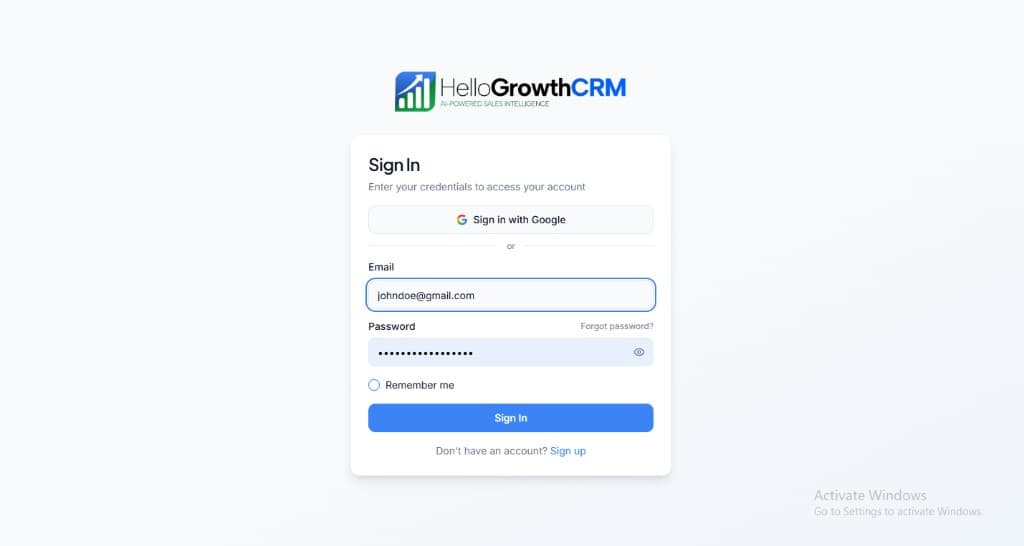
    Sign in or sign up at HelloGrowthCRM. Open the login page, enter your credentials (or use Google), or choose Sign up if you need a new account. You must be signed in before you can open Settings and connect this integration.

    HelloGrowthCRM login screen: Sign in with Google, email and password fields, Remember me, and Sign up link

    Open login page(opens in a new tab)app.hellogrowthcrm.com/login

  2. 2

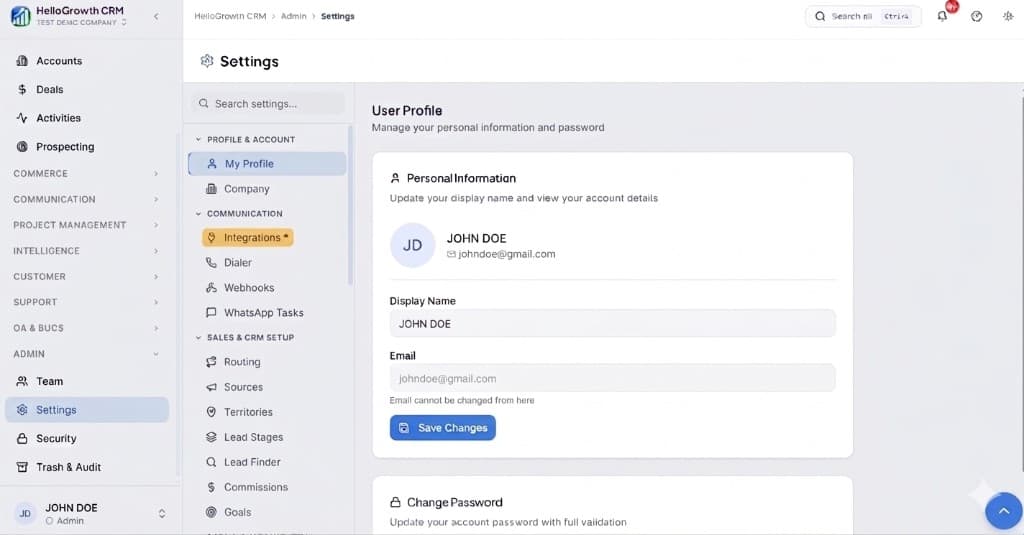
    Open Settings. In the left sidebar, under Admin, click Settings (you will land on the Settings area; the URL is app.hellogrowthcrm.com/settings).

    HelloGrowthCRM Settings: Admin sidebar with Settings selected, secondary menu with Communication and Integrations, and profile area

    Open Settings(opens in a new tab)app.hellogrowthcrm.com/settings

  3. 3

    Go to Integrations. On the Settings screen, use the middle settings menu. Under COMMUNICATION, click Integrations (star icon). Then find and configure this connector—the connector-specific steps below pick up from here.

    HelloGrowthCRM Settings menu highlighting COMMUNICATION and Integrations next to the Admin Settings sidebar

    Open Settings (Integrations)(opens in a new tab)app.hellogrowthcrm.com/settings

  4. 4

    Get your Shiprocket API credentials

    Log in to app.shiprocket.in. Go to Settings → API → Create API Credentials. Enter a label like HelloGrowthCRM. Copy the email and password credentials — these are used to authenticate the Shiprocket REST API.

  5. 5

    Connect Shiprocket in HelloGrowthCRM

    In HelloGrowthCRM, go to Settings → Integrations → Shiprocket. Enter your Shiprocket API email and password. Click Save. HelloGrowthCRM will authenticate and confirm the connection.

  6. 6

    Configure order event mapping

    Choose which Shiprocket shipment events update the CRM: order placed, pickup scheduled, out for delivery, delivered, and return initiated. Map each event to a CRM action such as logging a note, updating a custom field, or triggering a follow-up task.

  7. 7

    Match Shiprocket orders to CRM contacts

    Set your contact matching logic: match Shiprocket orders to CRM contacts by email address or mobile number. Enable auto-creation of a new contact if no match is found, to capture first-time buyers automatically.

  8. 8

    Test with a live shipment

    Place a real or test order in Shiprocket. Verify that the shipment status updates appear in the corresponding CRM contact timeline within 5 minutes. Check that assigned follow-up tasks trigger on delivery or exception events.

Need help with setup? Book a 15-minute onboarding call — our team will connect it live with you.
FAQ

Frequently asked questions

Which Shiprocket events appear in HelloGrowthCRM?
Order confirmed, pickup scheduled, in transit, out for delivery, delivered, delivery failed, and return initiated events all log in the CRM contact timeline. You can choose which events trigger automated CRM actions.
Can I trigger a post-delivery WhatsApp message from this integration?
Yes. Set a CRM automation that triggers when the Delivered event is received. The automation can send a WhatsApp template message (requesting a review or offering a reorder discount) and log the message in the contact timeline.
Does the Shiprocket integration support multi-courier shipments?
Yes. Shiprocket aggregates multiple courier partners (Delhivery, BlueDart, Ekart, etc.) under a single API. HelloGrowthCRM receives events from all couriers routed through Shiprocket — no per-courier configuration needed.
Can failed deliveries trigger a task for my team?
Yes. A delivery-failed or NDR event can raise an immediate task for the order owner, so someone calls the customer the same day to fix the address or reschedule. Caught early, most failed attempts are recoverable; discovered a week later in a courier report, they usually become RTO charges.
Does this help reduce RTO on COD orders?
Indirectly but meaningfully. The two biggest RTO levers — same-day intervention on failed attempts and a WhatsApp confirmation touch after order placement — are both CRM automations this integration enables. Teams also tag RTO events by lead source, which exposes segments producing chronically undeliverable orders.
Do Shiprocket buyers become CRM contacts?
Yes. Orders are matched to existing contacts by phone and email, and new buyers are created as contacts with their order logged. That is what makes repeat-purchase follow-up, review requests, and win-back campaigns possible from real purchase history rather than courier exports.
Does the CRM replace my Shiprocket panel?
No — booking, courier selection, and NDR management stay in Shiprocket. The CRM consumes shipment events so customer conversations and follow-ups can react to delivery reality automatically.
Can delivery updates go to customers automatically?
Yes. Status changes can trigger WhatsApp or email updates through the CRM using approved templates, giving customers proactive tracking without your team lifting a finger.

Want help evaluating the next step?

Book a demo to see HelloGrowthCRM in action, or start a free trial.