Skip to content
Integration

DigiLocker Integration for HelloGrowthCRM — Document Verification & KYC

Connect DigiLocker with HelloGrowthCRM. Verify customer documents, automate KYC workflows, and store verified credentials against CRM records for BFSI.

Quick answer

Does the customer have to approve every document pull?

Yes. DigiLocker is consent-based — the customer authorises each document share from their own account. The CRM only stores what the customer explicitly agreed to share, with the consent event logged.
Last updated:
What you get

DigiLocker is India's government-backed digital document wallet that gives citizens secure access to Aadhaar, PAN card, driving license, educational certificates, and hundreds of other official documents. HelloGrowthCRM's DigiLocker integration enables BFSI, fintech, insurance, and compliance-driven businesses to verify customer identity documents directly within the CRM — eliminating paper-based KYC processes and reducing onboarding friction.

For financial services teams, the DigiLocker integration means KYC verification can be triggered from within a customer's CRM record. When a new lead submits their application, HelloGrowthCRM sends a DigiLocker consent request. Once the customer grants access, their verified documents are pulled and attached to the CRM record. The deal advances automatically to the next stage when KYC is complete.

Insurance sales teams benefit from document verification at the point of policy binding. Rather than collecting physical documents and tracking their status in spreadsheets, the DigiLocker integration allows agents to request, verify, and log document status from within HelloGrowthCRM — accelerating policy issuance and improving agent productivity.

Lending and NBFC teams can build KYC status tracking directly into their deal pipelines. HelloGrowthCRM tracks which documents have been verified, which are pending, and which have expired — surfacing alerts when customer documents need renewal before loan disbursement or account operations can proceed.

Compliance audit trails are built automatically when DigiLocker verification events are logged in HelloGrowthCRM. Regulators and auditors can see exactly which documents were verified, when, and by which team member — reducing compliance risk in regulated industries.

The DigiLocker integration is part of HelloGrowthCRM's India compliance stack, alongside GSTIN verification, PAN lookup, and e-sign capabilities — giving Indian businesses a unified KYC and compliance workflow within their CRM.
Implementation details

Paperless KYC patterns enabled by DigiLocker

Indian KYC has historically been a paperwork-driven workflow — physical Aadhaar copies, scanned PAN cards, attested driving licences, address-proof affidavits — that takes days to weeks per customer and adds significant operational cost. DigiLocker collapses this into a consent-driven digital flow where the customer authorises document sharing in a few seconds from their phone. The CRM integration captures this collapsed timeline as a measurable KYC SLA: most teams move from 2-5 day KYC turnaround to under 30 minutes once the DigiLocker flow replaces paper-based collection.

For NBFCs and digital lenders, the DigiLocker-CRM combination enables loan disbursement timelines that compete directly with fintech competitors. A customer who applies for a personal loan at 11am can complete KYC by 11:15am, get credit-bureau-pull approval by 11:30am, and receive disbursement by 1pm — a workflow that previously required two to three working days for the KYC step alone. The competitive implication is that lenders without this stack lose increasingly to those who have built it.

Compliance audit trails are the under-discussed long-term value. DigiLocker verifications produce cryptographically signed digital records that prove the document was genuine at the time of verification. When regulators or internal audit teams need to demonstrate KYC compliance two or three years later, the CRM record contains the original verification timestamp, the document hash, and the consent record — a far stronger audit position than physical document storage that may have been mishandled or lost over time.

Automation workflows

Automation workflows with DigiLocker and HelloGrowthCRM

Collect verified documents during onboarding

Instead of chasing photos of PAN cards over WhatsApp, request documents through DigiLocker's consent flow. Issuer-verified copies attach to the CRM contact, and the deal moves to Documents Received automatically.

Gate pipeline stages on document completion

Configure stages so a deal can't advance to approval until required documents are collected and marked verified. Reps see exactly which items are missing on the record instead of discovering gaps at disbursal or delivery.

Trigger reminders for missing paperwork

If requested documents aren't shared within 48 hours, the CRM sends a reminder by email or WhatsApp with the link to complete the DigiLocker flow, and creates a call task if the second nudge is ignored.

Keep an auditable consent trail

Each DigiLocker pull logs on the contact timeline with a timestamp and the requesting user. When a customer or auditor asks what was collected and when, the answer is on the record, not in someone's inbox.

In practice

Where document-verified onboarding pays off

Loan and insurance agents

A DSA team collects KYC documents via DigiLocker links sent from the CRM. Files arrive verified and legible the first time, cutting the resubmission loop that used to delay every application by days.

Education admissions

An admissions office requests marksheets and ID through DigiLocker during counselling. Verified documents attach to the applicant record, and seats are confirmed against complete files rather than promises.

Property rentals and brokerage

A brokerage verifies tenant identity documents before scheduling owner meetings. Deals with verified documents move faster, and owners trust shortlists because screening happened up front.

Setup guide

How to connect — step by step

Takes about 10–15 minutes. No coding required.

Setup at a glance

  • Obtain DigiLocker API access via an AA or partner
  • Connect DigiLocker in HelloGrowthCRM
  • Configure which deal stages trigger document requests
  • Set up consent request message templates
  • Test the KYC flow end-to-end
  1. 1

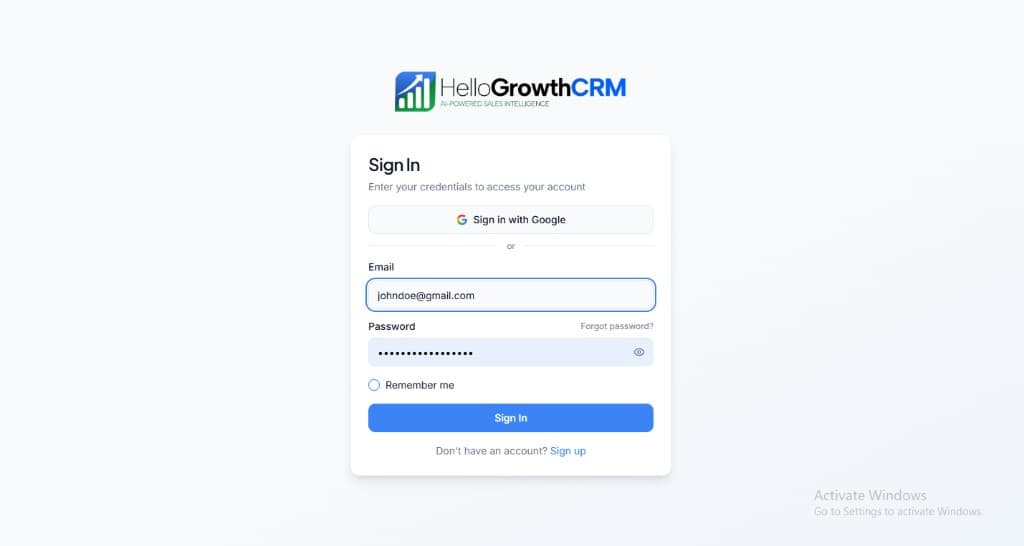
    Sign in or sign up at HelloGrowthCRM. Open the login page, enter your credentials (or use Google), or choose Sign up if you need a new account. You must be signed in before you can open Settings and connect this integration.

    HelloGrowthCRM login screen: Sign in with Google, email and password fields, Remember me, and Sign up link

    Open login page(opens in a new tab)app.hellogrowthcrm.com/login

  2. 2

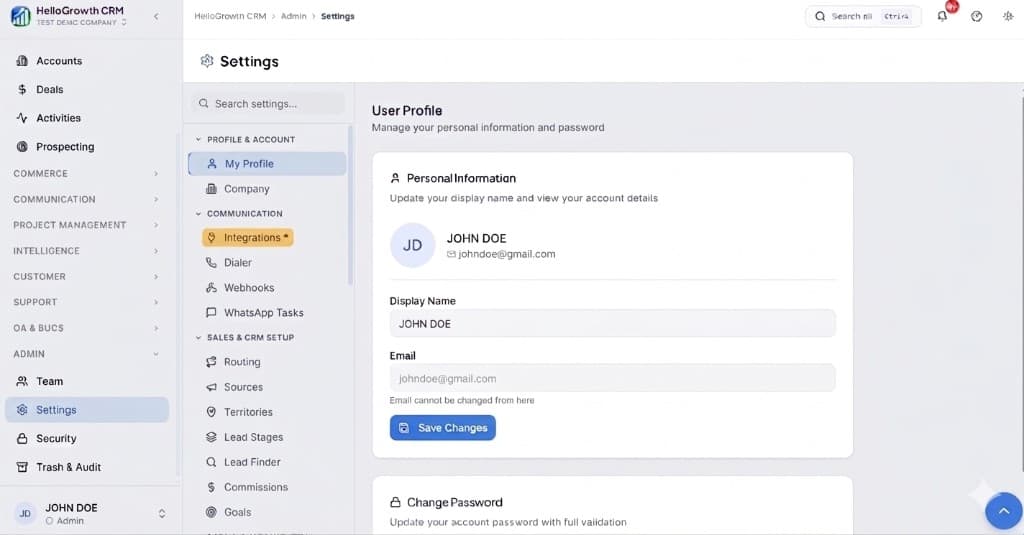
    Open Settings. In the left sidebar, under Admin, click Settings (you will land on the Settings area; the URL is app.hellogrowthcrm.com/settings).

    HelloGrowthCRM Settings: Admin sidebar with Settings selected, secondary menu with Communication and Integrations, and profile area

    Open Settings(opens in a new tab)app.hellogrowthcrm.com/settings

  3. 3

    Go to Integrations. On the Settings screen, use the middle settings menu. Under COMMUNICATION, click Integrations (star icon). Then find and configure this connector—the connector-specific steps below pick up from here.

    HelloGrowthCRM Settings menu highlighting COMMUNICATION and Integrations next to the Admin Settings sidebar

    Open Settings (Integrations)(opens in a new tab)app.hellogrowthcrm.com/settings

  4. 4

    Obtain DigiLocker API access via an AA or partner

    DigiLocker API access for businesses is available through NBFC-AA providers (such as Setu, FinBox, or Perfios) or directly via NeSL. Register with your chosen provider, complete KYC for your organization, and obtain a client ID and client secret.

  5. 5

    Connect DigiLocker in HelloGrowthCRM

    In HelloGrowthCRM, go to Settings → Integrations → India Compliance → DigiLocker. Enter your provider name, client ID, and client secret. Select your environment (sandbox or production) and click Save and Connect.

  6. 6

    Configure which deal stages trigger document requests

    In Settings → Automation, create a rule that sends a DigiLocker consent request when a deal reaches a specified stage (e.g., 'Application Submitted'). The customer receives a link via SMS or email to share their documents from DigiLocker.

  7. 7

    Set up consent request message templates

    In HelloGrowthCRM, customize the consent request message that is sent to customers. Include your organization name, which documents are required (Aadhaar, PAN, driving licence, etc.), and a reassurance about data security and privacy consent.

  8. 8

    Test the KYC flow end-to-end

    Create a test contact and manually trigger a DigiLocker document request. Use your own DigiLocker account to complete the consent flow. Verify that the verified documents appear attached to the CRM contact record and the KYC status field updates to 'Verified'.

Need help with setup? Book a 15-minute onboarding call — our team will connect it live with you.
FAQ

Frequently asked questions

Does the customer have to approve every document pull?
Yes. DigiLocker is consent-based — the customer authorises each document share from their own account. The CRM only stores what the customer explicitly agreed to share, with the consent event logged.
Is this a replacement for my regulated KYC process?
Treat it as the collection layer. If you operate under RBI, IRDAI, or similar mandates, your compliance process still governs verification. The CRM ensures collected documents are organised, attached, and auditable per customer.

Want help evaluating the next step?

Book a demo to see HelloGrowthCRM in action, or start a free trial.