Skip to content
Integration

GSTIN & PAN Verification Integration for HelloGrowthCRM

Verify GSTIN and PAN numbers in HelloGrowthCRM for B2B lead qualification and India KYC compliance. Auto-enrich company details from GST registry data.

Quick answer

What does a GSTIN verification actually return?

Typically the registered legal name, trade name, state, registration status (active, cancelled, suspended), and taxpayer type — enough to confirm you're dealing with the entity the buyer claims to be.
Last updated:
What you get

For B2B sales in India, GSTIN verification is as fundamental as confirming a company's existence. HelloGrowthCRM's GSTIN integration lets your team verify a prospect's GST number, enrich their CRM record with official company name, registered address, and filing status — all without leaving the CRM.

Lead qualification improves when GSTIN data is available. A verified GSTIN confirms the company is GST-registered (typically turnover above ₹40L for most businesses), providing a baseline revenue signal. Filing history indicates whether the company is actively trading. That context helps reps prioritize leads before the first call.

PAN verification adds another KYC layer. For lending, insurance, or high-value B2B contracts, confirming a proprietor's or director's PAN is a compliance requirement. HelloGrowthCRM's PAN lookup returns the name linked to the PAN so your team can confirm identity quickly during the deal process.

Auto-enrichment from GSTIN data reduces manual data entry. When a rep enters a GST number, HelloGrowthCRM populates the company name, registered address, business type, and state of registration automatically. That saves 2–3 minutes per lead and ensures accuracy — no typos on company names or addresses.

For businesses issuing GST-compliant invoices, the GSTIN stored on the CRM account feeds directly into the invoice generation workflow. Sales closes the deal; the GSTIN is already on record; the finance team generates a compliant invoice in one click without asking the customer to send their GST certificate again.

Compliance reporting is cleaner when KYC data is structured in the CRM. When auditors or finance teams need a list of GST-registered customers, the CRM can produce it instantly. No spreadsheet archaeology — the data is where it was captured during the sales process.
Implementation details

How GSTIN verification changes Indian B2B sales discipline

GSTIN verification at the lead stage filters out a meaningful percentage of low-quality B2B leads before reps invest call time. Bogus inquiries, name-only submissions, and prospects misrepresenting company size all fail GSTIN verification immediately. For inbound-heavy teams running paid lead generation, this single discipline often saves 20 to 35 percent of weekly call time previously spent on leads that wouldn't have converted regardless. The integration's auto-verification on form submit keeps this filter operationally invisible to reps — they only see leads that pass.

The enrichment data from verified GSTINs is also a quiet upgrade to qualification quality. The GST registry returns business type (Regular, Composition, SEZ), filing status (active, cancelled, suspended), state of registration, and registered business name. A 'Composition' GST scheme indicates turnover under ₹1.5 crore — useful triage data for segmenting SMB versus mid-market prospects. A cancelled or suspended GST status is a strong negative signal worth disqualifying on. These data points were available in spreadsheets-and-WhatsApp workflows but never operationally usable; the integration makes them queryable CRM fields.

For lending, insurance, and financial-services teams in India, PAN verification at the deal stage closes the KYC loop that would otherwise require manual document collection. The integration's PAN lookup confirms the proprietor or director's identity matches what they claimed during the sales conversation. This becomes a compliance gate that progresses or blocks deal advancement — useful both for regulatory reporting and for preventing later disputes over identity verification.

Automation workflows

Automation workflows with GSTIN and PAN verification in HelloGrowthCRM

Verify GSTIN at the moment of lead capture

When a B2B lead lands with a GSTIN, validate it against the registry and pull the registered legal name and state onto the record. Reps quote knowing the entity is real, active, and located where the buyer claims.

Gate credit terms behind verification

Configure the pipeline so deals can't reach the credit-approval stage without verified GSTIN and PAN. Finance stops discovering shell entities after goods have shipped.

Auto-fill invoicing details from verified data

Verified legal name, trade name, and state flow into the fields your invoicing process uses, eliminating the retyping errors that cause e-invoice rejections and ITC mismatches for your buyers.

Flag risk signals early

A GSTIN that comes back cancelled or suspended flags the deal and notifies the owner. The conversation about payment security happens at quote stage — not collection stage.

In practice

Where identity verification changes the sales process

B2B wholesale credit sales

A packaging supplier sells on 30-day credit. Verifying GSTIN and PAN before the first invoice cut their bad-debt write-offs noticeably, because non-existent buyers never made it past qualification.

Marketplace seller onboarding

A logistics aggregator onboards hundreds of merchant sellers. Verification runs during signup in the CRM, so the ops team activates only legitimate businesses and the compliance file builds itself.

Financial services KYB

A lending DSA checks PAN validity during the first call. Applications go to lenders with clean identity data, cutting rejections that used to burn a week per file.

Setup guide

How to connect — step by step

Takes about 10–15 minutes. No coding required.

Setup at a glance

  • Obtain GSTIN/PAN API credentials
  • Connect the verification API in HelloGrowthCRM
  • Enable auto-lookup on contact and company forms
  • Configure PAN verification for deals or contacts
  • Test with a known GSTIN and PAN
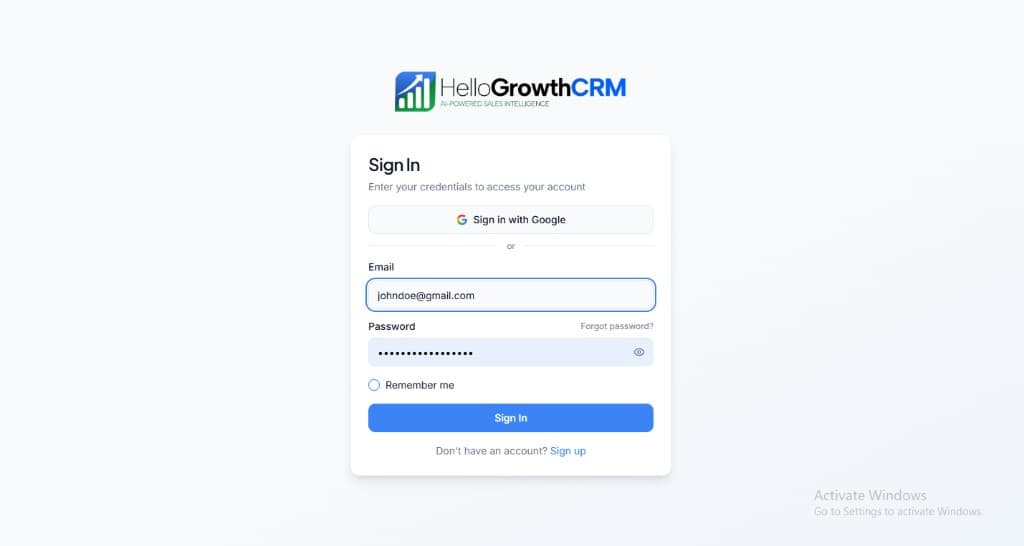
  1. 1

    Sign in or sign up at HelloGrowthCRM. Open the login page, enter your credentials (or use Google), or choose Sign up if you need a new account. You must be signed in before you can open Settings and connect this integration.

    HelloGrowthCRM login screen: Sign in with Google, email and password fields, Remember me, and Sign up link

    Open login page(opens in a new tab)app.hellogrowthcrm.com/login

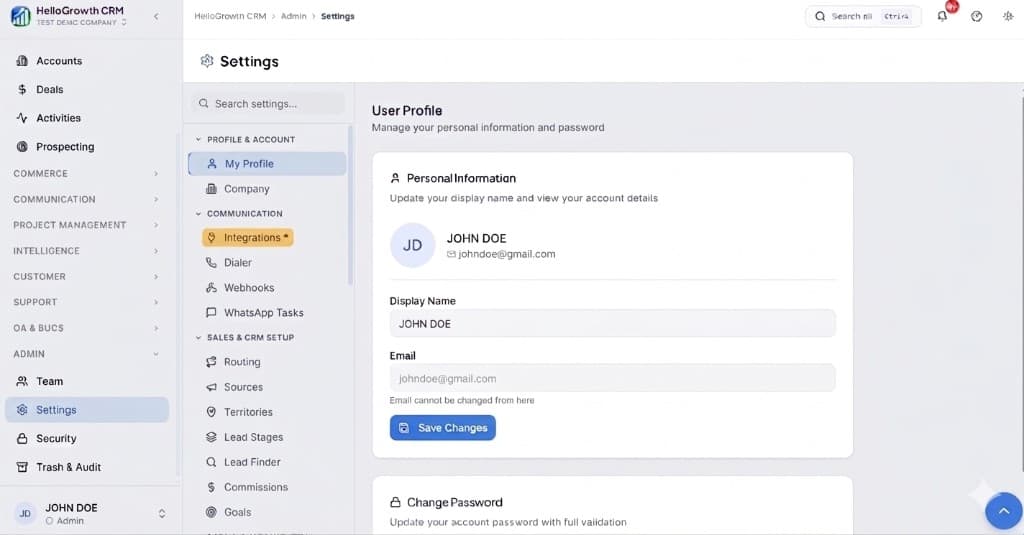
  2. 2

    Open Settings. In the left sidebar, under Admin, click Settings (you will land on the Settings area; the URL is app.hellogrowthcrm.com/settings).

    HelloGrowthCRM Settings: Admin sidebar with Settings selected, secondary menu with Communication and Integrations, and profile area

    Open Settings(opens in a new tab)app.hellogrowthcrm.com/settings

  3. 3

    Go to Integrations. On the Settings screen, use the middle settings menu. Under COMMUNICATION, click Integrations (star icon). Then find and configure this connector—the connector-specific steps below pick up from here.

    HelloGrowthCRM Settings menu highlighting COMMUNICATION and Integrations next to the Admin Settings sidebar

    Open Settings (Integrations)(opens in a new tab)app.hellogrowthcrm.com/settings

  4. 4

    Obtain GSTIN/PAN API credentials

    Sign up with a GSTIN/PAN verification API provider (such as Setu, Karza, or Perfios). Create a project, generate your API key and secret, and note your allowed query types — typically GSTIN lookup, PAN verification, or both.

  5. 5

    Connect the verification API in HelloGrowthCRM

    In HelloGrowthCRM, go to Settings → Integrations → India Compliance. Select GSTIN & PAN Verification, paste your API key and secret, and click Save. Choose your preferred provider from the dropdown if multiple are available.

  6. 6

    Enable auto-lookup on contact and company forms

    In Settings → Fields, enable the GSTIN auto-enrich toggle on the Company record type. When a rep enters a valid 15-digit GSTIN and saves, HelloGrowthCRM will automatically retrieve the registered business name, address, business type, and filing status from the registry.

  7. 7

    Configure PAN verification for deals or contacts

    Enable PAN Verification on the Contact record type for individual KYC. Set the verification trigger — either manual (rep clicks Verify) or automatic on record save. Choose which deal stages should require verified PAN before progressing.

  8. 8

    Test with a known GSTIN and PAN

    Open a test company record, enter a valid GSTIN (use your own company's GST number), and click Verify or save the record. Confirm that the enriched fields populate correctly. Repeat with a PAN number on a contact record to validate the PAN lookup flow.

Need help with setup? Book a 15-minute onboarding call — our team will connect it live with you.
FAQ

Frequently asked questions

What does a GSTIN verification actually return?
Typically the registered legal name, trade name, state, registration status (active, cancelled, suspended), and taxpayer type — enough to confirm you're dealing with the entity the buyer claims to be.
Is verification mandatory for every lead?
No — you decide where it sits. Most teams verify at qualification for credit sales and at onboarding for services, skipping it for small cash-and-carry transactions.

Want help evaluating the next step?

Book a demo to see HelloGrowthCRM in action, or start a free trial.