Skip to content
Integration

Razorpay Integration for HelloGrowthCRM

Connect Razorpay with HelloGrowthCRM to track payments, subscriptions, and revenue in your CRM. Auto-create deals when customers pay.

Quick answer

Does the Razorpay integration support subscriptions?

Yes. Subscription created, renewed, and cancelled events are all supported. Subscription lifecycle changes automatically update the customer's status and next follow-up task in HelloGrowthCRM.
Last updated:
What you get

For businesses running recurring billing or taking payments through Razorpay, the disconnect between payment processing and sales tracking creates pain. You close a deal in the CRM but don't see payment confirmation for days. Customer renewals happen without your sales team knowing. Failed charges languish unaddressed because nobody connected them back to the account. The Razorpay integration closes these gaps.

When a customer completes a payment through Razorpay, HelloGrowthCRM automatically logs it to the right account and opportunity. Payment status, amount, date, and invoice link are all captured in the deal timeline so sales teams see revenue realization in real time, not at month-end during reconciliation.

Subscription tracking becomes visible at the contact level. HelloGrowthCRM shows each customer's subscription status, next billing date, and MRR contribution so account managers can plan upsells, predict churn risk, and coordinate renewals. When a subscription approaches renewal, automated reminders trigger so the account team reaches out proactively instead of letting renewal lapse.

Failed payment automation is especially valuable. When a Razorpay charge fails—due to expired card, insufficient funds, or technical issues—HelloGrowthCRM creates an alert task so the account team can reach out immediately and resolve the problem. That quick response often prevents customer churn and keeps revenue from slipping.

For product-driven businesses using Razorpay for self-serve checkout, the integration creates deal records automatically when a customer completes their first payment. That turns payment data into CRM pipeline visibility—you now see which product segments are selling, which marketing sources generate paying customers, and which geographic regions are acquiring at the highest rate.

Reporting on subscription health and revenue becomes much clearer when Razorpay is integrated. HelloGrowthCRM can show MRR trends by segment, churn patterns by cohort, and upsell opportunities based on current subscription level. That visibility helps leadership forecast revenue, allocate resources, and understand which customer segments are expanding versus shrinking.

For teams managing both one-time payments and subscriptions, the unified view matters. Whether a customer is on a monthly plan, an annual contract, or making one-off purchases, their full payment history and current obligations are visible in one account record so the team never double-bills or loses track of what's already been paid.
Automation workflows

Automation workflows with Razorpay and HelloGrowthCRM

Generate payment links from deals in one click

Deal value, customer name, and phone flow into a Razorpay link sent by email or WhatsApp. UPI, cards, netbanking, and EMI options come with it — the buyer pays their way, and you skip the invoice-first dance for advances.

Automate the paid-to-fulfilment handoff

Payment webhooks advance the deal, log the transaction, and open the delivery checklist. The gap where ops waits for someone to confirm payment closes to zero.

Manage subscriptions and failed renewals

For recurring billing via Razorpay subscriptions, failed charges flag the account owner with a retry-and-reach-out task — dunning with a human touch, before the customer silently churns.

Track partial payments and refunds honestly

Advances, balances, and refunds each log against the deal, so 'how much has this customer actually paid?' has one answer across sales, ops, and accounts.

In practice

How Indian businesses collect through Razorpay plus CRM

SaaS onboarding to first payment

A software startup sends the subscription link the moment a trial converts in the pipeline. Time-to-first-payment shrank from days of invoice ping-pong to minutes.

Interior design project advances

A design firm collects a 10% token via link during the closing call itself. Token-paid deals almost never ghost — the payment is the commitment device.

B2B annual contracts with EMI

An equipment vendor offers EMI through Razorpay on high-ticket deals. Finance-sensitive buyers close faster, and instalment status stays visible on the account.

Setup guide

How to connect — step by step

Takes about 10–15 minutes. No coding required.

Setup at a glance

  • Get your Razorpay API credentials
  • Connect Razorpay in HelloGrowthCRM
  • Map Razorpay events to CRM actions
  • Configure customer matching
  • Test with a small payment
  1. 1

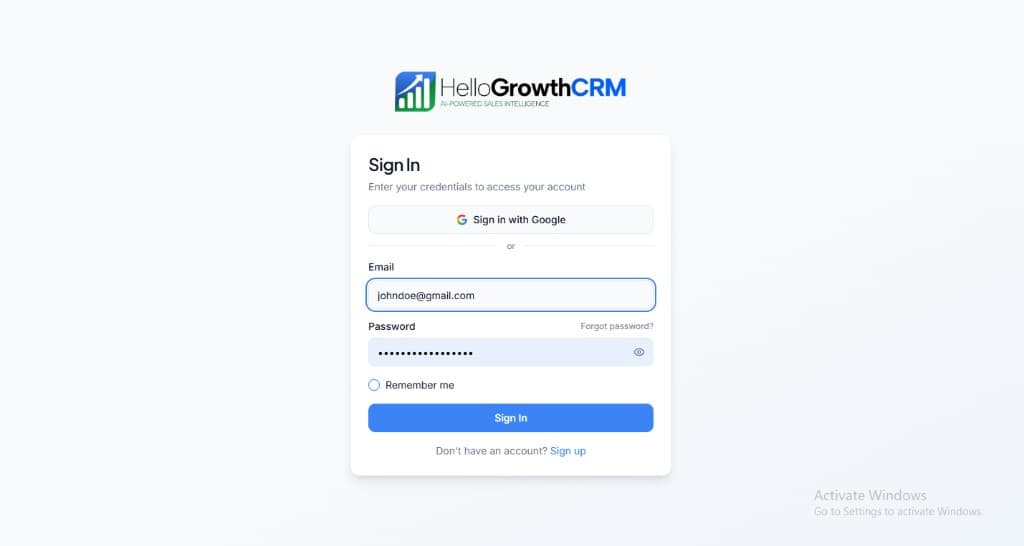
    Sign in or sign up at HelloGrowthCRM. Open the login page, enter your credentials (or use Google), or choose Sign up if you need a new account. You must be signed in before you can open Settings and connect this integration.

    HelloGrowthCRM login screen: Sign in with Google, email and password fields, Remember me, and Sign up link

    Open login page(opens in a new tab)app.hellogrowthcrm.com/login

  2. 2

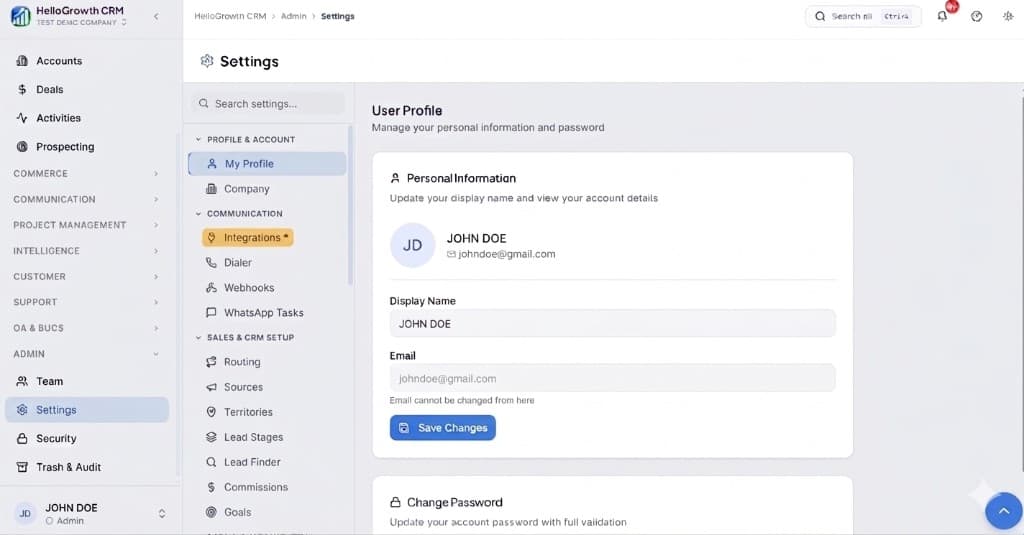
    Open Settings. In the left sidebar, under Admin, click Settings (you will land on the Settings area; the URL is app.hellogrowthcrm.com/settings).

    HelloGrowthCRM Settings: Admin sidebar with Settings selected, secondary menu with Communication and Integrations, and profile area

    Open Settings(opens in a new tab)app.hellogrowthcrm.com/settings

  3. 3

    Go to Integrations. On the Settings screen, use the middle settings menu. Under COMMUNICATION, click Integrations (star icon). Then find and configure this connector—the connector-specific steps below pick up from here.

    HelloGrowthCRM Settings menu highlighting COMMUNICATION and Integrations next to the Admin Settings sidebar

    Open Settings (Integrations)(opens in a new tab)app.hellogrowthcrm.com/settings

  4. 4

    Get your Razorpay API credentials

    Log in to your Razorpay Dashboard. Go to Settings → API Keys → Generate Key. Copy the Key ID and Key Secret. You will need both to authenticate the integration.

  5. 5

    Connect Razorpay in HelloGrowthCRM

    In HelloGrowthCRM, go to Settings → Integrations → Razorpay. Paste your Key ID and Key Secret. Click Save. HelloGrowthCRM will verify the connection with a test API call.

  6. 6

    Map Razorpay events to CRM actions

    Choose which Razorpay payment events trigger CRM updates: payment.captured advances a deal to Closed Won, payment.failed creates a follow-up task, subscription.activated tags the contact as a paid customer.

  7. 7

    Configure customer matching

    Set how Razorpay customers are matched to HelloGrowthCRM contacts: by email address, phone number, or Razorpay customer ID. Duplicate prevention ensures one CRM record per customer.

  8. 8

    Test with a small payment

    Make a test payment via Razorpay (you can use Razorpay's test mode). Verify that HelloGrowthCRM receives the webhook, updates the correct contact's deal stage, and logs the payment amount in the timeline.

Need help with setup? Book a 15-minute onboarding call — our team will connect it live with you.
FAQ

Frequently asked questions

Does the Razorpay integration support subscriptions?
Yes. Subscription created, renewed, and cancelled events are all supported. Subscription lifecycle changes automatically update the customer's status and next follow-up task in HelloGrowthCRM.
Can I see payment history inside a contact's CRM record?
Yes. All Razorpay payment events linked to a contact appear in their HelloGrowthCRM timeline with amount, currency, payment method, and Razorpay order ID.
Does this work with Razorpay Payment Links?
Yes. Payment Link paid events trigger the same webhook flow as standard order payments, so you can track link-based payments in the CRM exactly like checkout payments.
What Razorpay products does the integration work with?
Payment links are the core flow, with webhook support covering payments, subscriptions, and refunds. If your Razorpay account has a product enabled, its success events can drive CRM automation.
How fast does payment status reach the CRM?
Webhooks deliver within seconds of payment success. The deal updates and downstream automations — notifications, fulfilment tasks — fire immediately.

Want help evaluating the next step?

Book a demo to see HelloGrowthCRM in action, or start a free trial.