HelloGrowthCRM software
Built for real small-business sales teams
HelloGrowthCRM helps reps qualify faster, follow up on time, and close more deals—with practical automation in one place.
- AI lead scoring and pipeline visibility
- Built-in dialer, WhatsApp, and email automation
- Sales forecasting and RevOps-ready reporting
Sales Task Boards vs Traditional To-Do Lists: Why Kanban Wins
In the world of sales automation, the tools you use can significantly impact your team's productivity and success. Traditional to-do lists have long been a staple in managing tasks and priorities, but they often fall short when it comes to visual organization and workflow management. Enter sales task boards, particularly those utilizing the Kanban methodology. Kanban boards can transform the way sales teams approach their daily tasks, providing a visual representation of work in progress and allowing for better prioritization and collaboration. In this article, we’ll explore the differences between traditional to-do lists and sales task boards, and why Kanban is the superior choice for sales leaders, RevOps teams, and small business owners.
Understanding Traditional To-Do Lists
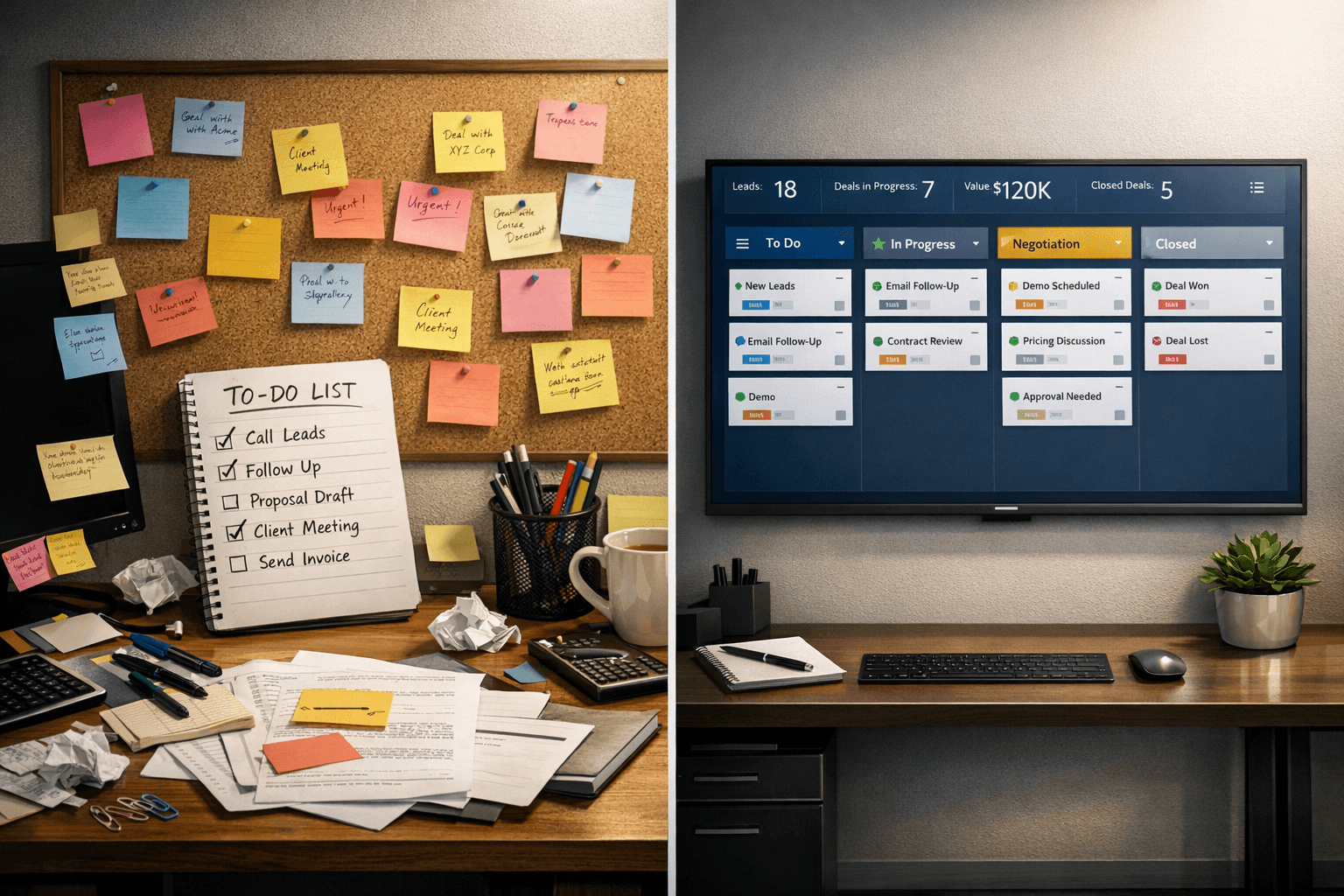
Traditional to-do lists are straightforward and familiar to most people. They often consist of a simple list of tasks that need to be completed, organized either by priority or due date. While this approach has its merits, it can quickly become overwhelming, especially when dealing with a long list of tasks. The lack of visual representation means that it’s easy to overlook important tasks or to mismanage priorities. Additionally, to-do lists do not provide insight into the status of tasks, leaving team members guessing about what others are working on and whether any bottlenecks exist.
Some common issues with traditional to-do lists include:
- Difficulty in tracking progress, leading to potential task overload.
- Lack of collaboration, as lists are often managed individually.
- Limited visibility into the overall workflow, making it hard to identify areas for improvement.
Sales task boards, on the other hand, offer a more dynamic approach to task management. By visualizing tasks in a board format, sales teams can better manage their workload and see the bigger picture of their sales process.
The Advantages of Sales Task Boards
Sales task boards, particularly those that use the Kanban method, bring several advantages over traditional to-do lists. One of the primary benefits is the visual representation of tasks, which allows team members to see the status of each task at a glance. This visibility can lead to improved communication and collaboration among team members, as everyone can quickly understand what needs to be done and who is responsible for each task. Furthermore, sales task boards can help identify bottlenecks in the workflow, allowing teams to address issues before they escalate.
Some key advantages of sales task boards include:
- Enhanced collaboration, as team members can easily see each other's tasks.
- Improved prioritization, allowing for a more strategic approach to task management.
- Real-time updates, which keep everyone informed about task statuses and deadlines.
By leveraging the power of sales automation tools like HelloGrowthCRM, teams can implement Kanban boards effectively, ensuring that they maximize the benefits of this approach.
How Kanban Works in Sales
The Kanban system is centered around a few key principles, making it an ideal choice for sales teams. At its core, Kanban emphasizes visualizing work, limiting work in progress, and managing flow. By breaking down tasks into smaller, manageable pieces and moving them across the board as they progress, sales teams can maintain focus and avoid becoming overwhelmed by a long list of tasks.
The Kanban process typically involves:
- Visualizing tasks on a board, often divided into columns that represent different stages of completion.
- Limiting the number of tasks in progress to prevent overload and encourage focus.
- Continuously evaluating and improving the workflow based on team feedback and performance metrics.
Implementing a Kanban board can streamline processes, making it easier for sales teams to stay organized and productive. With tools like HelloGrowthCRM, teams can create customized boards that reflect their unique sales processes, enabling them to work more efficiently.
Moving from To-Do Lists to Kanban Boards
Transitioning from traditional to-do lists to a Kanban board may seem daunting, but the process can be relatively straightforward. The key is to start with a clear understanding of your team's workflow and the tasks at hand. Begin by identifying the different stages of your sales process and categorize tasks accordingly.
Here’s how to make the switch:
- Assess your current to-do list and identify tasks that can be grouped by stage.
- Create columns on your Kanban board that represent each stage of your sales process.
- Move tasks from the to-do column to the in-progress and done columns as they progress.
As your team becomes accustomed to the Kanban system, you’ll likely notice improvements in productivity and collaboration. HelloGrowthCRM can support this transition by providing an intuitive platform for managing your Kanban boards, ensuring that your team has everything they need to succeed.
Best Practices for Using Sales Task Boards
To get the most out of your sales task boards, consider implementing some best practices. These practices can help your team stay organized and focused, maximizing the benefits of sales automation.
Some effective best practices include:
- Regularly review and update the board to reflect current priorities and tasks.
- Encourage team members to communicate openly about their progress and any obstacles they encounter.
- Use metrics to evaluate performance and refine your processes over time.
By following these best practices, you can create a culture of accountability and continuous improvement within your sales team. HelloGrowthCRM offers features that can help facilitate these practices, ensuring your team remains aligned and productive.
Conclusion
In the debate between sales task boards and traditional to-do lists, it’s clear that Kanban boards offer significant advantages for sales teams. From enhanced collaboration to improved prioritization, the benefits of adopting this sales automation approach are undeniable. By utilizing tools like HelloGrowthCRM, small business owners and sales leaders can streamline their processes and empower their teams to achieve greater success. Transitioning to a Kanban system may take some initial effort, but the long-term gains in productivity and efficiency make it well worth the investment.
To learn more about how HelloGrowthCRM can enhance your sales automation efforts, explore our features and discover how we can help your team thrive.
HelloGrowthCRM makes it easy to take the next step. You can Discover HelloGrowthCRM features to enhance your sales process. and see how it fits your team's workflow within minutes.
You can also explore Learn more about HelloGrowthCRM and our mission., Read more articles on sales automation strategies., Get support for using HelloGrowthCRM effectively., Contact us for a demo or more information. to connect the tools and resources your team already relies on.
Ready to put this into practice?
Set up your pipeline, WhatsApp follow-ups, and AI lead scoring in minutes — free, no credit card.
Try HelloGrowthCRM freeGet CRM tips in your inbox
Join thousands of sales professionals who get weekly insights on CRM strategy, AI automation, and pipeline optimization.

The HelloGrowthCRM team publishes guides on CRM strategy, AI sales tools, and revenue operations for small business sales teams.