Deal Lost Re-engagement Workflow(Free Download)
Full win-back playbook: enroll on Closed Lost, 30/60/90-day value emails, re-engagement scoring (0–100), tiered sales alerts, tasks, and clear outcomes.
Template preview
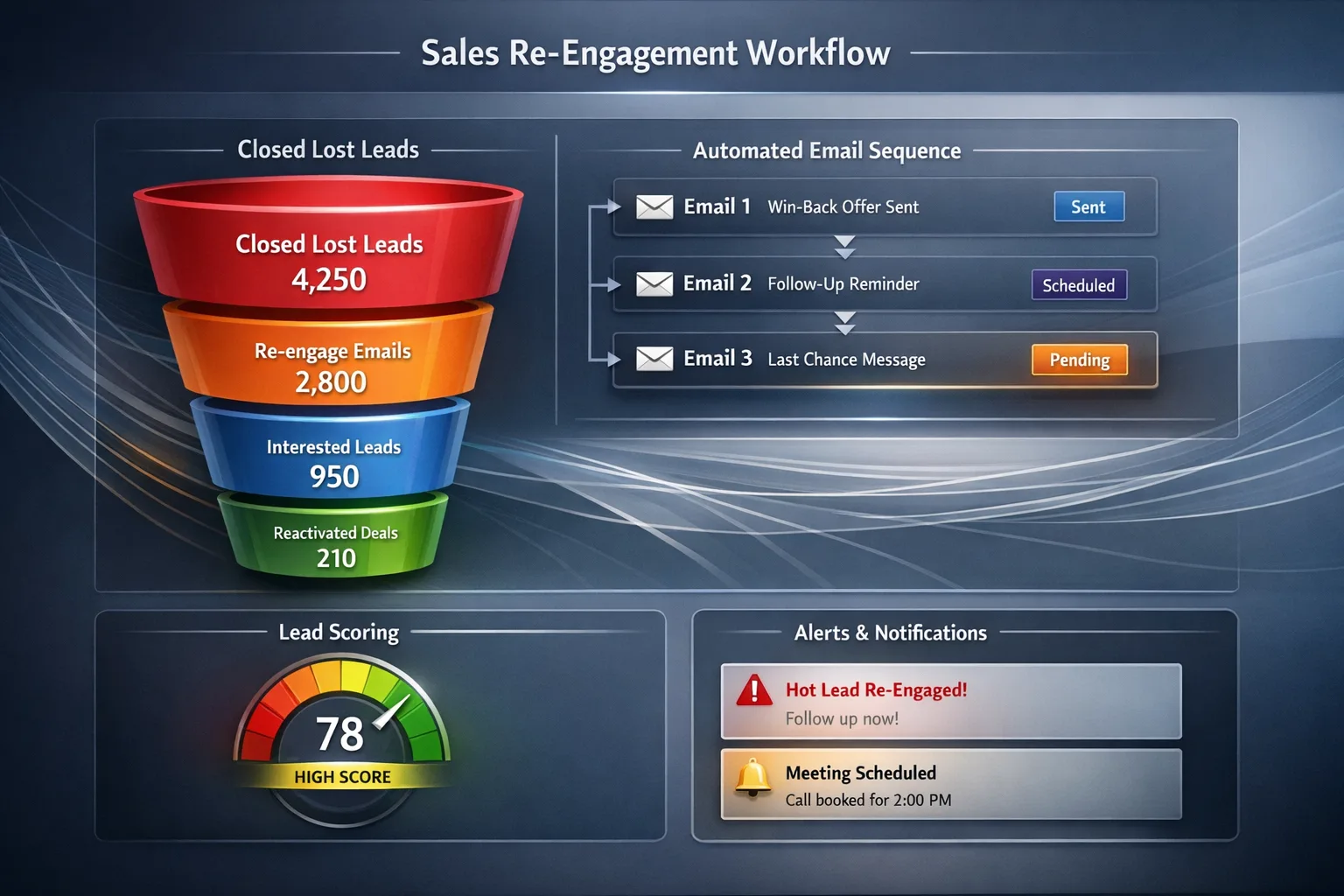
Win-back workflow
What's included
Six workflow stages (30 steps), three email templates with tokens, 0–100 re-engagement scoring model, BANT-style threshold tiers, sales alert and task rules, owner logic, timing table, and exit conditions.
Automation rules
- Closed Lost enrollment with exclusions and dedupe
- Content selection by industry, deal size, lost reason, product, persona
- Alerts on reply, clicks, key pages, meetings, score threshold
- Tasks with 1 business day SLA on meaningful re-engagement
- Exit on meeting, positive reply, pipeline move, unsubscribe, permanent DQ
Dashboards & views
- Win-back rate
- Re-engagement score distribution
- Time-to-reply after alert
Template specs
Updated 2026-03-21
No credit card · Free forever
A complete deal-lost re-engagement workflow with six stages: enrollment and context capture; 30-, 60-, and 90-day email touches with personalization; real-time signal detection; sales alerts and SLA tasks; and outcome handling (Re-engaged, No Response, Unqualified). Includes suggested email copy, merge tokens, engagement scoring with passive / warming / sales-ready bands, threshold logic, routing to prior deal owner, automation (enrollment guards, dedupe, alerts, tasks), and exit conditions. Timing defaults are editable after deployment.
The Problem This Solves
Lost deals go cold while competitors stay in touch. Without a structured 30/60/90 motion and scoring, win-back is inconsistent and reps miss re-engagement signals.
Who It's For
AEs, SDRs, sales managers, and RevOps teams managing Closed Lost pipelines and win-back programs.
Use Cases
- Auto-enroll lost deals with excluded reasons and deduped enrollment
- Run value-led emails with industry/lost-reason-aware assets
- Alert owners when engagement crosses moderate/high thresholds or on reply/meeting
How to Use This Template
- 1
Open “Use This Template” or “Workflow Preview” to explore stages, emails, signals, and automation
- 2
Connect trigger: Deal = Closed Lost; map lost reason, value, industry, product interest
- 3
Configure score weights and bands; align alerts to Slack/email
- 4
Assign default owner to prior deal owner; set 1-business-day task SLA after hot signals
- 5
Export PDF/Excel for enablement; deploy to activate the live workflow in CRM
Inside the template: sample data
The exact rows that ship with the Deal Lost Re-engagement Workflow download — replace them with your own records after import.
| Stage | # | Step | Owner |
|---|---|---|---|
| 1 — Enrollment | 1 | Detect deal marked lost | Workflow engine |
| 1 — Enrollment | 2 | Capture lost reason, value, owner, industry, product interest | CRM |
| 1 — Enrollment | 3 | Store lost date | System |
| 1 — Enrollment | 4 | Enroll in re-engagement workflow | Automation |
| 1 — Enrollment | 5 | Pause overlapping sales sequences | Sales engagement |
| 2 — Day 30 | 6 | Wait 30 days | Scheduler |
| 2 — Day 30 | 7 | Send personalized check-in email | Marketing automation |
| 2 — Day 30 | 8 | Reference prior conversation / lost reason | Content rules |
| 2 — Day 30 | 9 | Share case study or article | Content library |
| 2 — Day 30 | 10 | Track opens, clicks, replies, revisits | Analytics |
| 3 — Day 60 | 11 | Wait until day 60 if low engagement | Scheduler |
| 3 — Day 60 | 12 | Send second email — new angle | Marketing automation |
| 3 — Day 60 | 13 | Share industry proof / updated value | Content rules |
| 3 — Day 60 | 14 | Continue tracking signals | Analytics |
| 3 — Day 60 | 15 | Branch on reply or key pages | Workflow engine |
| 4 — Day 90 | 16 | Wait until day 90 | Scheduler |
| 4 — Day 90 | 17 | Send final re-engagement email | Marketing automation |
| 4 — Day 90 | 18 | Offer low-friction restart options | Template |
| 4 — Day 90 | 19 | Share high-conviction content | Content library |
| 4 — Day 90 | 20 | Monitor last-chance signals | Analytics |
| 5 — Alerts | 21 | Detect multiple opens | Email platform |
| 5 — Alerts | 22 | Detect clicks | Email platform |
| 5 — Alerts | 23 | Detect pricing/product/demo visits | Web analytics |
| 5 — Alerts | 24 | Detect reply or meeting | Inbox / calendar |
| 5 — Alerts | 25 | Alert assigned rep immediately | Notifications |
| 6 — Outcomes | 26 | Create follow-up task when threshold met | Sales |
| 6 — Outcomes | 27 | Reopen opportunity or return to pipeline | CRM rules |
| 6 — Outcomes | 28 | Stop on positive reply or meeting | Workflow engine |
| 6 — Outcomes | 29 | Mark outcome: Re-engaged / No Response / Unqualified | CRM |
| 6 — Outcomes | 30 | Complete workflow if no engagement after sequence | Workflow engine |
Frequently Asked Questions
Ready to use this template?
Deploy Deal Lost Re-engagement Workflow in HelloGrowthCRM with one click. Get started free — no credit card · free forever.
Free forever · No credit card required · Set up in minutes
Related resources
Related Templates
Inbound Lead Qualification Workflow
End-to-end inbound flow: capture → 0–100 score → BANT → routing → SLA → meeting booking → nurture/recycle, with full automation and field-level steps.
Lead Nurture Email Sequence
8-email drip sequence that educates and qualifies inbound leads over 30 days with progressive profiling and scoring.
E-commerce Customer Lifecycle
Five-step DTC lifecycle: first-purchase welcome, review & feedback, cross-sell & repeat buy, loyalty enrollment, and dormant win-back — with statuses and full automation pack.