E-commerce Customer Lifecycle(Free Download)
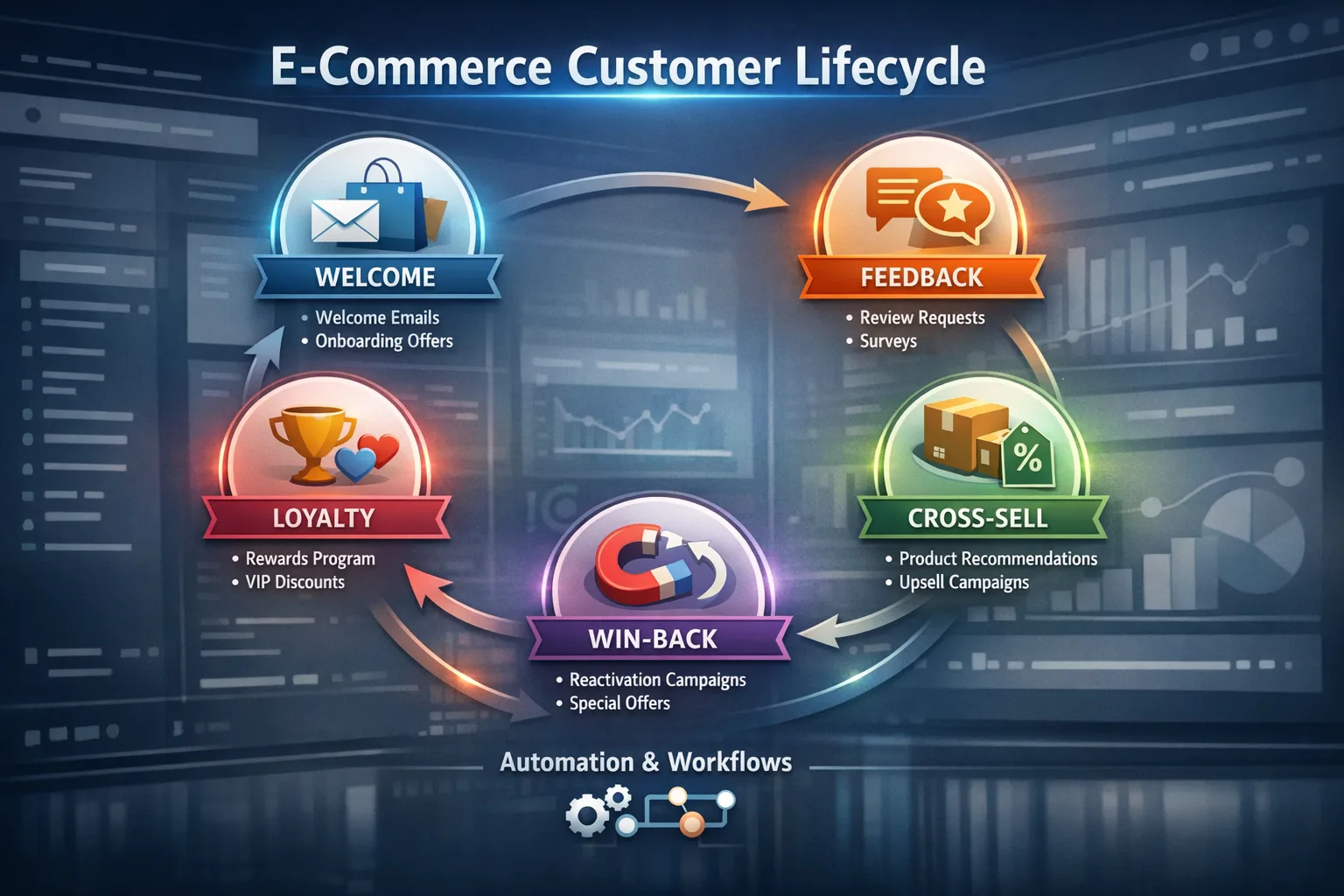
Five-step DTC lifecycle: first-purchase welcome, review & feedback, cross-sell & repeat buy, loyalty enrollment, and dormant win-back — with statuses and full automation pack.
Template preview
DTC lifecycle
What's included
Five lifecycle steps with 26 concrete actions, suggested customer statuses, delivery-based review timing, recommendation and loyalty logic, dormancy and win-back automation, and exportable checklists.
Automation rules
- First-purchase trigger and engagement timeline anchor
- Review requests after delivery / completion with sentiment branches
- Cross-sell, repeat purchase, and loyalty threshold rules
- Dormancy job and multi-touch win-back with reactivation tagging
- Email/SMS, tasks, and alerts as configured in CRM
Dashboards & views
- Repeat purchase rate
- Review completion & CSAT
- Loyalty enrollment funnel
- Win-back conversion
Template specs
Updated 2026-03-21
No credit card · Free forever
A structured e-commerce customer lifecycle template with five steps: (1) First Purchase Welcome — thank-you, expectations, First-Time Buyer tag, lifecycle record, engagement timeline; (2) Review & Feedback — delivery-timed review ask, NPS option, sentiment branching, alerts on bad feedback; (3) Cross-Sell & Repeat Purchase — recommendations, sequences, incentives, repeat detection; (4) Loyalty Program Enrollment — threshold detection, invite, tiers/points, welcome; (5) Dormant Win-Back — dormancy detection, win-back messages, incentives, reactivation. Includes suggested statuses (e.g. First-Time Buyer through Reactivated), email/SMS support, tasks/alerts, and editable timing rules after deployment.
The Problem This Solves
Brands acquire hard but often stop engaging after checkout — missing reviews, second orders, loyalty, and save opportunities when buyers go dormant.
Who It's For
E-commerce and DTC marketing, retention, and operations teams using Shopify, WooCommerce, or similar stacks.
Use Cases
- Automate post-purchase through loyalty with one playbook
- Catch unhappy buyers early via review branching
- Win back dormants with segmented offers and clear reactivation tracking
How to Use This Template
- 1
Open “Use This Template” to review the five steps, actions, statuses, and automation checklist
- 2
Connect order, delivery, and product catalog data; set dormancy X days by category
- 3
Map CRM fields to lifecycle statuses and tags
- 4
Configure loyalty thresholds and win-back caps; deploy to activate in CRM
- 5
Export PDF/Excel for your team; adjust delays in-app after creation
Inside the template: sample data
The exact rows that ship with the E-commerce Customer Lifecycle download — replace them with your own records after import.
| Step | # | Action | Owner |
|---|---|---|---|
| 1 — First Purchase Welcome | 1 | Send post-purchase thank you email or SMS | Marketing automation |
| 1 — First Purchase Welcome | 2 | Confirm order and set expectations | Transactional messaging |
| 1 — First Purchase Welcome | 3 | Introduce brand relationship journey | Lifecycle marketing |
| 1 — First Purchase Welcome | 4 | Tag customer as First-Time Buyer | CRM / CDP |
| 1 — First Purchase Welcome | 5 | Create customer lifecycle record | CRM |
| 1 — First Purchase Welcome | 6 | Start engagement timeline | Workflow engine |
| 2 — Review & Feedback | 7 | Send review request email | Marketing automation |
| 2 — Review & Feedback | 8 | Ask for rating, testimonial, or product review | Marketing automation |
| 2 — Review & Feedback | 9 | Trigger NPS or satisfaction check if needed | CX / Marketing |
| 2 — Review & Feedback | 10 | Branch: positive, neutral, or negative | Workflow engine |
| 2 — Review & Feedback | 11 | Alert support or CS if bad feedback | Notifications |
| 3 — Cross-Sell & Repeat | 12 | Send personalized product recommendations | Personalization engine |
| 3 — Cross-Sell & Repeat | 13 | Trigger cross-sell / upsell sequence from history | Marketing automation |
| 3 — Cross-Sell & Repeat | 14 | Recommend complementary items | Merchandising rules |
| 3 — Cross-Sell & Repeat | 15 | Offer limited-time repeat incentive if needed | Promotions |
| 3 — Cross-Sell & Repeat | 16 | Track clicks, views, repeat buying | Analytics |
| 4 — Loyalty Enrollment | 17 | Detect repeat purchase or value threshold | Workflow engine |
| 4 — Loyalty Enrollment | 18 | Send loyalty program invitation | Marketing automation |
| 4 — Loyalty Enrollment | 19 | Explain rewards, points, tiers, benefits | Brand / Loyalty ops |
| 4 — Loyalty Enrollment | 20 | Tag Loyalty Eligible or Loyalty Member | CRM |
| 4 — Loyalty Enrollment | 21 | Track enrollment; member welcome message | Loyalty platform |
| 5 — Win-Back | 22 | Detect dormancy (no purchase in X days) | Scheduler |
| 5 — Win-Back | 23 | Send win-back email or SMS | Marketing automation |
| 5 — Win-Back | 24 | Offer incentive, reminder, or new arrival | Promotions |
| 5 — Win-Back | 25 | Highlight products related to prior purchases | Personalization |
| 5 — Win-Back | 26 | Final reactivation; mark Reactivated on return | Lifecycle marketing |
Frequently Asked Questions
Ready to use this template?
Deploy E-commerce Customer Lifecycle in HelloGrowthCRM with one click. Get started free — no credit card · free forever.
Free forever · No credit card required · Set up in minutes
Related resources
Related Templates
Deal Lost Re-engagement Workflow
Full win-back playbook: enroll on Closed Lost, 30/60/90-day value emails, re-engagement scoring (0–100), tiered sales alerts, tasks, and clear outcomes.
Lead Nurture Email Sequence
8-email drip sequence that educates and qualifies inbound leads over 30 days with progressive profiling and scoring.
SaaS Trial Conversion Sequence
14-day automated email sequence to convert free trial users into paying customers with A/B test variants.