Why Gmail-Based CRMs Like Streak Hold Sales Teams Back

Co-Founder, HelloGrowthCRM · March 14, 2026 · 15 min read
Quick Answer
Gmail-based CRMs like Streak are convenient for solo users but break at team scale: no standalone mobile app, no built-in dialer, no AI lead scoring, and no WhatsApp integration. Every feature requires a Chrome extension — so reps on mobile or using non-Gmail email are effectively locked out. Teams outgrow Gmail CRMs the moment they need calling, WhatsApp, or manager-level pipeline visibility.
HelloGrowthCRM software
Built for real small-business sales teams
HelloGrowthCRM helps reps qualify faster, follow up on time, and close more deals—with practical automation in one place.
- AI lead scoring and pipeline visibility
- Built-in dialer, WhatsApp, and email automation
- Sales forecasting and RevOps-ready reporting
When Streak Makes Sense
Streak is a well-designed product that solves a real problem: it turns Gmail into a lightweight CRM without requiring a separate application, data migration, or significant behaviour change. For a solo founder managing 30 active deals entirely through email, Streak is a genuinely good tool.
It surfaces pipeline stages inside Gmail, tracks email opens, and adds basic notes and tasks alongside your email conversations without requiring you to leave your inbox.
The use cases where Streak works well are narrow but real. A solo consultant managing fewer than 50 active client conversations who communicates exclusively through Gmail and does not need phone calling, AI features, or team collaboration. A very early-stage startup where the entire commercial operation is one person in a Gmail inbox.
A freelancer managing project inquiries through email who wants a lightweight Kanban view without paying for a full CRM.
In these scenarios, Streak's core proposition — CRM without leaving Gmail — is a genuine advantage. Setup is fast, the learning curve is shallow, and the tool does not force behaviour changes that solo users are resistant to.
The problem is that most sales teams outgrow these constraints quickly. The moment you add a second sales person, introduce a phone channel, start communicating with clients on WhatsApp, or want to understand which leads deserve attention based on more than inbox order, Streak's Gmail-first architecture becomes a constraint rather than a convenience.
The five limitations that follow are not edge cases or minor inconveniences — they are structural problems that emerge directly from Streak's decision to live inside Gmail rather than being a standalone sales platform. Each limitation is manageable when you are a solo Gmail user.
Each one becomes a significant operational problem when you are managing a team of 3 or more reps across multiple communication channels.
Limitation 1: No Standalone App — Locked to Gmail in a Browser
Streak's entire user experience lives inside Gmail. The pipeline view, the deal records, the contact management, the email tracking — all of it is accessed through a Chrome extension that modifies your Gmail interface. This creates three serious problems for growing sales teams.
First, you can only use Streak on a desktop or laptop browser with the Chrome extension installed. There is no independent Streak mobile app that gives you full pipeline access. The mobile experience is Gmail's mobile app with limited Streak functionality — you can view some deal information but you cannot manage your pipeline effectively from your phone.
For sales teams where reps are frequently in the field or working from mobile, this is a fundamental limitation. Modern sales teams expect to be able to call a lead, log the outcome, and see the full pipeline from their phone in under 60 seconds.
Second, if your company uses Microsoft Outlook, Firefox, or any browser other than Chrome, Streak is completely unavailable. The Chrome extension is the only delivery mechanism. A sales team that includes even one Outlook user faces an immediate adoption problem — that person either converts to Gmail-in-Chrome or does not use the CRM at all.
Third, Streak's dependency on Gmail means your CRM is only as reliable and available as Gmail. Gmail outages take your CRM down with them. Your pipeline is inaccessible. This is an unusual risk for a business-critical sales tool.
A purpose-built CRM like HelloGrowthCRM is a standalone application with its own mobile app, its own API, and its own reliability guarantee. It works regardless of whether your team uses Gmail, Outlook, or Yahoo Mail. Reps can access the full pipeline, log calls, send messages, and manage tasks from any device without depending on a Chrome extension installed on a specific computer.
This platform independence is not a luxury feature — it is a prerequisite for any sales team that expects to grow beyond a single office and a single email provider.
Limitation 2: No Built-In Dialer — Cannot Click-to-Call or Log Calls
Phone calling is the highest-conversion outreach channel for most B2B sales teams. Email response rates for cold outreach average 15-25%. Phone call connection rates, when the number is correct and the timing is right, can be 35-50% for warm leads. For Indian sales teams communicating with SMB decision-makers, a phone call routinely outperforms email by 3 to 5 times in terms of conversation rate.
Streak has no built-in dialer. There is no click-to-call button. There is no call logging. There is no call recording. There is no AI call summary. When a Streak user needs to call a lead, they switch out of Gmail, open their phone, dial the number manually, have the conversation, hang up, and then switch back to Streak to manually type notes about what was discussed.
In a busy sales day with 20 calls to make, this context switching is enormously inefficient. Each manual switch costs 2-3 minutes of productive time. Across a team of 5 reps making 15 calls per day each, that is 150-225 minutes of wasted daily productivity — 2.5 to 3.75 hours per day across the team.
Annually, that is 650-975 wasted rep-hours. At a blended rep cost of Rs.600 per hour, that is Rs.3.9 to Rs.5.85 lakh in wasted annual productivity — purely from the absence of an integrated dialer.
More importantly, without automated call logging, call history is only as complete as what reps choose to manually record. In practice, reps under call volume pressure skip logging. The CRM loses its completeness. The manager cannot see which leads have been called, how many times, and what was said. Pipeline quality degrades.
HelloGrowthCRM includes a built-in power dialer with one-click calling, automatic call logging, call recording, and AI-generated call summaries. A rep ends a call and the CRM has already logged who was called, at what time, for how long, and what the key outcomes were. The next action is suggested automatically. That efficiency difference compounds dramatically over a quarter.
Limitation 3: No AI Lead Scoring — All Leads Look Equal
In a Streak pipeline, all deals in the same stage look equally important. There is no scoring system that tells a rep which deal to call first thing Monday morning, which proposal to follow up on most urgently, or which prospect has been behaviorally signalling high purchase intent through their email engagement and website visits.
This is not a minor UX convenience gap — it is a fundamental competitive disadvantage. Research on B2B sales consistently shows that speed of follow-up to high-intent signals is one of the strongest predictors of conversion. A lead who downloads a pricing page PDF and visits the product comparison page three times in 24 hours has displayed extremely strong buying signals.
If a rep calls that lead within an hour, connection-to-meeting rates are typically 400-600% higher than if the rep calls 48 hours later.
Without AI lead scoring, reps cannot identify these high-intent leads without manually reviewing every contact record. In a pipeline of 100 active deals, that manual review is unrealistic. Reps resort to working the pipeline in FIFO order, alphabetically, or by gut feel — all of which perform dramatically worse than intent-based prioritisation.
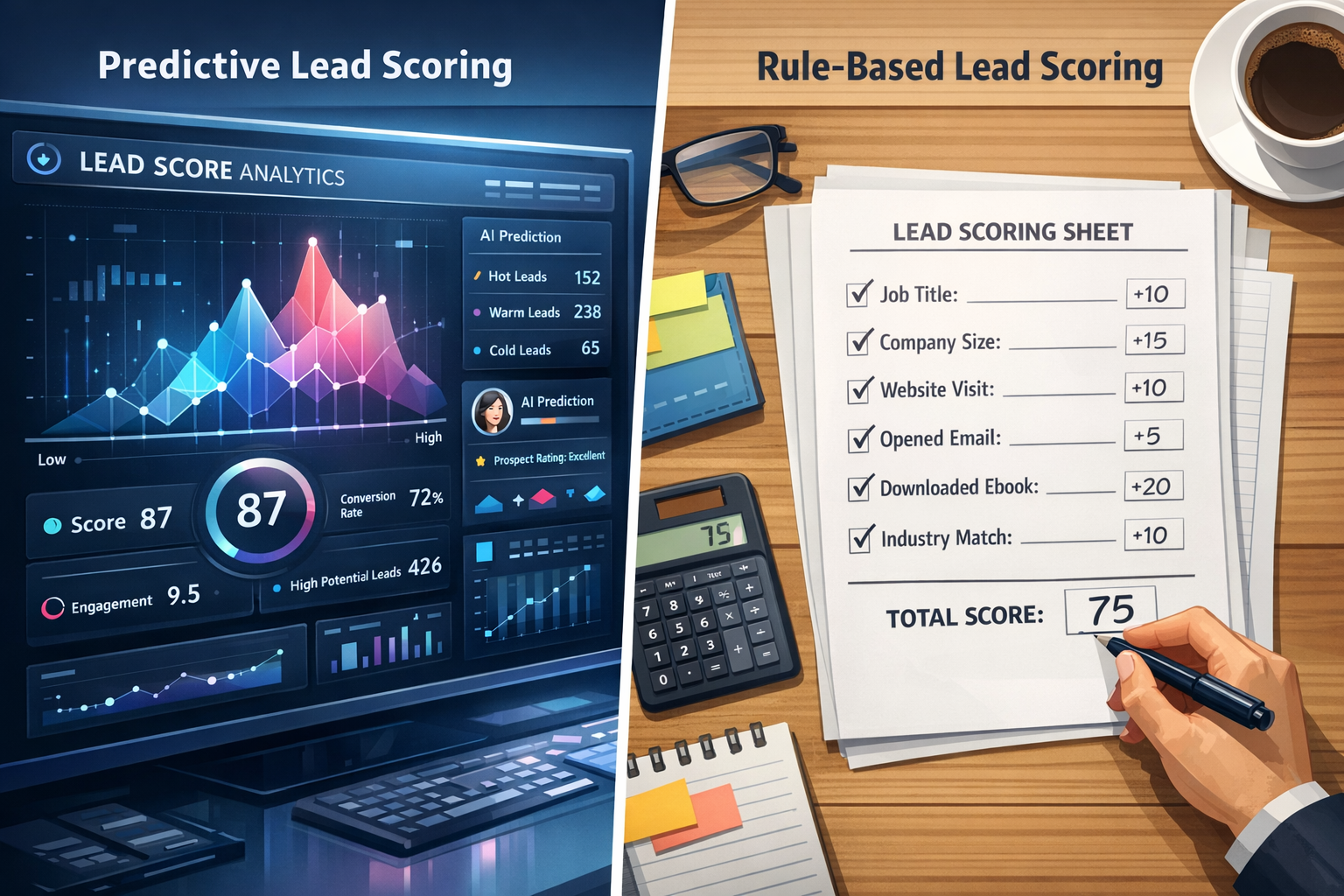
Streak's email tracking tells you that a prospect opened your email — which is useful context. But it does not synthesize signals across email opens, website behavior, previous call outcomes, deal stage age, and firmographic fit to produce a single score that tells the rep: this is your best lead right now, call them first. That synthesis is what AI lead scoring does.
HelloGrowthCRM's AI lead scoring engine assigns every lead a 0-100 score based on multiple signals, updates in real time as new data comes in, and surfaces the highest-scoring leads at the top of every rep's daily action list. Firms that switch from unscored to AI-scored pipelines give reps a ranked call list instead of a flat one, so the best-fit leads get contacted first.
Limitation 4: No WhatsApp — Critical Gap for Indian and Global Teams
Streak has no WhatsApp integration. Conversations that happen on WhatsApp — which, for Indian sales teams, is often the majority of client communication — are completely invisible to the CRM. They live on individual reps' personal phones, are not logged against deal records, and disappear from the business when the rep changes phones, loses the phone, or leaves the company.
This is not a minor feature gap for Indian teams — it is a fundamental operational failure. WhatsApp is not a supplementary channel in Indian B2B sales. It is the primary channel. Decision-makers who do not pick up calls from unknown numbers will respond to a WhatsApp message from a rep they met at a conference. Clients who take 3 days to respond to an email will reply to a WhatsApp within hours.
For international teams — particularly in Southeast Asia, the Middle East, Latin America, and Africa — WhatsApp is equally central. A sales CRM without WhatsApp integration is not a complete sales CRM for these markets.
The consequences of unmanaged WhatsApp are concrete. Client commitments made on WhatsApp are not logged in the CRM, so they cannot be tracked or held to. Follow-up reminders triggered by CRM automation do not reflect whether a WhatsApp conversation already resolved the issue. When a rep leaves, their WhatsApp conversation history — potentially months of relationship context — is gone.
HelloGrowthCRM's native WhatsApp integration means every WhatsApp conversation is automatically logged against the contact and deal record. Managers can see the full communication history across email, phone, and WhatsApp in a single timeline. Automation sequences can include WhatsApp messages with the same control and visibility as email.
And when a rep transitions off an account, the incoming rep can read the entire WhatsApp history in context.
Limitation 5: Gmail Dependency Risk and Migrating From Streak
Streak's most fundamental architectural limitation is one that only becomes visible when the team grows beyond the initial Gmail-only configuration. Any team member who uses Microsoft Outlook — either by company mandate or personal preference — cannot use Streak at all.
Any team member who primarily works on an Android phone without a desktop browser cannot use Streak effectively. Any company that acquires a team or merges with a business using a different email provider faces an immediate CRM fragmentation problem.
Most growing companies eventually encounter email diversity. A startup that begins with all-Gmail founders hires a VP of Sales who is more comfortable in Outlook. An Indian company expanding internationally acquires a UK team that runs on Office 365. In each scenario, Streak's Chrome extension architecture is not a minor inconvenience — it is a blocker.
Purpose-built CRMs are email-agnostic. HelloGrowthCRM integrates with both Gmail and Outlook, has a full-featured iOS and Android mobile app, and works the same way regardless of which email provider any individual team member uses.
For teams ready to migrate from Streak, the process takes under 3 hours. Export your Streak pipelines and contacts as CSV files from Settings and Export. Create your new pipeline in HelloGrowthCRM with stages matching your Streak stages — and take this opportunity to tighten stage definitions and entry criteria.
Import contacts first, then deals, using the field mapping wizard. Recreate your email templates and sequences in HelloGrowthCRM's email automation tool. Finally, configure WhatsApp Business API and the built-in dialer and brief your reps on how to use both channels from within the CRM.
On pricing: Streak Pro costs $49 per user per month and still lacks a dialer, AI scoring, and WhatsApp. HelloGrowthCRM Professional costs $10 per user per month with all three included. At 5 users, that is $245 per month versus $50 per month — for a significantly more capable platform.
Explore our switch from Streak page and our guide to CRM for small business to see how we compare across use cases relevant to your team.
Implementation checklist for Why Gmail-Based CRMs Like Streak Hold Sales Teams Back
Why Gmail-Based CRMs Like Streak Hold Sales Teams Back creates the most value when the team turns it into a repeatable operating rhythm instead of treating it like a one-time idea. That means defining ownership, documenting the workflow, and making sure the CRM captures the information required to move work forward consistently.
For teams in the Compare category, the real gain usually comes from clarity. Reps should know what triggers the next step, managers should know what to inspect weekly, and leadership should know which metrics indicate that the workflow is improving execution rather than just creating extra activity.
A practical implementation checklist should also explain what happens before launch and what happens after launch. Before rollout, the team should agree on definitions, entry criteria, ownership rules, and the small set of data points that matter most.
After rollout, the team should review real records, measure whether the workflow is actually being used, and tighten the process when a stage, task, or handoff is still too ambiguous.
This is where many CRM initiatives lose momentum. Teams buy the feature or copy the framework, but they never translate it into a weekly operating habit. The stronger path is to keep the workflow simple, connect it to visible manager review points, and make sure the next action is obvious enough that reps do not need to guess what to do next.
What strong teams standardize after adopting Why Gmail-Based CRMs Like Streak Hold Sales Teams Back
The strongest teams usually standardize stage rules, ownership, response expectations, and the minimum fields required for reporting. They also make sure follow-up tasks, communication history, and manager review points are visible in one system instead of being scattered across spreadsheets and inboxes.
That consistency is especially important for HelloGrowthCRM readers because the platform is designed to connect lead management, communication, pipeline control, and reporting in one place. When those pieces stay aligned, teams spend less time cleaning up process gaps and more time improving conversion quality.
Standardization does not mean forcing the whole company into unnecessary complexity. It means choosing the handful of rules that make execution more reliable. That might include one definition of a qualified lead, one owner for each stage transition, one agreed list of required fields, and one review cadence for deals or accounts that are going stale.
Those rules make automation and dashboards more trustworthy because everyone is working from the same operating model.
It also helps new hires ramp faster. When a process is written down clearly and reflected in the CRM itself, reps can understand how work moves without relying on tribal knowledge. That reduces friction, shortens onboarding time, and makes the system easier to improve later because the baseline workflow is already visible and testable.
Metrics to review when evaluating Why Gmail-Based CRMs Like Streak Hold Sales Teams Back
A useful workflow should change measurable outcomes. The exact metrics vary by topic, but most teams should review conversion rate, stage velocity, follow-up completion, response time, pipeline aging, and forecast confidence. Looking at both activity metrics and quality metrics gives a more reliable picture than tracking volume alone.
If the workflow is not improving those signals, the issue is often not effort but design. The team may be tracking too much, automating too early, or failing to define the next action clearly enough for reps and managers to trust the process.
It is also worth separating leading indicators from lagging indicators. Leading indicators show whether the team is doing the right things now, such as responding quickly, completing follow-up tasks, or moving records forward with the right context. Lagging indicators show whether those habits ultimately improve outcomes, such as more meetings booked, better conversion between stages, higher win rates, or more accurate forecasts.
Teams need both views if they want to improve the system instead of reacting only after performance slips.
For HelloGrowthCRM buyers, this matters because the platform is meant to reduce the gap between activity and insight. A strong CRM should help teams see what changed, why it changed, and which part of the workflow needs attention next. When those metrics are reviewed consistently, the blog topic becomes more than educational content.
It becomes a practical operating standard that guides better day-to-day decisions.
How HelloGrowthCRM readers should apply Why Gmail-Based CRMs Like Streak Hold Sales Teams Back
The best next step after reading this guide is to connect the topic to a real operating problem in your funnel. That could be slow lead response, unclear qualification, poor pipeline hygiene, weak forecasting, or disconnected communication. Once the problem is specific, it becomes easier to decide which features, tools, or service paths inside HelloGrowthCRM will actually help.
That practical lens is what turns educational blog content into a useful buying and implementation resource. It helps teams compare options more clearly, reduce CRM complexity, and make better process decisions with less trial and error.
A useful way to apply the guide is to identify one workflow your team already struggles with, then map the current steps from start to finish. Where does work stall? Which fields are missing? Which manager review points are inconsistent? Which channels are disconnected from the CRM?
Answering those questions creates a direct path from educational content to implementation priorities, which is much more valuable than collecting ideas without acting on them.
From there, teams can use HelloGrowthCRM in stages. Some will start with software only and implement the workflow internally. Others will pair the software with managed RevOps support so follow-up, reporting, and process discipline improve faster. In both cases, the strongest outcome comes from using the blog guidance as a bridge between diagnosis and execution, not as a standalone article that never changes how the team works.
Ready to put this into practice?
Set up your pipeline, WhatsApp follow-ups, and AI lead scoring in minutes — free, no credit card.
Try HelloGrowthCRM freeGet CRM tips in your inbox
Join thousands of sales professionals who get weekly insights on CRM strategy, AI automation, and pipeline optimization.
Harnish Shah is co-founder of Soor LLC and oversees engineering and growth at HelloGrowthCRM. He brings expertise in AI-driven software architecture and go-to-market systems for B2B SaaS, and has helped early-stage companies scale their sales infrastructure.