Quick Answer
Most SMB CRMs cost ₹800–₹2,500 (roughly $10–$30) per user per month on annual billing, and free plans cover basic use. Budget separately for hidden costs: implementation, data migration, WhatsApp Business API message charges, telephony minutes, and paid add-ons. A realistic first-year total for a five-person Indian sales team is ₹60,000–₹1.2 lakh.
HelloGrowthCRM software
Built for real small-business sales teams
HelloGrowthCRM helps reps qualify faster, follow up on time, and close more deals—with practical automation in one place.
- AI lead scoring and pipeline visibility
- Built-in dialer, WhatsApp, and email automation
- Sales forecasting and RevOps-ready reporting
The four CRM pricing models, and which one your bill will actually follow
Almost every CRM on the market prices in one of four ways, and understanding the model matters more than the headline number, because the model determines how your bill grows as your team grows.
The first and most common model is per user, per month. You pay a fixed amount for every person who logs in — a sales rep, a manager, sometimes even a read-only accounts person. Most vendors quote the annual-billing price in their marketing, which is typically 20 to 35 percent cheaper than paying month to month.
When you see "₹800 per user per month" on a pricing page, check the fine print: it usually means ₹800 only if you pay roughly ₹9,600 per user upfront for the year. The monthly-billing price for the same tier is often ₹1,000 to ₹1,100.
The second model is flat-fee pricing, where you pay one amount for the whole company regardless of how many users you add. Kylas is the best-known example in India. Flat pricing looks expensive for a three-person team and becomes progressively cheaper per head as you cross ten, fifteen, twenty users.
If you genuinely expect to have twenty-plus CRM users within a year, flat pricing deserves a serious look. If you are a five-person team, per-user pricing is almost always cheaper.
The third model is usage-based pricing, which rarely applies to the CRM licence itself but almost always applies to the channels attached to it. WhatsApp Business API conversations, SMS credits, calling minutes, and email sending volumes are all metered.
This is where most SMBs get surprised: the CRM subscription is predictable, but the usage bill moves with your activity. A team that sends 3,000 WhatsApp messages a month pays a very different total than one that sends 300, even on the identical CRM plan.
The fourth model is freemium — a genuinely free plan with capped users, contacts, or features, designed to get you started and upgrade you later. Free plans are real and useful, and we cover exactly when a free plan is enough (and when it quietly costs you money) later in this guide.
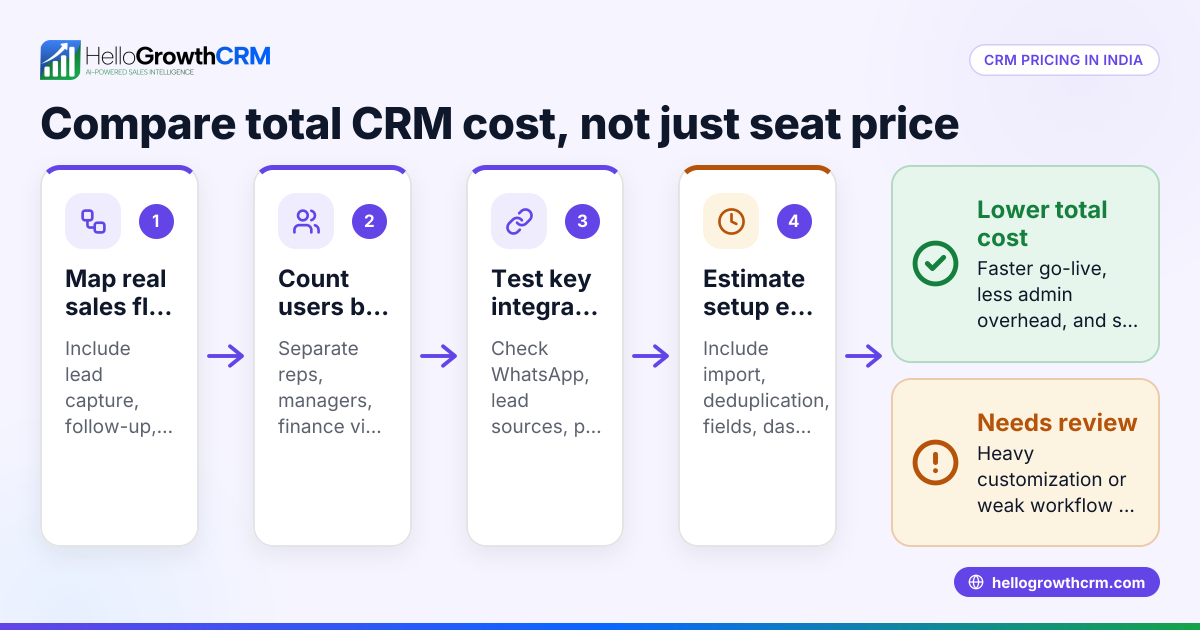
The practical takeaway: when comparing CRMs, always compare the same billing cycle, the same user count, and the projected usage charges — not just the number in the largest font on the pricing page.
What CRMs actually cost in India in 2026: real entry prices by vendor
Here are the published entry-tier prices for the CRMs Indian SMBs most commonly shortlist. Treat every competitor figure below as published entry pricing — verify current rates on the vendor's own pricing page before deciding, because vendors revise prices and India-specific tiers change.
Zoho CRM starts at roughly ₹800 per user per month on annual billing for its Standard plan, with cheaper Bigin-branded options below that for very simple pipelines. Zoho is usually the price anchor Indian buyers compare everything else against.
Freshsales (Freshworks) has historically priced its entry Growth tier in the ₹700–₹1,000 per user per month range on annual billing, with a limited free tier below it.
HubSpot Starter runs at roughly $15–$20 per seat per month (about ₹1,300–₹1,700) on annual billing. HubSpot's free CRM is generous on contacts, but the features SMB sales teams actually want — sequences, meaningful automation, removal of HubSpot branding — sit in paid tiers, and costs climb steeply from Starter to Professional.
Salesforce at the small-business end (its Starter/Essentials-class offering) is around $25 per user per month (about ₹2,100). That is the entry point; most teams that stay on Salesforce end up on higher tiers, and it remains the most expensive path on this list once add-ons are counted.
Pipedrive starts at roughly $14–$24 per user per month depending on tier and billing cycle (about ₹1,200–₹2,000), with no free plan.
Kylas, the Indian flat-fee player, publishes a model of roughly ₹12,999 per month for unlimited users on its main plan — expensive for five people, compelling for twenty-five.
LeadSquared sits at the enterprise-leaning end of the Indian market, with a sales motion built for larger, process-heavy teams in lending, education, and healthcare. It publishes its Sales CRM in US dollars — $60/user/month for Sales Pro and $100 for Sales Super, both billed annually — and no INR per-seat rate, so Indian buyers budget from a quote rather than a page (leadsquared.com/sales-crm-pricing, read 2026-08-19).
HelloGrowthCRM is priced at ₹899 per user per month, with a genuinely free plan for teams that are just getting started — and WhatsApp, calling, and pipeline features included in the core product rather than sold as add-ons.
The pattern across the market: Indian SMB CRM pricing clusters in the ₹800–₹2,500 per user per month band. Anything quoted well below that is either a free tier with caps or an annual price presented as monthly; anything well above it is enterprise software wearing SMB marketing.
The hidden costs no pricing page shows you
The subscription is the visible cost. For most Indian SMBs, the invisible costs add 30 to 100 percent on top of it in year one. Here is the full list, so nothing surprises you after you have signed.
Implementation and onboarding. Some vendors charge a one-time setup or onboarding fee — anywhere from a few thousand rupees to ₹50,000+ for enterprise-leaning products. Others include guided onboarding free but only on higher tiers. If you hire a local implementation partner to configure pipelines, fields, and automations, budget ₹15,000–₹75,000 for a small deployment depending on complexity.
Data migration. Moving contacts, deals, and history out of spreadsheets or an old CRM is rarely automatic. Simple CSV imports are free but eat your own team's hours; messy data (duplicates, inconsistent phone formats, WhatsApp chat history) often needs paid help. Budget your team's time honestly — a founder spending two full days cleaning a lead sheet is a real cost.
WhatsApp Business API message charges. This is the one Indian SMBs most often miss. Meta bills WhatsApp Business API usage per message, by category, and those charges are separate from your CRM subscription regardless of which CRM you use. From 1 October 2026 Meta also charges per message for replies sent inside the 24-hour customer service window, which were free until then.
A team running follow-up sequences and payment reminders over WhatsApp should budget ₹1,000–₹5,000 per month in message charges at typical SMB volumes, scaling with activity.
Telephony. Built-in dialers bill calling by the minute. Per-minute rates are small individually, but a five-rep team making 40 calls a day each generates a real monthly telephony line item — commonly ₹1,500–₹6,000 per month depending on volume and destinations.
Add-ons and tier gates. The classic trap: the entry tier looks affordable, but the feature you bought the CRM for — automation, sequences, custom reports, API access — lives one or two tiers up. Always price the tier that contains the features on your must-have list, not the cheapest tier.
Integrations. Connectors to Tally, Razorpay, IndiaMART, or your website are sometimes native and free, sometimes routed through Zapier (which has its own subscription from roughly ₹1,500–₹2,000 per month for meaningful volume), and sometimes custom-built at developer rates.
Training and adoption time. Every hour your reps spend learning the tool is an hour not selling. Simpler CRMs cost days of ramp-up; heavier platforms cost weeks. This never appears on an invoice, but it is often the largest hidden cost of all.
Worked examples: total cost of ownership for a 5-rep and a 20-rep team
Numbers make this concrete. Take a typical Indian SMB — a five-person sales team at a services or trading business — adopting a mid-market CRM priced at ₹899 per user per month, using WhatsApp and calling actively. Here is a realistic first-year total cost of ownership, in plain arithmetic.
Licences: ₹899 per user per month, times five users, is ₹4,495 per month, which is ₹53,940 for the year on annual billing.
WhatsApp Business API conversations: assume the team sends follow-ups, quote reminders, and payment nudges at moderate volume — roughly ₹2,000 per month in Meta conversation charges. That is ₹24,000 for the year.
Telephony: five reps making calls through the built-in dialer at modest volume — roughly ₹2,500 per month — is ₹30,000 for the year.
Setup and migration: a self-service setup with a clean spreadsheet import and a few hours of vendor-guided onboarding — call it ₹10,000 as a one-time cost, mostly in your own team's time.
Add it up: 53,940 plus 24,000 plus 30,000 plus 10,000 comes to ₹1,17,940 in year one, or roughly ₹9,800 per month all-in — about ₹1,965 per rep per month once every real cost is counted. Notice that the licence — the number everyone negotiates hardest on — is less than half the true total.
Usage charges and setup are the other half, and they are nearly identical whichever CRM you pick, because Meta and telephony providers bill the same way regardless.
Run the same team on an enterprise-leaning product at ₹2,500 per user per month and the licence line alone becomes ₹1,50,000 per year — the usage costs stay the same, and the all-in total crosses ₹2.1 lakh. Run it on a free plan and the licence line drops to zero, but you typically lose the automation and sequences that generate the follow-up volume in the first place.
The middle of the market is the middle for a reason.
Now scale the same exercise to a twenty-rep team. At twenty users the maths changes shape, and two things that did not matter at five users start to matter a lot: volume discounts and flat-fee pricing.
Per-user route: twenty users at ₹899 per user per month is ₹17,980 per month, or ₹2,15,760 per year on annual billing. At this size most vendors will negotiate — a 10 to 15 percent discount on a twenty-seat annual commitment is a normal ask, which brings the licence line to roughly ₹1.85–₹1.95 lakh per year.
Flat-fee route: a flat plan at roughly ₹12,999 per month (published entry pricing, verify current rates) is ₹1,55,988 per year regardless of user count. At twenty users that is about ₹650 per user per month — cheaper per head than almost any per-user plan.
The trade-off is that you are betting on the flat-fee product having the features and support quality your team needs; the per-user market is far more competitive, which tends to show in product depth.
Usage costs scale with the team. Twenty active reps generate roughly four times the WhatsApp and calling volume of five: budget around ₹8,000 per month in WhatsApp conversation charges (₹96,000 per year) and ₹10,000 per month in telephony (₹1,20,000 per year) at healthy activity levels.
Implementation gets real at this size. A twenty-rep rollout usually justifies structured onboarding: pipeline design, role permissions, territory or team-wise lead routing, manager dashboards, and two or three training sessions. Budget ₹40,000–₹75,000 one-time, whether paid to the vendor, a partner, or absorbed as internal time.
Putting the per-user route together: roughly 1,90,000 in licences plus 96,000 in WhatsApp plus 1,20,000 in telephony plus 50,000 in implementation comes to about ₹4.56 lakh in year one — roughly ₹1,900 per rep per month all-in. The striking result: the all-in per-rep cost at twenty users is almost the same as at five, because usage charges dominate and they scale linearly with headcount.
The lesson for buyers is to negotiate the licence, yes — but to manage the usage lines, because that is where a twenty-rep bill actually grows.
Free CRM vs paid CRM: when free is genuinely enough
Free CRM plans are not a trick. For the right team at the right stage, a free plan is the correct choice, and any vendor who tells you otherwise is selling. The honest decision rule looks like this.
Free is enough when you are one or two people, you have under a few hundred active leads, your follow-up is simple enough to do manually with reminders, and your main problem is "leads are scattered across WhatsApp chats and a notebook." Moving from nothing to a free CRM is the single biggest jump in sales organisation most micro-businesses ever make, and it costs nothing. HelloGrowthCRM's free plan exists precisely for this stage.
Free stops being enough at a predictable set of trigger points. The first is automation: free tiers almost universally exclude sequences and automated follow-up, which means every reminder depends on a human remembering. The second is caps — on users, contacts, pipelines, or monthly emails — which arrive faster than expected once lead volume grows.
The third is reporting: free tiers show you lists; paid tiers show you conversion rates, pipeline value, and which rep is sitting on stale deals. The fourth is integrations and channels: WhatsApp API access, calling, and accounting integrations are paid-tier features nearly everywhere.
The hidden cost of staying on free too long is not a fee — it is leakage. If a paid plan's automated follow-up recovers even two extra deals a month that manual memory would have dropped, and your average deal is worth ₹15,000, the plan pays for itself roughly ten times over for a five-person team.
The right way to think about the free-versus-paid line is not "can we avoid paying" but "has our lead volume crossed the point where a human-memory system drops money." For most growing teams that point arrives somewhere between 100 and 300 active leads a month.
One practical warning: beware of free plans from vendors whose paid tiers jump steeply. Migrating CRMs is painful enough that the free plan you choose today is, in practice, a vote for the paid pricing you will be on in eighteen months. Check the full pricing ladder before you commit to the free rung, and see our guide to affordable CRM options for the plans that scale gently.
How to evaluate CRM ROI: time saved and leads recovered
A CRM is one of the few software purchases where the return is directly countable, because it acts on two measurable quantities: hours your team spends on manual coordination, and leads that die from missed follow-up. Evaluate ROI on those two lines and ignore everything else.
Line one: time saved. Add up the daily minutes each rep spends on work a CRM automates — copying enquiries from WhatsApp into a sheet, asking "did anyone call this lead," writing the same follow-up message for the tenth time, assembling a Monday-morning status update.
For a typical SMB rep this is conservatively 45 to 60 minutes a day. Across five reps at a fully-loaded cost of ₹350–₹400 per hour, one hour a day saved is worth roughly ₹4 lakh a year in recovered selling time. You do not need to capture all of it for the sums to work; capturing a third of it already exceeds the all-in cost of the CRM from our five-rep example above.
Line two: leads recovered. This is the bigger number. Take your monthly enquiry count and your current conversion rate, then answer honestly: how many enquiries get zero follow-up after the first reply? Most teams auditing themselves for the first time find 30 to 50 percent of quotes are never chased.
Systematic follow-up — automated reminders, sequences, a visible pipeline — typically lifts conversion by a few percentage points. On 100 enquiries a month, moving conversion from 20 percent to 24 percent is four extra deals monthly; at ₹15,000 average deal value that is ₹7.2 lakh a year attributable to follow-up discipline alone.
The honest test: total annual benefit (time value plus recovered revenue) divided by total annual cost from your TCO calculation. For SMBs with real inbound enquiry flow, this ratio routinely lands between 5x and 20x, which is why CRM is one of the safest software purchases a small business makes — provided the team actually uses it, which is an adoption problem, not a pricing problem.
Run your own numbers with our CRM ROI calculator — ten minutes with your real enquiry and deal figures beats any vendor's benchmark.
One discipline: measure the baseline before you buy. Note this month's enquiry count, conversion rate, and average response time. Ninety days after go-live, measure again. That before-and-after is the only ROI evidence that matters.
How to negotiate CRM pricing (and what vendors expect you to ask)
CRM list prices are opening positions, not final ones — especially at ten seats and above. Here is what actually works, in rough order of leverage.
Commit annually, and say so early. Annual prepayment is the discount vendors care about most, because it locks in revenue and reduces churn risk on their side. The published annual price is already 20–35 percent below monthly; on top of that, a direct "what can you do on a 12-month commitment for N seats" question routinely yields another 10–15 percent at ten-plus seats.
Time the purchase to quarter-end. Sales teams at CRM vendors carry quarterly targets like everyone else. A deal that closes in the last two weeks of March, June, September, or December gets concessions that the same deal in mid-February does not.
Negotiate the extras, not just the rate. Free onboarding, waived setup fees, extra training sessions, a longer trial, or a price lock at renewal are often easier for a vendor to give than a per-seat discount — and the onboarding alone can be worth ₹20,000–₹50,000. Ask for the renewal price cap in writing; the classic pattern is a friendly year-one price followed by a sharp year-two increase.
Buy the seats you need now, not the seats you project. Vendors will happily sell you fifteen seats for a team of nine "so you're ready to grow." Every serious CRM lets you add seats mid-term in minutes. Start with actual headcount plus one.
Use the competitive shortlist openly. "We're deciding between you and two others at a lower price point" is not rude; it is the expected script, and it works best when true. Comparing Zoho's pricing against your other finalists gives you a credible anchor, since Zoho usually sets the floor of the Indian market.
Know what is not negotiable. WhatsApp conversation charges are set by Meta, and telephony rates are set by carriers — no CRM vendor controls them. A vendor who claims to discount those is discounting something else and relabelling it. Focus your negotiation on licences, onboarding, and renewal terms, where the vendor genuinely has room.
When you should NOT buy a CRM yet
A pricing guide owes you the negative case too. There are situations where the correct amount to spend on a CRM is zero, and pretending otherwise wastes your money and sours your team on the category.
Do not buy if you have almost no lead flow. Under roughly 30–50 enquiries a month, with one person handling all of them, a disciplined notebook or a free plan genuinely suffices. The CRM's value is proportional to the volume of follow-ups that can slip; at low volume, nothing slips.
Do not buy to fix a process you have not defined. A CRM automates a sales process; it does not invent one. If your team cannot answer "what are the stages a deal moves through, and what happens at each stage" on a whiteboard, the software will faithfully automate the confusion. Spend a week defining stages first — it costs nothing and doubles the value of whatever tool you eventually buy.
Do not buy if nobody owns adoption. The single biggest cause of failed CRM spend in SMBs is not price or product — it is a tool that reps quietly stop updating by week three because no one checks. If there is no founder, manager, or senior rep who will run pipeline reviews from the CRM every week, the subscription becomes an expensive list. Assign the owner before you sign.
Do not buy in the middle of a fire. Migrating tools during your peak season, a funding crunch, or a team restructuring means the rollout gets half the attention it needs. A CRM implemented badly once is much harder to implement well later, because the team now "knows" it does not work.
Do not buy an enterprise platform to feel serious. Paying ₹2,500-plus per user for depth you will not configure is the most common overspend in this market. Buy for the team you have this year, on a product you can leave in a month if it fails you — which is exactly why monthly-billing options and free plans matter in a first purchase.
If any of these describe you, start with a free plan, fix the process, and revisit paid tiers in a quarter. The guide to choosing the best CRM in India covers the selection step when you are ready.
What HelloGrowthCRM costs, exactly
Since this is our guide, here is our own pricing stated plainly, with no asterisks buried below the fold.
HelloGrowthCRM costs ₹899 per user per month. There is a free plan for teams that are starting out, so you can move your leads out of spreadsheets and WhatsApp chats and run a real pipeline before paying anything. The paid plan includes the things Indian SMBs otherwise buy as add-ons: WhatsApp-native follow-up on the official Business API, a built-in Twilio-powered dialer, AI lead scoring, sales pipelines, sequences across WhatsApp, SMS, and email, GST invoicing, and field-sales GPS check-in.
Integrations with IndiaMART, JustDial, Razorpay, Tally, Shopify, and Zapier are part of the product, not a separate line item.
Applying this guide's own framework to us: on the five-rep worked example above, HelloGrowthCRM's licence line is ₹53,940 a year, and your all-in cost lands near ₹1.2 lakh once WhatsApp message charges and calling minutes are counted — charges you would pay with any CRM, because Meta and telephony carriers bill them, not us.
What we can control, we keep flat: one price, features included rather than tier-gated, and a free plan that does not expire on a timer.
The honest comparison we invite: price the tier of any competitor that actually includes WhatsApp automation, calling, and sequences — not their entry tier — and put it next to ₹899. That is the comparison that predicts your real bill.
See HelloGrowthCRM pricing for the current plan details, or start on the free plan and upgrade only when your lead volume tells you to. If you want the wider market context first, our overview of CRM software for Indian businesses covers how the segment is structured and where each vendor fits.
The CRM buying checklist: 12 questions to settle before you pay
Run through this list before signing anything. Every item traces back to a cost covered earlier in this guide, and each takes minutes to check.
1. What is the annual-billing price for the tier that contains your must-have features — not the cheapest tier? Price the plan you will actually use.
2. What does the same tier cost on monthly billing? You may want month-to-month flexibility for the first quarter, even at a premium.
3. Are WhatsApp API access, calling, and automation included, or add-ons? Get the fully-loaded per-user figure in writing.
4. What will Meta's WhatsApp conversation charges cost at your message volume? Estimate from your current monthly WhatsApp activity; the CRM vendor should help you model it.
5. What are the telephony per-minute rates for the destinations you actually call?
6. Is there a setup or onboarding fee, and what does included onboarding cover? Ask for onboarding to be included as a negotiation item.
7. Who migrates your data, and what does it cost if your spreadsheets are messy?
8. What are the caps — contacts, storage, emails, automation runs — and what happens to your bill when you hit them?
9. What is the renewal price, in writing? A year-one discount without a renewal cap is a deferred price increase.
10. Can you add and remove seats mid-term? Growing teams need this; so do teams that shrink.
11. What is the exit path? Confirm you can export all contacts, deals, and notes in a standard format. A CRM you cannot leave is a CRM you cannot negotiate with at renewal.
12. Who on your team owns adoption, and is there a weekly pipeline review on the calendar from day one?
If a vendor answers all twelve clearly, you are buying from a company that expects to keep you by being useful rather than by being hard to leave. Settle the answers, run your own numbers on the ROI calculator, and then decide — the arithmetic in this guide is only a template; your enquiry volume and deal size are the inputs that matter.
Frequently Asked Questions
Ready to put this into practice?
Set up your pipeline, WhatsApp follow-ups, and AI lead scoring in minutes — free, no credit card.
Try HelloGrowthCRM freeGet CRM tips in your inbox
Join thousands of sales professionals who get weekly insights on CRM strategy, AI automation, and pipeline optimization.

The HelloGrowthCRM team publishes guides on CRM strategy, AI sales tools, and revenue operations for small business sales teams.