HelloGrowthCRM software
Built for real small-business sales teams
HelloGrowthCRM helps reps qualify faster, follow up on time, and close more deals—with practical automation in one place.
- AI lead scoring and pipeline visibility
- Built-in dialer, WhatsApp, and email automation
- Sales forecasting and RevOps-ready reporting
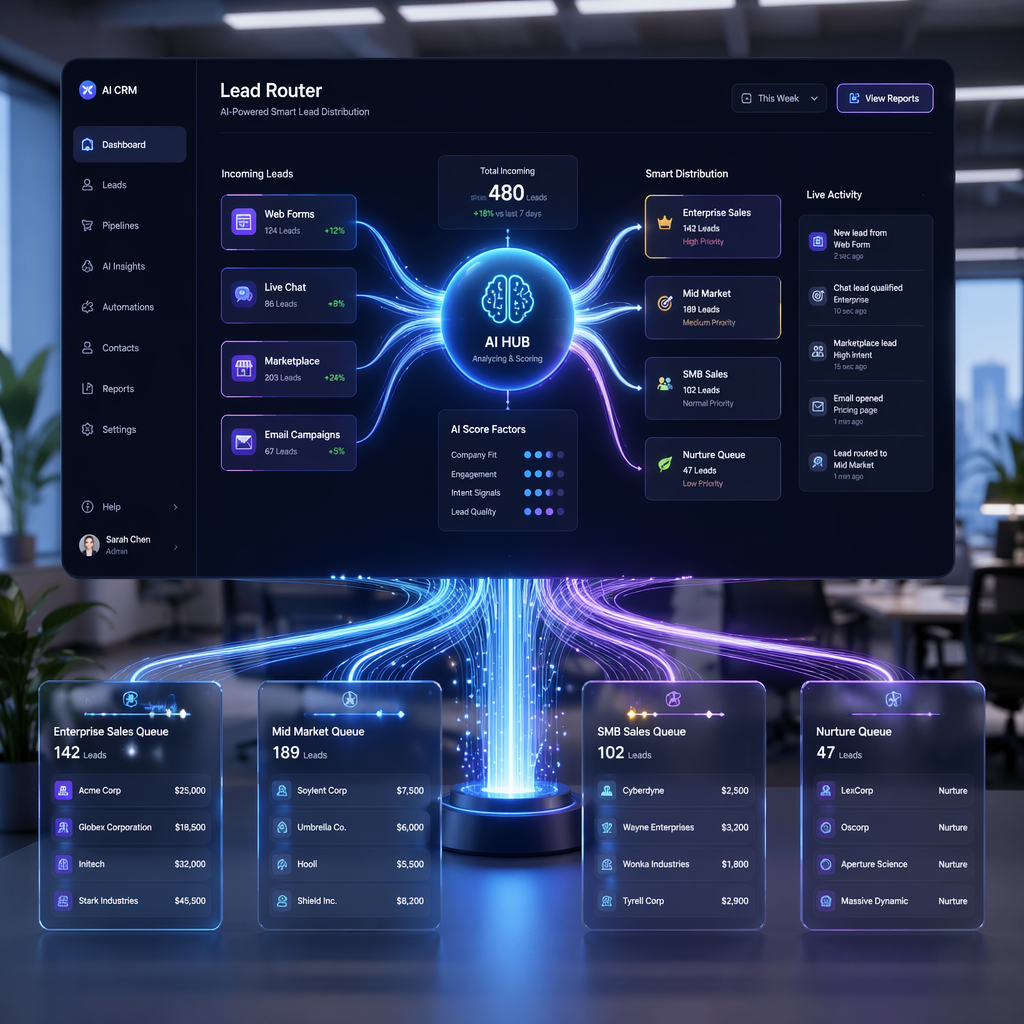
A unified lead inbox CRM is a centralized inbox inside your CRM that captures and organizes incoming enquiries from multiple channels—such as website forms, WhatsApp messages, marketplace leads, email, and ads—into a single view where sales teams can assign ownership, respond quickly, and track every interaction. Instead of leads scattered across tools and messaging apps, a unified inbox ensures every enquiry becomes a tracked opportunity in the CRM, improving response time, follow-ups, and pipeline visibility.
Key Takeaways
- A unified lead inbox CRM collects enquiries from websites, WhatsApp, ads, and marketplaces into one place.
- Automatic lead assignment prevents missed follow-ups and speeds up response times.
- Centralized conversations give sales leaders full pipeline visibility across channels.
- Integrated automation helps maintain consistent follow-up cadences.
- AI features like lead scoring and conversation insights help teams prioritize high-intent leads.
Why B2B Teams Lose Leads Across Multiple Channels
Most modern B2B sales teams receive enquiries from several sources at once:
- Website contact forms
- WhatsApp business messages
- Marketplace platforms
- Paid ad lead forms
- Email enquiries
- Partner referrals
Each channel often lives in a different tool. The website sends emails. WhatsApp sits in a phone app. Marketplace leads arrive in dashboards that reps rarely check.
This fragmentation creates a predictable problem: leads slip through the cracks.
In one RevOps audit I ran for a SaaS company with a 12-person sales team, we discovered that nearly 28% of inbound leads never received a reply within 24 hours. The reason was simple. Website leads went to Gmail. WhatsApp messages stayed on individual reps’ phones. Marketplace enquiries were buried in a partner portal.
No one had a single place to manage them.
Research consistently shows that speed-to-lead matters. According to Harvard Business Review, companies that respond to leads within an hour are significantly more likely to qualify them than those that wait longer (https://hbr.org/2011/03/the-short-life-of-online-sales-leads).
Without a centralized inbox inside the CRM, response time becomes inconsistent and pipeline visibility breaks down.
This is exactly the problem a unified lead inbox CRM is designed to solve.
What Is a Unified Lead Inbox in a CRM?
A unified lead inbox inside a CRM consolidates all inbound enquiries and conversations into one system where the sales team can manage them.
Instead of checking five different tools, sales reps work from a single workspace.
A modern unified inbox typically includes:
- Channel aggregation from website forms, email, WhatsApp, and ads
- Automatic lead creation in the CRM
- Conversation tracking
- Lead ownership assignment
- Follow-up reminders and tasks
- Pipeline tracking
Platforms like AI CRM systems combine this inbox with automation and AI so that inbound leads move directly into the sales pipeline.
This matters for forecasting and pipeline health. If inbound conversations remain outside the CRM, revenue leaders cannot accurately measure demand generation or deal velocity.
According to Gartner’s research on CRM strategy, centralizing customer interactions is a key requirement for sales effectiveness and forecasting accuracy (https://www.gartner.com/en/sales/topics/crm).
A unified inbox acts as the operational layer where those interactions are captured.
Common Channels That Should Feed Into a Unified Lead Inbox
B2B teams often underestimate how many lead sources they actually have.
A unified inbox should capture enquiries from all major inbound channels.
Website Lead Forms
Website forms remain the primary lead source for many B2B companies. These submissions should automatically create leads inside the CRM and trigger follow-up tasks.
With tools like Meeting Scheduler, teams can also allow prospects to book calls directly from the form submission workflow.
WhatsApp and SMS Conversations
WhatsApp has become a dominant communication channel in many global markets. When messages stay on individual sales reps’ phones, companies lose visibility into conversations and deal progress.
A CRM that supports WhatsApp & SMS CRM captures these messages directly in the lead record and keeps the conversation history accessible to the entire team.
Marketplace and Partner Leads
Marketplaces often deliver leads through API feeds or email notifications.
A unified inbox should automatically convert those enquiries into leads inside the CRM pipeline instead of leaving them in partner dashboards.
Email Enquiries
Email remains a high-volume inbound channel. Integrating your CRM with tools like Gmail allows inbound enquiries to automatically attach to lead or account records.
Paid Advertising Leads
Ad platforms such as Meta or LinkedIn generate lead forms that can integrate with the CRM via tools like Meta Ads or Zapier.
These leads should appear instantly in the unified inbox so reps can respond quickly.
Key Benefits of Using a Unified Lead Inbox CRM
A centralized lead inbox improves both day-to-day sales execution and long-term revenue visibility.
Faster Speed-to-Lead
The biggest benefit is response time.
When every enquiry lands in the same inbox, reps no longer need to monitor multiple platforms. Alerts and tasks ensure new leads are handled immediately.
In one rollout we did with a B2B services company, moving inbound messages into a unified CRM inbox reduced average response time from 7 hours to 42 minutes.
That single change increased booked meetings by 31%.
Clear Lead Ownership
Lead routing rules ensure that each enquiry is assigned to the right sales rep.
Ownership can be based on:
- Territory
- Product interest
- Company size
- Industry
- Round-robin assignment
Tools like Territory Management ensure leads reach the correct rep without manual intervention.
Consistent Follow-Ups
A unified inbox makes follow-up systematic instead of random.
With built-in workflows or tools like Email Automation, sales teams can create standardized follow-up sequences for inbound leads.
This ensures every prospect receives consistent outreach.
Centralized Conversation History
Every interaction stays attached to the lead record.
This includes:
- Messages
- Calls
- emails
- meeting notes
Using tools such as a CRM Dialer ensures outbound calls are also logged automatically.
If a deal gets reassigned or escalated, the next rep has full context.
Better Pipeline Visibility
When inbound enquiries enter the CRM immediately, leadership gets a more accurate view of pipeline health.
Tools like AI Pipeline Management and Sales Forecasting rely on complete data to generate reliable revenue projections.
If half the conversations happen outside the CRM, forecasts become unreliable.
How a Unified Inbox Improves Lead Qualification
Not all enquiries are equal.
Some leads are ready to buy. Others are early research.
A unified inbox helps prioritize leads using structured data and AI.
AI Lead Scoring
When inbound leads enter the CRM, tools like AI Lead Scoring can automatically evaluate them based on:
- company size
- job title
- industry
- engagement behavior
- website activity
High-scoring leads can be prioritized for immediate outreach.
Conversation Insights
AI assistants like the AI Sales Copilot can analyze inbound messages and recommend next steps.
For example:
- identifying buying signals
- flagging budget discussions
- suggesting qualification questions
This helps sales reps move faster during early-stage conversations.
Qualification Frameworks
Many B2B teams use structured frameworks such as MEDDPICC to qualify deals.
When conversations occur inside the CRM inbox, reps can capture these qualification details directly in the deal record.
This ensures pipeline stages reflect actual buying progress.
How to Implement a Unified Lead Inbox CRM: Step-by-Step
1. Identify All Lead Sources
List every channel where enquiries originate, including website forms, WhatsApp, marketplaces, ads, and email.
2. Connect Channels to the CRM
Integrate communication channels using native integrations or connectors like All Integrations to ensure every enquiry enters the CRM automatically.
3. Create Automatic Lead Routing
Define assignment rules based on geography, product line, or round-robin distribution so every lead receives an owner instantly.
4. Standardize Follow-Up Workflows
Build automated follow-up sequences using tasks or email workflows to ensure consistent responses for inbound enquiries.
5. Enable AI Lead Prioritization
Activate AI scoring and insights so high-intent leads receive faster attention from sales reps.
6. Track Pipeline Conversion Metrics
Monitor stage conversion, response time, and deal velocity using CRM dashboards to improve your inbound sales process.
Real-World Lessons From Unified Inbox Deployments
Implementing a unified inbox sounds straightforward, but a few operational details matter.
First, avoid duplicating leads across channels. When WhatsApp messages and website forms create separate records for the same company, pipeline data becomes messy. Good CRM systems automatically merge contacts based on email or phone.
Second, define ownership clearly.
In one implementation I worked on with a global SaaS startup, we discovered inbound leads were assigned to SDRs while WhatsApp messages went directly to account executives. This created inconsistent qualification.
We fixed it by routing all inbound enquiries through a single intake stage managed by SDRs.
Finally, track response-time metrics.
The easiest way to maintain lead quality is to monitor:
- first response time
- qualification rate
- meeting booked rate
A unified inbox makes these metrics visible and actionable.
Why HelloGrowthCRM Is Built for Unified Lead Management
HelloGrowthCRM was designed specifically for modern B2B sales teams dealing with multi-channel inbound demand.
The platform combines a unified inbox with AI-driven automation so every enquiry becomes a trackable opportunity.
Key capabilities include:
- multi-channel lead capture across forms, email, WhatsApp, and ads
- AI-driven lead prioritization
- automated assignment rules
- conversation history linked to deals
- built-in forecasting and pipeline analytics
Teams can also connect tools like Slack, Google Meet, and payment systems through the full integrations ecosystem.
Because HelloGrowthCRM also includes revenue operations support through Managed RevOps, companies can design a full inbound sales process instead of just installing software.
If your sales team struggles to track enquiries across channels, a unified lead inbox is often the fastest way to improve speed-to-lead and pipeline accuracy.
You can explore the platform’s full capabilities on the Features page, review plans on Pricing, or start a Free Trial to see how a unified inbox works in practice.
About the author
Arjun Mehta is the Sales Operations Lead at HelloGrowthCRM with over 11 years of experience in B2B SaaS revenue operations. He has implemented CRM and pipeline management systems for startups and mid-market companies across North America, Europe, and Asia. Earlier in his career, he led a RevOps project that migrated a 40-rep sales team from fragmented inbox tools into a unified CRM-driven inbound pipeline, increasing qualified lead response rates by 35%. His work focuses on sales process design, pipeline analytics, and AI-assisted CRM systems.
Frequently Asked Questions
Q: What is a unified lead inbox CRM?
A: A unified lead inbox CRM is a centralized inbox inside a CRM that collects enquiries from multiple channels such as website forms, WhatsApp, email, and marketplaces. It allows sales teams to manage conversations, assign leads, and track follow-ups in one place. This improves response time and prevents missed opportunities.
Q: Why do B2B companies need a unified lead inbox?
A: B2B companies often receive leads from many channels, which creates fragmentation and slow responses. A unified inbox centralizes all enquiries so sales reps can respond faster and track conversations. It also ensures leadership has accurate visibility into inbound pipeline activity.
Q: Can WhatsApp messages be managed inside a CRM inbox?
A: Yes. Modern CRM platforms integrate messaging channels so conversations appear directly inside the lead record. With tools like WhatsApp CRM integrations, sales teams can respond to messages without leaving the CRM while keeping a full conversation history.
Q: How does a unified inbox improve sales forecasting?
A: When inbound enquiries automatically create leads and opportunities in the CRM, pipeline data becomes more accurate. Forecasting tools can then track deal stage progression, conversion rates, and revenue projections based on real pipeline activity.
Q: Does a unified lead inbox replace email and messaging tools?
A: No. The inbox integrates with existing communication channels rather than replacing them. Messages still arrive through email or messaging apps, but the CRM captures and organizes them so the sales team can manage conversations in one place.
Q: What metrics should teams track after implementing a unified inbox?
A: Key metrics include first response time, lead qualification rate, meeting booking rate, and inbound conversion rate. These indicators show whether your inbound sales process is improving after centralizing enquiries in the CRM.
Q: How quickly can a company implement a unified lead inbox?
A: For most small and mid-sized B2B teams, implementation takes a few days to a couple of weeks. The timeline depends on the number of lead sources and integrations required. CRM platforms with built-in integrations can significantly reduce setup time.
Frequently Asked Questions
Ready to put this into practice?
Set up your pipeline, WhatsApp follow-ups, and AI lead scoring in minutes — free, no credit card.
Try HelloGrowthCRM freeGet CRM tips in your inbox
Join thousands of sales professionals who get weekly insights on CRM strategy, AI automation, and pipeline optimization.

The HelloGrowthCRM team publishes guides on CRM strategy, AI sales tools, and revenue operations for small business sales teams.