HelloGrowthCRM software
Built for real small-business sales teams
HelloGrowthCRM helps reps qualify faster, follow up on time, and close more deals—with practical automation in one place.
- AI lead scoring and pipeline visibility
- Built-in dialer, WhatsApp, and email automation
- Sales forecasting and RevOps-ready reporting
A crm for recruitment agencies is a recruiting-focused customer relationship management system that tracks candidates, client job orders, interviews, offers, and placement follow-up in one shared workflow, so recruiters can move faster, reduce missed touchpoints, and keep every client and candidate conversation tied to the right hiring opportunity.
Key Takeaways
- Recruitment agencies need one system for both candidate pipelines and client job orders, not separate tools that create blind spots.
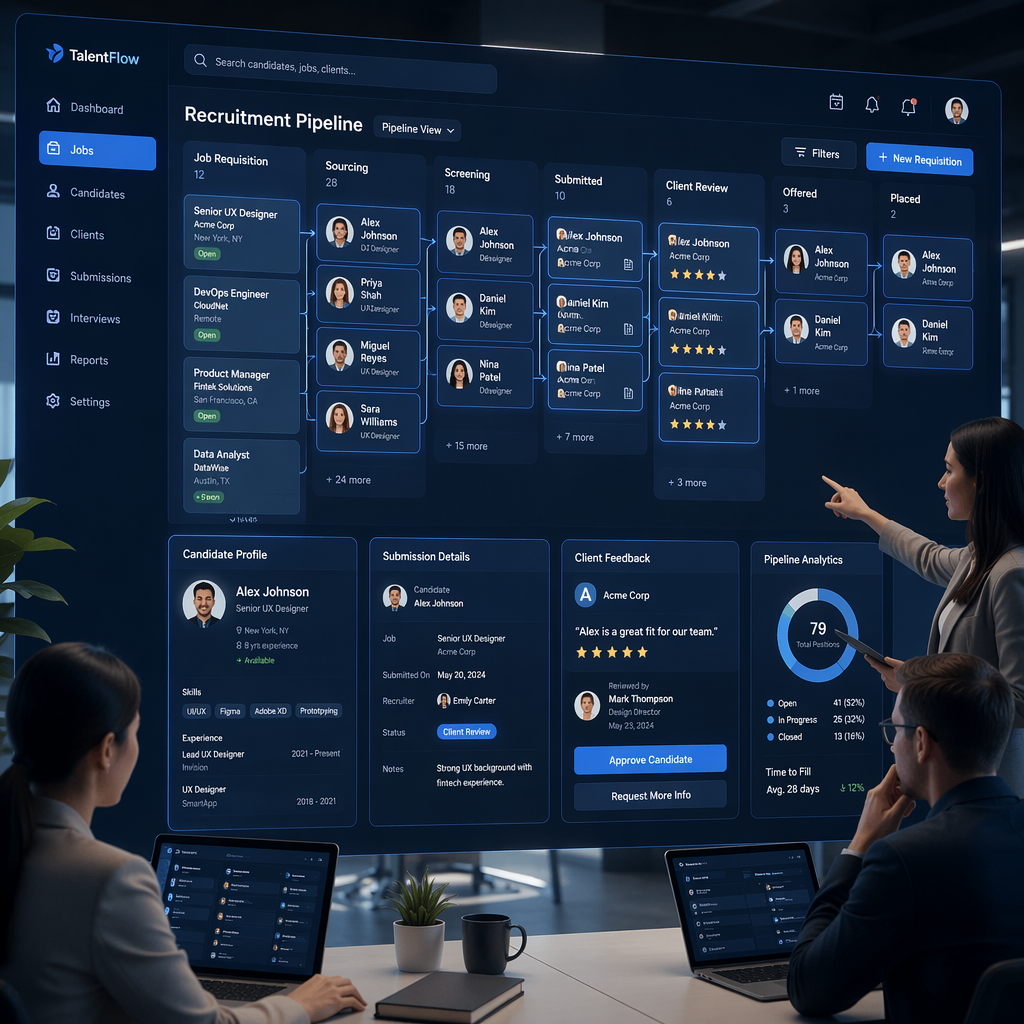
- The best CRM setup maps stages for sourcing, screening, submission, interview, offer, placement, and post-placement follow-up.
- Automation matters most for interview coordination, recruiter reminders, candidate nurturing, and client status updates.
- HelloGrowthCRM helps agencies centralize calls, emails, messages, tasks, and reporting in one AI CRM.
- Managed process design often improves adoption more than software alone, which is why some firms pair the platform with Managed RevOps.
- Recruiters should measure fill rate, time-to-submit, interview-to-offer rate, offer acceptance, and early attrition to prove CRM impact.
Why recruitment agencies need a CRM built for pipeline visibility
A recruitment agency needs a CRM built for pipeline visibility because agency revenue depends on managing two moving pipelines at once: candidate progression and client hiring demand. Without one connected system, recruiters lose context, miss follow-ups, duplicate outreach, and struggle to forecast placements accurately across roles, recruiters, and accounts.
Recruitment is not standard B2B sales. It has a dual-sided workflow.
You are managing:
- candidates
- hiring managers
- open job orders
- interview steps
- offers
- placement outcomes
- replacement windows
- repeat business
A generic spreadsheet or basic contact manager breaks down fast. One recruiter may know where a role stands. The rest of the team does not. Notes sit in inboxes. Interview feedback gets buried in chat. Candidate ownership becomes unclear.
In one rollout we did with a 12-person sales team that also handled staffing intake, the biggest issue was not lead volume. It was stage visibility. Recruiters were sourcing heavily, but managers could not see which candidates were screened, submitted, interviewed, or stalling. Once we standardized stages and auto-created follow-up tasks, response discipline improved within two weeks.
A CRM gives recruitment leaders a common operating view. With Sales Task Boards, Smart Inbox, and Meeting Scheduler, recruiters can work from one queue instead of juggling disconnected tools.
According to Gartner’s CRM topic overview, CRM helps sales organizations manage customer interactions and improve revenue execution, which applies directly to agency recruiting teams that must coordinate relationship-driven workflows across many stakeholders.
What breaks when agencies do not centralize recruiting operations
Common problems show up quickly:
- duplicate candidate outreach
- slow response to client updates
- poor handoff between BD and recruiters
- weak reporting by desk, role, or recruiter
- lost post-placement follow-up
- inconsistent candidate experience
These issues lower fill rate and hurt client trust. They also make recruiter productivity look worse than it really is.
What should a CRM for recruitment agencies manage?
A CRM for recruitment agencies should manage candidate records, client accounts, job orders, interview activity, offers, placements, and post-placement follow-up inside one workflow. The goal is to connect every touchpoint to the right role and account, so recruiters can act faster and leaders can measure pipeline health with confidence.
At minimum, the system should track both sides of the desk.
Candidate pipeline management
Candidate records should include:
- source channel
- role fit and specialization
- location and compensation expectations
- resume and profile notes
- qualification status
- interview stage
- offer status
- placement date
- re-engagement timing
With AI Lead Scoring, agencies can score candidates by fit, activity, and recency. That helps recruiters prioritize warm, placeable talent before they go cold.
Client job order management
Client-side workflows should include:
- account and hiring manager contacts
- active job orders
- required skills
- target compensation
- SLA or fill deadline
- number of candidates submitted
- interview progress
- fee structure
- placement and replacement terms
This is where a connected CRM matters. A job order should not sit apart from candidate progress. Recruiters need to see exactly which candidates are tied to which role and what is blocking movement.
Communication and coordination
Agencies also need communication tools tied to records:
- email tracking through Gmail
- internal updates through Slack
- call logging with CRM Dialer
- SMS and WhatsApp with WhatsApp & SMS CRM
- interview scheduling with Calendly and Google Meet
When I have audited pipelines like this, the fastest wins usually come from centralizing recruiter communication. Once every call, email, and follow-up task is visible, managers can coach activity quality instead of chasing status updates.
How HelloGrowthCRM fits the recruitment agency workflow
HelloGrowthCRM fits the recruitment agency workflow by combining candidate communication, client job order tracking, automation, and pipeline reporting in one system. It helps agencies run recruiting like revenue operations, with clear stages, faster follow-up, better workload visibility, and fewer dropped handoffs between business development and delivery teams.
HelloGrowthCRM is our product, so that is worth stating clearly. This article reflects both product knowledge and hands-on RevOps experience supporting structured pipeline design.
One workspace for candidates and clients
Recruitment agencies often split work across ATS tools, inboxes, spreadsheets, and chat. HelloGrowthCRM brings those actions together. Teams can manage job orders, candidate conversations, recruiter tasks, and forecastable placement activity from one operating layer using Features built for high-volume follow-up.
Useful capabilities include:
- Email Automation for stage-based outreach
- AI Pipeline Management for stalled-stage visibility
- AI Deal Insights to surface risk across active roles
- Revenue Attribution to connect source channels to placed candidates
- Proposal Builder for client-facing role or service documents
Automation that matches recruiter behavior
Automation should not feel robotic. It should remove admin friction.
For agencies, that usually means:
- auto-create next tasks after screening calls
- trigger reminders after candidate submission
- send interview prep sequences
- alert account owners when feedback is delayed
- create post-placement check-ins at 7, 30, and 90 days
Forrester notes that B2B buyers expect more relevant, connected engagement across channels, which is why workflow alignment matters even in relationship-heavy sales and recruiting environments (Forrester sales research and blogs).
Managed RevOps support for agencies that need process help
Many agencies do not fail because of software. They fail because no one owns process design.
That is where Managed RevOps helps. HelloGrowthCRM can support firms that need help with:
- stage definitions
- recruiter activity standards
- dashboard setup
- automation logic
- SLA design between BD and recruiting
- reporting by desk or geography
This works especially well for agencies under 50 recruiters. Above that, expect more complex territory, permissions, and integration needs.
HelloGrowthCRM vs disconnected recruiting tools
HelloGrowthCRM vs disconnected recruiting tools comes down to control and visibility. Agencies using separate inboxes, spreadsheets, calendar tools, and note systems can still recruit, but they usually lose speed, reporting accuracy, and process consistency. A connected CRM makes follow-up, coaching, and forecasting far easier at team scale.
| Capability | Disconnected tools | HelloGrowthCRM |
|---|---|---|
| Candidate and client data | Spread across files and inboxes | Centralized in one AI CRM |
| Job order tracking | Manual updates | Structured pipeline stages |
| Follow-up reminders | Rep-dependent | Automated tasks and sequences |
| Interview coordination | Separate calendars and messages | Linked scheduling and activity history |
| Recruiter productivity reporting | Hard to trust | Real-time dashboards and stage visibility |
| Post-placement follow-up | Often missed | Automated check-ins and renewal workflows |
| Process optimization | Ad hoc | Supported with Managed RevOps |
When a lightweight setup may still work
A very small boutique firm may survive with simple tools if:
- there are only one or two recruiters
- role volume is low
- no one needs formal reporting
- follow-up load is manageable manually
But that setup usually breaks once the firm adds recruiters, geographies, or retained search clients with stricter communication needs.
Which recruitment metrics should your CRM track?
A recruitment CRM should track metrics that show pipeline speed, quality, and revenue impact, including fill rate, time-to-submit, submission-to-interview rate, interview-to-offer rate, offer acceptance, placement value, and retention after placement. These metrics help agencies coach recruiters and improve client delivery with less guesswork.
The best dashboards are simple and operational.
Core metrics for agency leaders
Track these first:
- Fill rate: roles filled divided by total job orders
- Time-to-submit: days from job intake to first qualified candidate submission
- Submission-to-interview rate: signal of candidate quality
- Interview-to-offer rate: signal of role alignment and recruiter screening
- Offer acceptance rate: signal of candidate engagement and compensation fit
- Placement retention: early warning for bad-fit placements
- Recruiter activity mix: calls, emails, submissions, interviews coordinated
The Pipeline Health Score and CRM ROI Calculator can help agencies quantify where process changes will matter most.
Metrics that often mislead
Not every activity metric matters equally.
Be careful with:
- raw outreach volume without reply rate
- total candidates sourced without submission quality
- interviews booked without offers
- placements counted without retention window review
In one staffing workflow redesign I supported, a team celebrated rising submissions. But interview rates were flat. The issue was weak qualification. Once we added mandatory screening fields and structured feedback tags, submission quality improved and recruiter effort dropped.
How to set up a CRM for recruitment agencies: Step-by-Step
Setting up a CRM for recruitment agencies means defining your recruiting workflow, mapping candidate and client stages, connecting communication channels, automating repetitive follow-up, and measuring the few metrics that actually predict placements. A good setup gives recruiters structure without slowing them down with extra admin.
- Map your core workflow
Write the real process from job order intake to post-placement follow-up. Include candidate sourcing, screening, submission, interviews, offer, placement, and replacement window tasks. - Define candidate and client stages
Create separate but connected stages for candidates and job orders. Use plain labels that every recruiter understands. - Standardize required fields
Add fields for specialization, location, salary range, notice period, hiring urgency, and decision-maker details. This makes filtering and reporting reliable. - Connect inbox, calling, and messaging
Sync Gmail, Twilio, calendars, and meeting tools. Recruiters should not need to copy activity manually. - Automate stage-based follow-up
Use Email Automation and task rules to trigger reminders after screenings, submissions, interviews, and offers. The Follow-Up Cadence Builder can help set timing. - Build dashboards for desk leaders
Show open roles, candidate stage counts, stalled jobs, recruiter response times, and placement forecasts. Keep views simple enough for daily use. - Add AI assistance where it helps
Tools like AI Sales Copilot and Post-Call Agent can summarize calls and suggest next actions. That reduces admin load. - Review adoption weekly for 30 days
Inspect missing fields, overdue tasks, and stage aging. Fix process gaps quickly before bad habits become permanent.
Common setup mistakes to avoid
Most agencies should avoid:
- too many pipeline stages
- optional fields for critical qualification data
- no ownership rules for shared candidates
- automation without recruiter review
- dashboards built only for leadership, not recruiters
If you want a faster rollout, start with one desk or specialty team first. Then expand.
What does good placement follow-up look like?
Good placement follow-up means checking in with both the placed candidate and the client at planned milestones after the start date, documenting risks early, and using reminders and automation to protect retention, replacement obligations, and future revenue opportunities from the same account.
Placement follow-up is where many agencies leave money on the table.
A practical post-placement cadence
A simple cadence often works best:
- Day 2-3: confirm onboarding went smoothly
- Day 7: check role fit and manager feedback
- Day 30: review early performance and engagement
- Day 60-90: look for upsell, additional roles, or referral signals
HelloGrowthCRM can support these touchpoints through Meeting Scheduler, Customer Health Score, and AI Deal Insights for at-risk accounts or placements.
Why this matters commercially
Post-placement follow-up helps agencies:
- reduce early attrition
- catch issues before replacement clauses trigger
- improve client retention
- open new job orders faster
- turn one placement into a longer-term account
If you want one system to manage candidate pipelines, client job orders, recruiter follow-up, and post-placement retention, HelloGrowthCRM is built to support that workflow. You can explore the platform through a Demo, review Pricing, or start a Free Trial to see how a recruitment-focused CRM setup can improve fill rate and recruiter productivity.
About the author
Rohan Mehta is a Revenue Operations Lead at HelloGrowthCRM with 9 years of experience building pipeline systems for B2B teams. He focuses on CRM architecture, workflow automation, and reporting design for service-led and high-touch sales environments. One project that informed this article was a process redesign for a multi-specialty recruiting team that needed to connect job order intake, candidate tracking, and post-placement follow-up in one measurable workflow. He works with teams using both software and Managed RevOps support to improve execution.
Frequently Asked Questions
Q: What is the best CRM for recruitment agencies?
A: The best CRM for recruitment agencies is one that manages candidates, client job orders, communication, and follow-up in one workflow. For agencies that want pipeline visibility and automation, HelloGrowthCRM is a strong fit because it connects recruiter activity, stage tracking, and reporting in one system.
Q: Is a CRM different from an ATS for recruitment firms?
A: Yes, a CRM is different from an ATS for recruitment firms because a CRM focuses on relationships, outreach, pipeline management, and follow-up across candidates and clients. Many agencies still use ATS-style processes, but a CRM adds stronger communication, workflow automation, and account management.
Q: Can a recruitment agency use one CRM for candidates and clients?
A: Yes, a recruitment agency can use one CRM for candidates and clients if the system supports linked records and separate pipelines. That setup helps recruiters see which candidates belong to which job orders and gives leaders better visibility into delivery and revenue.
Q: How does a CRM improve recruiter productivity?
A: A CRM improves recruiter productivity by reducing manual admin, centralizing communication, and automating next steps after each stage. Recruiters spend less time updating spreadsheets and chasing notes, and more time sourcing, screening, and closing placements.
Q: What features should a recruiting CRM include?
A: A recruiting CRM should include candidate tracking, client account management, job order pipelines, interview scheduling, communication logging, reminders, and reporting. Useful advanced features include automation, AI summaries, scoring, and post-placement follow-up workflows.
Q: How do agencies track post-placement follow-up in a CRM?
A: Agencies track post-placement follow-up in a CRM by creating automated tasks and check-ins tied to the placement record. Common milestones include the first week, first month, and end of the replacement window, with notes stored against both candidate and client records.
Q: Is HelloGrowthCRM suitable for small recruitment agencies?
A: Yes, HelloGrowthCRM is suitable for small recruitment agencies that need more structure without heavy operational overhead. It works well for growing teams that want to standardize follow-up, improve reporting, and add process support through managed RevOps if needed.
Frequently Asked Questions
Ready to put this into practice?
Set up your pipeline, WhatsApp follow-ups, and AI lead scoring in minutes — free, no credit card.
Try HelloGrowthCRM freeGet CRM tips in your inbox
Join thousands of sales professionals who get weekly insights on CRM strategy, AI automation, and pipeline optimization.

The HelloGrowthCRM team publishes guides on CRM strategy, AI sales tools, and revenue operations for small business sales teams.